Sp-dev-docs: Changed SharePoint API behaviour over night
Category
- [ ] Question
- [ ] Typo
- [x] Bug
- [ ] Additional article idea
Expected or Desired Behavior
Running /_api/web/lists/getbytitle('Listname')/items?$select=* should return all items in the list.
Observed Behavior
Over night the API call above has stopped working returning:
The query cannot be completed because the number of lookup columns it contains exceeds the lookup column threshold enabled by the system administrator.
Steps to Reproduce
Our list has 10 lookup fields and 5 person field (including Author and Editor). This has been running fine for over two years until yesterday when the error above started to occur.
 frnk01
All 19 comments
Thank you for reporting this issue. We will be triaging your incoming issue as soon as possible.
 msft-github-bot
on 19 Sep 2019
msft-github-bot
on 19 Sep 2019
So - reason for this is obviously that there's too many lookup columns in the list, so next step is to understand how your list actually looks like and how many lookup columns you have added to it, so that we can understand how to build a repro. In general lookup columns are quite performance intensive, so speculating few options here - we might have adjusted our settings OR we might have added new oob look up, which then pushed your list over the limit...
But to be able to get the facts - we need to understand how your list looks like - what kind of fields it contains. If you need, you can change the column names, but don't change the type, so that we understand what you have there.
 VesaJuvonen
on 19 Sep 2019
VesaJuvonen
on 19 Sep 2019
As an example - if you have more than 12 lookup fields in the default view, that would cause the following exception to be raised as 12 is the limit supported also based on our documentation - https://support.office.com/en-us/article/manage-large-lists-and-libraries-in-sharepoint-b8588dae-9387-48c2-9248-c24122f07c59?redirectSourcePath=%252fen-us%252farticle%252fManage-large-lists-and-libraries-in-Office-365-b4038448-ec0e-49b7-b853-679d3d8fb784&ui=en-US&rs=en-US&ad=US
This includes people, lookup, and managed metadata field types.
VesaJuvonen
on 19 Sep 2019
@VesaJuvonen
List of fields in list "Project":
- Main project (Lookup back to same list ~2500 items)
- Stakeholder (Lookup to company list ~3500 items)
- Lead status (Lookup to lead status list)
- Project type (Lookup to project type list)
- Company (Lookup to company list)
- Status (Lookup to status list)
- Lead Department (Lookup lead department list)
- External project contact (Lookup to contact list ~1200 items)
- External lead contact (Lookup to contact list)
Project Department (Lookup to department list)
Person 1 (Person)
- Person 2 (Person)
- Person 3 (Person and group)
- Author (Person)
- Editor (Person)
No MMD fields
As mentioned in the original post this has been working fine for several years. No changes to the list recently but stopped working yesterday evening.
frnk01
on 19 Sep 2019
I forgot to mention that we have deleted a couple of unused lookups today without any help, so it seems that is has to be something else than one new OOTB field. The field description above is the current state of the list.
frnk01
on 19 Sep 2019
@VesaJuvonen Is it possible to remove some of the OOB fields? (Both at all, and without breaking something).
 eirikb
on 19 Sep 2019
eirikb
on 19 Sep 2019
Here are a grouped count of all fields based on TypeAsString from the failing tenant:
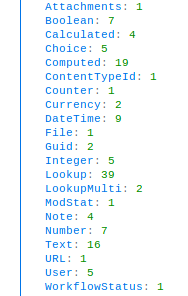
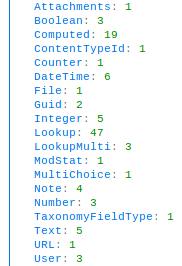
Here is the same count on a completely different tenant with similar setup which works fine:
eirikb
on 19 Sep 2019
We have encountered two new cases with the same problem.
Tantant1:
- {ContentTypeId: 1, Text: 12, Note: 4, Lookup: 43, User: 3, …}
- Attachments: 1
- Boolean: 4
- Calculated: 9
- Choice: 11
- Computed: 19
- ContentTypeId: 1
- Counter: 1
- DateTime: 12
- File: 1
- Guid: 2
- Integer: 5
- Lookup: 43
- LookupMulti: 3
- ModStat: 1
- MultiChoice: 1
- Note: 4
- Number: 4
- Text: 12
- URL: 1
- User: 3
Tenant2:
- {ContentTypeId: 1, Text: 10, Note: 4, Lookup: 42, User: 3, …}
- Attachments: 1
- Boolean: 3
- Calculated: 4
- Choice: 6
- Computed: 19
- ContentTypeId: 1
- Counter: 1
- Currency: 1
- DateTime: 15
- File: 1
- Guid: 2
- Integer: 5
- Lookup: 42
- ModStat: 1
- MultiChoice: 1
- Note: 4
- Number: 12
- Text: 10
- URL: 1
- User: 3
- WorkflowStatus: 1
 CronbachAlpha
on 20 Sep 2019
CronbachAlpha
on 20 Sep 2019
You can create a new custom list with some fields and check if the REST API works.
Or use the REST API below to get items.
/_api/web/lists/getbytitle('Listname')/items
Or use $select and $expand to get list items. Example:
/_api/web/lists/getbytitle('Listname')/items?$select=LookupField/Title&$expand=LookupField/Id
 Dennis-LZ
on 20 Sep 2019
Dennis-LZ
on 20 Sep 2019
You can create a new custom list with some fields and check if the REST API works.
Or use the REST API below to get items.
/_api/web/lists/getbytitle('Listname')/itemsOr use $select and $expand to get list items. Example:
/_api/web/lists/getbytitle('Listname')/items?$select=LookupField/Title&$expand=LookupField/Id
The REST API works.
Have tested with custom select on the affected tenants and it works fin up to 12 Lookup/Person/MMD fields, as expected, but we have ‘*’ in our selection.
As OP mentioned this is affecting customers that have made no changes to the list and have worked for several years.
Have also tested on tenants that are not affected and created lookup/person/mmd fields way beyond the limit without any problem.
We have now been contacted by 3 different customers on separate tenants in a short period of time with the same problem, which makes it more plausible that Microsoft have made some changes that are causing this.
As VesaJuvonen mentioned “_so speculating few options here - we might have adjusted our settings OR we might have added new oob look up, which then pushed your list over the limit._”
CronbachAlpha
on 20 Sep 2019
At my client we are using PowerApps and Power BI to access SharePoint Online libraries (O365) which was all running fine until at some point on Wednesday evening 18 Sept (UK time) when we got the "the number of lookup columns exceeds the lookup column threshold" message both in PowerApps and in Power BI even though nothing had changed (as it is a live production environment).
Now we are aware of the threshold being 12 lookup columns, however, behaviour was different for Managed Metadata compared to Person or Lookup columns in PowerApps and in Power BI.
Last year October (2018) I tested this in PowerApps and I got the threshold error depending on what columns I was using:
| Person | Lookup | Managed Metadata | Result
-- | -- | -- | -- | --
Test 1 | 9 | 3 | 0 | Success
Test 2 | 10 | 3 | 0 | Failed
Test 3 | 9 | 3 | 1 | Success
Test 4 | 9 | 3 | 2 | Failed
Test 5 | 8 | 3 | 2 | Success
Test 6 | 8 | 3 | 5 | Success
Test 7 | 8 | 3 | 10 | Failed
Test 8 | 6 | 3 | 10 | Success
Test 9 | 6 | 3 | 14 | Success
Test 10 | 6 | 3 | 15 | Failed
Test 11 | 5 | 3 | 15 | Success
Test 12 | 5 | 3 | 16 | Failed
Test 13 | 5 | 4 | 10 | Success
Test 14 | 5 | 4 | 11 | Failed
As you can see we could access SP lists or libraries even if there were up to 23 lookup columns as long as the number of person and standard lookup columns remained below 12. This was working until Thursday evening and afterwards behaviour for managed metadata columns was the same as for the other lookup columns:
| Person | Managed Metadata | Result
-- | -- | -- | --
Test 1 | 12 | 0 | Success
Test 2 | 13 | 0 | Failed
Test 3 | 9 | 3 | Success
Test 4 | 9 | 4 | Failed
So as it looks like the 12 column Lookup Column Threshold wasn't enforced in all circumstances (i.e. PowerApps, Power BI, REST API but it was in SPO itself) and I think Microsoft has enforced it across the board now. @VesaJuvonen is that anything you can confirm or look into? Thank you!
 Harmve
on 20 Sep 2019
Harmve
on 20 Sep 2019
Confirm our SPO is running into the same problem. Flows with queries into custom lists that have been working for months suddenly stopped working with no change on our side - happened sometime within the last 3-4 days.
Can I just say how nice it would be if changes like this were communicated in advance rather than discovered the hard way...?!
 plbowers
on 21 Sep 2019
plbowers
on 21 Sep 2019
Interestingly yesterday evening (Friday 20 Sept 22:45 UK time) I noticed behaviour had changed again (as our Power BI reports worked again). Testing in PowerApps gave these results:
| Person | Managed Metadata | Result
-- | -- | -- | --
Test 1 | 9 | 3 | Success
Test 2 | 9 | 4 | Success
Test 3 | 9 | 9 | Success
Test 4 | 9 | 12 | Success
Test 5 | 9 | 13 | Failed
So the lookup column threshold for Managed Metadata columns has once again changed. Why Microsoft? And like @plbowers mentioned it would be good to be communicated about such changes in advance.
Harmve
on 21 Sep 2019
All tenants we had problems with are now up and running again, the error has _magically_ disappeared
eirikb
on 21 Sep 2019
This indicates that someone reported the issue through Premier support and thus there was a detailed investigation on the issue, which clearly has then been resolved. Thanks for following up on @eirikb, highly appreciated.
Are others also seeing the issue being resolved?
VesaJuvonen
on 22 Sep 2019
Thank you @VesaJuvonen if there was a detailed investigation is it possible to find out what has happened and why? And how to know for sure this won't happen again in the future? Some kind of explanation would be good. Is there any way of finding out?
Also my test results from today are different again from the ones on Friday:
| Person | Lookup | Managed Metadata | Result
-- | -- | -- | -- | --
Test 1 | 9 | 0 | 3 | Success
Test 2 | 9 | 0 | 4 | Success
Test 3 | 9 | 0 | 9 | Success
Test 4 | 9 | 0 | 14 | Success
Test 5 | 9 | 0 | 15 | Failed
Test 6 | 6 | 3 | 14 | Success
Test 7 | 6 | 3 | 15 | Failed
This behaviour is the same again as what we had last year - which is good - but question is what is to be expected? How to explain having 23 lookup columns even though the documented threshold is only 12? And why does the threshold of 12 only applies to person and standard lookup columns where the limit for managed metadata is different in PowerApps and Power BI even though it is not in SPO?
Harmve
on 23 Sep 2019
@frnk01 I test it again in my tenant, create a custom list with 12 lookup fields and 5 person fields, then use $select=* in the REST API, it works. This issue seems to be resolved currently.
Dennis-LZ
on 24 Sep 2019
This is now working again so closing the issue, but would appreciate if we could get some kind of update on this @VesaJuvonen - Was this a temporary roll back or can we be sure that this will continue to work in the future?
frnk01
on 24 Sep 2019
Issues that have been closed & had no follow-up activity for at least 7 days are automatically locked. Please refer to our wiki for more details, including how to remediate this action if you feel this was done prematurely or in error: Issue List: Our approach to locked issues
msft-github-bot
on 23 Jan 2020
Related issues
 zerovectorspace
·
3Comments
zerovectorspace
·
3Comments
 StfBauer
·
3Comments
StfBauer
·
3Comments
 ken-harris
·
3Comments
ken-harris
·
3Comments
 nanddeepn
·
3Comments
nanddeepn
·
3Comments
 jonthenerd
·
3Comments
jonthenerd
·
3Comments
Most helpful comment
This is now working again so closing the issue, but would appreciate if we could get some kind of update on this @VesaJuvonen - Was this a temporary roll back or can we be sure that this will continue to work in the future?