Sp-dev-docs: Library components are not working
Category
- [ ] Question
- [ ] Typo
- [x] Bug
- [ ] Additional article idea
Related issue #4507 but more in-depth analysis.
Expected or Desired Behavior
It seems like that library components or documentation is missing following the instructions do not lead to a library component.
Observed Behavior
Following the instruction 1:1 on how to create a library component Leaded to the following result.
It doesn't make any difference if the library component is deployed to the server or not.

The following statement should be rendered by the library component that, at this time wasn't installed on the tenant.
The current time as returned from the corporate library is 13:22:54 GMT+0200 (Central European Summer Time)
The web part potentially should have raised an error. This behaviour is caused due by the following in code snippet:
import * as myLibrary from 'corporate-library';
This treats the 'corporate-library' as a regular NPM package and compiles directly the code in the final web part code. Instead of loading it from a library component.
This might could have been used as a fallback mechanism but even after installing the library component, with a changed return value of the library.
export class CorporateLibraryLibrary {
  public getCurrentTime(): string {
    return 'Hello World: time as returned from the corporate library is ' + new Date().toTimeString();
  }
}
The result of the web part looked exactly the same.

The result was that the library component wasn't picked up at all.
To verify that the source code of the library component was embedded in the code. The actually library component showed up directly in.
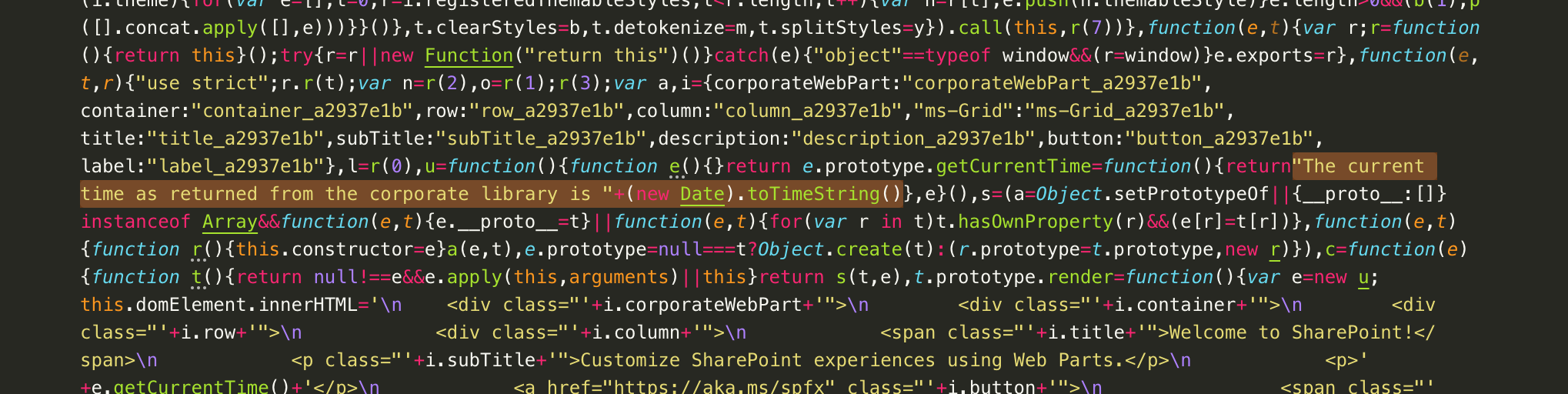
This screenshot shows the result of the compiled web part.
Steps to Reproduce
Source code used to reproduce can be found here..
 StfBauer
All 6 comments
Thank you for reporting this issue. We will be triaging your incoming issue as soon as possible.
 msft-github-bot
on 11 Sep 2019
msft-github-bot
on 11 Sep 2019
@StfBauer, I can reproduce your issue, but I noticed your repo didn't include the reference to the library in your web part's package.json. When I added the reference, the library component code was no longer included in the web part's js bundle.
Does this work for you? :)
 PopWarner
on 11 Sep 2019
PopWarner
on 11 Sep 2019
@PopWarner Yeah found it myself two minutes ago... I submit a PR to the documentation ... this one is not really good bad
StfBauer
on 11 Sep 2019
@StfBauer good find! Yea, some more documentation would help.
I also just did a clean pull of your code and did NOTHING but add the dependency reference and the library code was still included in my web part .js bundle.
I found that if I did ONLY a gulp bundle on the library, it would still be included in the web part .js, even when I added it as a dependency to the package.json.
Although, once I did a gulp bundle --ship on the library, the library code was no longer included in the web part .js bundle, even if I again did only a gulp bundle.
Gonna run a few more tests to see if that wasn't an anomaly.
PopWarner
on 11 Sep 2019
Somehow a bit strange constellation - https://n8d.at/blog/tips-and-tricks-working-with-spfx-library-components
Angular Elements in pnp/spfx use the "library" approach since last October or so and it handles things in a more web development / nodejs manner.
StfBauer
on 11 Sep 2019
Issues that have been closed & had no follow-up activity for at least 7 days are automatically locked. Please refer to our wiki for more details, including how to remediate this action if you feel this was done prematurely or in error: Issue List: Our approach to locked issues
msft-github-bot
on 23 Jan 2020
Related issues
 karishmaTCS
·
3Comments
karishmaTCS
·
3Comments
 nanddeepn
·
3Comments
nanddeepn
·
3Comments
 christianbueschi
·
3Comments
christianbueschi
·
3Comments
 SteIvanov
·
3Comments
SteIvanov
·
3Comments
 Ralms
·
3Comments
Ralms
·
3Comments