Sp-dev-docs: SharePoint Framework Field Customization Error
SPFX version 1.8.2
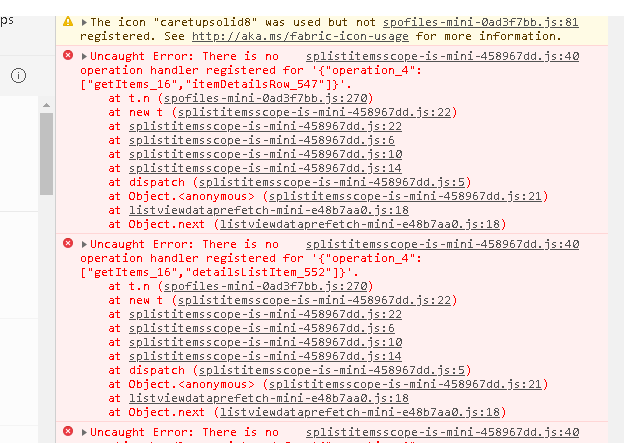
This error i have now in old projects and new too. Could you help me pls? Whats wrong?
 p333ter
All 9 comments
Thank you for reporting this issue. We will be triaging your incoming issue as soon as possible.
 msft-github-bot
on 1 Sep 2019
msft-github-bot
on 1 Sep 2019
I can confirm it for field customizers. They still do not work
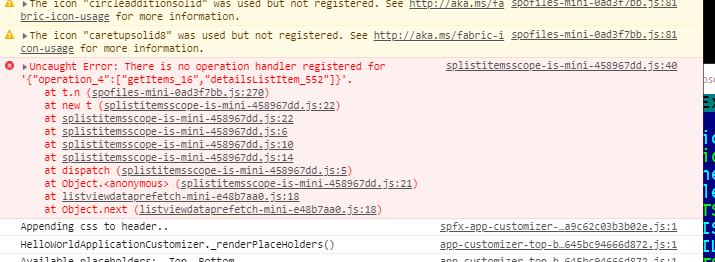
splistitemsscope-is-mini-458967dd.js:40 Uncaught Error: There is no operation handler registered for '{"operation_4":["getItems_16","detailsListItem_552"]}'.
    at t.n (spofiles-mini-0ad3f7bb.js:270)
    at new t (splistitemsscope-is-mini-458967dd.js:22)
    at splistitemsscope-is-mini-458967dd.js:22
    at splistitemsscope-is-mini-458967dd.js:6
    at splistitemsscope-is-mini-458967dd.js:10
    at splistitemsscope-is-mini-458967dd.js:14
    at dispatch (splistitemsscope-is-mini-458967dd.js:5)
    at Object.<anonymous> (splistitemsscope-is-mini-458967dd.js:21)
    at listviewdataprefetch-mini-e48b7aa0.js:18
    at Object.next (listviewdataprefetch-mini-e48b7aa0.js:18)
node --version v10.16.1
npm --version 6.9.0
yo --version 3.1.0
gulp --version CLI version: 2.2.0, Local version: Unknown
npm view webpack version 4.39.3
code -version 1.37.1 f06011ac164ae4dc8e753a3fe7f9549844d15e35 x64
SharePoint Online, modern team site
 Gennady-G
on 2 Sep 2019
Gennady-G
on 2 Sep 2019
@Gennady-G I found the issue. It works for me. You have to change the Internal Field Name in serve.json. But... they want from you internal field name, but the internal name gets me this errors. Then I try to use the field display name and tralala..everythink works Example. I'm using Title field (renamed to Process). If I use Title internal name "Title", it doesn't work, if I use renamed Title field
"Process," it works. 💃 Try it.
p333ter
on 2 Sep 2019
Hi @p333ter !
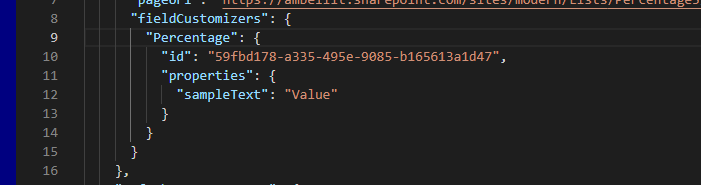
I tried, but have no luck. I have Field "Percentage" and same internal name "Percentage".
Tried "npm install" and "npm update"
, then
"gulp bundle --ship"
"gulp package-solution --ship"
dropped *.sppkg to 'App Catalog' and scripts to CDN, nothing changes.
Gennady-G
on 2 Sep 2019
Closing the issue as OP resolved their problem. @Gennady-G if you are having an issue, please open your own issue so we don't cross the streams.
But... are you trying to test it or deploy it? Sounds like deployment from your statement:
@Gennady-G said:
dropped *.sppkg to 'App Catalog' and scripts to CDN, nothing changes.
serve.json is only used in testing as it's used to configure the gulp serve task.
Field customizers are associated with new site columns, not existing ones, when deployed. The site column that's created is in the ./sharepoint/assets/elements.xml file. See the docs: https://docs.microsoft.com/en-us/sharepoint/dev/spfx/extensions/get-started/building-simple-field-customizer#add-the-field-definition-to-the-solution-package-for-deployment
 andrewconnell
on 3 Sep 2019
andrewconnell
on 3 Sep 2019
@andrewconnell , arghh!..
So when I test it uses existing column with same name, but in production I should deploy Site Column!..
Thank You much Andrew, now it is resolved.
It was not obvious for me..
p.s. this error
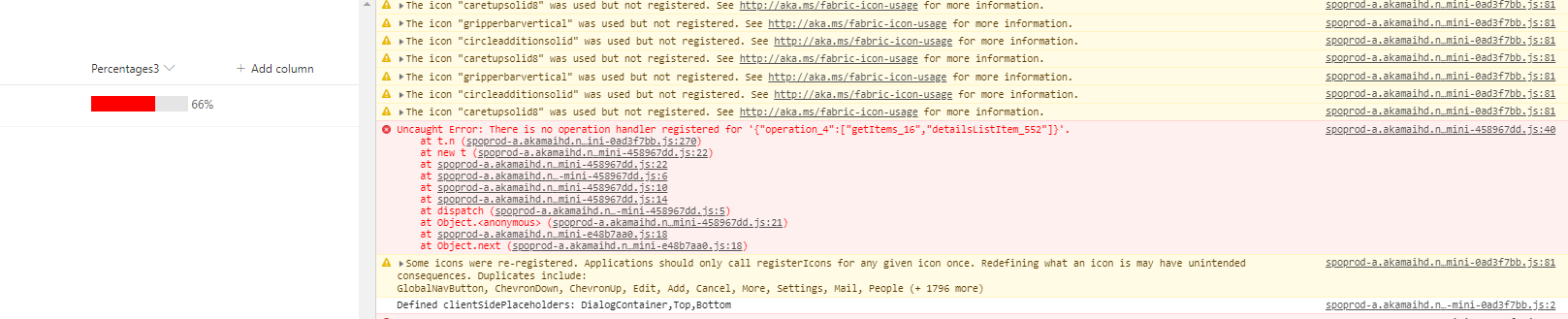
still exists in my console log but does not affect my things. Thank You much!
Gennady-G
on 4 Sep 2019
Look closely at that error... does anything in it look like it's coming from your code? Nope... it's all coming from something hosted in Akamai's CDN. IOW, it's not yours so it's not your problem :)
andrewconnell
on 4 Sep 2019
I found the issue. It works for me. You have to change the Internal Field Name in serve.json. But... they want from you internal field name, but the internal name gets me this errors. Then I try to use the field display name and tralala..everythink works Example.
Yes @p333ter , there should be DIsplayName, but it does not allow spaces in this display name.. Fantastic.. :-D
I also found how to attach Field Customizers to existing OOTB fields:
Connect-PnPOnline ..
Set-PnPField -Identity "PercetageField" -List "PercentagesList" -Values @{ClientSideComponentId=[GUID]"6a6cfa85-933b-4a3d-b08f-c2755bb2bae2"}
where guid is id from "YourFieldCustomizer.manifest.json"
Nope... it's all coming from something hosted in Akamai's CDN. IOW, it's not yours so it's not your problem :)
@andrewconnell, no SharePoint - no problems! :-D
By the way - I already commented about this error, but these bugs are closed as duplicates, so I think it is already exists in Your bug tracking system..
Gennady-G
on 4 Sep 2019
Issues that have been closed & had no follow-up activity for at least 7 days are automatically locked. Please refer to our wiki for more details, including how to remediate this action if you feel this was done prematurely or in error: Issue List: Our approach to locked issues
msft-github-bot
on 23 Jan 2020
Related issues
 waldekmastykarz
·
3Comments
waldekmastykarz
·
3Comments
waldekmastykarz
·
3Comments
waldekmastykarz
·
3Comments
 mikeparkie
·
3Comments
mikeparkie
·
3Comments
 qrown
·
3Comments
qrown
·
3Comments
 nanddeepn
·
3Comments
nanddeepn
·
3Comments