Sp-dev-docs: Access to XMLHttpRequest at 'https://centralindia0-completenessp.svc.ms/api/collection' from origin 'https://abc145.sharepoint.com' has been blocked by CORS policy: No 'Access-Control-Allow-Origin' header is present on the requested resource
I'm creating a simple field customizer solution in SPFx and it is not working as expected.
every time is shows an error on cosnole.
Access to XMLHttpRequest at 'https://centralindia0-completenessp.svc.ms/api/collection' from origin 'https://abc145.sharepoint.com' has been blocked by CORS policy: No 'Access-Control-Allow-Origin' header is present on the requested resource.
I'm using
SPFx 1.8.2
npm 6.9.2
node 10.15.3
 Viipiin
All 20 comments
Thank you for reporting this issue. We will be triaging your incoming issue as soon as possible.
 msft-github-bot
on 14 Aug 2019
msft-github-bot
on 14 Aug 2019
Hello I'm having the same problem with 'https://eastus0-completenessp.svc.ms/api/collection' , but happen on every page over SharePoint Online. It started yesterday.
 carlos-acuna-lizama
on 18 Oct 2019
carlos-acuna-lizama
on 18 Oct 2019
since October I have started experiencing the same. Working with workbench.aspx I can see constant post calls to https://australiasoutheast0-completenessp.svc.ms/api/collection
 nilokillian
on 19 Oct 2019
nilokillian
on 19 Oct 2019
I am experiencing the same for "...westeurope0-completeness...". And what's worse is that this same issue is popping up in the SharePoint admin central, more specifically under webApiPermissionManagement for me. And I don't know if it is related but I am unable to approve a new api permission request for "Group.ReadWrite.All". I originally noticed the error, when an app I was making was unable to get the correct data for listing all groups under my organization.
 Katli95
on 20 Oct 2019
Katli95
on 20 Oct 2019
I have got the problem using the webpart in teams, same webpart works in SPO:
Access to XMLHttpRequest at 'https://northeurope0-completenessp.svc.ms/api/collection' from origin 'https://semtalk.sharepoint.com' has been blocked by CORS policy: No 'Access-Control-Allow-Origin' header is present on the requested resource.
 cfillies
on 20 Oct 2019
cfillies
on 20 Oct 2019
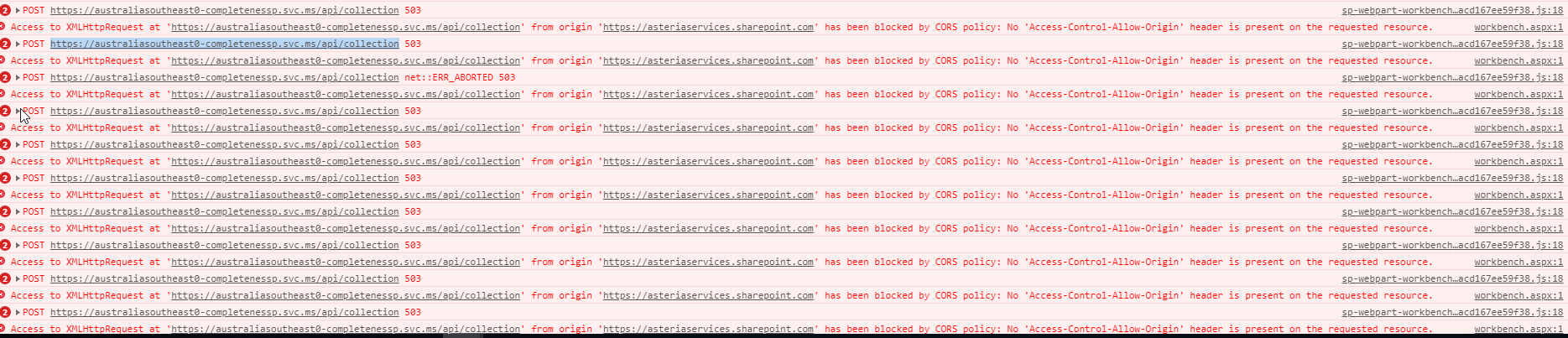
Last few days i am also experiencing the same issue, Please check this, very difficult to debug and i am not able to find my errors. Please check my screenshot.
https://australiasoutheast0-completenessp.svc.ms/api/collection
 nsksaisaravana
on 21 Oct 2019
nsksaisaravana
on 21 Oct 2019
Same error here, it happens in Workbench.aspx page and all pages of SharePoint online site.
 mfdezvil
on 21 Oct 2019
mfdezvil
on 21 Oct 2019
Same error here since last few days.
https://northcentralus0-completenessp.svc.ms/api/collection
Clicking on the link says - Our services aren't available right now
We're working to restore all services as soon as possible. Please check back soon.
 SaritaSony
on 21 Oct 2019
SaritaSony
on 21 Oct 2019
Hi,
Same problem with SPFx Webpart. Throwing below console error.
"Access to XMLHttpRequest at 'https://northcentralus0-completenessp.svc.ms/api/collection' from origin 'https://
Can anyone please let me know how to resolve this?
 sanjayadsure
on 21 Oct 2019
sanjayadsure
on 21 Oct 2019
Im getting the same, Ive logged a ticket with microsoft yesterday and was called within 15mins. The agent was able to reproduce the problem on his side also but had no explanation yet. I'll be getting a call back today so i'll update here if I find out anything. In my it actually doesnt appear to be breaking anything or affecting my code its just disconcerting to see all the red errors constantly polling in the console.
sp-webpart-workbench-assembly_en-us_85b1f174760ce5efaf0acd167ee59f38.js:18 POST https://uksouth0-completenessp.svc.ms/api/collection 503 (Service Unavailable)
Access to XMLHttpRequest at 'https://uksouth0-completenessp.svc.ms/api/collection' from origin 'https://colchinst.sharepoint.com' has been blocked by CORS policy: No 'Access-Control-Allow-Origin' header is present on the requested resource.
 RoystonGates
on 22 Oct 2019
RoystonGates
on 22 Oct 2019
Having the same issue when running sp workbench
This error is repeating in the console.
Link: https://uksouth0-completenessp.svc.ms/api/collection


 Macaurly
on 22 Oct 2019
Macaurly
on 22 Oct 2019
Same issue here on at least 4 tenants (EU & US). We get the error even on regular modern pages without any webparts on them.
@andrewconnell Any chance you could update the tags on this ticket? I have a feeling it's not really related to extensions but more a global issue.
 justdevelopment
on 22 Oct 2019
justdevelopment
on 22 Oct 2019
_I don't know why I tagged this as an extension. My bad..._
I'm not familiar with that API... but regardless, CORS is a configuration element on the endpoint you're calling, it's not anything the consumer can configure. That endpoint isn't configured to allow all, or the domain you're calling from to call it.
What is that API? Are you calling it? What is it? Or are these just showing up in the console (ie: not triggered from your code)?
 andrewconnell
on 22 Oct 2019
andrewconnell
on 22 Oct 2019
This is not an endpoint we as developers are calling, it is being called by SPO. I think it's part of the service that MSFT uses to collect usage data, as it seems to go off when you do certain things within SPO. The entire service appears to be down, see screenshot of @Macaurly - its error page probably doesn't return the headers needed for CORS to accept it.
It doesn't seem to actively break anything, but it sure is annoying when debugging :) I managed to hit 4000 errors in my console before my browser said No
justdevelopment
on 22 Oct 2019
OK... well, in that case, that's not something we can address in this issue list as this is for developer-related issues. If this is happening without custom code, it's a platform issue... the best way to address this is to submit a ticket in your SPO admin center.
Going to tag this as invalid which will automatically close it... please do open a support issue in your admin center.
andrewconnell
on 22 Oct 2019
Thank you for your submission. This GitHub issue list is targeted only for SharePoint development issues. If this is a capability question/discussion, please use the SharePoint TechCommunity. If it is an issue is related to out-of-the-box capabilities of SharePoint or not related to SharePoint, we cannot process is through this channel. Please submit your finding using the Tenant administrator support channels in your tenant or using Premier support, if that’s available for you. Sorry for the inconvenience.
msft-github-bot
on 22 Oct 2019
I am having the same the same issue in when running sp workbench and deployed web part modern pages with my account
home.aspx:1 Access to XMLHttpRequest at 'https://eastus0-completenessp.svc.ms/api/collection' from origin 'https://XXXXXX.sharepoint.com' has been blocked by CORS policy: No 'Access-Control-Allow-Origin' header is present on the requested resource.
 damodaram1010
on 23 Oct 2019
damodaram1010
on 23 Oct 2019
similar
SEC7120: [CORS] The origin 'https://TENANT.sharepoint.com' did not find 'https://TENANT.sharepoint.com' in the Access-Control-Allow-Origin response header for cross-origin resource at 'https://southcentralus0-completenessp.svc.ms/api/collection'.
HTTP503: SERVICE UNAVAILABLE - The service is temporarily overloaded.
(XHR)POST - https://southcentralus0-completenessp.svc.ms/api/collection
 JRRSG
on 24 Oct 2019
JRRSG
on 24 Oct 2019
FYI - MSFT is aware of this issue and is looking into it / addressing it
For those who are posting to the closed issue, a few points:
andrewconnell
on 24 Oct 2019
Issues that have been closed & had no follow-up activity for at least 7 days are automatically locked. Please refer to our wiki for more details, including how to remediate this action if you feel this was done prematurely or in error: Issue List: Our approach to locked issues
msft-github-bot
on 23 Jan 2020
Related issues
 qrown
·
3Comments
qrown
·
3Comments
 mikeparkie
·
3Comments
mikeparkie
·
3Comments
 nanddeepn
·
3Comments
nanddeepn
·
3Comments
 acksoft
·
3Comments
acksoft
·
3Comments
 Ralms
·
3Comments
Ralms
·
3Comments
Most helpful comment
Im getting the same, Ive logged a ticket with microsoft yesterday and was called within 15mins. The agent was able to reproduce the problem on his side also but had no explanation yet. I'll be getting a call back today so i'll update here if I find out anything. In my it actually doesnt appear to be breaking anything or affecting my code its just disconcerting to see all the red errors constantly polling in the console.
sp-webpart-workbench-assembly_en-us_85b1f174760ce5efaf0acd167ee59f38.js:18 POST https://uksouth0-completenessp.svc.ms/api/collection 503 (Service Unavailable)
Access to XMLHttpRequest at 'https://uksouth0-completenessp.svc.ms/api/collection' from origin 'https://colchinst.sharepoint.com' has been blocked by CORS policy: No 'Access-Control-Allow-Origin' header is present on the requested resource.