Sp-dev-docs: How to get list item url from spfx
Hi Team,
I need to fetch the pages in Site Pages library in modern site. and i am using below code to do that
` let url:string = context.pageContext.web.absoluteUrl.split("/sites/")[0] +this.TOOLS_BASE_PATH + "/_api/web/lists/getByTitle('Site Pages')/GetItems";
   const payload:ISPHttpClientOptions={

        headers: { 'odata-version': '3.0'},
        body: `{'query': {
        '__metadata': {'type': 'SP.CamlQuery'},
        'ViewXml': "<View><Query> <Where><Eq><FieldRef Name='FSObjType' /><Value Type='Integer'>0</Value></Eq></Where><ViewFields><FieldRef Name='FileRef' /><FieldRef Name='EncodedAbsUrl'/><FieldRef Name='LinkFilenameNoMenu' /><FieldRef Name='LinkFilename' /></ViewFields><QueryOptions><IncludeMandatoryColumns>True</IncludeMandatoryColumns></QueryOptions></Query></View>",
        'FolderServerRelativeUrl':'${this.TOOLS_BASE_PATH}/SitePages/'
        }}`
    };
    return  context.spHttpClient.post(url,SPHttpClient.configurations.v1,payload).then((response:SPHttpClientResponse)=>{
        return  response.json().then((jsonvalue)=>{
            return new Promise<any>((resolve)=>{
                resolve(jsonvalue.value);
            });
        });
    });`
so i am trying to get the url of the page along with some other metadata.
I tried including following in view field..
FileRef
FileLeafRef
EncodedAbsUrl
LinkFilename
but i am not able to get file name .
the reason why i am using post with caml is that i have a taxonomy field and i need to get the label.
Please suggest how i can get file name or page url in the result.
Thank you so much
 mukeshhope
All 16 comments
Thank you for reporting this issue. We will be triaging your incoming issue as soon as possible.
 msft-github-bot
on 8 Aug 2019
msft-github-bot
on 8 Aug 2019
@mukeshhope why don't you using REST api in which similar functionality is available.
e.g.
let url:string = context.pageContext.web.absoluteUrl.split("/sites/")[0] +this.TOOLS_BASE_PATH + "/_api/web/lists/getByTitle('Site Pages')/Items?$select=FileRef,FileLeafRef,EncodedAbsUrl,LinkFilename";
Try this out and let me know your feedback.
 anomepani
on 9 Aug 2019
anomepani
on 9 Aug 2019
Hi Ano Mepani,
Thank you so much for your response.
I have a single valued (multiple value not allowed) Managed metadata field in Site pages library.
When i put that field in select list then the value that i get is below.
<d:Label>1</d:Label><d:TermGuid>0bfb5a0b-4f3e-42e2-8da7-1cfb45bd1e33</d:TermGuid><d:WssId m:type="Edm.Int32">1</d:WssId>
I am not getting label of taxonomy term.
for multivalued taxonomy fields , i am getting the lables correctly.
Once again thank you so much for your response.
Please suggest some way to solve this problem
mukeshhope
on 9 Aug 2019
@mukeshhope
Could you try this one by expand TaxCatchAll which will show you label name as per your request.
_api/web/Lists/GetByTitle('<list>')/Items/?
$select=*,TaxCatchAll/Term&
$expand=TaxCatchAll
Edited:
TaxCatchAll will be available in TaxonomyHiddenList which is available in site collection when you configure metadata. But this will be separate call to get Label. Which is not good idea.
Disregard this reply.
Note: you can set managed meta column allow multiple as well.
anomepani
on 9 Aug 2019
Hi Ano Mepani,
it says
The field or property 'TaxCatchAll' does not exist.
and of course i need filter on those taxonomy fields
mukeshhope
on 9 Aug 2019
Hi @mukeshhope
Sorry, I misunderstood your query. I think you are right for multi-value managed metadata column it is returning Label but for Single value type, it is not returning label using REST API it is known bug or limitation as per uservoice link.
However you can achieve this using CAML Query
fetch(${util.rootUrl}/_api/Web/Lists/getbytitle('Site Pages')/GetItems(query=@v1)?@v1={'ViewXml':''},{method:"POST", headers:{accept:"application/json;odata=verbose","X-RequestDigest":temp3}}).then(r=>r.json()).then(r=>console .log(r))
In the result, there is field "LinkToItem" which contains url of article page which might helpful to you
LinkToItem:{
Description: "<root_url>/SitePages/1.0-What-is-Lorem-Ipsum-141.aspx"
Url: "<root_url>/SitePages/1.0-What-is-Lorem-Ipsum-141.aspx"
__metadata: {type: "SP.FieldUrlValue"}
_}
For other reference links for filter you can find here : https://github.com/pnp/pnpjs/issues/139
anomepani
on 9 Aug 2019
Hi Ano,
Thankyou so much.
The code sample you have given is in ajax.
I am using sphttpclient , i am not sure how can i use it there
mukeshhope
on 9 Aug 2019
@mukeshhope
Can you please share response if you don't mind.
anomepani
on 9 Aug 2019
Yes , Please have a look in the below image. the result of query of my original question is below.
the colored fields are custom fields
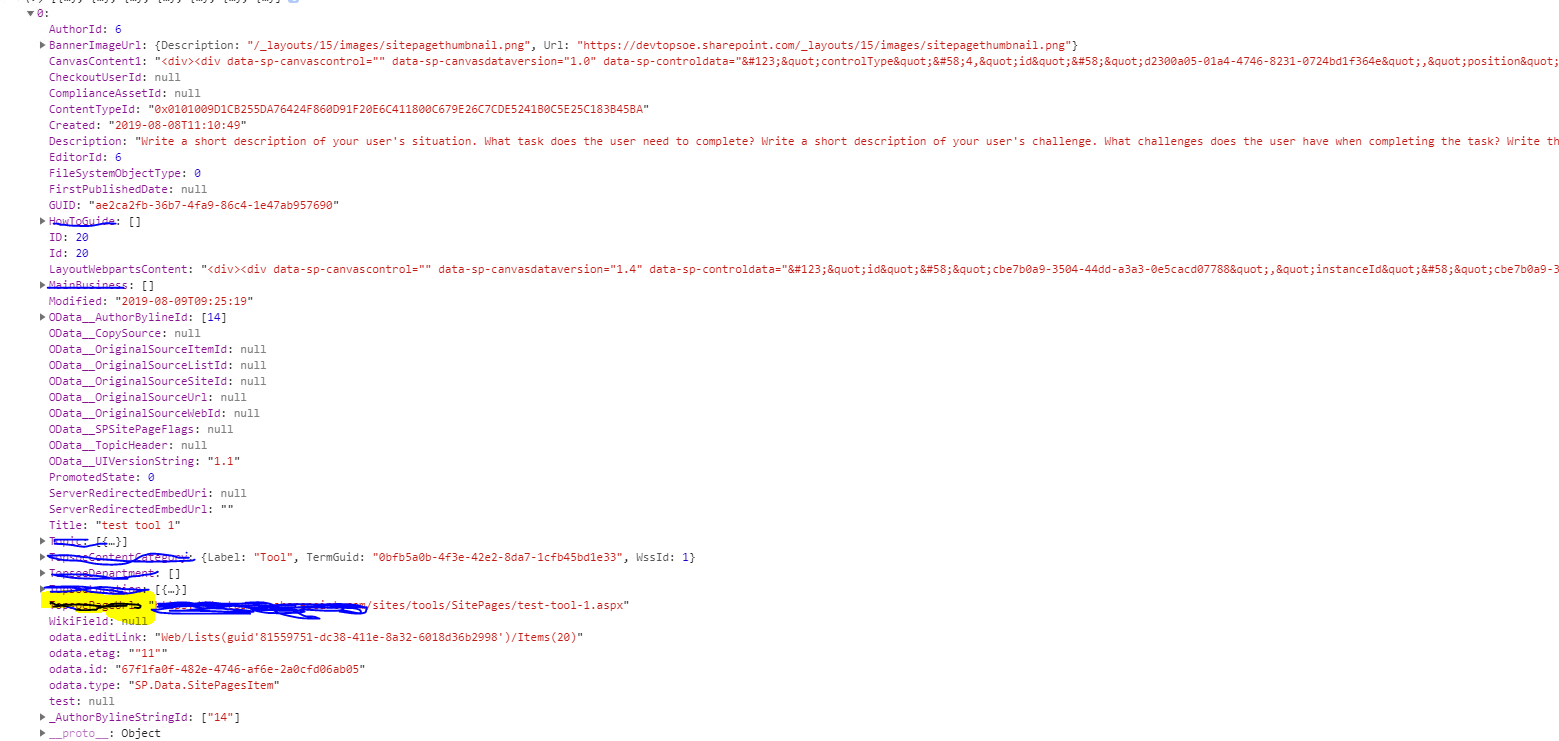
I tried to create a single line text field and copied the url via flow then i was able to get the url from my field.
but this is not solution i should be able to get from API it self
mukeshhope
on 9 Aug 2019
@mukeshhope Then I think this is a limitation as per my knowledge.
- Using REST API we are not able to get Label for Managed Metadata column for Single Value but we can use OData to get
EncodedAbsUrlusing $select. - Using Caml query REST API we can get Label for Managed Metadata column for Single Value but we can not use Odata like $select to get specific column e.g
EncodedAbsUrl
Need more feedback from an expert. Maybe @andrewconnell, @bcameron1231 or other people will give your answer.
Thanks
anomepani
on 9 Aug 2019
Yea the label is an issue with the REST API for Single Value Managed Term sets as it doesn't use the Display Value. Not sure you can get the TaxCatchAll from the CAML Query (it's a hidden column), it does work from a the REST API.
 bcameron1231
on 9 Aug 2019
bcameron1231
on 9 Aug 2019
@mukeshhope As per your requirement, I have found a way to achieve your functionality using "RenderListDataAsStream" method for REST API, It is internally used by SharePoint for rendering List data in Modern Page. The response is returning Managed Metadata column label and FileRef and FileLeafRef with single request.
Here is code snippet you can test in chrome console and implement in your code accordingly.
fetch("https://YourTenant.sharepoint.com/_api/web/Lists/Getbytitle('Site Pages')/RenderListDataAsStream", {method:"POST",headers:{"X-RequestDigest":digest,accept:"application/json;odata=verbose"}}).then(r=>r.json()).then(r=>console.log(r))
anomepani
on 9 Aug 2019
@mukeshhope did you get a chance to take a look at above code?
anomepani
on 13 Aug 2019
Hi @anomepani ,
I will look at it and will let you know today. sorry for delay.
mukeshhope
on 13 Aug 2019
Hi @anomepani ,
It works..
Thankyou so much for giving your time. it just works.
First i tried "RenderListDataAsStream" endpoint and i was getting the FileRef and FileLeafRef.
Then i started finding out how can i apply filter on RenderListDataAsStream and i came across
https://docs.microsoft.com/en-us/sharepoint/dev/sp-add-ins/working-with-lists-and-list-items-with-rest
I saw that i can apply caml there and it worked.
So i can get the label of single valued taxonomy field , multi value taxonomy field , apply filtering etc.
below is the code that i used
let url:string = context.pageContext.web.absoluteUrl.split("/sites/")[0] +this.TOOLS_BASE_PATH + "/_api/web/lists/getByTitle('Site Pages')/RenderListDataAsStream";
const payload : ISPHttpClientOptions={
        headers:{ "accept":"application/json;odata=verbose"},
        body:
{
"parameters": {
"ViewXml" : "my caml query"
}
}
    }
return  context.spHttpClient.post(url,SPHttpClient.configurations.v1,payload).then((response:SPHttpClientResponse)=>{
             return  response.json().then((jsonvalue)=>{
                 return new Promise<any>((resolve)=>{
console.log(jsonvalue.Row)
 resolve(jsonvalue.Row);
                 });
             });
         });
once again Thankyou so much for you time.
mukeshhope
on 13 Aug 2019
Issues that have been closed & had no follow-up activity for at least 7 days are automatically locked. Please refer to our wiki for more details, including how to remediate this action if you feel this was done prematurely or in error: Issue List: Our approach to locked issues
msft-github-bot
on 23 Jan 2020
Related issues
 bengtmoss
·
3Comments
bengtmoss
·
3Comments
 karishmaTCS
·
3Comments
karishmaTCS
·
3Comments
 christianbueschi
·
3Comments
christianbueschi
·
3Comments
 acksoft
·
3Comments
acksoft
·
3Comments
 Ralms
·
3Comments
Ralms
·
3Comments