Sp-dev-docs: How can I create folders in a Document Library with Site Design ?
Thank you for reporting an issue or suggesting an enhancement. We appreciate your feedback - to help the team to understand your needs, please complete the below template to ensure we have the necessary details to assist you.
_(DELETE THIS PARAGRAPH AFTER READING)_
Category
- [ ] Question
- [ ] Typo
- [ ] Bug
- [ ] Additional article idea
- [x] Example checked item (delete this line)
For the above list, an empty checkbox is [ ] as in [SPACE]. A checked checkbox is [x] with no space between the brackets. Use the
PREVIEWtab at the top right to preview the rendering before submitting your issue.If you are planning to share a new feature request (enhancement / suggestion), please use SP Dev UserVoice at http://aka.ms/sp-dev-uservoice. (DELETE THIS PARAGRAPH AFTER READING)
_(DELETE THIS PARAGRAPH AFTER READING)_
Expected or Desired Behavior
If you are reporting a bug, please describe the expected behavior. If you are suggesting an enhancement please describe thoroughly the enhancement, how it can be achieved, and expected benefit.
_(DELETE THIS PARAGRAPH AFTER READING)_
Observed Behavior
If you are reporting a bug, please describe the behavior you expected to occur when performing the action. If you are making a suggestion, you can delete this section.
_(DELETE THIS PARAGRAPH AFTER READING)_
Steps to Reproduce
If you are reporting a bug please describe the steps to reproduce the bug in sufficient detail to allow testing. Only way to fix things properly, is to have sufficient details to reproduce it. If you are making a suggestion, you can delete this section.
_(DELETE THIS PARAGRAPH AFTER READING)_
Submission Guidelines
- All suggestions or bugs are welcome, please let us know what's on your mind.
- If you are reporting an issue around any of the documents or articles, please ensure that you have clear > reference on the specific file or URL, which should be fixed.
- If you have technical questions about the framework, we’ll be monitoring #spfx, #spfx-webparts, and > #spfx-tooling on (SharePoint StackExchange)[http://sharepoint.stackexchange.com/]. You can also > alternatively submit your question to (SharePoint Developer group)> [https://network.office.com/t5/SharePoint-Developer/bd-p/SharePointDev] at Office Network.
- Remember to include sufficient details and context.
- If you have multiple suggestions or bugs please submit them in separate bugs so we can track resolution.
_(DELETE THIS PARAGRAPH AFTER READING)_
Thanks for your contribution! Sharing is caring.
 YOUBIMAX
All 16 comments
Thank you for reporting this issue. We will be triaging your incoming issue as soon as possible.
 msft-github-bot
on 31 Jul 2019
msft-github-bot
on 31 Jul 2019
You could setup a flow in Microsoft Flow which creates the folders for you in the library. You can trigger this flow using the _triggerFlow_ verb in the site script.
 michelsmit
on 31 Jul 2019
michelsmit
on 31 Jul 2019
Similar question - #4385 which addresses this scenario.
Microsoft Flow w/ triggerFlow as mentioned by Michel is the best approach.
 bcameron1231
on 31 Jul 2019
bcameron1231
on 31 Jul 2019
You could setup a flow in Microsoft Flow which creates the folders for you in the library. You can trigger this flow using the _triggerFlow_ verb in the site script.
It worked! thank you.
YOUBIMAX
on 31 Jul 2019
Similar question - #4385 which addresses this scenario.
Microsoft Flow w/ triggerFlow as mentioned by Michel is the best approach.
Thanks for your reply, it worked!
YOUBIMAX
on 31 Jul 2019
You could setup a flow in Microsoft Flow which creates the folders for you in the library. You can trigger this flow using the _triggerFlow_ verb in the site script.
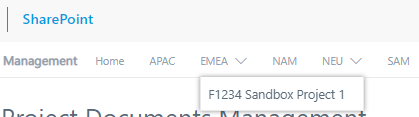
I have another question, is it possible to create a top navigation bar that contains a sub navigation with site design/flow?
Here is an example that i've done manually on SharePoint :
YOUBIMAX
on 31 Jul 2019
You can create a navigation link using addNavLink
https://docs.microsoft.com/en-us/sharepoint/dev/general-development/sharepoint-design-manager-display-templates
If you are asking if you can do it dynamically in a site script, no you cannot. But you can execute a REST call against the navigation API using Microsoft Flow.
Examples to help you research...
//add new header link
/api/web/navigation/topnavigationbar
//add link to specific node
/api/web/navigation/GetNodeById(your node id)
//add child link to specific node
/api/web/navigation/GetNodeById(your node id)
bcameron1231
on 31 Jul 2019
You can create a navigation link using addNavLink
https://docs.microsoft.com/en-us/sharepoint/dev/general-development/sharepoint-design-manager-display-templatesIf you are asking if you can do it dynamically in a site script, no you cannot. But you can execute a REST call against the navigation API using Microsoft Flow.
Examples to help you research...
//add new header link
/api/web/navigation/topnavigationbar
//add link to specific node
/api/web/navigation/GetNodeById(your node id)
//add child link to specific node
/api/web/navigation/GetNodeById(your node id)
Thanks for you reply Cameron. Can you tell me the steps i need to follow for the flow that will create the navigation bar and it's childs ?
YOUBIMAX
on 1 Aug 2019
You'd need to use triggerFlow to execute the FLow (will require you to have premium Flow license). But once you get that setup, you can use the Send HTTP Request to SharePoint Action to execute the REST call.
https://www.chakkaradeep.com/2018/05/16/working-with-the-sharepoint-send-http-request-flow-action/
Thanks,
bcameron1231
on 1 Aug 2019
You'd need to use triggerFlow to execute the FLow (will require you to have premium Flow license). But once you get that setup, you can use the Send HTTP Request to SharePoint Action to execute the REST call.
https://www.chakkaradeep.com/2018/05/16/working-with-the-sharepoint-send-http-request-flow-action/
Thanks,
Hello Cameron, i really appreciate your time and your help, thankfully i managed to create Top navigation bar with Site design and Microsoft Flow, now i'm still trying to figure out a way to create the navigation bar child aswell. Thanks!
YOUBIMAX
on 1 Aug 2019
You'd need to use triggerFlow to execute the FLow (will require you to have premium Flow license). But once you get that setup, you can use the Send HTTP Request to SharePoint Action to execute the REST call.
https://www.chakkaradeep.com/2018/05/16/working-with-the-sharepoint-send-http-request-flow-action/
Thanks,Hello Cameron, i really appreciate your time and your help, thankfully i managed to create Top navigation bar with Site design and Microsoft Flow, now i'm still trying to figure out a way to create the navigation bar child aswell. Thanks!
Even the navigation bar child got it working aswell ! (y)
YOUBIMAX
on 1 Aug 2019
Awesome! Great to see you got it working!
We'll close out this ticket.
bcameron1231
on 1 Aug 2019
Awesome! Great to see you got it working!
We'll close out this ticket.
Go for it! One question, is there a way i can stay in contact with you? I'm currently in an intership and i'm working on a big SharePoint Project. I'd love to have you by my side in case i'm blocked at something if that's okay!
YOUBIMAX
on 1 Aug 2019
You can follow me on Twitter, but my suggestion would be if you have questions that aren't bugs/issues, check out https://techcommunity.microsoft.com/ as a way to get some great answers from the community!
bcameron1231
on 1 Aug 2019
Closing issue as "answered". If you encounter similar issue(s), please open up a NEW issue. Thank you.
msft-github-bot
on 4 Aug 2019
Issues that have been closed & had no follow-up activity for at least 7 days are automatically locked. Please refer to our wiki for more details, including how to remediate this action if you feel this was done prematurely or in error: Issue List: Our approach to locked issues
msft-github-bot
on 24 Jan 2020
Related issues
 mikeparkie
·
3Comments
mikeparkie
·
3Comments
 StfBauer
·
3Comments
StfBauer
·
3Comments
 jonthenerd
·
3Comments
jonthenerd
·
3Comments
 byrongits
·
3Comments
byrongits
·
3Comments
 acksoft
·
3Comments
acksoft
·
3Comments
Most helpful comment
You could setup a flow in Microsoft Flow which creates the folders for you in the library. You can trigger this flow using the _triggerFlow_ verb in the site script.