- [x] Question
- [ ] Typo
- [x] Bug
- [ ] Additional article idea
Expected or Desired Behavior
custom footer contains icon and text as https://docs.microsoft.com/en-us/sharepoint/dev/images/ext-app-header-footer-visible.png
Observed Behavior
the footer with his message displays correctly but the icon is missing

- Sharepoint Online
- User is configured for targeted release. Tenant is configured for standard
- SPFx version v1.8.2
- gulp v3.9.1
 RiccardoAmadi
All 12 comments
Thank you for reporting this issue. We will be triaging your incoming issue as soon as possible.
 msft-github-bot
on 8 Jul 2019
msft-github-bot
on 8 Jul 2019
@RiccardoAmadi: Fabric UI stopped bundling icons in solutions somewhat recently.
To include icons in your solution, try adding the following import in your code:
import { initializeIcons } from 'office-ui-fabric-react/lib/Icons';
Then call initializeIcons() once in your code, as follows:
initializeIcons();
I have found that it is often the reason why older solutions/code samples that have icons do not work/stop working.
I hope it helps?
 hugoabernier
on 9 Jul 2019
hugoabernier
on 9 Jul 2019
I've tried putting the import at the end of my imports and InitializeIcons() at the begin of the onInit method but that didn't work.
This is my HelloWorldApplicationCustomizer.ts
```import { override } from '@microsoft/decorators';
import { Log } from '@microsoft/sp-core-library';
import {
BaseApplicationCustomizer,
PlaceholderContent,
PlaceholderName
} from '@microsoft/sp-application-base';
import { Dialog } from '@microsoft/sp-dialog';
import * as strings from 'HelloWorldApplicationCustomizerStrings';
import styles from './AppCustomizer.module.scss';
import { escape } from '@microsoft/sp-lodash-subset';
/*
- ADDING IMPORT HERE
*/
import { initializeIcons } from 'office-ui-fabric-react/lib/Icons';
const LOG_SOURCE: string = 'HelloWorldApplicationCustomizer';
/**
- If your command set uses the ClientSideComponentProperties JSON input,
- it will be deserialized into the BaseExtension.properties object.
- You can define an interface to describe it.
*/
export interface IHelloWorldApplicationCustomizerProperties {
Bottom: string;
}
/** A Custom Action which can be run during execution of a Client Side Application */
export default class HelloWorldApplicationCustomizer
extends BaseApplicationCustomizer
// These have been added
private _bottomPlaceholder: PlaceholderContent | undefined;
@override
public onInit(): Promise
Log.info(LOG_SOURCE, Initialized ${strings.Title});
//** ADDING METHOD CALL HERE **
initializeIcons();

// Wait for the placeholders to be created (or handle them being changed) and then
// render.
this.context.placeholderProvider.changedEvent.add(this, this._renderPlaceHolders);

return Promise.resolve<void>();
}
private _renderPlaceHolders(): void {
console.log("HelloWorldApplicationCustomizer._renderPlaceHolders()");
console.log(
"Available placeholders: ",
this.context.placeholderProvider.placeholderNames
.map(name => PlaceholderName[name])
.join(", ")
);
// Handling the bottom placeholder
if (!this._bottomPlaceholder) {
  this._bottomPlaceholder = this.context.placeholderProvider.tryCreateContent(
    PlaceholderName.Bottom,
    { onDispose: this._onDispose }
  );

  // The extension should not assume that the expected placeholder is available.
  if (!this._bottomPlaceholder) {
    console.error("The expected placeholder (Bottom) was not found.");
    return;
  }

  if (this.properties) {
    let bottomString: string = this.properties.Bottom;
    if (!bottomString) {
      bottomString = "(Bottom property was not defined.)";
    }

    if (this._bottomPlaceholder.domElement) {
      this._bottomPlaceholder.domElement.innerHTML = `
      <div class="${styles.app}">
        <div class="${styles.bottom}">
          <i class="ms-Icon ms-Icon--Info" aria-hidden="true"></i> ${escape(
            bottomString
          )}
        </div>
      </div>`;
    }
  }
}
}
private _onDispose(): void {
console.log('[HelloWorldApplicationCustomizer._onDispose] Disposed custom bottom placeholders.');
}
}
```
EDIT:
These are the errors I can see in google chrome console:

RiccardoAmadi
on 9 Jul 2019
Ah, I see from the warnings that the icons are already registered. Do you mind sharing what version of Fabric UI is included in your package.json?
Another thought is to use the Icon Fabric UI control instead of <i class="ms-Icon ms-Icon--Info" aria-hidden="true"></i>:
import { Icon } from 'office-ui-fabric-react/lib/Icon';

...
if (this._bottomPlaceholder.domElement) {
          this._bottomPlaceholder.domElement.innerHTML = `
          <div class="${styles.app}">
            <div class="${styles.bottom}">
<Icon iconName="Info" /> ${escape(bottomString)}
            </div>
          </div>`;
        }
...
This is my fabric UI version
"@microsoft/sp-office-ui-fabric-core": "^1.8.2",
The Icon Fabric UI control is not working either:
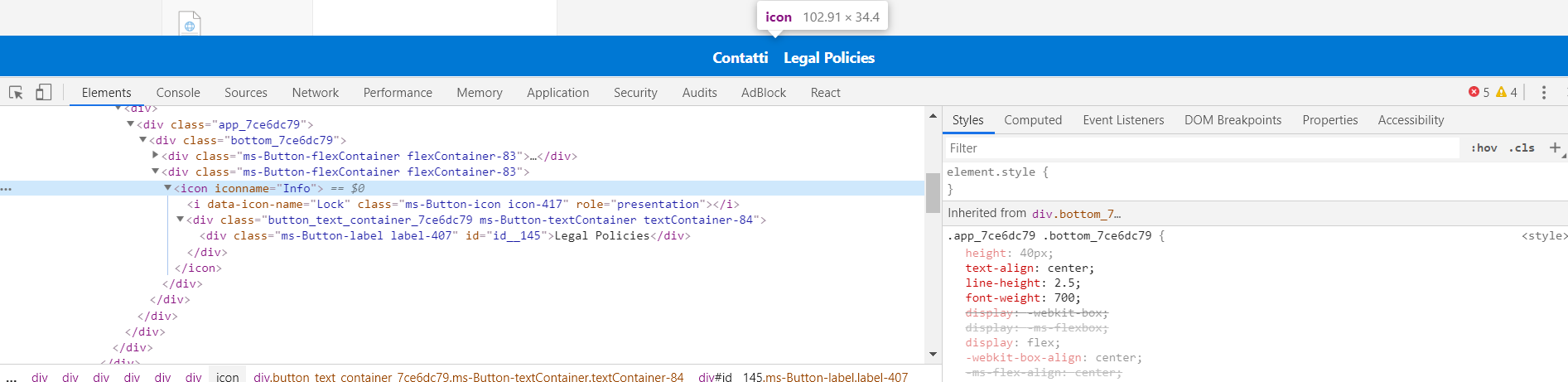

import { override } from '@microsoft/decorators';
import { Log } from '@microsoft/sp-core-library';
import {
  BaseApplicationCustomizer,
  PlaceholderContent,
  PlaceholderName
} from '@microsoft/sp-application-base';
import { Dialog } from '@microsoft/sp-dialog';

import * as strings from 'HelloWorldApplicationCustomizerStrings';
import styles from './AppCustomizer.module.scss';
import { escape } from '@microsoft/sp-lodash-subset';
import { initializeIcons } from 'office-ui-fabric-react/lib/Icons';
import { Icon } from 'office-ui-fabric-react/lib/Icon';

const LOG_SOURCE: string = 'HelloWorldApplicationCustomizer';

/**
 * If your command set uses the ClientSideComponentProperties JSON input,
 * it will be deserialized into the BaseExtension.properties object.
 * You can define an interface to describe it.
 */
export interface IHelloWorldApplicationCustomizerProperties {
  Bottom: string;
}

/** A Custom Action which can be run during execution of a Client Side Application */
export default class HelloWorldApplicationCustomizer
  extends BaseApplicationCustomizer<IHelloWorldApplicationCustomizerProperties> {

  // These have been added
  private _bottomPlaceholder: PlaceholderContent | undefined;

  @override
  public onInit(): Promise<void> {
    Log.info(LOG_SOURCE, `Initialized ${strings.Title}`);

    initializeIcons();

    // Wait for the placeholders to be created (or handle them being changed) and then
    // render.
    this.context.placeholderProvider.changedEvent.add(this, this._renderPlaceHolders);

    return Promise.resolve<void>();
  }

  private _renderPlaceHolders(): void {
    console.log("HelloWorldApplicationCustomizer._renderPlaceHolders()");
    console.log(
      "Available placeholders: ",
      this.context.placeholderProvider.placeholderNames
        .map(name => PlaceholderName[name])
        .join(", ")
    );

    // Handling the bottom placeholder
    if (!this._bottomPlaceholder) {
      this._bottomPlaceholder = this.context.placeholderProvider.tryCreateContent(
        PlaceholderName.Bottom,
        { onDispose: this._onDispose }
      );

      // The extension should not assume that the expected placeholder is available.
      if (!this._bottomPlaceholder) {
        console.error("The expected placeholder (Bottom) was not found.");
        return;
      }

      if (this.properties) {
        let bottomString: string = this.properties.Bottom;
        if (!bottomString) {
          bottomString = "(Bottom property was not defined.)";
        }

        if (this._bottomPlaceholder.domElement) {
          this._bottomPlaceholder.domElement.innerHTML = `
          <div class="${styles.app}">
            <div class="${styles.bottom}">
              <div class="ms-Button-flexContainer flexContainer-83">
                <i data-icon-name="EditMail" class="ms-Button-icon icon-508" role="presentation"></i>
                <div class="${styles.button_text_container} ms-Button-textContainer textContainer-84">
                  <div class="ms-Button-label label-411" id="id__197">Contatti</div>
                </div>
              </div>
              <div class="ms-Button-flexContainer flexContainer-83">
                <Icon iconName="Info" />
                <i data-icon-name="Lock" class="ms-Button-icon icon-417" role="presentation"></i>
                <div class="${styles.button_text_container} ms-Button-textContainer textContainer-84">
                  <div class="ms-Button-label label-407" id="id__145">Legal Policies</div>
                </div>
              </div>
            </div>
          </div>`;
        }
      }
    }
  }

  private _onDispose(): void {
    console.log('[HelloWorldApplicationCustomizer._onDispose] Disposed custom bottom placeholders.');
  }

}
OK, that means something! (just don't know what yet :-) )
Interesting that it complains that icons are being re-registered. Do you get the same messages if you comment out the initializeIcons(); line?
hugoabernier
on 9 Jul 2019
Any chance you can provide a repo that repro's the issue to help troubleshoot as I can't replicate this...
 andrewconnell
on 5 Aug 2019
andrewconnell
on 5 Aug 2019
I tried to pack everything here https://github.com/RiccardoAmadi/app-extension
Thanks
RiccardoAmadi
on 27 Aug 2019
I don't see anything in the project you provided reference icons anywhere... thus, I can't repro.
On your side, I'd suggest you try upgrading the project to SPFx v1.9.1 as there might have been an issue fixed a UI fabric update.
andrewconnell
on 30 Sep 2019
This issue has been automatically marked as stale because it has marked as requiring author feedback but has not had any activity for 7 days. It will be closed if no further activity occurs within next 7 days of this comment. Thank you for your contributions to SharePoint Developer activities.
msft-github-bot
on 7 Oct 2019
Closing issue due no response from original author. If this issue is still occurring, please open a new issue with additional details. Notice that if you have included another related issue as additional comment on this, please open that also as separate issue, so that we can track it independently.
msft-github-bot
on 14 Oct 2019
Issues that have been closed & had no follow-up activity for at least 7 days are automatically locked. Please refer to our wiki for more details, including how to remediate this action if you feel this was done prematurely or in error: Issue List: Our approach to locked issues
msft-github-bot
on 24 Jan 2020
Related issues
 thechriskent
·
3Comments
thechriskent
·
3Comments
 Ralms
·
3Comments
Ralms
·
3Comments
 waldekmastykarz
·
3Comments
waldekmastykarz
·
3Comments
 zerovectorspace
·
3Comments
zerovectorspace
·
3Comments
 nanddeepn
·
3Comments
nanddeepn
·
3Comments