Sp-dev-docs: SPFx Yeoman Generator Errors and Warnings, Build Fails
Category
- [ ] Question
- [ ] Typo
- [x] Bug
- [ ] Additional article idea
Expected or Desired Behavior
The helloworld-webpart is created without error and runs with gulp serve.
Observed Behavior
There are many warnings and errors. The build fails to gulp serve anything at all.
Steps to Reproduce
Build the dev environment according to the instructions here: Set up your SharePoint Framework development environment.
Attempt to create the helloworld-webpart according to the instructions here: Build your first SharePoint client-side web part (Hello World part 1)
Submission Guidelines
I have included the exact output I receive on-screen, as well as the build log.
Build Log: 2019-06-27T23_29_41_503Z-debug.log
PowerShell Output: HelloWebpart_Fail.txt
For reference, this is what I have installed:
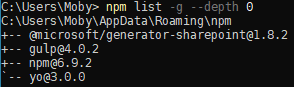
This is what happens when I run gulp trust-dev-cert:

This is what happens when I run gulp serve:

 8thHalfHour
All 11 comments
Thank you for reporting this issue. We will be triaging your incoming issue as soon as possible.
 msft-github-bot
on 4 Jul 2019
msft-github-bot
on 4 Jul 2019
What version of Node.js are you using? (node -v)
When you ran gulp trust-dev-cert, did you do that with the administrative command prompt?
 andrewconnell
on 4 Jul 2019
andrewconnell
on 4 Jul 2019
According to the attached log file, the following version was used:
2 info using [email protected]
3 info using [email protected]
Node version 12.x.x is currently not supported only Node 10. You need to downgrade in order to get it running I assume.
 StfBauer
on 4 Jul 2019
StfBauer
on 4 Jul 2019
I get the exact same results with 10.16.0, the latest LTS. I will post the results in a few minutes.
 geekalert
on 4 Jul 2019
geekalert
on 4 Jul 2019
Okay, here are the results with Node LTS (v10.16.0). Spoiler: exactly the same.
Build log: 2019-07-04T19_02_11_145Z-debug.log
PowerShell output: HelloWebpart_Fail_LTS.txt
This is the environment I've installed, per the instructions:
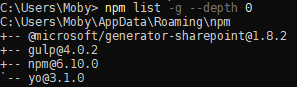
This is what happens when I run gulp trust-dev-cert with LTS:

This is what happens when I run gulp serve:
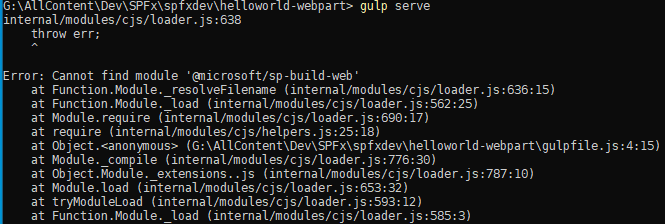
So, yeah . . FYI: I had tried both nodejs versions before posting this. Also, I've tried using the NodeJS that is downloaded for windows, and nvm for windows NodeJS. There is no change.
When I look at the errors, it seems that there are actually pieces missing. . . things that the yeoman scaffold is unable to produce or locate. Surely, I cannot be the only one experiencing these errors? I literally just followed the instructions, verbatim.
Please help, if you can. Thank you!
8thHalfHour
on 5 Jul 2019
@8thHalfHour said:
"cannot find module '@microsoft/sp-build-web'"
Did you create a project & execute npm install BEFORE running any of the gulp commands? The gulp task trust-dev-cert is in the included packages for a default project, but you must first create the project and install all dependencies by running npm install to obtain the task.
Correct steps for a brand new environment:
- install all global dependencies
- create a project using
yo @microsoft/sharepoint - let the default scaffolding process of Yeoman run
npm installor you do it manually on the project - run
gulp trust-dev-cert
andrewconnell
on 5 Jul 2019
Gave it a go, but no joy.
Results of npm install (the instructions of which, btw, are not in the Microsoft build webpart instructions): npm_install_LTS_2.txt
Results of gulp trust-dev-cert after npm install: gulp trst cert_FAIL_LTS_2.txt
Results of gulp serve after npm install: gulp serve_FAIL_LTS_2.txt
8thHalfHour
on 5 Jul 2019
First, in the future, please paste the output of the logs to the issue and not as text-file attachments. Adding attachments is just adding extra steps in helping resolve the issue...
Second, you should not run npm audit fix as I see in your log. That is going to try to upgrade dependencies to versions that have not been tested with SPFx.
Third, something seems very wrong with your global Gulp install. I'd uninstall and reinstall it and try again. The errors show gulp-cli isn't being found. So do this:
npm uninstall -g gulp
npm list -g --depth=0
npm install -g gulp
npm list -g --depth=0
I uninstalled and re-installed gulp. Then I did the npm install. Lo and behold, it built! It served! It was interactive! So, thank you very much for that. I am, however, still confused by all of the deprecation warnings, the ENOENT messages, and the vast amount of issues node believes the web part has once it’s been built. Also, how does this tiny web part have over 70K files?? Are all of the files absolutely essential for each and every web part that is built out? Holy cow! The sheer number blew me away.
8thHalfHour
on 6 Jul 2019
When things get real screwy, sometimes it's easiest to just uninstall & reinstall... not just NPM / SPFx, but software in general ;)
My $0.02 on the deprecation & warnings when installing packages:
http://www.andrewconnell.com/blog/don-t-be-alarmed-by-vulnerabilities-after-running-npm-install
@8thHalfHour said:
Also, how does this tiny web part have over 70K files?? Are all of the files absolutely essential for each and every web part that is built out? Holy cow! The sheer number blew me away.
Yes, they are required. Node takes the approach that what you install initially are the bare bones to get it to run. Each project defines all it's dependencies. it's all interpreted, not compiled. I'm guessing you're familiar with .NET which is compiled & Visual Studio takes 20GB & 5 hours to install... you get it all up front. Just a different approach (and one that .NET Core / Standard guys adopted as well).
andrewconnell
on 6 Jul 2019
Issues that have been closed & had no follow-up activity for at least 7 days are automatically locked. Please refer to our wiki for more details, including how to remediate this action if you feel this was done prematurely or in error: Issue List: Our approach to locked issues
msft-github-bot
on 24 Jan 2020
Related issues
StfBauer
·
3Comments
 ken-harris
·
3Comments
ken-harris
·
3Comments
 zerovectorspace
·
3Comments
zerovectorspace
·
3Comments
 nanddeepn
·
3Comments
nanddeepn
·
3Comments
 byrongits
·
3Comments
byrongits
·
3Comments