Sp-dev-docs: sourceId modern search results webpart
Category
- [X] Question
- [ ] Typo
- [ ] Bug
- [ ] Additional article idea
Expected or Desired Behavior
This is mainly a question, but possibly a bug. After provisioning a modern communication site with a homepage containing 'SharePoint Framework modern search Web Parts' the 'Search Results' webparts properties needs to be modified to use the new instanceId's of the refiners, pagination and search box webparts.
Using the OfficeDevPnP.Core.Pages ClientSideWebPart class I set the following webpart properties before I save and publish the page:
_Search results:_
cpWp.Properties["useDefaultSearchQuery"] = true;
cpWp.Properties["useRefiners"] = true;
cpWp.Properties["showPaging"] = true;
cpWp.Properties["refinerDataSourceReference"] = "WebPart."+ refiner.WebPartId +"."+ refiner.InstanceId +":refinersWebPart";
cpWp.Properties["paginationDataSourceReference"] = "WebPart." + pagination.WebPartId + "." + pagination.InstanceId + ":paginationWebPart";
cpWp.Properties["propertyId"] = "searchQuery";
cpWp.Properties["propertyPath"] = "rawInputValue";
cpWp.Properties["sourceId"] = "WebPart." + searchbox.WebPartId + "." + searchbox.InstanceId;
cpWp.Properties["defaultSearchQuery"] = "*";
_Pagination_
cpWp.Properties["searchResultsDataSourceReference"] = "WebPart." + searchresults.WebPartId + "." + searchresults.InstanceId + ":searchResultsWebPart";
_Refiners_
cpWp.Properties["searchResultsDataSourceReference"] = "WebPart." + searchresults.WebPartId + "." + searchresults.InstanceId + ":searchResultsWebPart";
I'd expect the search results webpart to be linked to the search box and have user raw input overwrite the "*" defaultsearchquery.
Observed Behavior
Search attempts have no impact and the search results webpart doesn't seem to be connected to the source:search box. (Search pagination and refiners are working fine)
Am I missing something? Any help would be gratefully appreciated.
Steps to Reproduce
- Create a provisioning template of a communication site with a home page containing a search box, search results, search pagination and search refiners webparts.
- Use it to create a new communication site
- User the ClientSideWebPart to edit the properties of the webparts as mentioned above.
 Hit0shi
All 6 comments
Thank you for reporting this issue. We will be triaging your incoming issue as soon as possible.
 msft-github-bot
on 20 Jun 2019
msft-github-bot
on 20 Jun 2019
Not clear... are you asking this as part of the provisioning service, PNP Sites Core (CSOM) project or a search question? Also, can you provide context for your SharePoint environment?
 andrewconnell
on 20 Jun 2019
andrewconnell
on 20 Jun 2019
My apologies for the unclarity. English isn't my mothertongue. I'm working on a SharePoint online environment.
This is about programmatically editing the properties of the spfx search results webpart to acquire these settings:
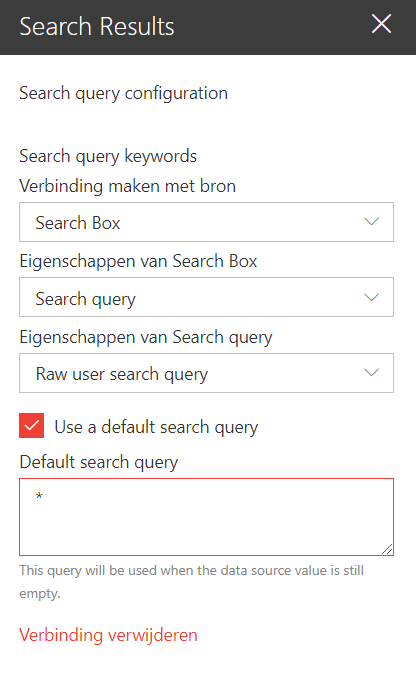
Instead the results of the code above are just:
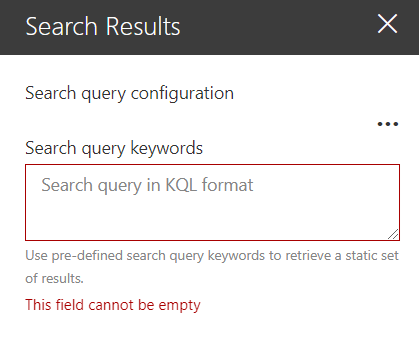
Hit0shi
on 20 Jun 2019
The connection to the Search Box Web Part is different than the connection to all the other Web Parts. All connections are build up dynamically, except for the connection to the Search Box Web part which uses the out of the box connection interface and the data gets stored a little bit different.
I don't have the ability to test now, but could you try to add the following to your code:
cpWp.DynamicDataPaths["queryKeywords"] = "WebPart." + searchbox.WebPartId + "." + searchbox.InstanceId + ":searchQuery:rawInputValue";
 YannickRe
on 22 Jun 2019
YannickRe
on 22 Jun 2019
The connection to the Search Box Web Part is different than the connection to all the other Web Parts. All connections are build up dynamically, except for the connection to the Search Box Web part which uses the out of the box connection interface and the data gets stored a little bit different.
I don't have the ability to test now, but could you try to add the following to your code:
cpWp.DynamicDataPaths["queryKeywords"] = "WebPart." + searchbox.WebPartId + "." + searchbox.InstanceId + ":searchQuery:rawInputValue";
Thanks a lot! That was it!
Before my initial post I saw the DynamicDataPaths in the page xml and tried to add it in the provisioning template without success. I was wondering what I missed, but it seems my SharePointPnPCoreOnline package was outdated (v3.6 instead of v3.10.1906) and my ClientSideWebPart class didn't have 'DynamicDataValues/DynamicDataPaths' properties...
Hit0shi
on 24 Jun 2019
Issues that have been closed & had no follow-up activity for at least 7 days are automatically locked. Please refer to our wiki for more details, including how to remediate this action if you feel this was done prematurely or in error: Issue List: Our approach to locked issues
msft-github-bot
on 24 Jan 2020
Related issues
 jonthenerd
·
3Comments
jonthenerd
·
3Comments
 Ralms
·
3Comments
Ralms
·
3Comments
 karishmaTCS
·
3Comments
karishmaTCS
·
3Comments
 acksoft
·
3Comments
acksoft
·
3Comments
 StfBauer
·
3Comments
StfBauer
·
3Comments