Sp-dev-docs: Yeoman generator always generates v 1.5 of SPFx
I tried using the following versions of @microsoft/generator-sharepoint:
1.8.2
1.8.1
1.7.1
Here's what I have:
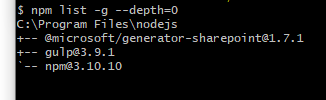
When running yo @microsoft/sharepoint I get SharePoint framework version 1.5, I also don't get the option to target SharePoint 2019:
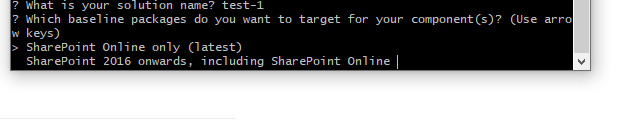
I am on windows 10. I am using Node v 6.11.0, npm v 3.10.10
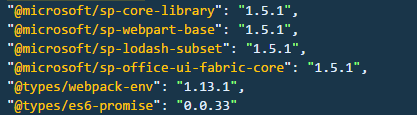
Here's a screenshot of what I have in package.json:
 Danielaroc
All 12 comments
Thank you for reporting this issue. We will be triaging your incoming issue as soon as possible.
 msft-github-bot
on 13 May 2019
msft-github-bot
on 13 May 2019
Hello. FYI we have the exact same issue but for us it is either SPFX 1.6 or 1.7 depending on the machine we use. It looks like after updating the generator to the latest version it will still always use the first version which was installed on the machine. Have tested it on 3 different machines in our office and all have the same behaviour.
 keith-knight
on 13 May 2019
keith-knight
on 13 May 2019
So, quite strange. First off, if you are migrating to SPFx 1.8, you should move to Node 10 LTS. Otherwise, is it possible that you have the generator installed in a folder higher up than your current one? Ie, you have a global generator, but also a generator installed at c:\code, and you are trying to use the generator in c:\code\myproject ? What happens if you use a totally different root folder than normal (c:\mycode)?
 patmill
on 14 May 2019
patmill
on 14 May 2019
Hi @patmill . I am not trying to migrate any solution. I am trying to create a new solution. I am now using generator version 1.7.1, created a new directory under d: drive, named it code2, and ran yo @microsoft/sharepoint, but I am seeing the same behavior. Do I need to upgrade my nodejs version for 1.7.1?
Danielaroc
on 14 May 2019
Also, something am confused about. When you say SPFx 1.8, do you mean the yeoman generator version 1.8, or the version of the packages inside the project? I mean, if I use yeoman generator 1.7, do I expect to get SPFx 1.7 as well and all the @sp packages inside will be version @1.7?
Danielaroc
on 14 May 2019
In general, if you are using version 1.x of the generator, the package.json file it creates will be using 1.x of all the SPFx packages (unless you choose one of the on-prem targets for what version you want to support). Are you answering "SharePoint 2019" or "SharePoint 2016 FP2" to the generator questions?
patmill
on 14 May 2019
Hi @patmill so if I get it right, if I use version 1.7x of the generator, that means I'll get version 1.7x of the SPFx as well, and so on, correct? I thought for example version 1.4 of the generator might provide version 1.6 for SPFX.
Back to my problem, I don't get the option to choose SP 2019 when running yo @microsoft/sharepoint, I get only the options to target SP Online and SP 2016 onwards. If I choose SPOnline, I get SPFx 1.5.1 (as in the screenshot in my question).
Danielaroc
on 14 May 2019
@keith-knight said:
FYI we have the exact same issue but for us it is either SPFX 1.6 or 1.7 depending on the machine we use. It looks like after updating the generator to the latest version it will still always use the first version which was installed on the machine.
Can you verify:
- You have installed the generator globally and not locally?
- What version of the generator you have installed globally? Do this by running
npm list -g --depth-=0
 andrewconnell
on 14 May 2019
andrewconnell
on 14 May 2019
@Danielaroc said:
if I use version 1.7x of the generator, that means I'll get version 1.7x of the SPFx as well, and so on, correct?
The version of the generator does not necessarily = version of packages added to your project. The latest generator (v1.8.2 as of today) can create 3 types of projects:
- SP Server 2016
- SP Server 2019
- SP Online
Each of those target project types (ie: target environments) dictates what version of SPFx is supported. For instance:
- SP Server 2016 = SPFx v1.1.0
- SP Server 2019 = SPFx v1.4.1
- SP Online = SPFx all, including latest (today that's v1.8.2)
I thought for example version 1.4 of the generator might provide version 1.6 for SPFX.
Nope... the SPFx generator v1.4 only knows about SPFx v1.4 and earlier (<=1.4) not later (1.4<).
I don't get the option to choose SP 2019 when running yo @microsoft/sharepoint
The 2019 option is only available in SPFx v1.7.0 & higher.
One thing I noticed from your OP is you have a very old version of NPM & the version of Node is also old. Mirroring what @patmill said in one of his comments, here's what I'd do: clean up your machine & start fresh. In general, it's safe to run the latest generator regardless of the environment you target.
- uninstall Node.js (add/remove programs)
- you normally don't need to do this, but what you describe is going on is confusing so I'd start fresh... this step will also remove all previously installed global npm packages
- after you do this, verify node isn't on your machine:
node -v - I've seen where if you have installed the Node.js dev tools for Visual Studio, it installs it's own version of Node & edits the environment variable
PATHthat can cause a lot of confusion... if you uninstall node & it's still there by runningnode -v, then that's telling... stop here if so before proceeding
- install Node.js v10
- install the latest SPFx generator:
npm install @microsoft/generator-sharepoint -g - now verify what you have:
node -v
npm list -g --depth=0
Uninstalling/reinstalling nodejs then the SPFx generator did it. Now I can see the 2019 option, and when choosing SPOnline I get version .
Maybe NodeJS v 6.x would force yeoman generator to use max version of SPFx 1.5? Even though I had the Yeoman generator v1.8 then v1.7, I always got 1.5 , probably Node v6 is the reason?
Anyway, thanks @andrewconnell
Danielaroc
on 15 May 2019
@Danielaroc said:
Maybe NodeJS v 6.x would force yeoman generator to use max version of SPFx 1.5? Even though I had the Yeoman generator v1.8 then v1.7, I always got 1.5 , probably Node v6 is the reason?
Not sure... what you described was really confusing to figure out what was going on so instead of trying to pick through all the possibilities, I sent you down a "let's clean this up and try again... if it doesn't work, then we have a better idea of where you are today and can go from there".
The version of Node.js wouldn't have changed things. It's just a runtime that supports things that are built from it. I suspect it was something with your PATH env variable... at any rate, it's fixed so we'll just move along :)
andrewconnell
on 15 May 2019
Issues that have been closed & had no follow-up activity for at least 7 days are automatically locked. Please refer to our wiki for more details, including how to remediate this action if you feel this was done prematurely or in error: Issue List: Our approach to locked issues
msft-github-bot
on 24 Jan 2020
Related issues
 jonthenerd
·
3Comments
jonthenerd
·
3Comments
 nanddeepn
·
3Comments
nanddeepn
·
3Comments
 zerovectorspace
·
3Comments
zerovectorspace
·
3Comments
 christianbueschi
·
3Comments
christianbueschi
·
3Comments
 Ralms
·
3Comments
Ralms
·
3Comments