Sp-dev-docs: Not display modal view on click custom-formatting-lookup column.
I customize my lookup column with JSON formatting. But when clicked on item in this column there's problem with display modal view (probably the class of the modal view is "od-IFrameDialog") and this view not support on the custom formatting lookup column.

After click 758 number, nothing happens.
But after click on 2 565, whitch is the same type of column as Obj. dopravce, it show this window.
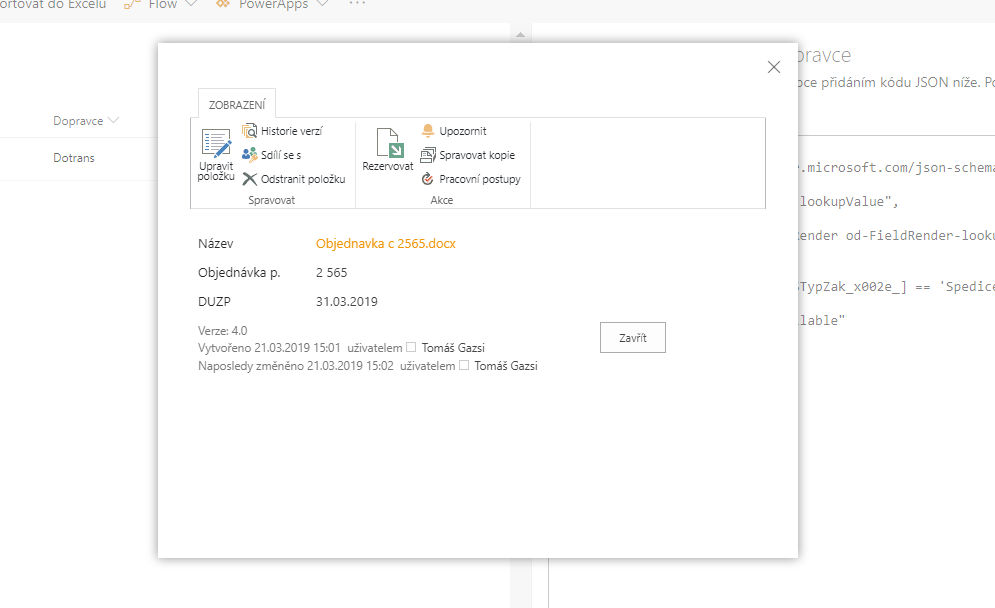
Have anybody idea how to solve this? Thanks
Document Details
⚠ Do not edit this section. It is required for docs.microsoft.com ➟ GitHub issue linking.
- ID: f60068c3-4534-a400-350b-fdbcefd684b6
- Version Independent ID: 228accdb-a7de-0671-34ad-60a37866c380
- Content: Use column formatting to customize SharePoint
- Content Source: docs/declarative-customization/column-formatting.md
- Product: sharepoint
- GitHub Login: @spdevdocs
- Microsoft Alias: spdevdocs
 tomasgazsi
All 5 comments
Thank you for reporting this issue. We will be triaging your incoming issue as soon as possible.
 msft-github-bot
on 25 Mar 2019
msft-github-bot
on 25 Mar 2019
@thechriskent @bcameron1231
 andrewconnell
on 29 Mar 2019
andrewconnell
on 29 Mar 2019
Unfortunately, I do not believe what you are trying to do is supported by Column Formatting. @thechriskent can probably confirm, but the click events that are registered would not be picked up by the customization.
An option, could be to provide a link to the item in a new window, by constructing a URL to the lookup list. Not the same experience, but another way around it.
{
  "$schema": "https://developer.microsoft.com/json-schemas/sp/column-formatting.schema.json",
  "debugMode": true,
  "elmType": "a",
  "txtContent": "@currentField.lookupValue",
  "attributes":{
  "href":"=@currentWeb + '/Lists/YourLookupList/DispForm.aspx?ID=' + @currentField.lookupId",
  "target":"_blank"
  }
}
 bcameron1231
on 30 Mar 2019
bcameron1231
on 30 Mar 2019
Yes, then I solved it with link to the item in new window. Thanks for help.
tomasgazsi
on 4 Apr 2019
Issues that have been closed & had no follow-up activity for at least 7 days are automatically locked. Please refer to our wiki for more details, including how to remediate this action if you feel this was done prematurely or in error: Issue List: Our approach to locked issues
msft-github-bot
on 24 Jan 2020
Related issues
 waldekmastykarz
·
3Comments
waldekmastykarz
·
3Comments
 ken-harris
·
3Comments
ken-harris
·
3Comments
 nanddeepn
·
3Comments
nanddeepn
·
3Comments
 thechriskent
·
3Comments
thechriskent
·
3Comments
 Ralms
·
3Comments
Ralms
·
3Comments
Most helpful comment
Unfortunately, I do not believe what you are trying to do is supported by Column Formatting. @thechriskent can probably confirm, but the click events that are registered would not be picked up by the customization.
An option, could be to provide a link to the item in a new window, by constructing a URL to the lookup list. Not the same experience, but another way around it.