Sp-dev-docs: 1.8 spfx webparts containing MSGraphClient in the desktop versions of Teams
As Mark Rackley describes in http://www.markrackley.net/2018/11/12/microsoft-graph-in-teams/ it seems to be impossible to run even 1.8 SPFx webparts containing MSGraphClient calls in the desktop versions of Teams. The webservices simply return no results, while they are working as expected in the web client. This applies to v1.0 and to the beta endpoint.
If this is not a bug, please provide some documentation how to make it work.
(I basically want to push information into planner).
Category
- [x] Question
- [ ] Typo
- [x] Bug
- [ ] Additional article idea
Expected or Desired Behavior
MSGraph returns the same results in Teams Desktop as in the web edition.
Observed Behavior
MSGraph returns no results in Teams Desktop.
Steps to Reproduce
basically your demo code:
private _fetchRecentDocuments() {
if (this.props.graphClient) {
this.setState({
loading: true,
error: null
});
this.props.graphClient
.api("me/drive/recent")
.version("v1.0")
.get((err, res: IRecentDocuments) => {
if (err) {
// Something failed calling the MS Graph
this.setState({
error: err.message ? err.message : strings.Error,
recentDocs: [],
loading: false
});
return;
}
// Check if a response was retrieved
if (res && res.value && res.value.length > 0) {
this._processRecentDocuments(res.value);
} else {
// No documents retrieved
this.setState({
recentDocs: [],
loading: false
});
}
});
}
 cfillies
All 32 comments
Thank you for reporting this issue. We will be triaging your incoming issue as soon as possible.
 msft-github-bot
on 22 Mar 2019
msft-github-bot
on 22 Mar 2019
In my case graph request fails at all in desktop app, works fine in browser.
You can find a sample web part here: https://github.com/AJIXuMuK/issues/tree/master/graph-teams-desktop
It contains the only request to graph:
const client = await this.context.msGraphClientFactory.getClient();
    client.api(`groups/${this._teamsContext!.groupId}/members`).version('v1.0').get().then(members => {
      console.log(members);
    }).catch(error => {
      console.log(error);
    });
In browser I'm getting members with no issues, it desktop I'm getting
SyntaxError: Unexpected token u in JSON at position 0
    at JSON.parse (<anonymous>)
    at teams-web-part-application-assembly_default_109101cd752d6f9c7603273b7a37775d.js:517
    at <anonymous>
 AJIXuMuK
on 12 Apr 2019
AJIXuMuK
on 12 Apr 2019
In my case graph request fails at all in desktop app, works fine in browser.
You can find a sample web part here: https://github.com/AJIXuMuK/issues/tree/master/graph-teams-desktop
It contains the only request to graph:const client = await this.context.msGraphClientFactory.getClient(); client.api(`groups/${this._teamsContext!.groupId}/members`).version('v1.0').get().then(members => { console.log(members); }).catch(error => { console.log(error); });In browser I'm getting members with no issues, it desktop I'm getting
SyntaxError: Unexpected token u in JSON at position 0
    at JSON.parse (<anonymous>)
    at teams-web-part-application-assembly_default_109101cd752d6f9c7603273b7a37775d.js:517
    at <anonymous>
I have the same issue, in desktop app i'm getting the syntax error.
 chelobone
on 17 Apr 2019
chelobone
on 17 Apr 2019
So.. we are releasing a feature to enable SPFx components in any reach client (SPMobile, Teams Client, Teams Mobile, etc.).
The feature is rolling out as we speak and, once it is available 100% in prod, we will provide public documentation on how to enable such capability in your tenant.
I will keep this issue opened until the documentation is ready (which means that the feature will be 100% rolled in production).
 lucabandMSFT
on 25 Apr 2019
lucabandMSFT
on 25 Apr 2019
Thank you Luca for the update!
Just to clarify - will there always be some manual step to enable the feature for a tenant?
AJIXuMuK
on 25 Apr 2019
yes-ish. but "manual" steps will be very different at one point:
- Phase 1 (honestly quite soon): documentation that will require tenant admin to #a navigate to our "Manage API" page and #b edit some metadata in AAD Portal
- Phase 2 just go and navigate to our "manage API" page.. and we will do the "magic" in AAD directly.
as the code takes time to roll in production 100%, we figured out that we want to unblock our customers and partners that are having issues right now with Phase 1.
It will be our responsibility to update the article and reflect the status of the Production environment.
lucabandMSFT
on 25 Apr 2019
Thank you for the explanation!
AJIXuMuK
on 25 Apr 2019
I would love to get unblocked! Do you need a PN?
cfillies
on 25 Apr 2019
ok, I just got confirmation that the code is enabled 100% in production. Please follow the steps below to enable rich client working with SPFx components that requires access to Web APIs:
Note: you have to be Global Tenant Administrator to perform all the steps below
Step 1. Visit the "Manage Permissions" Page in SharePoint Tenant Admin
Step 2. Go to -> https://aad.portal.azure.com/#blade/Microsoft_AAD_IAM/ActiveDirectoryMenuBlade/RegisteredAppsPreview
Step 3. Click on "SharePoint Online Client Extensibility" Web Application Principal
Step 4. Click Manifest on the left menu
Step 5. Copy the id from the oAuth2Permission array
"oauth2Permissions": [
{
"adminConsentDescription": "Allow the application to access SharePoint Online Client Extensibility Web Application Principal on behalf of the signed-in user.",
"adminConsentDisplayName": "Access SharePoint Online Client Extensibility Web Application Principal",
"id": "2143704b-186b-4210-b555-d03aa61823cf",
"isEnabled": true,
"lang": null,
"origin": "Application",
"type": "User",
"userConsentDescription": "Allow the application to access SharePoint Online Client Extensibility Web Application Principal on your behalf.",
"userConsentDisplayName": "Access SharePoint Online Client Extensibility Web Application Principal",
"value": "user_impersonation"
}
],
Step 6. Replace “preAuthorizedApplications” entry with the following json
"preAuthorizedApplications": [
    {
        "appId": "00000003-0000-0ff1-ce00-000000000000",
        "permissionIds": [
            "2143704b-186b-4210-b555-d03aa61823cf"
        ]
    }
],
Step 7. Hit Save.
lucabandMSFT
on 25 Apr 2019
I will wait for feedback from you guys that the step above worked before closing this issue
lucabandMSFT
on 25 Apr 2019
Hi Luca,
I still have the same issue.
Step 1. Visit the "Manage Permissions" Page in SharePoint Tenant Admin
Are you talking about API Management page? Do I need to do something on that page or just "visit"?
AJIXuMuK
on 25 Apr 2019
hey Alex, just visiting.
so, to be clear: your app works in the browser but not in the rich client, correct? Do you think you can share access to your environment?
Thx,
Luca
lucabandMSFT
on 25 Apr 2019
your app works in the browser but not in the rich client, correct?
Exactly
Do you think you can share access to your environment?
Yep! Do you want me to add guest user, or share some existing user with you? What level of permissions do you need?
AJIXuMuK
on 25 Apr 2019
Hi Luca,
I made the proposed changes in the aad.portal, but I do not see any difference. It still works in the browser but not in the client (I did empty the cache before restarting the teams desktop client),
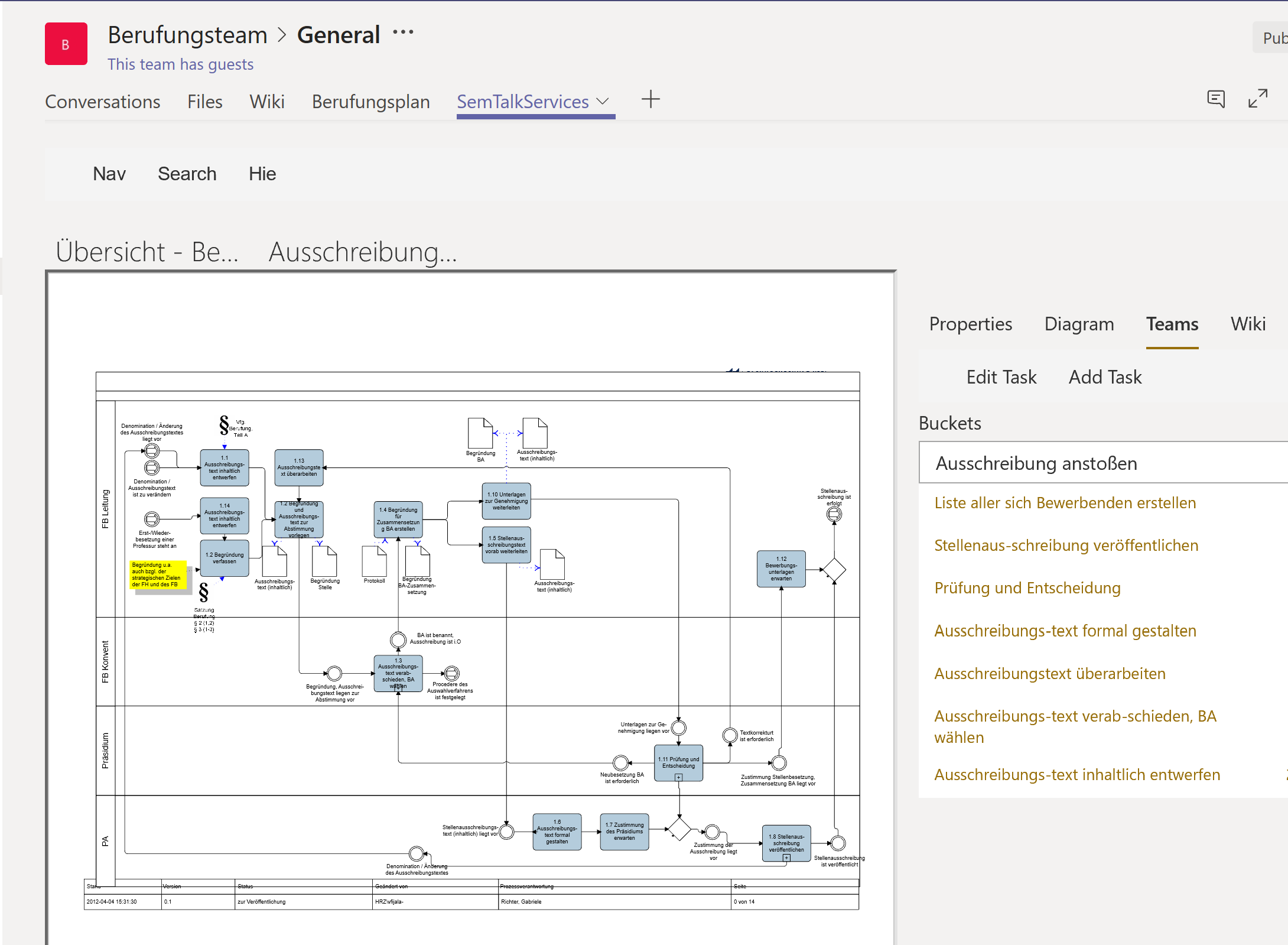
We have a SPFx react webpart, based on VisioOnline. The idea is to create planner buckets, tasks etc. based on the flowchart and to link them bidirectional. There are also calls to the graph insights api.
let me know if you need an invitation or a web meeting.
BR, Christian
cfillies
on 26 Apr 2019
We found some issues on our side and we believe we were able to address those.
Can you guys please give a try again and tell me if it works?
lucabandMSFT
on 29 Apr 2019
Hey Luca @lucabandMSFT ,
I can confirm that it works on my end.
AJIXuMuK
on 29 Apr 2019
Sweet! thanks Alex.
@lahuey FYI. Christian( @cfillies ) I will wait for you to confirm that it works for you as well before closing this issue.
lucabandMSFT
on 30 Apr 2019
Hi Luca,
I can also confirm that this is now working.
 mpaukkon
on 30 Apr 2019
mpaukkon
on 30 Apr 2019
Hi Luca, Sorry to tell you that it still does not work for me. Should I undo the changes I made in aad.portal? Does it make sense to wait a couple of hours/days?
cfillies
on 30 Apr 2019
hey Christian (@cfillies ): no, no waiting needed as it was not a push of new code.
Did you visit back the API Management page today? Basically, to be 100% certain, did you do the whole process from the beginning?
Thanks a lot.
lucabandMSFT
on 30 Apr 2019
I just doublechecked it. It is the same as Friday. preAuthorizedApplications.permissionIds matches oauth2Permissions.id. I have cleaned the cache, it is still working fine in the browser. I'll build a new stripped repro later on. Thanks a lot.
cfillies
on 30 Apr 2019
hey Christian (@cfillies ), thanks.
To be 100% sure: you are not using isolated web parts in your solution, right?
Thanks
lucabandMSFT
on 30 Apr 2019
Hey Luca,
- We want to reuse the react ctrls in multiple web parts. They are not in a subfolder of the webpart anymore
- We pass context and graphClient as params into stateful react controls and make then calls to the graph api from the react control ( I hope this is allowed)
- I am currently changing a copy of Alex’s example but I am currently stuck in package versions…
BR
Christian
From: Luca Bandinelli notifications@github.com
Sent: Tuesday, April 30, 2019 4:00 PM
To: SharePoint/sp-dev-docs sp-dev-docs@noreply.github.com
Cc: Christian Fillies cfillies@semtalk.com; Mention mention@noreply.github.com
Subject: Re: [SharePoint/sp-dev-docs] 1.8 spfx webparts containing MSGraphClient in the desktop versions of Teams (#3665)
hey Christian (@cfillieshttps://github.com/cfillies ), thanks.
To be 100% sure: you are not using isolated web parts in your solution, right?
Thanks
—
You are receiving this because you were mentioned.
Reply to this email directly, view it on GitHubhttps://github.com/SharePoint/sp-dev-docs/issues/3665#issuecomment-487963513, or mute the threadhttps://github.com/notifications/unsubscribe-auth/AEG6EMIRAUOELUU5LZLBUVDPTBGHJANCNFSM4HAP67DA.
cfillies
on 30 Apr 2019
No, we dont use them
From: Luca Bandinelli notifications@github.com
Sent: Tuesday, April 30, 2019 4:00 PM
To: SharePoint/sp-dev-docs sp-dev-docs@noreply.github.com
Cc: Christian Fillies cfillies@semtalk.com; Mention mention@noreply.github.com
Subject: Re: [SharePoint/sp-dev-docs] 1.8 spfx webparts containing MSGraphClient in the desktop versions of Teams (#3665)
hey Christian (@cfillies https://github.com/cfillies ), thanks.
To be 100% sure: you are not using isolated web parts in your solution, right?
Thanks
—
You are receiving this because you were mentioned.
Reply to this email directly, view it on GitHub https://github.com/SharePoint/sp-dev-docs/issues/3665#issuecomment-487963513 , or mute the thread https://github.com/notifications/unsubscribe-auth/AEG6EMIRAUOELUU5LZLBUVDPTBGHJANCNFSM4HAP67DA . https://github.com/notifications/beacon/AEG6EMNDLXFHSLXEX7MRYGTPTBGHJANCNFSM4HAP67DA.gif
cfillies
on 30 Apr 2019
I do not understand the magic behind, but suddenly it works for me even in the desktop client 😊
Thanks alot
From: Luca Bandinelli notifications@github.com
Sent: Tuesday, April 30, 2019 4:00 PM
To: SharePoint/sp-dev-docs sp-dev-docs@noreply.github.com
Cc: Christian Fillies cfillies@semtalk.com; Mention mention@noreply.github.com
Subject: Re: [SharePoint/sp-dev-docs] 1.8 spfx webparts containing MSGraphClient in the desktop versions of Teams (#3665)
hey Christian (@cfillies https://github.com/cfillies ), thanks.
To be 100% sure: you are not using isolated web parts in your solution, right?
Thanks
—
You are receiving this because you were mentioned.
Reply to this email directly, view it on GitHub https://github.com/SharePoint/sp-dev-docs/issues/3665#issuecomment-487963513 , or mute the thread https://github.com/notifications/unsubscribe-auth/AEG6EMIRAUOELUU5LZLBUVDPTBGHJANCNFSM4HAP67DA . https://github.com/notifications/beacon/AEG6EMNDLXFHSLXEX7MRYGTPTBGHJANCNFSM4HAP67DA.gif
cfillies
on 30 Apr 2019
Sweet! good to hear that guys. I'm going to close this issue.
lucabandMSFT
on 30 Apr 2019
Hey Luca!, thanks for your help!
Sorry to bother you, but now i'm facing another problem, the error change from:
SyntaxError: Unexpected token u in JSON at position 0
to:
Cannot read property 'indexOf' of undefined undefined
i follow the steps you provide 8 days ago, matching the preAuthorizedApplications.permissionIds with oauth2Permissions.id
also, clear the cache and restart msteams. Perhaps there is a delay and we have to wait until the configuration is updated?
Thanks in advance!
chelobone
on 3 May 2019
Have you redeployed your sppkg to the SharePoint app store?
cfillies
on 3 May 2019
Hi Christian! thanks for your reply
Have you redeployed your sppkg to the SharePoint app store?
Yes, i have redeployed my sppkg, right now it's deployed for debug, not for production.
This is the code i'm using to consume the graph api
 public RootWeb(): Promise<JSON> {
        return new Promise<JSON>((resolve, reject) => {
            this._msGraphClientFactory.getClient().then((_msGraphClient: MSGraphClient) => {
                //alert(_msGraphClient.api("/me"))
                _msGraphClient.api("/sites/root").get((error, site: JSON, rawResponse?: any) => {

                    if (error) {
                        alert(error.message)
                    }

                    resolve(site);
                });
            });
        });
    }
I would use "site: any" and parse site.value like this:
this.props.graphClient
.api("groups/" + teamid + "/members")
.version("v1.0")
.get((err, res: any) => {
if (err) {
// Something failed calling the MS Graph
this.setState({
member_error: err.message ? err.message : strings.Error,
teamMembers: [],
loading_members: false
});
return;
}
    // Check if a response was retrieved
    if (res && res.value && res.value.length > 0) {
      this.setState({
        teamMembers: res.value,
        loading_members: false
      });
Hi, thanks for your help.
So, i tried a few things but nothing work, in my case, it won't work using neither "msGraphClientFactory" or "aadHttpClientFactory". Using these, i always get the same error:
Cannot read property 'indexOf' of undefined undefined
Until i found a property in the context of the SPFx webpart called "graphHttpClient". I used this and i was able to get the documents from document library in SharePoint Online and show it in the Web and desktop context of MSTeams
Edit: I forgot to add that the GraphHttpClient is deprecated, but it was the ony way to make it run in both context's
This is an example of how it worked!
this.props.context.graphHttpClient
      .get("v1.0/sites/{tenantid}/lists/{documentlibraryid}/items",
        GraphHttpClient.configurations.v1)
      .then((resp: HttpClientResponse) => {
        var response = resp.json();
        console.log(response);
        response.then((res: any) => {
        }).catch((e) => {
          console.log(e);
          //alert(e);
        });
      }).catch((err) => {
        console.log(err);
        //alert(err);
      });
I hope this could be helpful to some one who experienced the same issues i got!
chelobone
on 8 May 2019
Issues that have been closed & had no follow-up activity for at least 7 days are automatically locked. Please refer to our wiki for more details, including how to remediate this action if you feel this was done prematurely or in error: Issue List: Our approach to locked issues
msft-github-bot
on 25 Jan 2020
Related issues
 byrongits
·
3Comments
byrongits
·
3Comments
 StfBauer
·
3Comments
StfBauer
·
3Comments
 mikeparkie
·
3Comments
mikeparkie
·
3Comments
 waldekmastykarz
·
3Comments
waldekmastykarz
·
3Comments
 ken-harris
·
3Comments
ken-harris
·
3Comments