Sp-dev-docs: BUG: spfx fails to respect <a /> onClick event (react)
Category
- [ ] Question
- [ ] Typo
- [x] Bug
- [ ] Additional article idea
spfx 1.7.1
Expected or Desired Behavior
onClick event on <a /> tag must be respected when redirects to internal pages url.
Observed Behavior
On modern site I created an spfx react webpart/extension with an <a href="/SitePages/Home.aspx" onClick={this._onClick.bind(this)} >link</a>} tag. Clickin on the tag with valid sharepoint modern page link (e.g: /SitePages/home.aspx) redirects the page instead of accessing this._onClick method first (tested on debugger). If the href redirects to external url e.g: google.com it will correctly access this._onClick method.
Because this._onClick can be:
private _onClick(ev){
  ev.preventDefault();
}
There is an event receptor probably attached to all links that tries to redirect with minimal download strategy(modern version). But it should honor other onClick event receiver before redirecting user and allow redirection to be prevented too if possible.
Edit:
You must test straight on the modern page using ?debugManifestsFile=https%3A%2F%2Flocalhost%3A4321%2Ftemp%2Fmanifests.js&loadSPFX=true parameter.
 jonathanhotono
All 13 comments
Thank you for reporting this issue. We will be triaging your incoming issue as soon as possible.
 msft-github-bot
on 11 Feb 2019
msft-github-bot
on 11 Feb 2019
The syntax for how you're writing it up is a bit verbose... do it like this and you'll see the expected result:
<a href="https://aka.ms/spfx" className={ styles.button } onClick={this.onClick}>
  <span className={ styles.label }>Learn more</span>
</a>
Similar handler, but with a more performant syntax (not using bind):
public onClick = (ev) => {
  ev.preventDefault();
  console.log('clicked event');
}
 andrewconnell
on 11 Feb 2019
andrewconnell
on 11 Feb 2019
@andrewconnell thanks. Can you perhaps change this and test this on your end from another page(/SitePages/home.aspx), and make sure you have /SitePages/test.aspx page exist:
<a href="/SitePages/test.aspx" className={ styles.button } onClick={this.onClick}>
  <span className={ styles.label }>Learn more</span>
</a>
public onClick = (ev) => {
  ev.preventDefault();
  console.log('clicked event');
}
The onClick event doesn't seem to be triggered when I clicking but it redirects the link to that modern page instead.
jonathanhotono
on 11 Feb 2019
Confirmed... created a new site collection & added the web part to the /SitePages/Home.aspx page. Works exactly as I'd expect using the code I posted above. The click handler ran, I can block navigation using event.preventDefault() and write to the console.
andrewconnell
on 11 Feb 2019
@andrewconnell I deployed a sample hello world webpart into a communication site. Then added the webpart into test.aspx page, still can replicate that issue.
Screenshot below:
Notice the Url/link points to SitePages/Home.aspx from test.aspx
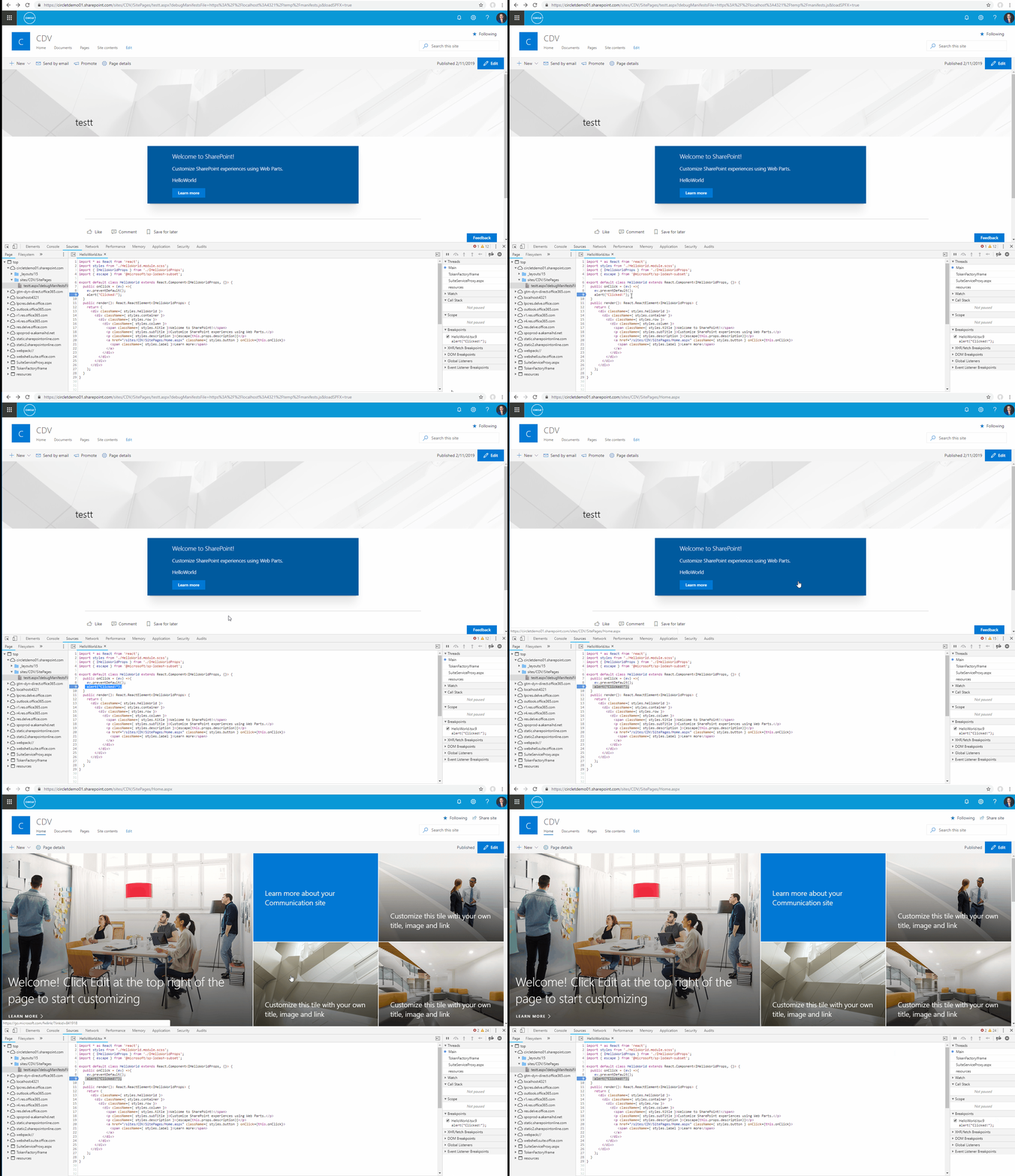
And update second test case here points to https://aka.ms/spfx or external site and it works fine.

It seems that sharepoint detects if the link is internal it forces you to redirect no matter what and it does not even triggered the onClick event.
jonathanhotono
on 11 Feb 2019
I've done the same thing... I just can't replicate what you're experiencing. The only difference in the screencap linked below is I build the web part and deployed it so everything is minified, but you can see it's performing as designed...
https://drive.google.com/open?id=1bpKJyGYELZc6VP2md6JsYrKdE7ckFCmb
Not sure what to suggest here... what browser & version are you using? Looks like Chrome... that's what I'm using. Try different browsers? What are the errors showing up in the console?
andrewconnell
on 11 Feb 2019
@andrewconnell you need to change your link on <a href from that https://aka.ms/spfx to another internal page within the site collection relatively, like my case "/sites/CDV/SitePages/Home.aspx" . This happens across all my tenants. I'm on latest chrome 72.
jonathanhotono
on 11 Feb 2019
Ah... now I can repro it... that's odd... will raise the issue to see if this is expected...
andrewconnell
on 11 Feb 2019
Thanks. I found that if you change the link to sitePages across site collections(modern pages only), it will also forces you to redirect and skipping the event trigger.
I suspect that some script in sharepoint evaluates the link as internal and forces to open it regardless. Altough I kind of liked the minimal download strategy that is automatically applied.
jonathanhotono
on 11 Feb 2019
Following up... this isn't a bug apparently. It's known and an aspect of the page router in SPO. See this post for more info & how to disable the behavior: https://julieturner.net/2018/08/spfx-anchor-tags-hitting-the-target
andrewconnell
on 11 Feb 2019
@andrewconnell thanks for your help! I've been scratching my head around this! :)
jonathanhotono
on 12 Feb 2019
Credit to @juliemturner for the investigation & @wobba for making me aware of it... was news to me until yesterday. I'm just the match maker on this one :)
andrewconnell
on 12 Feb 2019
Issues that have been closed & had no follow-up activity for at least 7 days are automatically locked. Please refer to our wiki for more details, including how to remediate this action if you feel this was done prematurely or in error: Issue List: Our approach to locked issues
msft-github-bot
on 25 Jan 2020
Related issues
 StfBauer
·
3Comments
StfBauer
·
3Comments
 mikeparkie
·
3Comments
mikeparkie
·
3Comments
 zerovectorspace
·
3Comments
zerovectorspace
·
3Comments
 thechriskent
·
3Comments
thechriskent
·
3Comments
 jonthenerd
·
3Comments
jonthenerd
·
3Comments
Most helpful comment
Following up... this isn't a bug apparently. It's known and an aspect of the page router in SPO. See this post for more info & how to disable the behavior: https://julieturner.net/2018/08/spfx-anchor-tags-hitting-the-target