Sp-dev-docs: Process for setting "SingleWebPartAppPage" doesn't work when page approval is enabled
Category
- [x] Question
- [ ] Typo
- [x] Bug
- [ ] Additional article idea
Expected or Desired Behavior
I have a SharePoint site which uses the new page approval for managing changes to content. In the same site I have a web part on a page which is set as a single app page, see link below. I should be able to use single app pages in sites where page approval is setup
https://docs.microsoft.com/en-us/sharepoint/dev/spfx/web-parts/single-part-app-pages
Observed Behavior
Currently you need to run a PS script or run JS in the console to update the page layout but as soon as you do that the page approval option disappears. This means you can't publish a page which is a single app because the UI option isn't there. Even if you setup the page and approve it as soon as you run the script to change the layout back to single app it puts the page back as a draft
Steps to Reproduce
Create SP site
Enable page approval flow
Create a page
Add web part
Run script to set new page as single app page
There is now no way to trigger the approval on the single app page and if you go to site pages you can click "Submit for approval" but it simply takes you to the page and there is no option available
 raymondlittle100
All 10 comments
Thank you for reporting this issue. We will be triaging your incoming issue as soon as possible.
 msft-github-bot
on 14 Jan 2019
msft-github-bot
on 14 Jan 2019
Can you simply go to the list view and approve the page?
 patmill
on 14 Jan 2019
patmill
on 14 Jan 2019
When trying to approve via the edit control block it just seemed to re-direct to the page. I'll test again and see
raymondlittle100
on 15 Jan 2019
Tried again and got the following
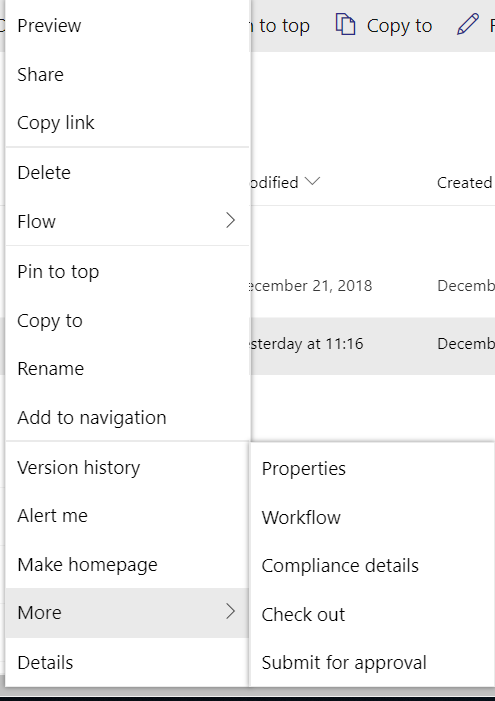
and when clicking on "Submit for approval" it takes me to the page in a new tab, see below

There is no option to edit the page or submit/approve
raymondlittle100
on 15 Jan 2019
Any other details on this?
raymondlittle100
on 31 Jan 2019
We are looking into fixing this as part of the 1.8 (GA) version of the capability.
 VesaJuvonen
on 5 Feb 2019
VesaJuvonen
on 5 Feb 2019
With release of 1.8 (GA) you will create an app page as a new page and won't run into this approval issue.
 GrahamMcMynn
on 7 Mar 2019
GrahamMcMynn
on 7 Mar 2019
Do we have a date for this?
raymondlittle100
on 7 Mar 2019
In a matter of days rather than weeks.
VesaJuvonen
on 7 Mar 2019
Issues that have been closed & had no follow-up activity for at least 7 days are automatically locked. Please refer to our wiki for more details, including how to remediate this action if you feel this was done prematurely or in error: Issue List: Our approach to locked issues
msft-github-bot
on 25 Jan 2020
Related issues
 thechriskent
·
3Comments
thechriskent
·
3Comments
 patrick-rodgers
·
3Comments
patrick-rodgers
·
3Comments
 jonthenerd
·
3Comments
jonthenerd
·
3Comments
 christianbueschi
·
3Comments
christianbueschi
·
3Comments
 acksoft
·
3Comments
acksoft
·
3Comments