Sp-dev-docs: Cannot position absolute element in custom web part over OOB component
Category
- [x ] Question
- [ ] Typo
- [ ] Bug
- [ ] Additional article idea
Expected or Desired Behavior
I'm trying to create a search box with an absolutely positioned (via CSS) dropdown which will appear over any content below the search box.
Observed Behavior
Any components below my custom component appear in front of my absolutely position element. Changing the z-index, position, opacity, seems to have no effect. Below you can see that the document library and people web parts sit in front of the dropdown (which has position: absolute) for the search box.

Steps to Reproduce
- Create a custom component with an absolutely positioned element.
- Place a web part below this component and notice that it will appear in front of the absolutely positioned element.
I think the issue could be related to the animation on the web part zones, specifically the element with this class "Canvas-slideUpIn", which has two animations. One of the animations changes the Z coordinate of the element which I think cause all of the components to exist in CSS 3D space, placing them in front of any absolutely positioned elements.
Was wondering if anyone has experienced this behaviour or has any solutions.
 steevinBradlee
All 10 comments
Thank you for reporting this issue. We will be triaging your incoming issue as soon as possible.
 msft-github-bot
on 8 Jan 2019
msft-github-bot
on 8 Jan 2019
@steevinBradlee Have you checked that the parent container is positioned, relative?
Are you able to provide a short sample showing exactly this behaviour?
 StfBauer
on 14 Jan 2019
StfBauer
on 14 Jan 2019
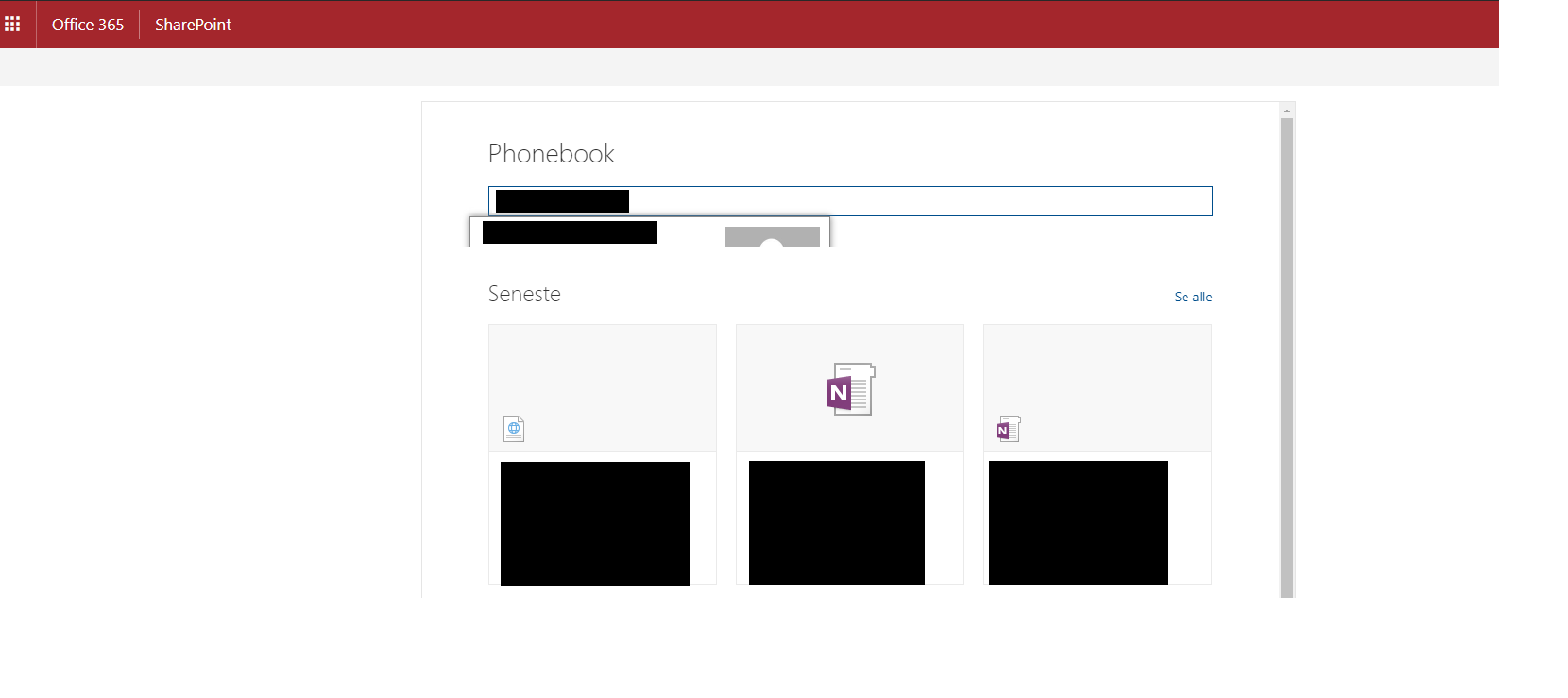
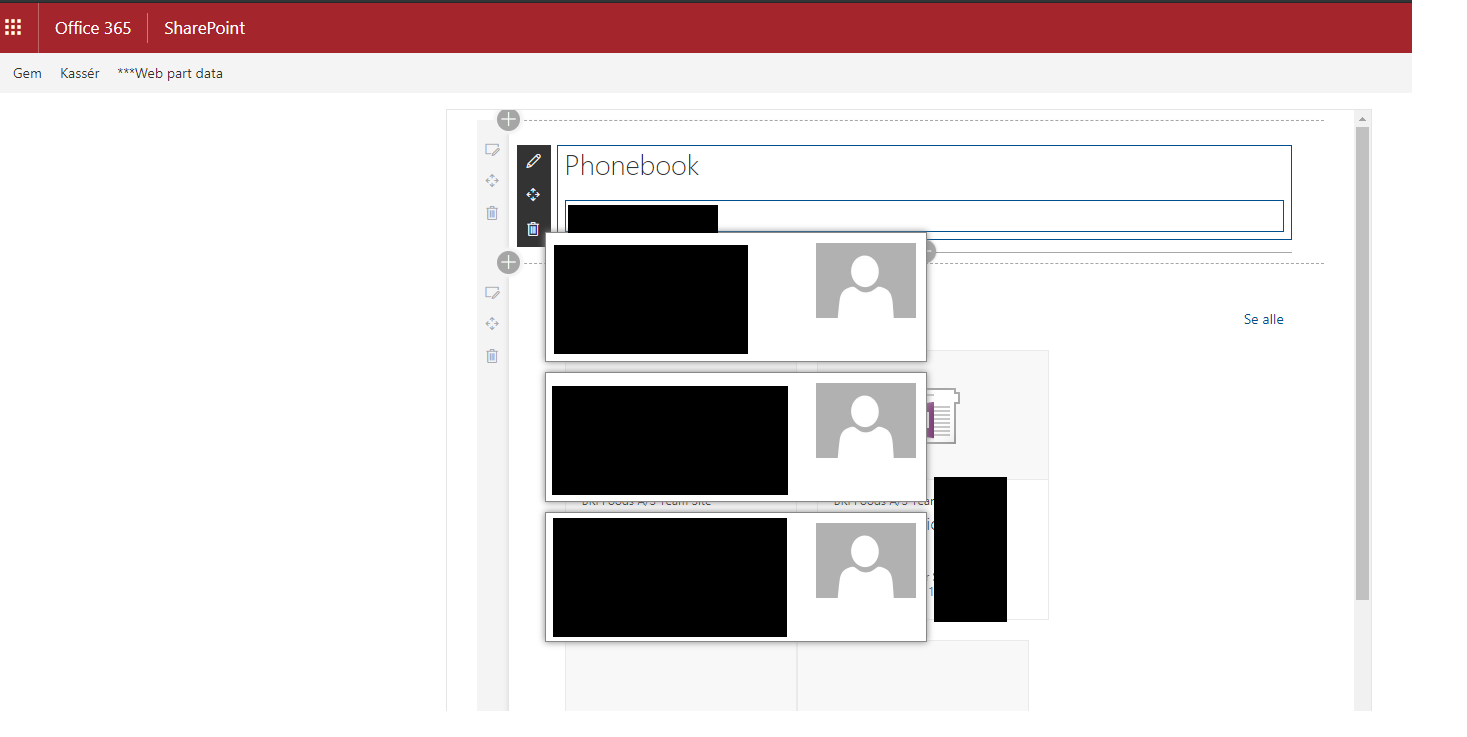
I Have the same issue. i Created a Phonebook serach webpart that drops the result as a list of business cards
i can not position it in front. I tried everything with position and z-index nothing helps. In workbench it works fine until i click the example at the top right. so it works in edit mode but not in normal mode. i am attaching one in edit mode and one in the normal mode. i had the phonebook in production for a while and it happened suddenly without any updates from my side
 assadarram
on 19 Jan 2019
assadarram
on 19 Jan 2019
I don't know if this is a long term fix, but I was able to fix it this way.
Webpart.ts
let wrapper = jquery(this.domElement).closest(".Canvas-slideUpIn");
wrapper.addClass(styles.transitionFix);
Module.scss
.transitionFix{
  opacity: 1 !important;
  animation-name: unset;
}
To ensure that the class is on the DOM element and also keep the animation, I only execute the code when the absolute/fixed positioned element shows up.
 araver
on 24 Jan 2019
araver
on 24 Jan 2019
Thanks Araver i will try this as soon as possible.
assadarram
on 25 Jan 2019
Thanks @araver, let me give it a try and get back to you :)
steevinBradlee
on 25 Jan 2019
Your fix worked for @araver . I wonder if this should be recognized as a bug?
steevinBradlee
on 25 Jan 2019
Thanks @araver. It worked for me too. I needed to do som changes because i am using ReactDom.render. This should be a temperary fix until what i think is a bug is fixed
Webpart.ts her is how i am calling the render from wenpart.ts
public render(): void {
ReactDom.render(element, this.domElement);
}
Module.scss (the same)
.transitionFix{
  opacity: 1 !important;
  animation-name: unset;
}
webpart.tsx and after componentDidMount()
let wrapper = jquery(this.props.context.domElement).closest(".Canvas-slideUpIn");
wrapper.addClass(styles.transitionFix);
assadarram
on 26 Jan 2019
Technically this is not recommend solution as you should not do dom manipulation to hide or change out of the box elements. Seems also that the solution has been already provided if you chose to do this regardless, so we are closing this issue.
 VesaJuvonen
on 29 Jan 2019
VesaJuvonen
on 29 Jan 2019
Issues that have been closed & had no follow-up activity for at least 7 days are automatically locked. Please refer to our wiki for more details, including how to remediate this action if you feel this was done prematurely or in error: Issue List: Our approach to locked issues
msft-github-bot
on 25 Jan 2020
Related issues
 qrown
·
3Comments
qrown
·
3Comments
 patrick-rodgers
·
3Comments
StfBauer
·
3Comments
patrick-rodgers
·
3Comments
StfBauer
·
3Comments
 nanddeepn
·
3Comments
nanddeepn
·
3Comments
 byrongits
·
3Comments
byrongits
·
3Comments
Most helpful comment
I don't know if this is a long term fix, but I was able to fix it this way.
Webpart.ts
Module.scss
To ensure that the class is on the DOM element and also keep the animation, I only execute the code when the absolute/fixed positioned element shows up.