Sp-dev-docs: AADSTS50058: A silent sign-in request was sent but none of the currently signed in user(s) match the requested login hint
Category
- [ ] Question
- [ ] Typo
- [x] Bug
- [ ] Additional article idea
Expected or Desired Behavior
Calling a secured Web API from a custom SPFx component should work. The AadHttpClient should always take the UPN as a login_hint instead of the email address.
Observed Behavior
Since this morning, users receive the following error when using the AadHttpClient:
_AADSTS50058: A silent sign-in request was sent but none of the currently signed in user(s) match the requested login hint_
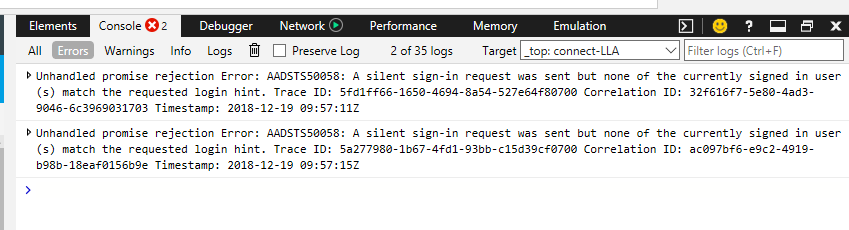
We can see that the auto-generated login_hint URL parameter is now the email address of the user, instead of his UPN:
https://login.windows.net/< tenant ID >/oauth2/authorize?response_type=id_token&client_id=< client ID >&redirect_uri=< tenant prefix >%2F_forms%2Fspfxsinglesignon.aspx&state=99a1b7d5-e0df-44a8-a247-d592b829b469%7Cddd8870b-461c-4a84-86c4-db2ee6feff2c&login_hint=< things go wrong here >&client-request-id=< request ID >&x-client-SKU=Js&x-client-Ver=1.0.16&prompt=none&nonce=< nonce >
This means that users with a different email address compared to the UPN will receive errors when trying to load a page with our custom components calling a secured Web API.
Steps to Reproduce
The following lines of code throw the error.
const aadHttpClient: AadHttpClient = await this.context.aadHttpClientFactory.getClient(appSettings.azureADAppId);
  const result = await this.serviceContext.aadHttpClient.post(
      '${this.serviceContext.serviceUrl}',
      new HttpClientConfiguration({}) as any,
      {
        headers: Utils.withDefaultHeaders({}),
        body: JSON.stringify(data)
      }
    );
Am I doing something wrong or can I force the login_hint to use the UPN?
Thanks in advance!
 klaaslauwers
All 15 comments
Happens on some of our production environments too. Without any changes.
@VesaJuvonen @patmill I think this might be a critical issue.
 Nasicus
on 19 Dec 2018
Nasicus
on 19 Dec 2018
We have the same problem. It's quite critical as some of our client's intranets don't work anymore. For your info: We're using SPFx 1.6 and all calls to graph and our custom API fail.
 PzYon
on 19 Dec 2018
PzYon
on 19 Dec 2018
I can confirm the same issue. Started seeing it this morning.
 NickSevens
on 19 Dec 2018
NickSevens
on 19 Dec 2018
We have the same problem since this morning.
 MatthiasWeibel
on 19 Dec 2018
MatthiasWeibel
on 19 Dec 2018
+1 Also having the same problem, starting this morning CET time.
 EagleWizard28
on 19 Dec 2018
EagleWizard28
on 19 Dec 2018
Hi,
There was a regression in how SPFx calls AAD to grant access tokens. This issue should be resolved now. Could you please verify?
 ghost
on 19 Dec 2018
ghost
on 19 Dec 2018
We believe we have removed the code that was causing this issue. Is it still occurring for anybody?
 GrahamMcMynn
on 19 Dec 2018
GrahamMcMynn
on 19 Dec 2018
Problem is gone for me, had to log my session off to get it working
 jansenbe
on 19 Dec 2018
jansenbe
on 19 Dec 2018
I can also confirm it's working again.
Nasicus
on 19 Dec 2018
Works indeed! Thanks for the quick intervention!
klaaslauwers
on 20 Dec 2018
Had this problem and can confirm now it's working again. Wish I had found this issue earlier though.
 mohag519
on 20 Dec 2018
mohag519
on 20 Dec 2018
Thanks, everyone for confirming that the issue is resolved and sorry for the inconvenience caused by this. Thanks for reporting this as fast as possible initially, so that we got things moving as fast as possible.
 VesaJuvonen
on 20 Dec 2018
VesaJuvonen
on 20 Dec 2018
Problem still persist now
 M9lab
on 31 Jan 2019
M9lab
on 31 Jan 2019
Reproduced in IE/Edge with 1.8.1.
 olemp
on 24 Apr 2019
olemp
on 24 Apr 2019
Issues that have been closed & had no follow-up activity for at least 7 days are automatically locked. Please refer to our wiki for more details, including how to remediate this action if you feel this was done prematurely or in error: Issue List: Our approach to locked issues
 msft-github-bot
on 25 Jan 2020
msft-github-bot
on 25 Jan 2020
Related issues
 zerovectorspace
·
3Comments
zerovectorspace
·
3Comments
 mikeparkie
·
3Comments
mikeparkie
·
3Comments
 ken-harris
·
3Comments
ken-harris
·
3Comments
 Ralms
·
3Comments
Ralms
·
3Comments
 waldekmastykarz
·
3Comments
waldekmastykarz
·
3Comments
Most helpful comment
Problem still persist now