Sp-dev-docs: Conditional formatting based on calculated field is broken since summer 2018
At some unknown point, approximately August 2018, I had a sharepoint online list whose column formatting stopped working. The column formatting was based on a calculated field (where both the reference and the calculated columns are Date and Time type).
Part of the column formatting expression worked, that is the part that evaluates whether there is a value (and if so, apply a green background), however the nested condition that looks to see whether the date is approaching in the next three days, colouring the background red, stopped working.
I have reproduced the problem described above using a new Date and Time column, as well as a column using calculated value based on the first. The formatting only works on the original, not the calculated column.
This previously worked. Is it a new 'feature'?
Document Details
⚠ Do not edit this section. It is required for docs.microsoft.com ➟ GitHub issue linking.
- ID: f60068c3-4534-a400-350b-fdbcefd684b6
- Version Independent ID: 228accdb-a7de-0671-34ad-60a37866c380
- Content: Use column formatting to customize SharePoint
- Content Source: docs/declarative-customization/column-formatting.md
- Product: sharepoint
- GitHub Login: @spdevdocs
- Microsoft Alias: spdevdocs
 hazymat
All 8 comments
Can you please share the JSON format you are using for column formatting?
 iamguptarishi
on 18 Dec 2018
iamguptarishi
on 18 Dec 2018
Hello. I have tested this with both Excel-style expressions and custom JSON. I have pasted this below. The below code is an expansion of the example posted on the documentation page under the heading "Formatting items based on arbitrary dates (advanced)"
Notes:
Sorry about the formatting, I have also attached (to this comment) a nicely formatted txt file with the json: date-ranges-json.txt.
Please note,
$Next_x0020_Deadlineis a column that is calculated like this:
=IF([Shoot Status]="Creating Gallery",[Gallery Deadline],IF([Shoot Status]="Editing",[Delivery Deadline],""))
Also note, this worked from about December 2017 until about August 2018. I didn't make any changes to any code or list settings at that time. (I run a completely different business and I use Sharepoint 99% of the time and only develop it 1% of the time!)
I have reproduced the problem by pointing this same JSON towards a different Date Time field which is not calculated (i.e. I have entered dates manually for test data). That works fine.
Here's the JSON:
{
  "$schema": "https://developer.microsoft.com/json-schemas/sp/column-formatting.schema.json",
  "debugMode": false,
  "elmType": "div",
  "txtContent": "@currentField",
  "attributes": {
    "class": {
      "operator": "?",
      "operands": [
        {
          "operator": "<=",
          "operands": [
            "[$Next_x0020_Deadline]",
            1
          ]
        },
        "",
        {
          "operator": "?",
          "operands": [
            {
              "operator": "<=",
              "operands": [
                "[$Next_x0020_Deadline]",
                {
                  "operator": "+",
                  "operands": [
                    "@now",
                    86400000
                  ]
                }
              ]
            },
            "sp-field-severity--severeWarning",
            {
              "operator": "?",
              "operands": [
                {
                  "operator": "<=",
                  "operands": [
                    "[$Next_x0020_Deadline]",
                    {
                      "operator": "+",
                      "operands": [
                        "@now",
                        259200000
                      ]
                    }
                  ]
                },
                "sp-field-severity--warning",
                "sp-field-severity--good"
              ]
            }
          ]
        }
      ]
    }
  }
}
Just updated your last post... you can let GH format the code if you fence it and provide help to GH on how to colorize it by telling it the format.
Sorry, I don't have insight into what the issue is though as not terribly familiar with list formatting... added labels for visibility to others who may though...
 andrewconnell
on 18 Dec 2018
andrewconnell
on 18 Dec 2018
As per Microsoft documentation they say Calculated columns are not supported for Column Formatting. Not sure if this was changed as you mentioned that it was working fine earlier. Probably SharePoint eng team might answer this.
https://docs.microsoft.com/en-us/sharepoint/dev/declarative-customization/column-formatting#formatting-items-based-on-arbitrary-dates-advanced
Supported column types
The following column types support column formatting:
Single line of text
Number
Choice
Person or Group
Yes/No
Hyperlink
Picture
Date/Time
Lookup
Title (in Lists)
The following are not currently supported:
Managed Metadata
Filename (in Document Libraries)
Calculated
Retention Label
Currency
iamguptarishi
on 18 Dec 2018
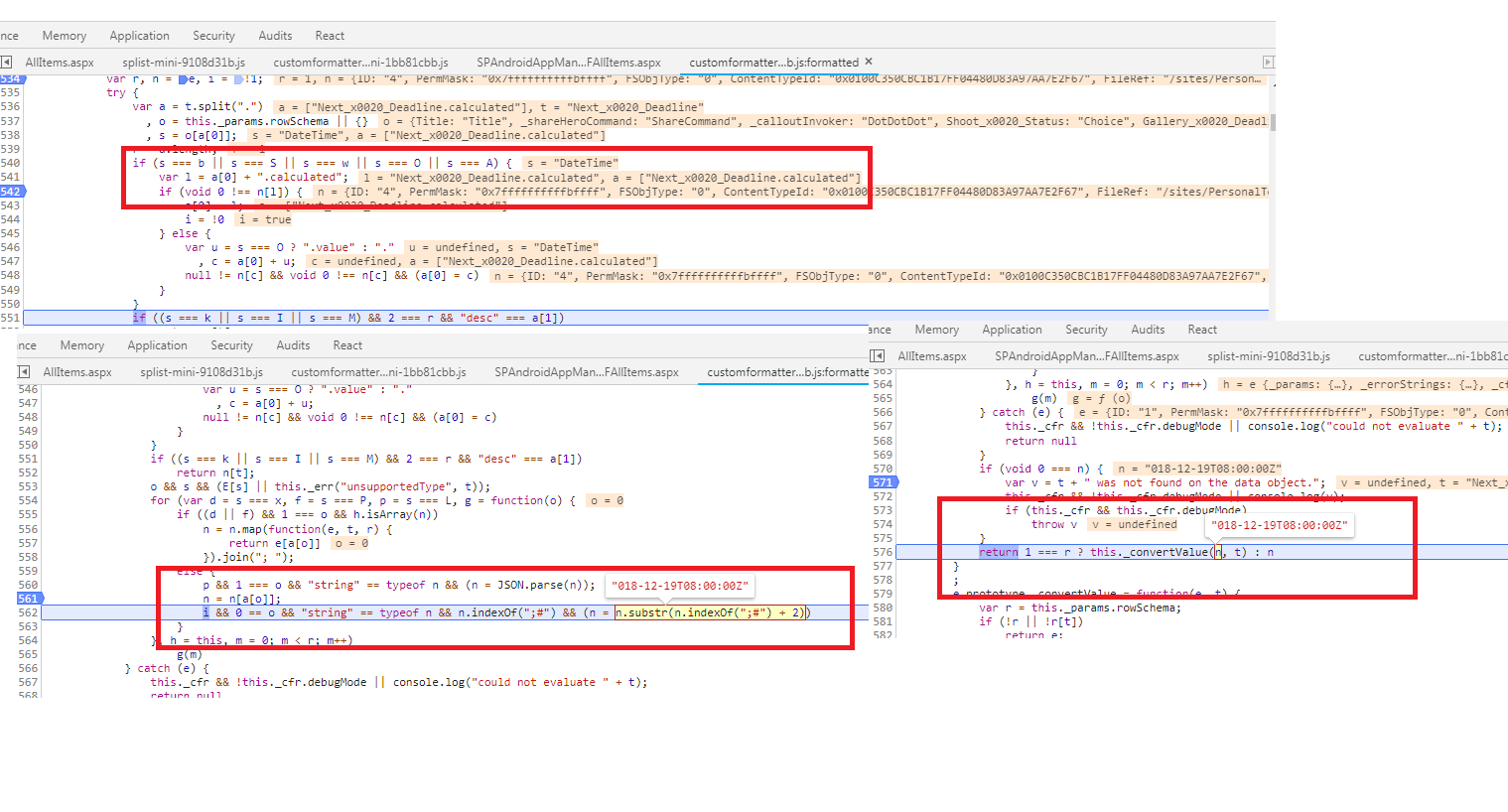
@thechriskent It seems that the calculated columns are broken. I tried to debug it and found that the Valid date time columns are converting date properly but with calculated columns its not converting date property as sub-string method is giving error. Not sure if this " var l = a[0] + ".calculated";" is intentionally added to the code. See the screen shots for more details, the date is not proper. 2018 has 2 missing as its doing a substr and trimming 2 from 2018.
iamguptarishi
on 19 Dec 2018
This is work in progress, soon user should be able to format calculated columns output as date, though user can still format calculated columns for Single line text, Numbers and Yes/NO
 niketjain2020
on 3 Jan 2019
niketjain2020
on 3 Jan 2019
This has magically* started working again, so I think you're good to close this issue now!
- (Magically = I know someone spent time working on this, so thank you!)
hazymat
on 19 Jan 2019
Issues that have been closed & had no follow-up activity for at least 7 days are automatically locked. Please refer to our wiki for more details, including how to remediate this action if you feel this was done prematurely or in error: Issue List: Our approach to locked issues
 msft-github-bot
on 25 Jan 2020
msft-github-bot
on 25 Jan 2020
Related issues
 thechriskent
·
3Comments
thechriskent
·
3Comments
 byrongits
·
3Comments
byrongits
·
3Comments
 waldekmastykarz
·
3Comments
waldekmastykarz
·
3Comments
 SteIvanov
·
3Comments
SteIvanov
·
3Comments
 qrown
·
3Comments
qrown
·
3Comments
Most helpful comment
Just updated your last post... you can let GH format the code if you fence it and provide help to GH on how to colorize it by telling it the format.
Sorry, I don't have insight into what the issue is though as not terribly familiar with list formatting... added labels for visibility to others who may though...