Sp-dev-docs: Problem making 3rd party API calls using SPFx
Category
- [x] Question
Expected or Desired Behavior
Hey, I was able to make Slack API calls using the class way (CEWP) plus jQuery and $.ajax.
Now I'm trying to learn SPFx and figure out how to make REST calls to 3rd party apis but I'm getting the error below.
Observed Behavior
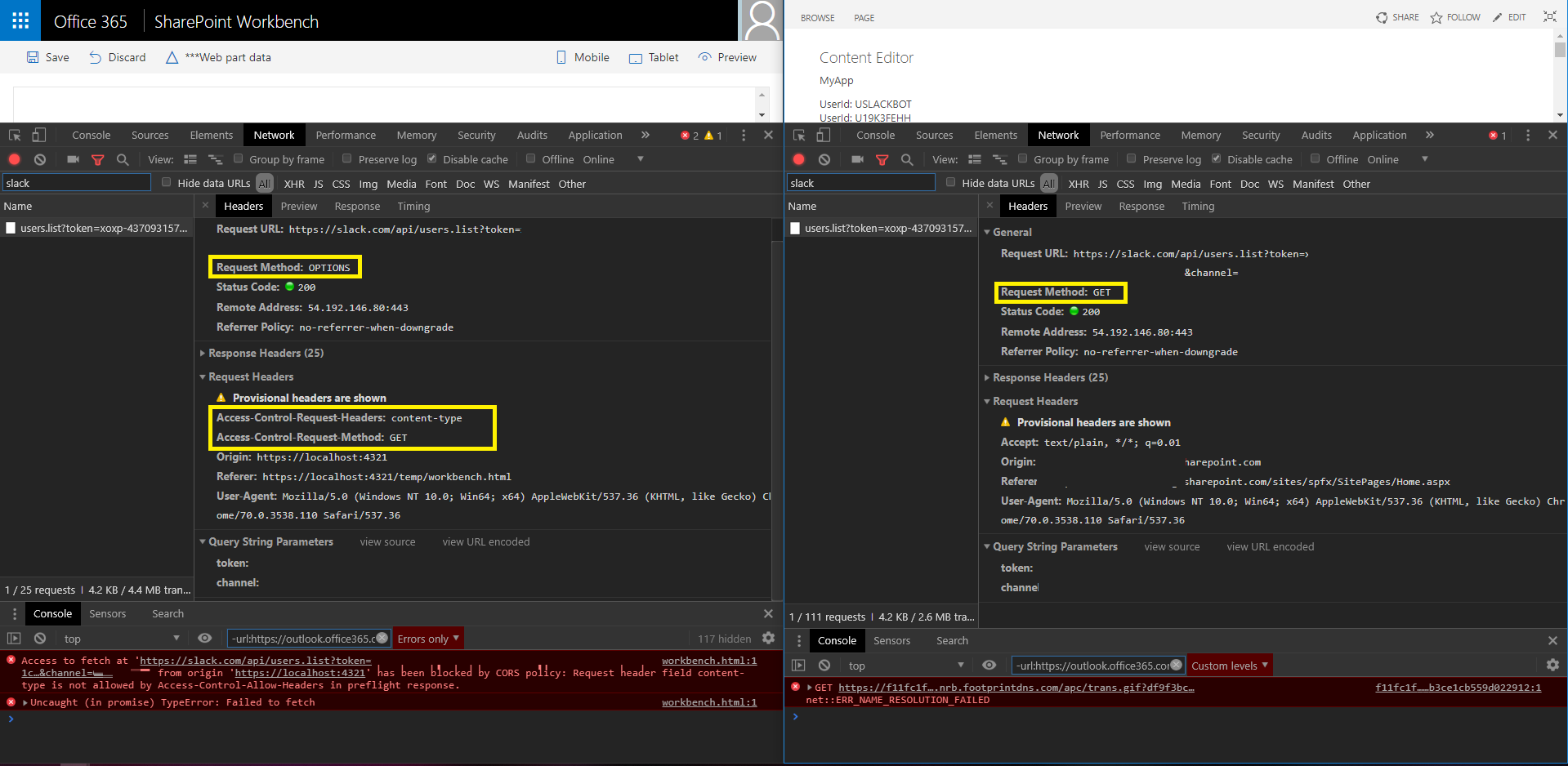
Access to fetch at 'https://slack.com/api/users.list?token=
&channel= ' from origin 'https://localhost:4321' has been blocked by CORS policy: Request header field content-type is not allowed by Access-Control-Allow-Headers in preflight response.
On the Left side I have my webpart running in the Local workbench, the Right side is the classic example
This is my code:
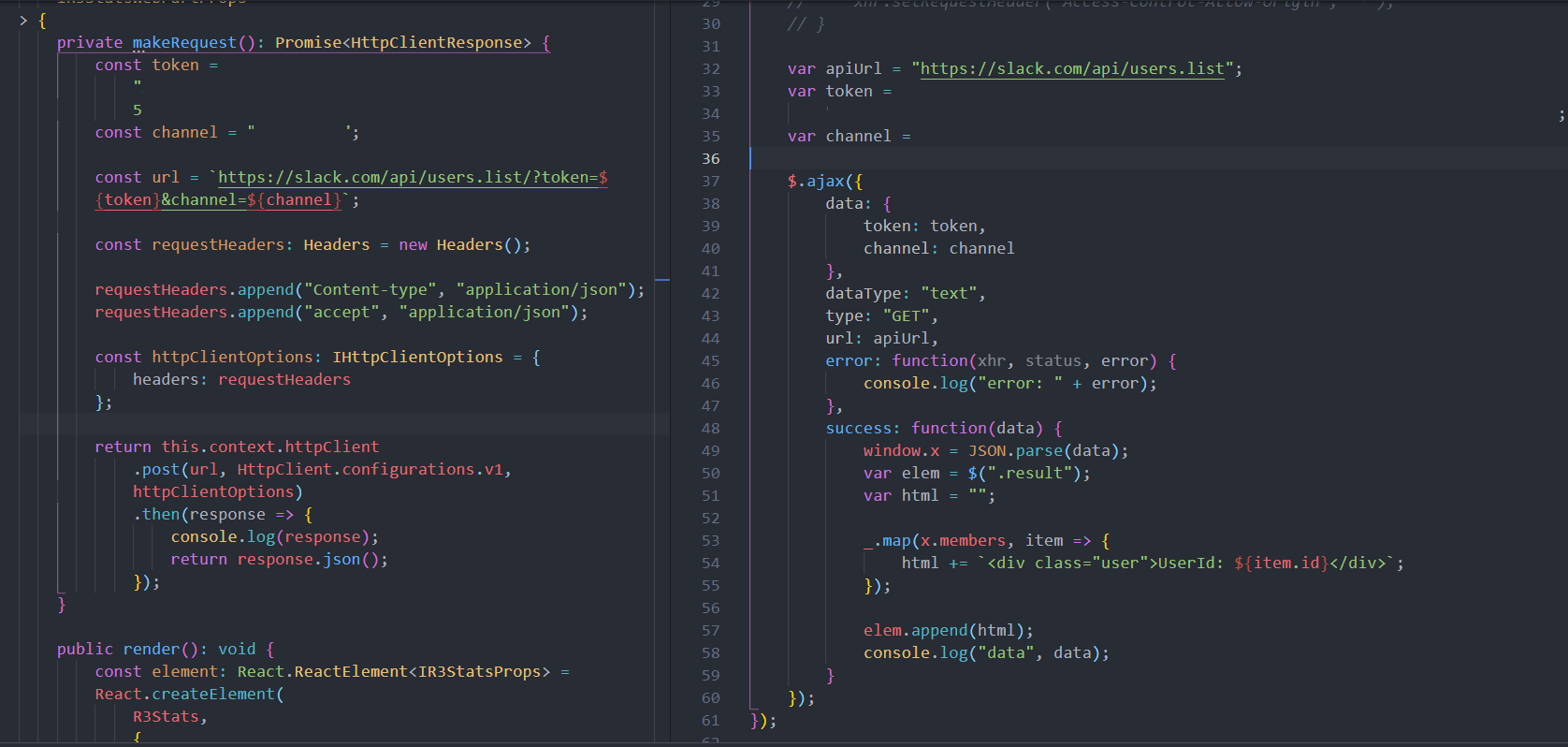
    private makeRequest(): Promise<HttpClientResponse> {
        const token =
            "";
        const channel = "";

        const url = `https://slack.com/api/users.list?token=${token}&channel=${channel}`;

        const requestHeaders: Headers = new Headers();

        requestHeaders.append("Content-type", "application/json");
        requestHeaders.append("accept", "application/json");

        const httpClientOptions: IHttpClientOptions = {
            headers: requestHeaders,
            method: "GET"
        };

        return this.context.httpClient
            .get(url, HttpClient.configurations.v1, httpClientOptions)
            .then(response => {
                console.log(response);
                return response.json();
            });
    }
Any help would be appreciated.
 simkessy
All 14 comments
As a first step in diagnosing, what happens when you run this from the hosted workbench? With gulp serve running, just navigate to https://yourtenant.sharepoint.com/_layouts/15/workbench.aspx
 patmill
on 10 Dec 2018
patmill
on 10 Dec 2018
Hey @patmill the same error occurs
simkessy
on 10 Dec 2018
So, one thing I notice is that your call in the workbench is doing a post, and the call in classic is doing a get. The post across domains goes through the preflight path, and that's tripping you up it looks like.
patmill
on 11 Dec 2018
Hey @patmill yea sorry the screenshot is outdated. I had noticed that as well and changed it to a get call but that did not solve my issue.
simkessy
on 11 Dec 2018
Can you update with new screenshots of the code / network traces?
patmill
on 11 Dec 2018
The screenshot of the network traces as is the current status. I've added the latest code to the OP where it uses GET.
simkessy
on 11 Dec 2018
So, the next difference is that you are setting the content type in modern, but not in classic (and that content type is saying it's violating the CORS rules).
Can you start from a point where the requests headers / etc. are the same?
patmill
on 11 Dec 2018
Agreed with @patmill . Setting the content-type in the header is forcing the pre-flight options request. Which means the response from Slack would have to return the access-control-allow-headers response header containing this content type -- This isn't a part of the slack response, so you'd get this CORS error.
Setting the Content-Type to anything other than application/x-www-form-urlencoded, multipart-form-data, text/plain will cause the pre-flight request. See Mozilla docs here
 bcameron1231
on 11 Dec 2018
bcameron1231
on 11 Dec 2018
You may want to be careful posting your token in a public space like this... it will allow others to now post messages to your slack.
I would double check with Slack to make sure that endpoint really does allow JSON. Because it seems to always fail when specifying the content type application/json.
I have confirmed if you use application/x-www-form-urlencoded and pass the values for token, channel and message over the query string (much like Axios does), everything will work as expected.
bcameron1231
on 11 Dec 2018
Thanks
Was able to get it working as well as you suggested:
private async postToChannel(msg = "Testing API", channel = this.channel) { const url = `https://slack.com/api/chat.postMessage?token=${ this.token }&channel=${this.channel}&text=${msg + " using HttpClient"}`; const requestHeaders: Headers = new Headers(); // requestHeaders.append("Content-type", "application/json"); requestHeaders.append( "Content-type", "application/x-www-form-urlencoded" ); const httpClientOptions: IHttpClientOptions = { headers: requestHeaders, mode: "cors" }; return await this.context.httpClient.post( url, HttpClient.configurations.v1, httpClientOptions ); }
But i think it's way cleaner using Axios:
await axios({
method: "post",
url: "https://slack.com/api/chat.postMessage",
params: {
token: this.token,
channel: channel,
text: msg + " using Axios"
},
transformRequest: [
(data, headers) => {
delete headers.post["Content-Type"];
return data;
}
]
});
Well I'm glad you got it worked out!
bcameron1231
on 12 Dec 2018
Out of curiosity - does this help simplify your code (and work)?
private async postToChannel(msg = "Testing API", channel = this.channel) {
      const url = `https://slack.com/api/chat.postMessage?token=${
          this.token
      }&channel=${this.channel}&text=${msg + " using HttpClient"}`;


    return await this.context.httpClient.post(
        url,
        HttpClient.configurations.v1,
        {
          mode:"cors",
          headers:{
            "Content-Type":"application/x-www-form-urlencoded"
          }
        }
    );
}
Yea, that is way cleaner. Thanks!
simkessy
on 12 Dec 2018
Issues that have been closed & had no follow-up activity for at least 7 days are automatically locked. Please refer to our wiki for more details, including how to remediate this action if you feel this was done prematurely or in error: Issue List: Our approach to locked issues
 msft-github-bot
on 25 Jan 2020
msft-github-bot
on 25 Jan 2020
Related issues
 jonthenerd
·
3Comments
jonthenerd
·
3Comments
 SteIvanov
·
3Comments
SteIvanov
·
3Comments
 christianbueschi
·
3Comments
christianbueschi
·
3Comments
 karishmaTCS
·
3Comments
karishmaTCS
·
3Comments
 waldekmastykarz
·
3Comments
waldekmastykarz
·
3Comments
Most helpful comment
Out of curiosity - does this help simplify your code (and work)?