Sp-dev-docs: Incorrect placeholder interpretation in manifest.json for Teams tab app
Category
- [ ] Question
- [ ] Typo
- [x] Bug
- [ ] Additional article idea
Expected or Desired Behavior
Correct replacement of placeholders {teamSiteDomain}, {teamSitePath} etc. in manifest.json
Observed Behavior
When adding tab, the iframe src is not correct:
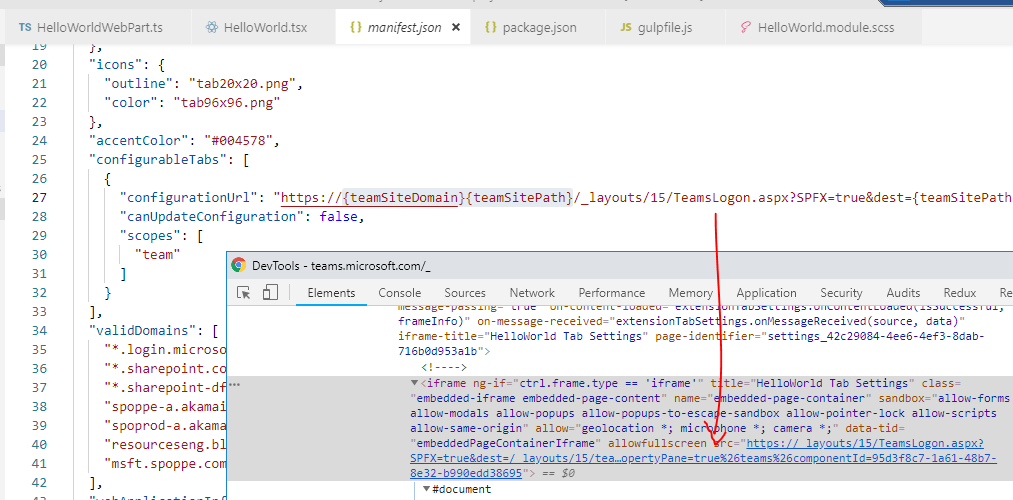
Steps to Reproduce
Follow this tutorial:
https://docs.microsoft.com/en-us/sharepoint/dev/spfx/web-parts/get-started/using-web-part-as-ms-teams-tab
 Mhbuur
All 31 comments
Complete manifest.json:
{
  "$schema": "https://developer.microsoft.com/en-us/json-schemas/teams/v1.2/MicrosoftTeams.schema.json",
  "manifestVersion": "1.2",
  "packageName": "HelloWorld",
  "id": "95d3f8c7-1a61-48b7-8e32-b990edd38695",
  "version": "0.1",
  "developer": {
    "name": "SPFx + Teams Dev",
    "websiteUrl": "https://products.office.com/en-us/sharepoint/collaboration",
    "privacyUrl": "https://privacy.microsoft.com/en-us/privacystatement",
    "termsOfUseUrl": "https://www.microsoft.com/en-us/servicesagreement"
  },
  "name": {
    "short": "HelloWorld"
  },
  "description": {
    "short": "HelloWorld description",
    "full": "HelloWorld description"
  },
  "icons": {
    "outline": "tab20x20.png",
    "color": "tab96x96.png"
  },
  "accentColor": "#004578",
  "configurableTabs": [
    {
      "configurationUrl": "https://{teamSiteDomain}{teamSitePath}/_layouts/15/TeamsLogon.aspx?SPFX=true&dest={teamSitePath}/_layouts/15/teamshostedapp.aspx%3FopenPropertyPane=true%26teams%26componentId=95d3f8c7-1a61-48b7-8e32-b990edd38695",
      "canUpdateConfiguration": false,
      "scopes": [
        "team"
      ]
    }
  ],
  "validDomains": [
    "*.login.microsoftonline.com",
    "*.sharepoint.com",
    "*.sharepoint-df.com",
    "spoppe-a.akamaihd.net",
    "spoprod-a.akamaihd.net",
    "resourceseng.blob.core.windows.net",
    "msft.spoppe.com"
  ],
  "webApplicationInfo": {
    "resource": "https://{teamSiteDomain}",
    "id": "00000003-0000-0ff1-ce00-000000000000"
  }
}
Hey Michael, just want to make sure we are tracking down the same issue.
The problem is that when the iFrame loads, the {teamSiteDomain} and {teamSitePath} tokens are getting replaced with an empty string, rather than the actual domain and site, correct?
 patmill
on 4 Dec 2018
patmill
on 4 Dec 2018
Yep, that is what it seems like. I can add the app to Teams without any issues. The “about” dialog shows up, but when I add the tab to a channel, a dialog shows up with the broken iframe from which the screenshot is from.
Let me know If I can help any further 🙂
Mhbuur
on 4 Dec 2018
I've forwarded this to the teams folks. They should hop on shortly.
patmill
on 4 Dec 2018
Interesting bug 🤔 Are you sure you're using the _Public Developer Preview_ option in Teams?
 lokimeyburg
on 4 Dec 2018
lokimeyburg
on 4 Dec 2018
Yes, I enabled the dev preview as described here:
https://docs.microsoft.com/en-us/microsoftteams/platform/resources/dev-preview/developer-preview
Mhbuur
on 5 Dec 2018
I am seeing the same issue in some of my teams, but some do work. I did not have the time to analyze it any further, but I believe it is the case when I did not create the team via teams, but instead added a team to an existing group via graph api.
 OliverZeiser
on 6 Dec 2018
OliverZeiser
on 6 Dec 2018
Okay, that is interesting: I tried creating a new team in web client (developer preview mode) and add the helloworld app to that, and that actually worked.
I tried adding the app on the "old" team that failed earlier again (btw this was not created via Graph - just in the client a few months ago) and I still get the error here.
So it would seem like the SP hosted app feature is not working with "old" teams (whatever that means).
Mhbuur
on 6 Dec 2018
@OliverZeiser, @Mhbuur, do the Files tabs in these teams work? If the teamSiteUrl property for you teams isn't configured then there should be other broken functionality there.
 ydogandjiev
on 11 Dec 2018
ydogandjiev
on 11 Dec 2018
Okay that is interesting. The Files tab did not work. It was saying something like "we are setting up your files...". (The site was created several days ago though) I then added the SharePoint Page App, which did work just fine. After going back to the files tab now this one is working as well. And in the end now my custom Teams SPFx App also works correct. So something musst have triggered and added the URL to the Team/Group.
Probably because I was opening the File Tab or because I was adding the SharePoint Page App as a Tab. Maybe that gives you a hint to where the issue is coming from...
OliverZeiser
on 12 Dec 2018
For newly created teams the provisioning of the underlying SharePoint site can sometimes take up to 24 hours. I think we might need some kind of error handling + friendly error message for users that run into this. @lokimeyburg, this might be something we need to account for in our GA plans.
ydogandjiev
on 12 Dec 2018
@ydogandjiev This can not be the issue in my case. Because i have created the site/group first and then i added a Team to an existing Group. I am 100% sure that i was on the SharePoint site and it was fully working before I added a Team to it. So the underlying SharePoint site was provisioned!
OliverZeiser
on 13 Dec 2018
@OliverZeiser, it’s not necessarily the provisioning of the SharePoint site that’s holding things up. The linking of the team to the underlying SharePoint site is an async process that also takes time. I will ask some folks with more knowledge of this as to why that’s the case; however, this has been the design for some time now and there are likely good reasons for it to be so. In any case, please test your solution in teams where the Files tab is working in order to ensure that the necessary provisioning has completed.
ydogandjiev
on 13 Dec 2018
@ydogandjiev It is my older teams that have the problem - not the new ones I set up.
Mhbuur
on 21 Dec 2018
Sorry for the delay on this. Is this still an issue within any tenant you have? Old or new? Obviously, we need to ensure that this is fixed by GA, so would love to get an updated status on this. Thanks for the updated information advance.
 VesaJuvonen
on 15 Jan 2019
VesaJuvonen
on 15 Jan 2019
@VesaJuvonen Yes I am still able to reproduce this issue. If I create a classic Teamsite, then groupify it and then add Teams functionality to the group. If i switch to MS teams and add an SPFx Teams App, i can then see that the placeholders are not getting replaced. This happens in the MS Teams client as well as Teams in the browser.
If i switch to the files Tab in Teams, i see the message "We are setting up your file directory. Try refreshing the page after a few minutes or check back later." After some time the files tab works. Once that works, SPFx apps in teams also work just fine.
If i create the team directly from within MS Teams, everything works right away.
So the issue seems to be somehow related to groupify/teamify or simply to the fact that it is based on a classic teamsite.
OliverZeiser
on 16 Jan 2019
@VesaJuvonen Yes, it is still a problem in old teams - it is only working for newly created teams
Mhbuur
on 17 Jan 2019
Thanks, everyone for following up on this. We are investigating to get this resolved by GA. We'll add more comments if there's anything new we can provide before 1.8.
VesaJuvonen
on 24 Jan 2019
As a follow up. I got this error in a team created in April. Created a new team now, and there it works.
 wobba
on 22 May 2019
wobba
on 22 May 2019
I have the same problem with tokens not being replace if i install the spfx teams app to a team trough MS graph as described here: https://docs.microsoft.com/en-us/graph/api/teamsappinstallation-add?view=graph-rest-1.0
Using spfx 1.8.2.
Get the error message:
The web page at https://_layouts/15/TeamsLogon.aspx?SPFX=true&dest=/_layouts/15/teamshostedapp.aspx%3FopenPropertyPane=true%26teams%26componentId=3931098d-2a61-4bf7-88c7-1afc22fb0e5f%26forceLocale=en-gb might be temporarily down or it may have moved permanently to a new web address.
 AndreasNorefalk
on 12 Jun 2019
AndreasNorefalk
on 12 Jun 2019
For your crafted manifest, what does the URL look like in it?
patmill
on 12 Jun 2019
I have the following standard segment in manifest.json:
"configurableTabs": [
    {
      "configurationUrl": "https://{teamSiteDomain}{teamSitePath}/_layouts/15/TeamsLogon.aspx?SPFX=true&dest={teamSitePath}/_layouts/15/teamshostedapp.aspx%3FopenPropertyPane=true%26teams%26componentId=2921098d-2a61-4bf7-88c7-1afc22fb0e5f%26forceLocale={locale}",
      "canUpdateConfiguration": true,
      "scopes": [
        "team"
      ]
    }
  ],
The {locale} token gets replaced but not {teamSiteDomain} or {teamSitePath}.
AndreasNorefalk
on 13 Jun 2019
@AndreasNorefalk, are you able to open the Files tab for your team? How long ago was this team created?
ydogandjiev
on 13 Jun 2019
Yes the Files tab works.
I have this problem when adding teams to a group with MS Graph as described here:
https://docs.microsoft.com/en-us/graph/api/team-put-teams?view=graph-rest-1.0
and here:
https://docs.microsoft.com/en-us/graph/teams-create-group-and-team
Requets: PUT /groups/{id}/team
Body: {}
It works as expected if I create the team in the Teams client.
AndreasNorefalk
on 13 Jun 2019
Done some testing and the tokens are replaced correctly when I use delegated permissions, but not when I use Application permissions, when calling the endpoint in MS Graph documented here:
https://docs.microsoft.com/en-us/graph/api/teamsappinstallation-add?view=graph-rest-1.0
AndreasNorefalk
on 13 Jun 2019
@AndreasNorefalk, thank you for the added details! Our team is looking into this issue and will get back to you once we have completed our investigation.
ydogandjiev
on 15 Jun 2019
@AndreasNorefalk, facing the same thing. Using MS Graph to create teams and add a custom app (from an Azure Function via an Enterprise Application). Not able to see the app/ its settings due to the error above.
Did you come around any workaround?
 BigEaseGueldi
on 2 Aug 2019
BigEaseGueldi
on 2 Aug 2019
@BigEaseGueldi , No I have no workaround for it, I hope Microsoft is looking into it. The problem I have is with Application permissions. It seems to work with Delegated permissions.
AndreasNorefalk
on 2 Aug 2019
Using App Permissions as well (that's what I meant with "via Enterprise Application"). And I'm also unsure whether it's currently supported to add an SPFx Web Part without a crafted manifest via MS Graph as an MS Teams app.
BigEaseGueldi
on 2 Aug 2019
Just a quick summary
Current state:
Adding teams apps/tabs based on SPFx Web Parts via Graph by using Application Permissions is not possible.Reason:
Placeholders for {teamSiteDomain} or {teamSitePath} don't get replaced with actual values.Holds for:
SPFx Web Parts with custom manifest (see https://github.com/SharePoint/sp-dev-docs/issues/3063#issuecomment-501586378) as well as SPFx Web Parts with auto generated manifest (experiencing that myself)
Many of our provisioning processes depend on Azure Functions that are using an Enterprise Application (authentication via certificate) for Graph access - this means App permissions (right?) so currently we struggle a bit here...
BigEaseGueldi
on 8 Aug 2019
I got it working now with application permissions if i skip the configuration section in the body of my POST request when adding the tab. I just do a POST request like this to https://graph.microsoft.com/v1.0/teams/{0}/channels/{1}/tabs:
{
    'displayName': 'SPFx Teams tab',
    '[email protected]' : 'https://graph.microsoft.com/v1.0/appCatalogs/teamsApps/{id from appCatalog}'
}
A 'Ready to set up the tab?' message is then displayed the first time you open the tab. However, it will fail because of the placeholders if you don't click on the Files or Wiki tab first. I guess some kind of connection is configured to SharePoint when you do that, and the placeholders start working.
After clicking on Files or Wiki tab, you can go back to you SPFx tab and click 'Set up tab', and it will work.
It would be nice if the placeholders would work without users having to click on Files or Wiki tab first.
Actually, adding the general SharePoint tab also fails the same way regarding placeholders if you don't click Files or Wiki tab first, so it's not a problem specific to SPFx.
AndreasNorefalk
on 9 Aug 2019
Related issues
 StfBauer
·
3Comments
StfBauer
·
3Comments
 mikeparkie
·
3Comments
StfBauer
·
3Comments
mikeparkie
·
3Comments
StfBauer
·
3Comments
 byrongits
·
3Comments
byrongits
·
3Comments
 bengtmoss
·
3Comments
bengtmoss
·
3Comments