Sp-dev-docs: How to create a page using site scripts?
As per the JSON schema you can create a page using site scripts, but it doesn't seems to be working. I tried below verbs.
{
"$schema": "schema.json",
"actions" : [
{
"verb": "createPage",
"fileName": "WelcomePage.aspx",
"pageData":
{
"Title":"Welcome to your site",
"BannerImageUrl":"https://tenantURL.sharepoint.com/:i:/s/SiteDesignTeams/EezSIpu9gJRPmhTm4HUJXOwBc7cmUHsDDE5pJyLdqqlIlQ?e=sXuLHE",
"CanvasContent1":"<div>/div>",
"LayoutWebpartsContent":"{\"id\":\"cbe7b0a9-3504-44dd-a3a3-0e5cacd07788\",\"instanceId\":\"cbe7b0a9-3504-44dd-a3a3-0e5cacd07788\",\"title\":\"Title Region\",\"description\":\"Title Region Description\",\"serverProcessedContent\":{\"htmlStrings\":{},\"searchablePlainTexts\":{},\"imageSources\":{},\"links\":{}},\"dataVersion\":\"1.4\",\"properties\":{\"title\":\"\",\"imageSourceType\":4,\"layoutType\":\"FullWidthImage\",\"textAlignment\":\"Left\",\"showKicker\":false,\"showPublishDate\":false,\"kicker\":\"\"}}"
},
"setAsHomePage": true
},
{
"verb" : "activateSPFeature",
"featureId":"15a572c6-e545-4d32-897a-bab6f5846e18"
},
],
"version": 1
}
The page is created but when I click on the page it throws an error stating NoComponentId. The site script does show the status of failure after executing site script.
Document Details
⚠ Do not edit this section. It is required for docs.microsoft.com ➟ GitHub issue linking.
- ID: 68267476-ee8d-7b95-446b-711ddb683da2
- Version Independent ID: aa099b9d-48db-5513-11c7-32c49a27e5be
- Content: Site design JSON schema
- Content Source: docs/declarative-customization/site-design-json-schema.md
- Product: sharepoint
- GitHub Login: @spdevdocs
- Microsoft Alias: spdevdocs
 iamguptarishi
All 12 comments
I believe this error comes not not setting the ClientSideApplicationId to 'b6917cb1-93a0-4b97-a84d-7cf49975d4ec' . It doesn't look like the schema supports this, so I'm hoping the framework will be doing it for us when creating a new page.
 bcameron1231
on 13 Dec 2018
bcameron1231
on 13 Dec 2018
@bcameron1231 @iamguptarishi @VesaJuvonen Did you get this to work? It kinda gets more and more interesting to do page generation thru site-scripts since our templates have default pages that needs to be created with content.
or is it just added as teaser by the sharepoint team? :)
It goes without saying that i'm experiencing the same scenario as @iamguptarishi
 trillian74
on 21 Jan 2019
trillian74
on 21 Jan 2019
Creating pages through the Site Scripts are not yet supported. We will be providing updates on the documentation when this capability will be enabled, but there is no point to test this as it's not yet enabled.
 VesaJuvonen
on 21 Jan 2019
VesaJuvonen
on 21 Jan 2019
Is creating pages supported now?
 annajhaveri
on 19 Mar 2019
annajhaveri
on 19 Mar 2019
@annajhaveri Nope. Creating pages is not supported.
bcameron1231
on 25 Mar 2019
Getting closer? ....

 rrtoland
on 17 May 2019
rrtoland
on 17 May 2019
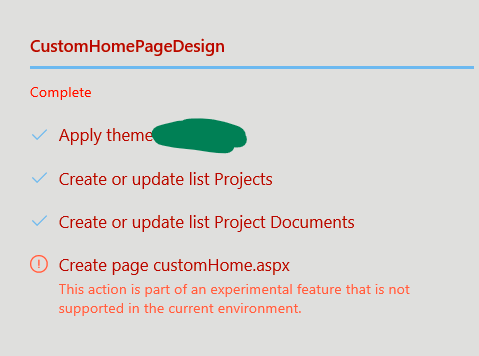
Is this available in dev tenants maybe? Our company doesn't have one yet, but our secondary tenant we made originally to function as a "dev" tenant is First Release and I get the same "experimental feature" error as @rrtoland showed above, both in PowerShell and in the browser when creating a new site with a design containing the action.
Screenshot of the behaviour in Browser is below (ignore the colour scheme, I was using an early theme I made to test the theming system)
 Lee-Myhre
on 24 Jul 2019
Lee-Myhre
on 24 Jul 2019
Not available yet. Still experimental in all tenants I've tested.
bcameron1231
on 24 Jul 2019
According to this it should be launched by now: https://www.microsoft.com/en-us/microsoft-365/roadmap?filters=&searchterms=page%2Csite%2Cdesigns
Any ETA on the general availability?
 DmitryVorobyov
on 29 Oct 2019
DmitryVorobyov
on 29 Oct 2019
This feature is not yet supported. No ETA. No idea how the road map page would claim that it's out, but it's not there. You will need to use PnP API for the modern page creation either PnPjs or PnP Sites Core.
VesaJuvonen
on 29 Oct 2019
Thanks for clarifying, Vesa!
From: Vesa Juvonen notifications@github.com
Sent: Tuesday, October 29, 2019 1:44 AM
To: SharePoint/sp-dev-docs sp-dev-docs@noreply.github.com
Cc: Richard Toland richard.toland@perpetualreality.com; Mention mention@noreply.github.com
Subject: Re: [SharePoint/sp-dev-docs] How to create a page using site scripts? (#3038)
This feature is not yet supported. No ETA. No idea how the road map page would claim that it's out, but it's not there. You will need to use PnP API for the modern page creation either PnPjs or PnP Sites Core.
—
You are receiving this because you were mentioned.
Reply to this email directly, view it on GitHubhttps://github.com/SharePoint/sp-dev-docs/issues/3038?email_source=notifications&email_token=ADXYKW6SMRTBZTWSFKSKQNTQQ7SVDA5CNFSM4GHK6YM2YY3PNVWWK3TUL52HS4DFVREXG43VMVBW63LNMVXHJKTDN5WW2ZLOORPWSZGOECPRETQ#issuecomment-547295822, or unsubscribehttps://github.com/notifications/unsubscribe-auth/ADXYKW4A7N6LTBNJ34HSVLTQQ7SVDANCNFSM4GHK6YMQ.
rrtoland
on 29 Oct 2019
Issues that have been closed & had no follow-up activity for at least 7 days are automatically locked. Please refer to our wiki for more details, including how to remediate this action if you feel this was done prematurely or in error: Issue List: Our approach to locked issues
 msft-github-bot
on 26 Jan 2020
msft-github-bot
on 26 Jan 2020
Related issues
 StfBauer
·
3Comments
StfBauer
·
3Comments
 byrongits
·
3Comments
byrongits
·
3Comments
 bengtmoss
·
3Comments
bengtmoss
·
3Comments
 jonthenerd
·
3Comments
jonthenerd
·
3Comments
 ken-harris
·
3Comments
ken-harris
·
3Comments
Most helpful comment
Getting closer? ....
