Sp-dev-docs: SP2019/SPFx - Search REST API returning status code 500
Category
- [ ] Question
- [ ] Typo
- [x] Bug
- [ ] Additional article idea
Expected or Desired Behavior
Using Search REST API with SPFx & SPHttpClient should return search results for the passed querytext parameter with Firefox. It does so with Chrome & IE11.
Observed Behavior
With Firefox the result ends up to server status code 500 Internal Server Error the response payload being the following:
{"odata.error":{"code":"-1, Microsoft.Office.Server.Search.REST.SearchServiceException","message":{"lang":"en-US","value":"An unknown error occurred."}}}
This behavior can only be reproduced on SharePoint 2019 RTM. On SharePoint 2016 January 2018 CU the same search API call works as expected with Firefox with the same exact code.
Steps to Reproduce
Using this simplified snippet in a SPFx webpart to retrieve data via Search by editing the URL value to match the environment and the render method being the webpart's render method.
  public render(): void {
    this._getSearchData("http://sharepoint2019.sp.test/_api/search/query?querytext='*'").then((res: any) => {});
  }

  private _getSearchData(url: string): Promise<any> {
    return this.context.spHttpClient.get(url, SPHttpClient.configurations.v1, {
      headers: {
        'odata-version': '3.0',
        'accept': 'application/json;odata=verbose',
        'content-type': 'application/json;odata=verbose'
      }
    }).then((res: SPHttpClientResponse) => {
      return res.json();
    }).catch(error => {
      return Promise.reject(JSON.stringify(error));
    });
  }
will result to 500 Internal server error with Firefox
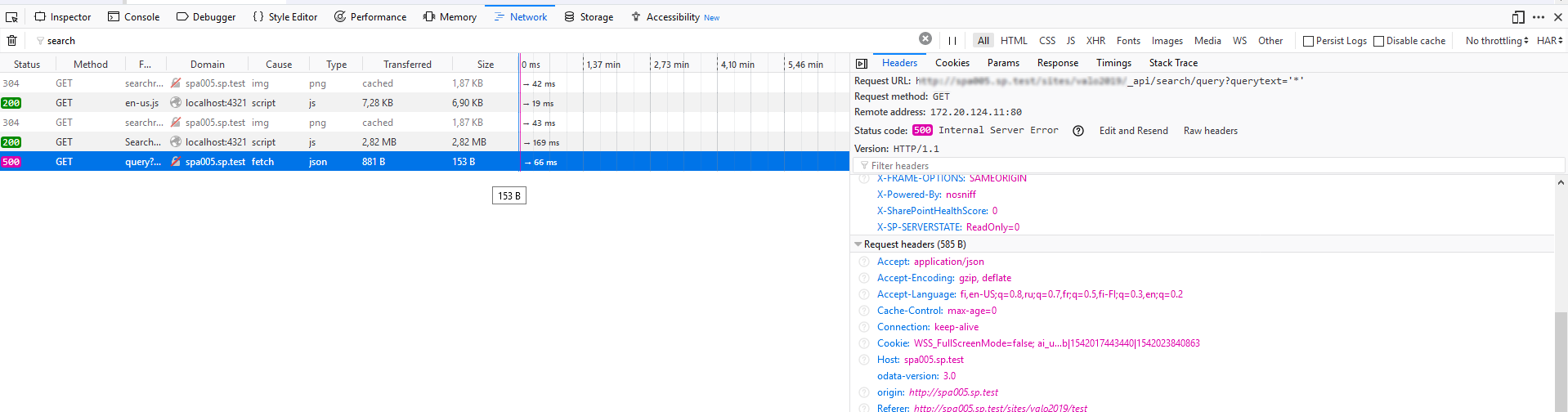
 juhaalhojoki
All 2 comments
Add SelectProperties to your query.
For instance: &SelectProperties='Title'
 gbasantis
on 23 Sep 2019
gbasantis
on 23 Sep 2019
Hey,
I had the same issue just now and i've dug in.
- I found the error occurs when the API returns results which includes a datetime. @johnBasadis work-around only succeeds because it doesn't select a date/time value, but if you use SelectProperties='LastModifiedTime', you'll get the same error as @juhaalhojoki
- Fails when using SharePoint Search REST API query via SPFX spHttpClient using default configuration (SPHttpClient.configurations.v1),
- When I execute via my own ajax request, I can see it works with "odata-version" = "3.0" and Accept="application/json;odata=minimalmetadata;charset=utf-8"
So to summarize: The bug is that the SharePoint Search REST API cannot serialize datetime (and possibly other types?) using odata version 4.
The work-around is to fall back to version 3. See below.
let config: SPHttpClientConfiguration = new SPHttpClientConfiguration({
        defaultODataVersion: ODataVersion.v3
    });

    this.props.context.spHttpClient.get(this.props.context.pageContext.web.absoluteUrl + searchUrl, config, { headers: { Accept: "application/json;odata=minimalmetadata;charset=utf-8" } }).then((response) => {
 aronbardsley
on 25 Sep 2019
aronbardsley
on 25 Sep 2019
Related issues
 karishmaTCS
·
3Comments
karishmaTCS
·
3Comments
 patrick-rodgers
·
3Comments
patrick-rodgers
·
3Comments
 mikeparkie
·
3Comments
mikeparkie
·
3Comments
 Ralms
·
3Comments
Ralms
·
3Comments
 jonthenerd
·
3Comments
jonthenerd
·
3Comments
Most helpful comment
Hey,
I had the same issue just now and i've dug in.
So to summarize: The bug is that the SharePoint Search REST API cannot serialize datetime (and possibly other types?) using odata version 4.
The work-around is to fall back to version 3. See below.