Sp-dev-docs: Workbench in 1.6.0 and in IE11 is broken.
Category
- [ ] Question
- [ ] Typo
- [x] Bug
- [ ] Additional article idea
Expected or Desired Behavior
Open workbench for local testing in IE11 since some customer still uses this browser.
Observed Behavior
Currently, the workbench cannot be opened because of the following error message on the console.

The problem comes from a for loop where a const instead of let or var was used:
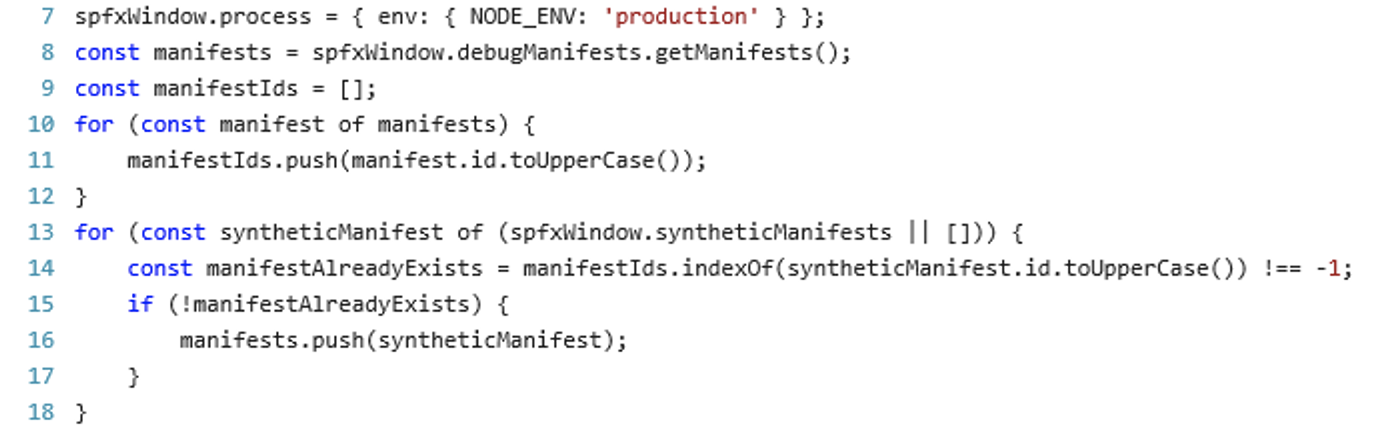
While other browsers ignore that IE11 show a more strict behaviour and avoid to init.
Steps to Reproduce
Create a new project, gulp serve, open Workbench in IE11.
 StfBauer
All 11 comments
Not working in new SPFx 1.7.0 too.
 phawrylak
on 8 Nov 2018
phawrylak
on 8 Nov 2018
Any ETA for the fix? Some big companies still use IE11 and even have it in the list of supported corporate browsers.
 s-KaiNet
on 21 Nov 2018
s-KaiNet
on 21 Nov 2018
Is this limited to just the workbench, or SPFx in general?
 andrewconnell
on 20 Dec 2018
andrewconnell
on 20 Dec 2018
This is happening to me also (IE11 - WB1.7.1) only seems to happen on workbench - I've added pnp polyfills as suggested by some sites but with no joy.
Any ideas
npm install --save @pnp/polyfill-ie11
(index.d.ts in polyfill dir)
import "core-js/es6/array";
import "core-js/modules/es6.promise";
import "core-js/modules/es6.array.iterator.js";
import "core-js/modules/es6.array.from.js";
import "core-js/modules/es6.array.fill.js";
import "core-js/modules/es6.array.find";
import "es6-map/implement";
import "whatwg-fetch";
 SeanCMrsh
on 28 Feb 2019
SeanCMrsh
on 28 Feb 2019
Please refer to the recently published IE11 support doc here: https://support.office.com/en-us/article/Which-Browsers-Work-With-Office-Online-AD1303E0-A318-47AA-B409-D3A5EB44E452
After reviewing the above doc, can you please verify the issue is still present in the lastest SPFx version (1.8.2)?
andrewconnell
on 9 Aug 2019
const manifests = spfxWindow.debugManifests.getManifests();
const manifestIds = [];
for (const manifest of manifests) {
manifestIds.push(manifest.id.toUpperCase());
}
SCRIPT1053: "const" muss initialisiert sein.
workbenchInit.js (10,21)
SCRIPT5007: Objekt erwartet
sp-loader-assembly_default.js (5190,13)
Von: Andrew Connell notifications@github.com
Gesendet: Freitag, 9. August 2019 22:01
An: SharePoint/sp-dev-docs sp-dev-docs@noreply.github.com
Cc: Feser, Achim Achim.Feser@tge-gas.com; Manual manual@noreply.github.com
Betreff: Re: [SharePoint/sp-dev-docs] Workbench in 1.6.0 and in IE11 is broken. (#2892)
Please refer to the recently published IE11 support doc here: https://support.office.com/en-us/article/Which-Browsers-Work-With-Office-Online-AD1303E0-A318-47AA-B409-D3A5EB44E452https://eur01.safelinks.protection.outlook.com/?url=https%3A%2F%2Fsupport.office.com%2Fen-us%2Farticle%2FWhich-Browsers-Work-With-Office-Online-AD1303E0-A318-47AA-B409-D3A5EB44E452&data=02%7C01%7Cachim.feser%40tge-gas.com%7Ce797c06deeb242de89bb08d71d0449cc%7Ceeb159ae2c594dbb94ecf6357c614854%7C0%7C0%7C637009776578966444&sdata=lScv0AEFdxLFO8OdcZhz0bcuroCIE44hYCi1jhrSjRU%3D&reserved=0
After reviewing the above doc, can you please verify the issue is still present in the lastest SPFx version (1.8.2)?
—
You are receiving this because you are subscribed to this thread.
Reply to this email directly, view it on GitHubhttps://eur01.safelinks.protection.outlook.com/?url=https%3A%2F%2Fgithub.com%2FSharePoint%2Fsp-dev-docs%2Fissues%2F2892%3Femail_source%3Dnotifications%26email_token%3DAD2CBOUU36MIKTBD6ES3Q53QDXEHNA5CNFSM4GCMNNQKYY3PNVWWK3TUL52HS4DFVREXG43VMVBW63LNMVXHJKTDN5WW2ZLOORPWSZGOD37UIMA%23issuecomment-520045616&data=02%7C01%7Cachim.feser%40tge-gas.com%7Ce797c06deeb242de89bb08d71d0449cc%7Ceeb159ae2c594dbb94ecf6357c614854%7C0%7C0%7C637009776578976436&sdata=q93Ct4SbmhO3zvl2Ic%2Bvo9DuZa%2FxRig7nCtKudoWs5c%3D&reserved=0, or mute the threadhttps://eur01.safelinks.protection.outlook.com/?url=https%3A%2F%2Fgithub.com%2Fnotifications%2Funsubscribe-auth%2FAD2CBOVLNQYCI2EVBEX2CLDQDXEHNANCNFSM4GCMNNQA&data=02%7C01%7Cachim.feser%40tge-gas.com%7Ce797c06deeb242de89bb08d71d0449cc%7Ceeb159ae2c594dbb94ecf6357c614854%7C0%7C0%7C637009776578976436&sdata=A%2FdI7EqdN5MovKIJgtIafsNSzHtaSaDsi8za8BkSgJ0%3D&reserved=0.
 AchimFeser
on 12 Aug 2019
AchimFeser
on 12 Aug 2019
This issue has been automatically marked as stale because it has marked as requiring author feedback but has not had any activity for 7 days. It will be closed if no further activity occurs within next 7 days of this comment. Thank you for your contributions to SharePoint Developer activities.
 msft-github-bot
on 19 Aug 2019
msft-github-bot
on 19 Aug 2019
Can someone post a fix for this. I am still having issues and the links posted do not say how to fix it.
 euvin3582
on 20 Aug 2019
euvin3582
on 20 Aug 2019
This issue has been automatically marked as stale because it has marked as requiring author feedback but has not had any activity for 7 days. It will be closed if no further activity occurs within next 7 days of this comment. Thank you for your contributions to SharePoint Developer activities.
msft-github-bot
on 27 Aug 2019
Closing issue due no response from original author. If this issue is still occurring, please open a new issue with additional details. Notice that if you have included another related issue as additional comment on this, please open that also as separate issue, so that we can track it independently.
msft-github-bot
on 3 Sep 2019
Thanks for raising the concern. Yes, we're aware of this issue. It is a browser compatibility issue and the fix will take more effort than required. Also, this is developer only scenario and not a end user scenario. Here are some of the workarounds you can try:
- Use any other browser for this scenario?
- Use hosted workbench
I'm closing the issue.
Thanks for understanding,
Sri
 srideshpande
on 27 Sep 2019
srideshpande
on 27 Sep 2019
Related issues
 jonthenerd
·
3Comments
StfBauer
·
3Comments
jonthenerd
·
3Comments
StfBauer
·
3Comments
 thechriskent
·
3Comments
thechriskent
·
3Comments
 nanddeepn
·
3Comments
nanddeepn
·
3Comments
 acksoft
·
3Comments
acksoft
·
3Comments
Most helpful comment
Not working in new SPFx 1.7.0 too.