Sp-dev-docs: AADHttpClient-An OAuth permission with the scope user_impersonation could not be found.
Category
- [ ] Question
- [ ] Typo
- [x] Bug
- [ ] Additional article idea
Hi , I have an Azure function secured by azure AD and I am calling it from an spfx webpart using the docs at https://docs.microsoft.com/en-us/sharepoint/dev/spfx/use-aadhttpclient-enterpriseapi.
The Azure AD registratcion looks like this:
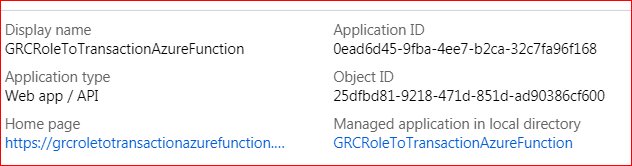
My Package solution contains:
"webApiPermissionRequests": [
{
"resource": "GRCRoleToTransactionAzureFunction",
"scope": "user_impersonation"
}
]
When a tenant admin tried to approve the request from the new portal, he got the following error:
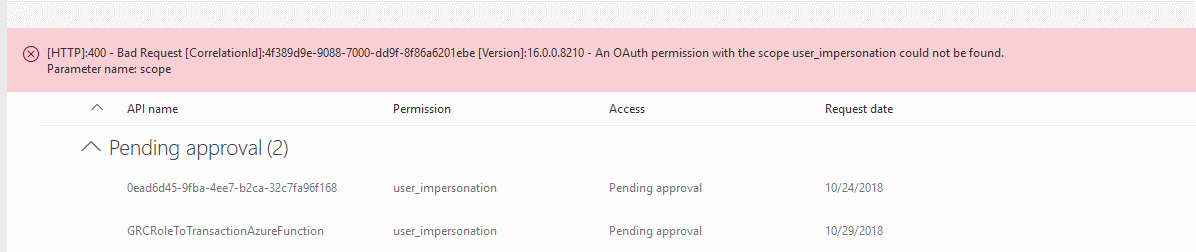
How do I get this approved?
 russgove
All 24 comments
The exception mean you doesn't set the user_impersonation correctly. It is not SharePoint dev issue but configure issue.
You can reference this issue.
 Seiyasu
on 2 Nov 2018
Seiyasu
on 2 Nov 2018
In Azure AD, open the Azure AD app's manifest and verify is user_impersonation is among OAuth permissions defined in the app.
 waldekmastykarz
on 3 Nov 2018
waldekmastykarz
on 3 Nov 2018
It's in there:
...
"logoutUrl": null,
"oauth2AllowImplicitFlow": false,
"oauth2AllowUrlPathMatching": false,
"oauth2Permissions": [
{
"adminConsentDescription": "Allow the application to access GRCRoleToTransactionAzureFunction on behalf of the signed-in user.",
"adminConsentDisplayName": "Access GRCRoleToTransactionAzureFunction",
"id": "4938f370-a6f8-4794-ae1f-ec93b251d256",
"isEnabled": true,
"type": "User",
"userConsentDescription": "Allow the application to access GRCRoleToTransactionAzureFunction on your behalf.",
"userConsentDisplayName": "Access GRCRoleToTransactionAzureFunction",
"value": "user_impersonation"
}
],
"oauth2RequirePostResponse": false,
"objectId": "25dfbd81-9218-471d-851d-ad90386cf600",
...
russgove
on 3 Nov 2018
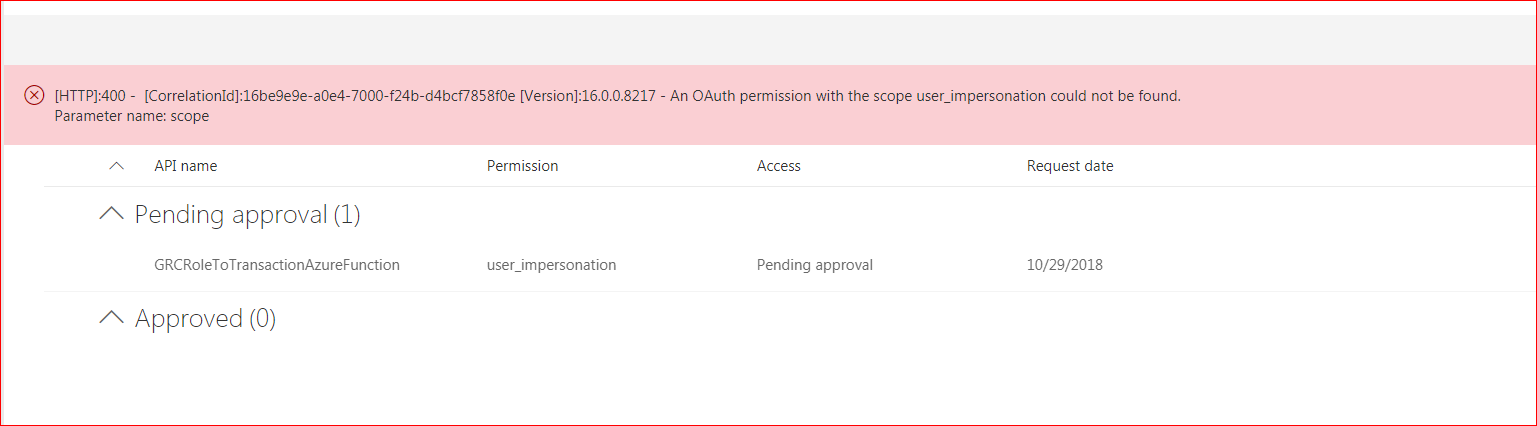
Ah, could it be that the other pending permission, where the resource is denoted with a GUID is causing trouble? Could you please remove it and see if you can approve the pending permission request then?
waldekmastykarz
on 3 Nov 2018
I rejected the one with the guid and still got the same issue
russgove
on 3 Nov 2018
Is the app in the same AAD as your Office 365 tenant?
waldekmastykarz
on 3 Nov 2018
It is. I am a corporate dev. Only have access to one tenant.
russgove
on 4 Nov 2018
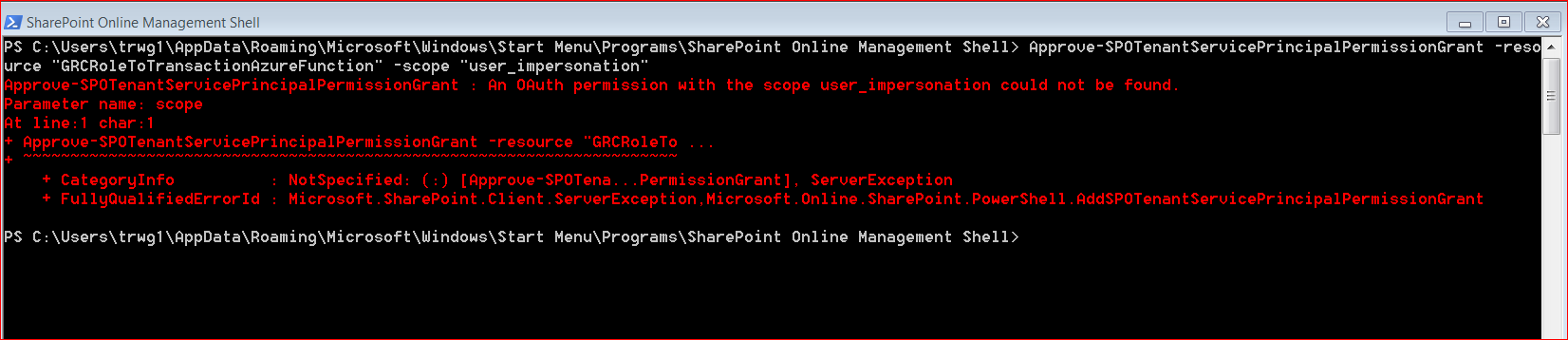
Could you remove the pending permission request and see if you can directly add a grant using PowerShell: https://docs.microsoft.com/en-us/powershell/module/sharepoint-online/approve-spotenantserviceprincipalpermissiongrant?view=sharepoint-ps
waldekmastykarz
on 4 Nov 2018
Not sure that i have the parameters correct, but i get this:
russgove
on 5 Nov 2018
Parameters seems right. @VesaJuvonen any other suggestions what we could try?
waldekmastykarz
on 5 Nov 2018
@VesaJuvonen any ideas on this?
russgove
on 10 Nov 2018
Anybody? I am blocked here!
russgove
on 17 Nov 2018
I stumbled upon it just recently. In my case, this exact error was caused by another Azure AD app with the same name already present in the Azure AD. You can solve it either by removing the old app or renaming the new one.
waldekmastykarz
on 17 Nov 2018
I went into Azure App Registrations and there is only one app shown.
On Sat, Nov 17, 2018 at 12:58 PM Waldek Mastykarz notifications@github.com
wrote:
I stumbled upon it just recently. In my case, this exact error was caused
by another Azure AD app with the same name already present in the Azure AD.
You can solve it either by removing the old app or renaming the new one.—
You are receiving this because you authored the thread.
Reply to this email directly, view it on GitHub
https://github.com/SharePoint/sp-dev-docs/issues/2866#issuecomment-439635535,
or mute the thread
https://github.com/notifications/unsubscribe-auth/ACTRnEw_UU-bsma5XYdp7dbG8J9pTVUdks5uwE48gaJpZM4YIkRg
.
russgove
on 17 Nov 2018
Could it be the case thst your app is named as some of ootb apps provided by Microsoft? Just a coincidence...
 AJIXuMuK
on 17 Nov 2018
AJIXuMuK
on 17 Nov 2018
Is the Azure AD app registered in the same AAD as used by O365?
waldekmastykarz
on 17 Nov 2018
Btw, I stand corrected: you sholdn't be looking at the app name but the App ID URI, which you can see through app's properties. Is it possible that you have an app with a different name but the same App ID URI?
waldekmastykarz
on 17 Nov 2018
You're a genious waldek! I renamed the app registrationn and now instead of the previous error I get '[HTTP]:500 - [CorrelationId]:3e56a39e-9067-7000-9a0c-e11cf680f643 [Version]:16.0.0.8307 - Insufficient privileges to complete the operation.'
I'm not a tenant admin, so I expect that. Will have a tenant admin approve on Monday. and close this issue,
It is strange that I only saw one app registration though. are there some kind of 'hidden' app registrations?
russgove
on 17 Nov 2018
btw, i see no duplicate app-ids when i go to app registrations
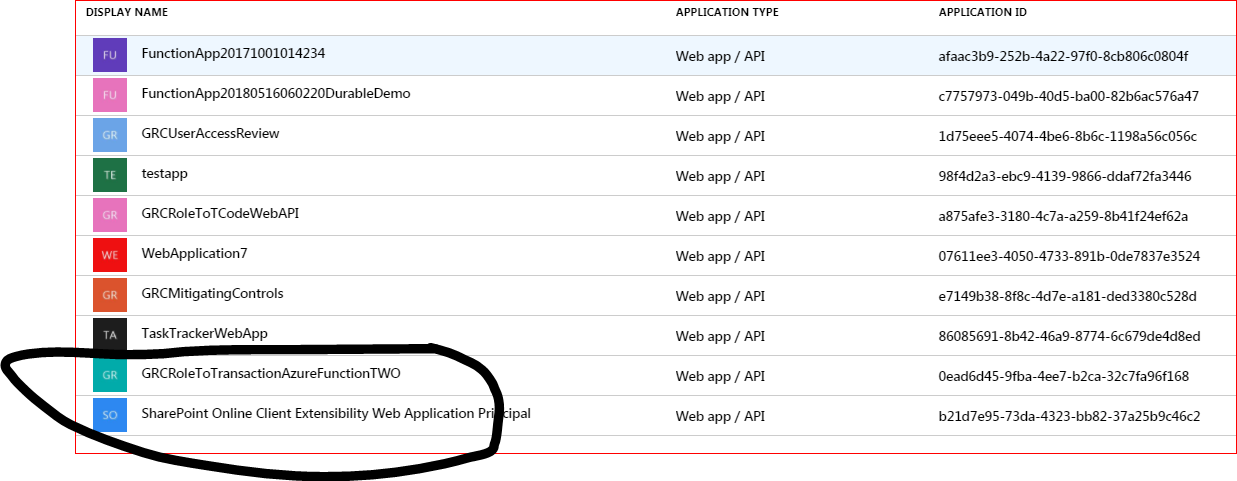
Renaming from GRCRoleToTransactionAzureFunction to GRCRoleToTransactionAzureFunctionTWO seems to have fixed the issue
russgove
on 17 Nov 2018
It wouldn't be the App ID, but the App ID URI that would be duplicate. Either way, good to hear you're unblocked.
waldekmastykarz
on 17 Nov 2018
Argh!! still not working! I asked pritesh (my tenat admin) to approve the request and he replied:
Hi,
Tried it on my phone - see attached. Both times it gave an error message (different message the second time around). Let me know if there’s anything different I should be doing?
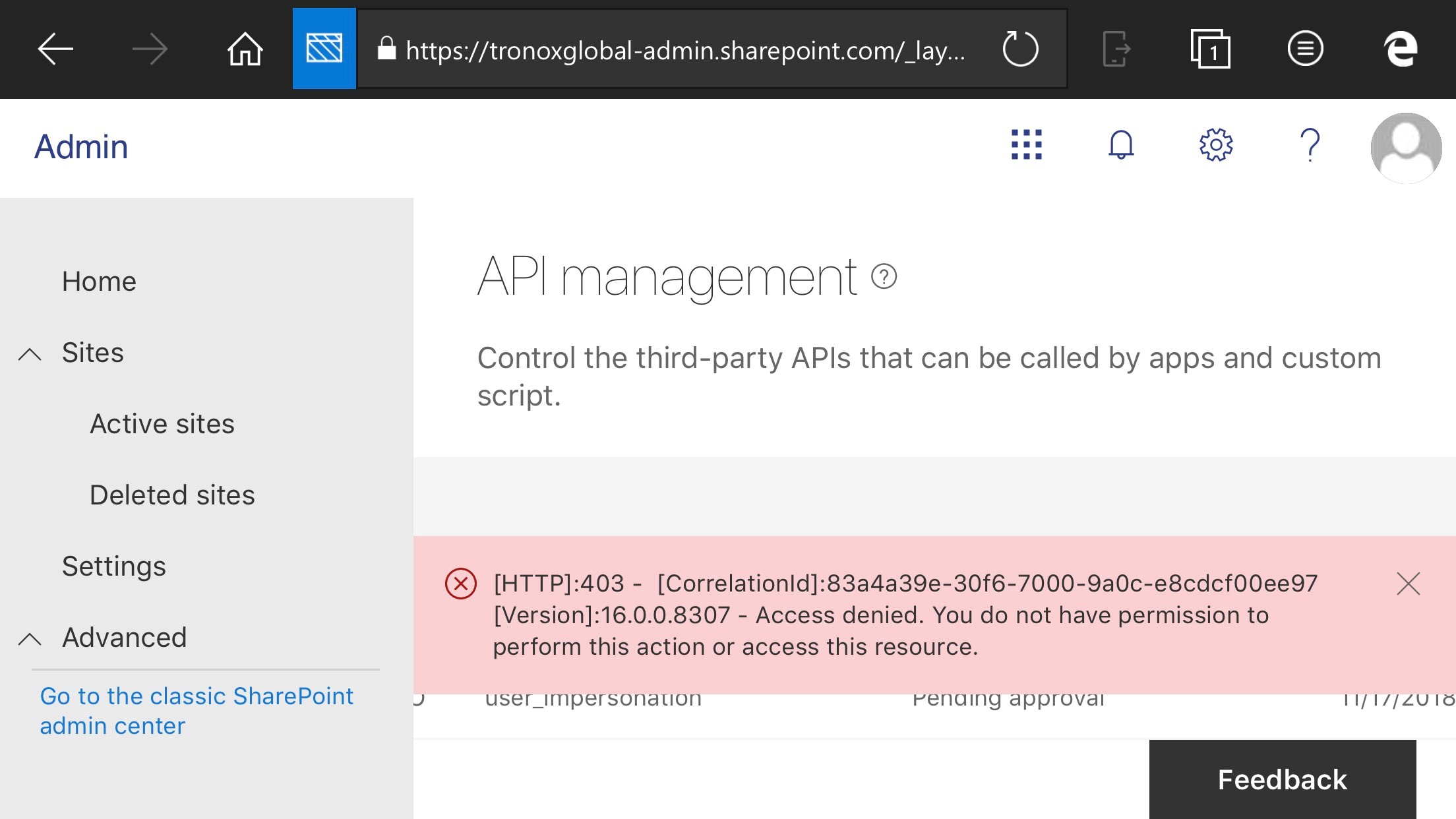
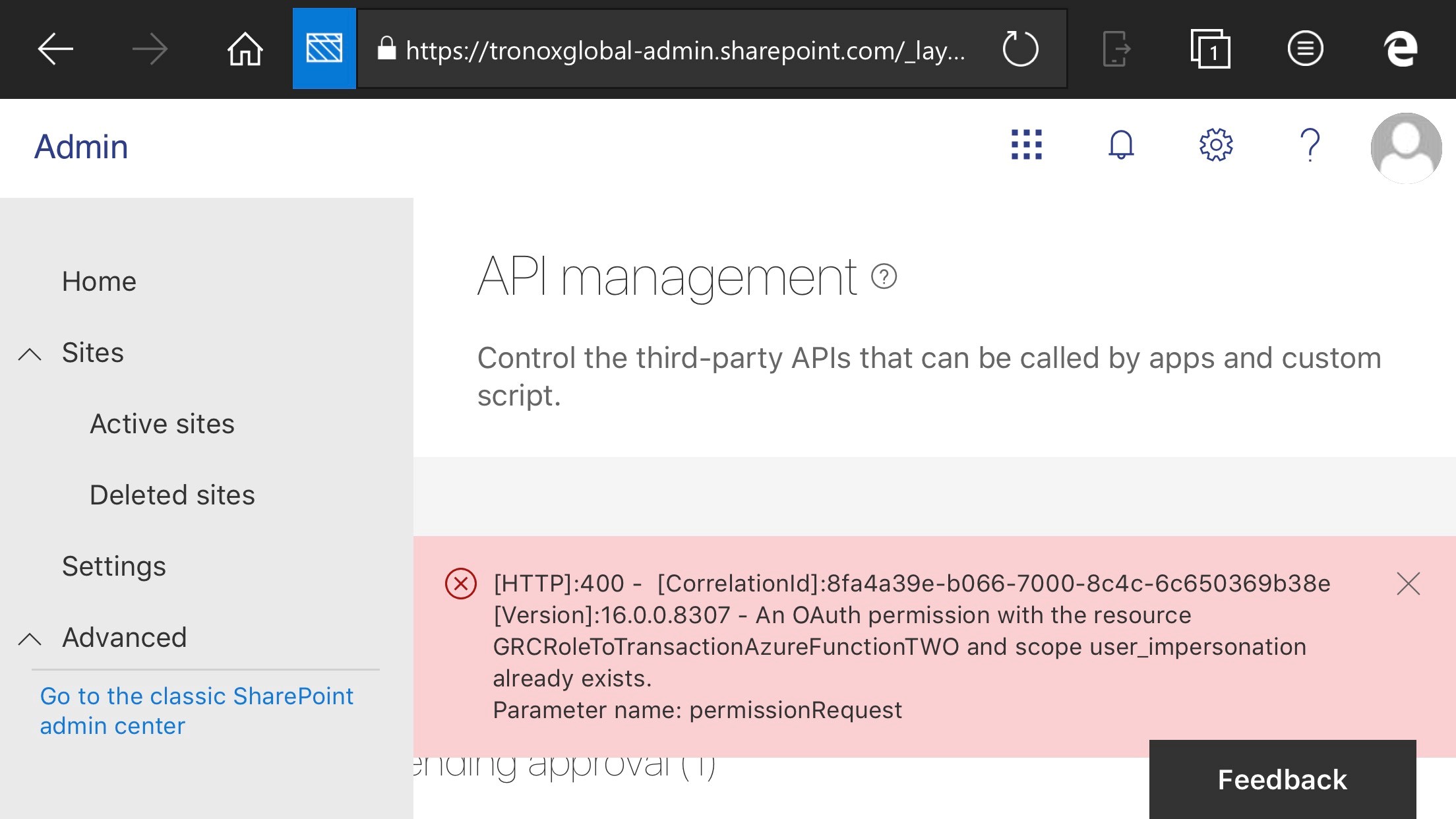
russgove
on 19 Nov 2018
In the second case it says that the API permission has already been granted. is that the case, or is the API permission still not granted despite the error message?
waldekmastykarz
on 29 Nov 2018
Hi, I switched to a powerapps solution to avoid this issue, so am i am closing this ticket for now.
If the powerapps doesn't fly , I'll re-open,
russgove
on 30 Nov 2018
Issues that have been closed & had no follow-up activity for at least 7 days are automatically locked. Please refer to our wiki for more details, including how to remediate this action if you feel this was done prematurely or in error: Issue List: Our approach to locked issues
 msft-github-bot
on 26 Jan 2020
msft-github-bot
on 26 Jan 2020
Related issues
 qrown
·
3Comments
waldekmastykarz
·
3Comments
qrown
·
3Comments
waldekmastykarz
·
3Comments
 StfBauer
·
3Comments
StfBauer
·
3Comments
 ken-harris
·
3Comments
ken-harris
·
3Comments
 patrick-rodgers
·
3Comments
patrick-rodgers
·
3Comments