Sp-dev-docs: 🐞 Tenant Wide Extensions list not present in App Catalog's Site Contents page
Category
- [ ] Question
- [ ] Typo
- [X] Bug
- [ ] Additional article idea
Expected or Desired Behavior
The list Tenant Wide Extensions should appear in the Site Contents page of an app catalog.
Observed Behavior
The list Tenant Wide Extensions is not present in the Site Contents page of an app catalog. This is for a very old tenant (created around the introduction of SPO). Tried both modern & classic experience.

I can access the list directly via the URL...
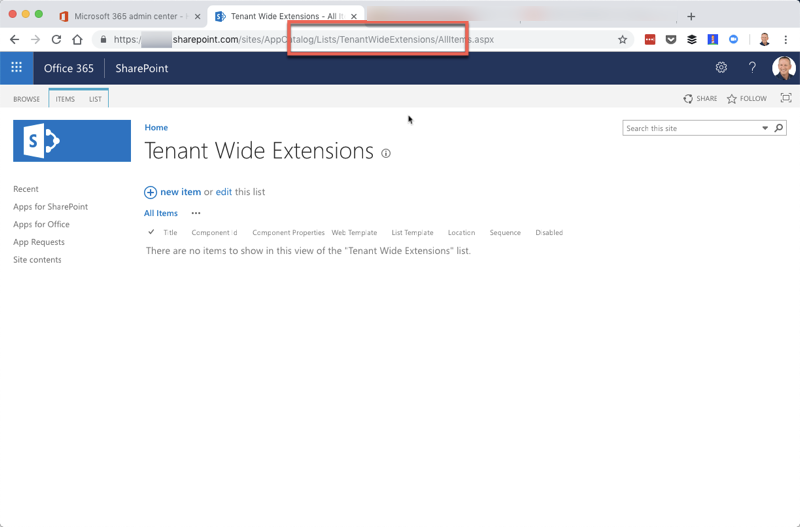
I can provide the specific tenant privately if it helps troubleshoot.
Steps to Reproduce
Explained above in the Observed Behavior section.
 andrewconnell
All 6 comments
Thanks, @andrewconnell for reporting. List should be indeed visible in the Site Contents as administrators can access that for editing the entries as needed. We'll check the situation on this. This seems to indicate that the list settings are getting for some reason unghosted in your case (old tenant), which explains why it would not be visible, but it's clearly a bug.
 VesaJuvonen
on 24 Oct 2018
VesaJuvonen
on 24 Oct 2018
This is an unfortunate situation, but most likely what happened is that before the feature was released, the list got unghosted with UI operations. When we then got the final schema.xml files out, they did not have any impact as the list was already unghosted. Technically by design. Inconvenient and should only happen for those scenarios where user knew about this list BEFORE it was released and visible. So - the cost for fixing is too high vs assumed impact to assign resources for this.
VesaJuvonen
on 20 Nov 2018
:-/
In my case that's not what happened... I never tried going to the list prior to the GA of the feature.
andrewconnell
on 20 Nov 2018
thanks for coming back on this. This would be also an extremely costly thing to fix 100% reliably cross the world and as it's not really blocking issue as such and only in one random tenant, we can't justify the resource ask. Now - if we see this more widely, we'll absolutely need to jump on it.
VesaJuvonen
on 20 Nov 2018
Np... was just clarifying the situation. Understand risk/reward. Thanks for follow up.
andrewconnell
on 20 Nov 2018
Issues that have been closed & had no follow-up activity for at least 7 days are automatically locked. Please refer to our wiki for more details, including how to remediate this action if you feel this was done prematurely or in error: Issue List: Our approach to locked issues
 msft-github-bot
on 26 Jan 2020
msft-github-bot
on 26 Jan 2020
Related issues
 jonthenerd
·
3Comments
jonthenerd
·
3Comments
 qrown
·
3Comments
qrown
·
3Comments
 SteIvanov
·
3Comments
SteIvanov
·
3Comments
 zerovectorspace
·
3Comments
zerovectorspace
·
3Comments
 Ralms
·
3Comments
Ralms
·
3Comments