Sp-dev-docs: Custom Command Set Customizer in Document Library Web Part
Category
- [x] Question
- [ ] Typo
- [x] Bug
- [ ] Additional article idea
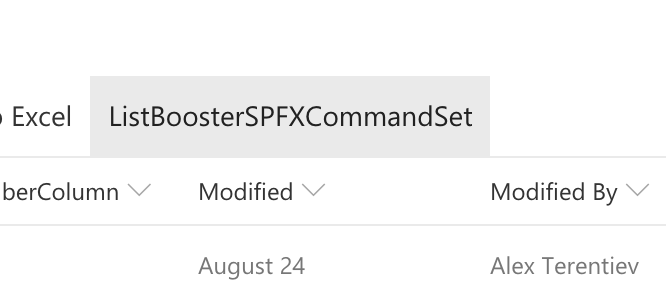
Today I found custom Command Set in Document Library Web Part.
It was displayed incorrectly - instead of title I see alias from manifest file.
I know that the web part in in preview and we can expect it to work incorrectly.
But I'm just letting you know and additionally asking if you have any specific thought on when and what to expect.
Thanks!
Steps to Reproduce
- apply custom command set customizer to doc library
- display doc library in Document Library Web Part.
 AJIXuMuK
All 13 comments
Can you provide the manifest.json file and your commandset TS file sample code?
 vmiy
on 1 Nov 2018
vmiy
on 1 Nov 2018
OK, so here is a full picture.
Initial description was a bit incorrect: Document Library Web Part uses not alias from manifest but the Title of CustomAction from elements.xml.
It's easy to reproduce:
- Scaffold OOTB Command Set with
yo @microsoft/sharepoint - Add
CustomActiondeclaration intoelements.xmlto display command set in Document Library:
<CustomAction
Title="DocLibTest"
RegistrationId="101"
RegistrationType="List"
Location="ClientSideExtension.ListViewCommandSet.CommandBar"
ClientSideComponentId="30d0a9a4-f3a6-4aef-9954-89a9034d22f5"
ClientSideComponentProperties="{"sampleTextOne":"One item is selected in the list.", "sampleTextTwo":"This command is always visible."}">
</CustomAction>
- After that you'll see
DocLibTestbutton in Command Bar of Doc Library Web Part.
Even more, in OOTB Command Set there are 2 commands, but only one button is added to the Command Bar.
Please, let me know if you need more details.
AJIXuMuK
on 8 Nov 2018
Thx @AJIXuMuK, that's a strange implementation indeed and have been routed finally to right people. Sorry for the delay on the triage.
 VesaJuvonen
on 20 Nov 2018
VesaJuvonen
on 20 Nov 2018
Thanks @VesaJuvonen!
AJIXuMuK
on 20 Nov 2018
we are looking into this issue and will provide update as soon as we can. Thank you
 ahackettms
on 4 Dec 2018
ahackettms
on 4 Dec 2018
The work to enable ListViewCommandSet in webpart is done and will be available to customer in mid-late January 2019.
ahackettms
on 21 Dec 2018
Will there be ability to check if the command set is displayed in web part or in regular list?
Also will there be an API to get viewId in the web part? Currently I can get it from query string and/or pageContext. What about web part? There could be multiple web parts on the page.
AJIXuMuK
on 21 Dec 2018
This feature should be enabled for customer now. Please give it a try. Thank you
ahackettms
on 4 Feb 2019
Hi @ahackettms!
Thanks for the update!
I quickly looked at the functionality and it looks like there are still issues.
For example, icon for custom command set is not displayed.
iconImageUrl in Command Set manifest is set to display an icon from Azure CDN. It works fine in Document library itself, but in the web part I'm getting
<img src="" class="ms-Image-image ms-Image-image--contain ms-Image-image--portrait is-notLoaded is-fadeIn is-error image-666">
src is not set.
AJIXuMuK
on 4 Feb 2019
When the web part is added to a small zone command part is rendered with overlap
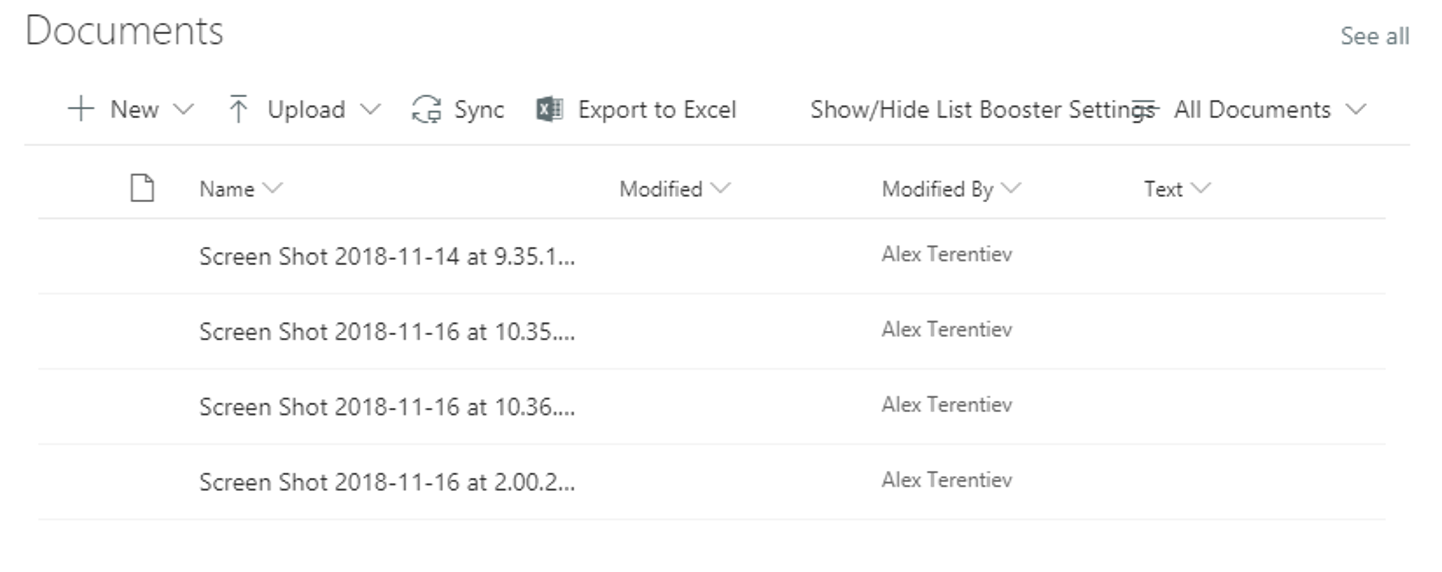
AJIXuMuK
on 4 Feb 2019
And, as I previously mentioned, it looks like there is no way to get viewId for the web part.
AJIXuMuK
on 4 Feb 2019
@AJIXuMuK the icon issue was just fixed recently. Please allow another 1-2 weeks and try again.
For the commandbar overlap issue in small webpart, @VesaJuvonen could you file a new issue for us to track that? it most likely a generic commandbar issue which is not related to client-side extensions.
For the ViewID issue, I don't think we have API supporting that. @VesaJuvonen feel free to Chime in
ahackettms
on 6 Feb 2019
Hi. Seems issue with icons steel exists. Currently I get this in both cases: if iconImageUrl has value and whet it's empty
<img src(unknown) class="ms-Image-image ms-Image-image--contain ms-Image-image--portrait is-notLoaded is-fadeIn is-error image-333">
Any suggestions?
 vlad-nvs
on 1 Mar 2019
vlad-nvs
on 1 Mar 2019
Related issues
 waldekmastykarz
·
3Comments
waldekmastykarz
·
3Comments
 Ralms
·
3Comments
Ralms
·
3Comments
 SteIvanov
·
3Comments
SteIvanov
·
3Comments
 patrick-rodgers
·
3Comments
patrick-rodgers
·
3Comments
 christianbueschi
·
3Comments
christianbueschi
·
3Comments
Most helpful comment
The work to enable ListViewCommandSet in webpart is done and will be available to customer in mid-late January 2019.