Sp-dev-docs: Additional scrollbar appears when using MSGraphClient
Category
- [ ] Question
- [ ] Typo
- [x] Bug
- [ ] Additional article idea
Expected or Desired Behavior
Using MSGraphClient to request purely data should not alter the view.
Observed Behavior
A second scroll bar is being added to the page
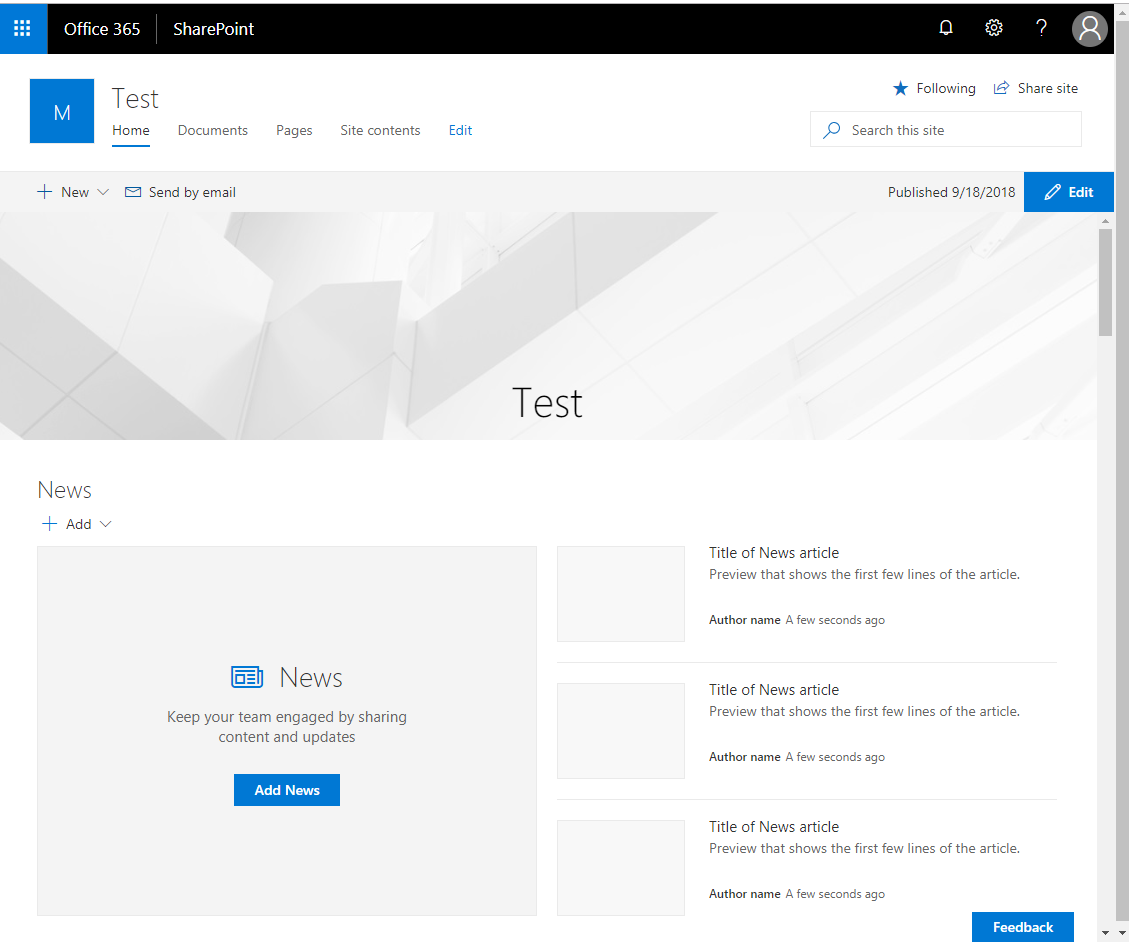
Upon investigation there is an adal related iframe causing this to appear if the browser does not have a token to provide (i.e. first load/cache reset)
<iframe id="adalRenewFramehttps://graph.microsoft.com" aria-hidden="true" sandbox="allow-same-origin allow-scripts allow-forms allow-pointer-lock"............
The iframe is set with visibility hidden, when I temporarily set this to display: none the scrollbar disappears
Steps to Reproduce
Within chrome clear the application cache, and include an SPFX extension or webpart that utilizes the MSGraphClient
import { override } from '@microsoft/decorators';
import { BaseApplicationCustomizer } from '@microsoft/sp-application-base';
export default class Header extends BaseApplicationCustomizer<any> {
  @override
  public async onInit(): Promise<void> {
    await super.onInit();
    const extensionsDataResult = (await this.context.msGraphClientFactory.getClient()).api('/me/extensions').get();
  }
}
 2toLeadMike
All 8 comments
Note that this may be a duplicate of #1514 but I am unable to determine this without more information
2toLeadMike
on 25 Sep 2018
@patmill - this is the issue we were talking about yesterday. Maybe you can direct this to Landis, currently can't figure out how to @-mention him. Thanks! Dirk
 BigEaseGueldi
on 28 Sep 2018
BigEaseGueldi
on 28 Sep 2018
@lahuey - any ideas?
 patmill
on 1 Oct 2018
patmill
on 1 Oct 2018
The issue is related to the user agent stylesheet of chrome. It applies the following style to all iframes: border-width: 2px;
If SPFx would add border:0; to the inline style of the adal iframes, things should be good.
 OliverZeiser
on 4 Oct 2018
OliverZeiser
on 4 Oct 2018
To overcome this issue in your spfx webpart, you could add the following to your stylesheet for now. But please note that applying global styles is not the recommended way and you should remove it, once MS has fixed/changed this.
:global {
  iframe[id^="adal"] {
    border:0;
  }
}
Are you still seeing this issue? I believe we fixed this issue in the past @2toLeadMike @OliverZeiser
 ghost
on 2 May 2019
ghost
on 2 May 2019
@lahuey No longer an issue! Thanks
2toLeadMike
on 3 May 2019
Issues that have been closed & had no follow-up activity for at least 7 days are automatically locked. Please refer to our wiki for more details, including how to remediate this action if you feel this was done prematurely or in error: Issue List: Our approach to locked issues
 msft-github-bot
on 26 Jan 2020
msft-github-bot
on 26 Jan 2020
Related issues
 bengtmoss
·
3Comments
bengtmoss
·
3Comments
 waldekmastykarz
·
3Comments
waldekmastykarz
·
3Comments
 patrick-rodgers
·
3Comments
patrick-rodgers
·
3Comments
 acksoft
·
3Comments
acksoft
·
3Comments
 karishmaTCS
·
3Comments
karishmaTCS
·
3Comments
Most helpful comment
To overcome this issue in your spfx webpart, you could add the following to your stylesheet for now. But please note that applying global styles is not the recommended way and you should remove it, once MS has fixed/changed this.