Sp-dev-docs: SPFX ApplicationCustomizer not executed on default NewForm.aspx
Category
- [ ] Question
- [ ] Typo
- [x] Bug
- [ ] Additional article idea
Expected or Desired Behavior
An Alert from ApplicationCustomizer sample has to be shown or custom debugger fired when dev tools are opened on default modern NewForm.aspx.
Observed Behavior
No alert and debugger on default modern NewForm.aspx, even no ApplicationCustomizer scripts loaded when opened network tab in chrome browser dev tools as well in debug mode no prompt to enable debug scripts, however on default modern EditForm.aspx, DispForm.aspx alert is shown and debugger fired, from dev tools scripts are loaded as well as on home page and custom site pages everything works.
Steps to Reproduce
Deploy ApplicationCustomizer sample with following onInit method:
  @override
  public onInit(): Promise<void> {
    Log.info(LOG_SOURCE, `Initialized ${strings.Title}`);
    debugger;
    let message: string = this.properties.testMessage;
    if (!message) {
      message = '(No properties were provided.)';
    }

    Dialog.alert(`Hello from ${strings.Title}:\n\n${message}`);

    return Promise.resolve();
  }
And try to install it through app catalog or run using gulp serve on SharePoint online web site then visit on custom list default modern NewForm.aspx
Submission Guidelines
Looks like something special happens only on NewForm.aspx, I have tried as well on different site templates and got the same behavior, Please let me know how can I inject script to default modern NewForm.aspx on custom list or if it is a bug then approximately when it will be fixed and rolled out ?
Thanks
 VitaliyZadorozhnyy
All 11 comments
Hi Amy Hackett,
You can navigate to newform.aspx from modern list webpart on a site page,
so to navigate from SharePoint:
- create new modern Site Page
- add List webpart
- Press on + to add item
- you are navigated to newform.aspx
Best regards Vitaliy
вт, 18 вер. 2018 о 01:40 Amy Hackett notifications@github.com пише:
Hello @VitaliyZadorozhnyy https://github.com/VitaliyZadorozhnyy , could
you clarify how to get to the NewForm.aspx, EditForm.aspx and DispForm.aspx?Thanks
—
You are receiving this because you were mentioned.
Reply to this email directly, view it on GitHub
https://github.com/SharePoint/sp-dev-docs/issues/2523#issuecomment-422195070,
or mute the thread
https://github.com/notifications/unsubscribe-auth/APMJ0FKL-mqohZErPjpMSlR7UfgEwzuEks5ucCTHgaJpZM4WlDWv
.
--
Vitaliy Zadorozhniy
VitaliyZadorozhnyy
on 18 Sep 2018
We have identified the issue and working on a fix.
 ahackettms
on 18 Sep 2018
ahackettms
on 18 Sep 2018
@ahackettms any updates on this issue ?
VitaliyZadorozhnyy
on 14 Nov 2018
@ahackettms Hi, any news?
 tlozynskyy
on 3 Jan 2019
tlozynskyy
on 3 Jan 2019
We are experiencing the same issue. Any update @ahackettms ?
 LeemansBE
on 28 Jan 2019
LeemansBE
on 28 Jan 2019
@ahackettms How is the progress here? We need to get this fixed as this is an essential part of our product and we reported it already 8mt ago. Could you please check if there is a workaround or a possibility to fix it?
Thanks a lot.
 spmattw
on 25 May 2019
spmattw
on 25 May 2019
I experience the same problem.
DispForm.aspx and EditForm.aspx work fine. But the same app extension does not get loaded on NewForm.aspx at all.
Interesting that before it was working fine on NewForm.aspx as well.
 menu4web
on 7 Jan 2020
menu4web
on 7 Jan 2020
NewForm.aspx is now working. But it was broken for 3 days.
menu4web
on 10 Jan 2020
@VitaliyZadorozhnyy Can you verify if this issue still occurs?
 kemesfun
on 31 Jan 2020
kemesfun
on 31 Jan 2020
App extension on new NewForm.aspx is working for me.
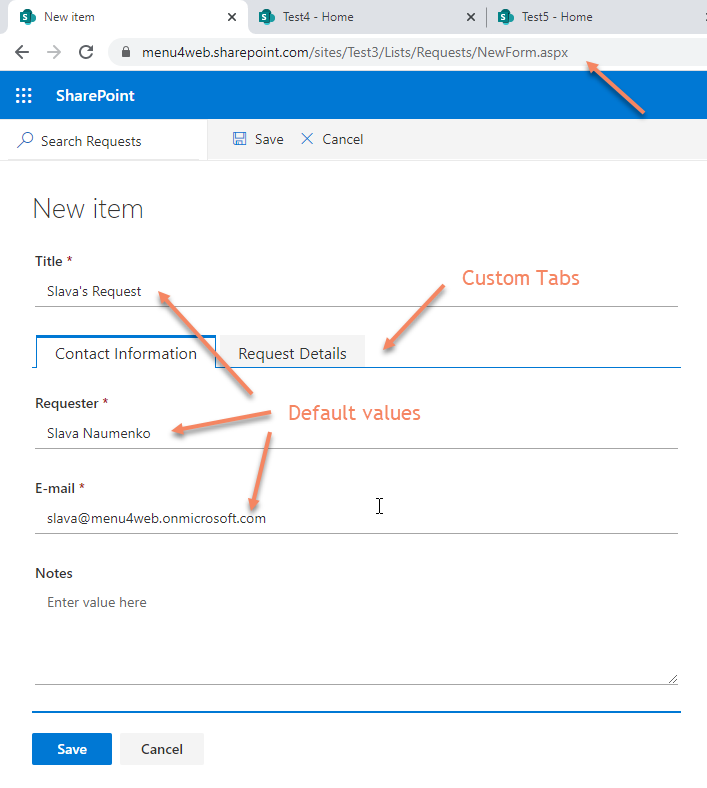
All form customization work as expected.
menu4web
on 31 Jan 2020
Issues that have been closed & had no follow-up activity for at least 7 days are automatically locked. Please refer to our wiki for more details, including how to remediate this action if you feel this was done prematurely or in error: Issue List: Our approach to locked issues
 msft-github-bot
on 8 Feb 2020
msft-github-bot
on 8 Feb 2020
Related issues
 bengtmoss
·
3Comments
bengtmoss
·
3Comments
 waldekmastykarz
·
3Comments
waldekmastykarz
·
3Comments
 thechriskent
·
3Comments
thechriskent
·
3Comments
 jonthenerd
·
3Comments
jonthenerd
·
3Comments
 patrick-rodgers
·
3Comments
patrick-rodgers
·
3Comments
Most helpful comment
We have identified the issue and working on a fix.