Sp-dev-docs: ts. d.ts, js, js.map in same folder after upgrading spfx to 1.6.0
ts. d.ts, js, js.map are in same folder after upgrading spfx to 1.6.0. How do we fix that?
 lipalath-ms
All 10 comments
There are a few changes in the project structure and build configuration in SPFx v1.6.0 comparing to v1.5.1. I'd suggest you either manually compare the your existing v1.5.1 project with a new v1.6.0 project or use the Office 365 CLI to automatically detect the necessary changes for you (support for upgrading to SPFx v1.6.0 is currently available in the latest beta which you can get from npm by executing in the command line: npm i -g @pnp/office365-cli@next.
 waldekmastykarz
on 8 Sep 2018
waldekmastykarz
on 8 Sep 2018
Hi @licypal I got this issue as well. The solution was to update the tsconfig.json file in the root as it has changed from 1.5.1. As @waldekmastykarz says, create a new project with 1.6 and copy over the tsconfig.json to your existing project.
Apart from that I also had to make the 2 changes listed in the "Build and tooling changes in 1.6.0" section in the release notes:
https://github.com/SharePoint/sp-dev-docs/wiki/SharePoint-Framework-v1.6-release-notes#build-and-tooling-changes-in-160
 vman
on 8 Sep 2018
vman
on 8 Sep 2018
Thank you @vman. Copying tsconconfig.json to my project fixed the issue. Appreciate your help!
lipalath-ms
on 10 Sep 2018
Thanks @waldekmastykarz.
I ran the command npm i -g @pnp/office365-cli@next
I get the following error on running spfx project upgrade in the folder where the project is located:

Please let me know if I am missing any steps. Thanks!
lipalath-ms
on 11 Sep 2018
prepend the command with o365, so o365 spfx project upgrade --output md > report.md (the last part will create a Markdown report and save it to the report.md file in the current directory).
waldekmastykarz
on 11 Sep 2018
Thank you @waldekmastykarz
lipalath-ms
on 11 Sep 2018
After running o365 spfx project upgrade --output md > report.md, I followed steps from report.md and on running npm install, it showed following error:
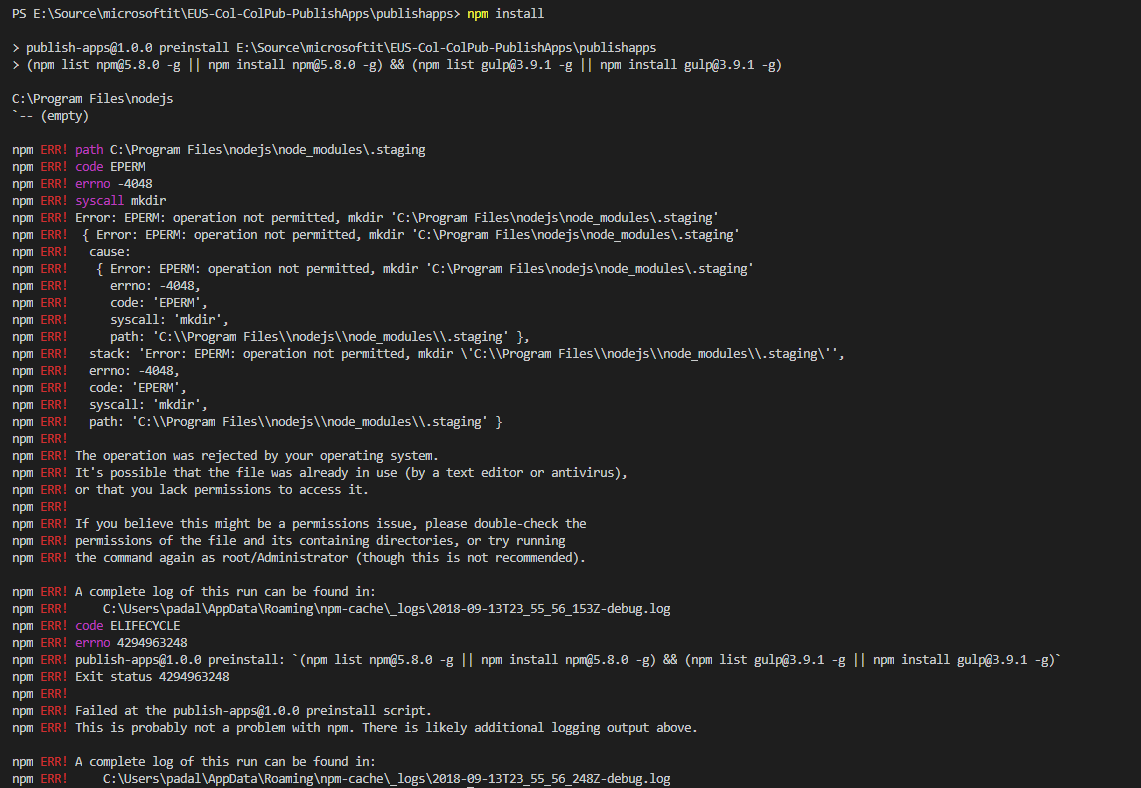
After deleting npm and npm-cache folders from \AppData\Roaming and node_modules folder from the project, npm install ran succesfully. Could you please let me know the cause for this issue and a better way to fix this issue? Thanks!
lipalath-ms
on 12 Sep 2018
I haven't seen this error before so unfortunately can't tell what went wrong. What often helps in odd cases like the one you mentioned is to remove the node_modules folder and re-run npm install to restore all dependencies.
waldekmastykarz
on 12 Sep 2018
@vman Could you please share the steps you followed to upgrade to SPFx 1.6.0?
lipalath-ms
on 8 Nov 2018
Issues that have been closed & had no follow-up activity for at least 7 days are automatically locked. Please refer to our wiki for more details, including how to remediate this action if you feel this was done prematurely or in error: Issue List: Our approach to locked issues
 msft-github-bot
on 26 Jan 2020
msft-github-bot
on 26 Jan 2020
Related issues
 StfBauer
·
3Comments
StfBauer
·
3Comments
 byrongits
·
3Comments
byrongits
·
3Comments
 karishmaTCS
·
3Comments
karishmaTCS
·
3Comments
 mikeparkie
·
3Comments
mikeparkie
·
3Comments
 patrick-rodgers
·
3Comments
patrick-rodgers
·
3Comments