Sp-dev-docs: WopiFrame / REST API ServerRedirectedEmbedUrl Issue for PDF Documents
Category
- [x] Bug
Expected or Desired Behavior
Querying a library via REST API should return a ServerRedirectedEmbedUrl value, that developers can use to navigate the user to the document (whatever library/tenant configuration is set for handling documents... but specifically here, opening a PDF in Office Online / OWA).
Observed Behavior
The ServerRedirectedEmbedUrl value returned for PDF documents looks like this:
https://{tennant}/_layouts/15/WopiFrame.aspx?sourcedoc={GUID}&action=interactivepreview
This link navigates the user to the Document Library, rather than opening PDF in Word Online or in browser. In order to navigate the user to the PDF document (open in Word Online), the link currently needs to be modified to this:
https://{tennant}/_layouts/15/WopiFrame.aspx?sourcedoc={GUID}&&action=interactivepreview
Perhaps the WopiFrame.aspx code is not properly parsing the encoded ampersand in the URL?
ServerRedirectedEmbedUrl values for Excel documents provide the same formatted URL, and these documents open as desired in Excel Online.
Steps to Reproduce
Perform a REST Query against a document library containing a PDF document:
https://{tennant}/_api/web/lists/getbytitle('My Document Library')/items?$select=ServerRedirectedEmbedUrl
Copy the ServerRedirectedEmbedUrl value into a new browser tab. You will be taken to the document library if the document was a PDF document.
 volleybaldridge
All 7 comments
Please provide you test environment details. Thanks.
 Seiyasu
on 4 Sep 2018
Seiyasu
on 4 Sep 2018
I recognize here my problem.
In a SPFx component development, i want to open a PDF viewer like it is in library but the link returned by query ("ServerRedirectedEmbedUri") open Word Online viewer without any native functionality (like download, get link, etc.).
In library, we have a link like :
https://{web absolute url}/Documents%20partages/Forms/AllItems.aspx
?id=%2Fsites%2F{web url}%2FDocuments%20partages%2F{doc name}%2Epdf
&parent=%2Fsites%2F{web url}%2FDocuments%20partages
whereas the in-code "item.ServerRedirectedEmbedUri" returns :
https://{web absolute url}/_layouts/15/WopiFrame.aspx
?sourcedoc={document guid}&action=interactivepreview
Any idea ?
I wouldn't like have to re-generate the "AllItems.aspx" URL by hand.
(sorry for the tricky english)
 Frost-on-Web
on 19 Dec 2018
Frost-on-Web
on 19 Dec 2018
Hi @Frost-on-Web Did you ever receive resolution on your issue? I am experiencing the same exact issue in our SP environment. ("Trending Documents" CSWP opening PDFs without native functionality (download, print, etc.)
 morghandc
on 6 Jun 2019
morghandc
on 6 Jun 2019
@Frost-on-Web, here's what I ended up doing. In this example, we have a metadata column for specifying the type of report (Excel or PDF), but you could use File Type attribute instead.
This has the result of opening the both files in the browser using Office Web Apps.
if (item.ReportType === "Excel") {
//without this, Excel files open in OWA without any SharePoint Trim
docURL = item.ServerRedirectedEmbedUrl.split('&action')[0];
} else {
//without this PDFs navigate user to document library
docURL = item.ServerRedirectedEmbedUrl.split('&action')[0] + "&action=interactivepreview";
}
If you want to open a PDF using native browser functionality, use item.EncodedAbsUrl; this provides a direct link to the PDF file.
 BrennanAldridge
on 6 Jun 2019
BrennanAldridge
on 6 Jun 2019
@b-aldridge I apologize for the trivial questions, but I'm learning SP/coding as I go... Where is this being inserted? I do see that whatever property is chosen here in the Web Part ("Link URL") is affecting the file opening behavior. I've tried a handful of different choices which had different (almost there!) results. E.g., using "Path" opens PDF as expected with native features, but auto-downloads Word/Excel docs (boo).
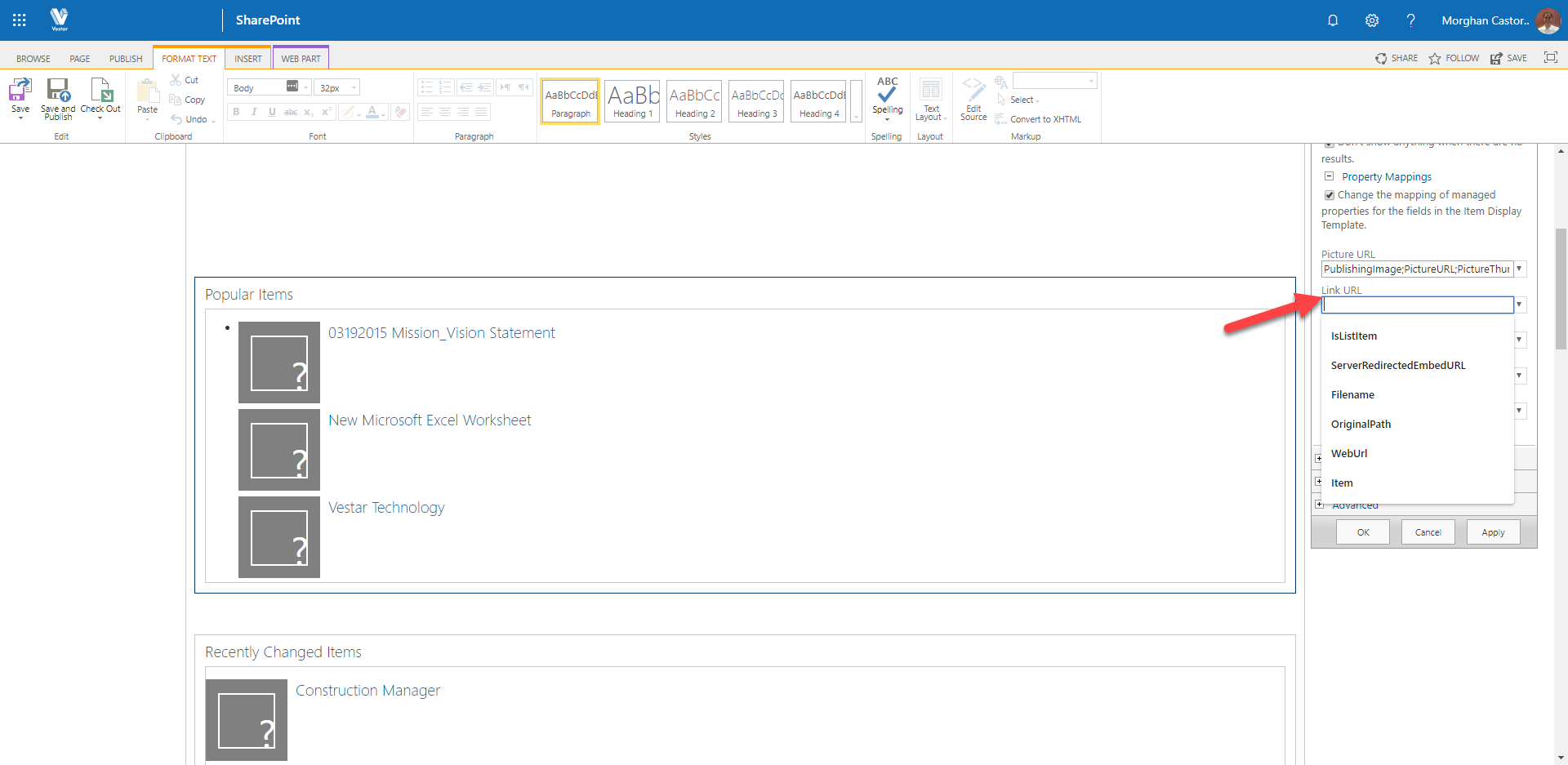
Do I need to find where "ServerRedirectedEmbedUrl" is being managed and edit it to reflect your suggestion?
morghandc
on 6 Jun 2019
My approach may not be applicable to your case, but it looks as if you are using a Content Search Web Part... you can create your own display template which contain the JavaScript embedded in the HTML.
However, unless this is a strong argument for using classic sites, I would first consider if modern sites and webparts can do what you want (and then look at SPFx components if you need something different). There are some "modern" search webparts available in PnP and coming soon from MS.
My post was specific to calling the REST API and getting back a value that seemed incorrect, so I don't want to open a giant can of worms regarding how/when you'd want to actually do that ;).
BrennanAldridge
on 6 Jun 2019
Hi, i was in a SPFx component so in Typescript code.
I haven't found better solution than recreate the full "AllItems.aspx" URL.
thisDocURL = libraryPath + "/Forms/AllItems.aspx?id=" + encodeURIComponent(item.FileRef) + "&parent=" + encodeURIComponent(libraryPath);
I'm really not proud of me on it.
Frost-on-Web
on 7 Jun 2019
Related issues
 waldekmastykarz
·
3Comments
waldekmastykarz
·
3Comments
 mikeparkie
·
3Comments
mikeparkie
·
3Comments
 jonthenerd
·
3Comments
jonthenerd
·
3Comments
 acksoft
·
3Comments
acksoft
·
3Comments
 SteIvanov
·
3Comments
SteIvanov
·
3Comments
Most helpful comment
My approach may not be applicable to your case, but it looks as if you are using a Content Search Web Part... you can create your own display template which contain the JavaScript embedded in the HTML.
However, unless this is a strong argument for using classic sites, I would first consider if modern sites and webparts can do what you want (and then look at SPFx components if you need something different). There are some "modern" search webparts available in PnP and coming soon from MS.
My post was specific to calling the REST API and getting back a value that seemed incorrect, so I don't want to open a giant can of worms regarding how/when you'd want to actually do that ;).