Sp-dev-docs: Horrible performance and memory leaks in modern pages and SPFx
Category
- [ ] Question
- [ ] Typo
- [X] Bug
- [ ] Additional article idea
Expected or Desired Behavior
Modern pages and SPFx in general should work in all supported browsers. Thus it should also work without any issues in IE and Edge. Both are supported for SharePoint Online and O365 in general.
Observed Behavior
The performance especially in IE on modern pages is horrible and very bad. Also there are huge memory leaks that lead to errors within sharepoint and crashes of IE. This does not happen in Chrome!
This is a memory profile after refreshing a site with IE about 10-12 times. Also look at the time how long those few refreshes take and how slow the page is. It is a serious issue! The used memory will not get freed up. It will grow until the browser crashes/hangs or until sharepoint throws an "SPFx loadmodule not found" error. Overall, currently modern pages are totally unusable for IE and Edge users. Although it is a little bit better in Edge.
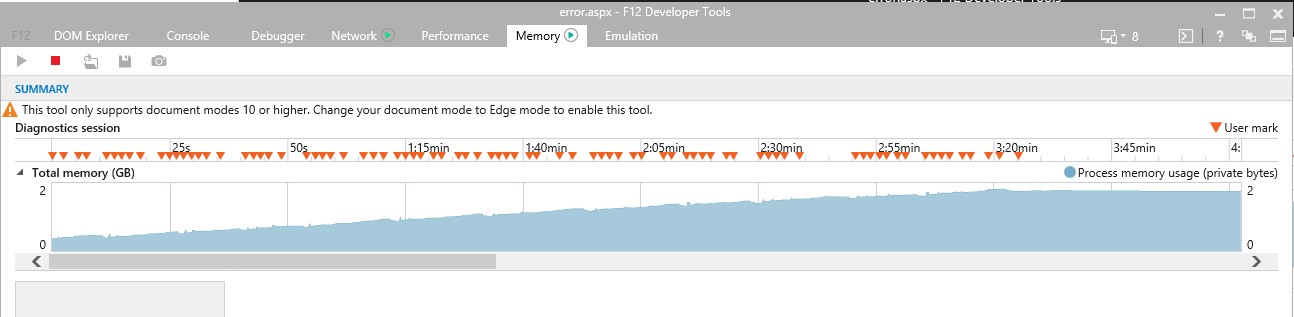
Steps to Reproduce
It is very easy to reproduce on modern pages with some content added to it. The more data and the more webparts are on the page, the worse gets the performance and memory leak. Just add content to a modern OOTB group site/communication site and add a couple of webparts. With custom webparts it will get worse, but the leak also exist just with ootb webparts.
 OliverZeiser
All 6 comments
I can just verify the issue. We have also observed the same problem and as mentioned it very easy to reproduce the issue.
The most critical part is, on enterprise level the IE is still the main browser and could not be replaced very easily. Because of these performance issues almost all our enterprise customers are rejecting to switch to the modern pages. This also kills the SharePoint transformation to modern and as a consequence all these new features.
 canturan
on 30 Aug 2018
canturan
on 30 Aug 2018
As this is not really developer issue, rather happening apparently constantly in the pages with IE, we cannot, unfortunately, process this through this channel. Please report this from the Office 365 Admin support channels as we can only concentrate on pure developer topics. Sorry for the inconvenience and slow response time, but closing this for now as we can't handle this. Please do report these in Tenant admin process. Thx.
 VesaJuvonen
on 12 Sep 2018
VesaJuvonen
on 12 Sep 2018
I think you should reopen this issue as it is directly related to SPFx. Since the OOTB Microsoft WebParts are also written using SPFx (more or less....) they also have this problem. I was just using those in my example so we don't even have to talk about issues related to custom code. But in fact, every custom webpart has this issue. So it is directly related to SPFx and it is a developer issue. Everyone that writes webparts using SPFx automatically excludes IE and Edge users. You should seriously have a look at this again, because the SPFx team is the only one that can fix this. IE Team won't do that for sure.... It does not help customers out there, if the SPFx Team is using Chrome as there no1 dev platform and don't even test there own stuff on other browsers. I am just trying to help and provide feedback. But if that is not welcome, I will stop and advise customers that are still using IE/Edge to stay on classic...
OliverZeiser
on 12 Sep 2018
Hi @OliverZeiser - we have clear rules and processes on reporting these things. If this is caused also by oob web parts, it's not a development issue and we simply cannot report these forward from this route. There is no point re-opening the issue as that does not change that fact. We have an agreement to get all non-dev stuff routed using alternative routes and feature crews will simply ignore them if we try to route this to them from here... as this is not owned by our team.
VesaJuvonen
on 12 Sep 2018
Now - on this - you can also always read between the lines and show that the leak happens also with custom web part, which then would result opening a new issue, attaching sample solution in for the repo. That would make this a dev topic. We can't process this item as it's posted, but if @OliverZeiser, for example, has issues explicitly with the 3rd party custom ones, please report that as a new issue and we can assign that to the right people. Just guiding how to get work done on this.
VesaJuvonen
on 13 Sep 2018
Issues that have been closed & had no follow-up activity for at least 7 days are automatically locked. Please refer to our wiki for more details, including how to remediate this action if you feel this was done prematurely or in error: Issue List: Our approach to locked issues
 msft-github-bot
on 26 Jan 2020
msft-github-bot
on 26 Jan 2020
Related issues
 qrown
·
3Comments
qrown
·
3Comments
 StfBauer
·
3Comments
StfBauer
·
3Comments
 ken-harris
·
3Comments
ken-harris
·
3Comments
 zerovectorspace
·
3Comments
zerovectorspace
·
3Comments
 SteIvanov
·
3Comments
SteIvanov
·
3Comments
Most helpful comment
I can just verify the issue. We have also observed the same problem and as mentioned it very easy to reproduce the issue.
The most critical part is, on enterprise level the IE is still the main browser and could not be replaced very easily. Because of these performance issues almost all our enterprise customers are rejecting to switch to the modern pages. This also kills the SharePoint transformation to modern and as a consequence all these new features.