Sp-dev-docs: Footer placeholder sometimes not positioned correctly
Category
- [ ] Question
- [ ] Typo
- [x] Bug
- [ ] Additional article idea
Expected or Desired Behavior
Footer/bottom placeholder is supposed to be rendered in a fixed position at the bottom of the screen (wish it was the bottem of the page) and stay there
Observed Behavior
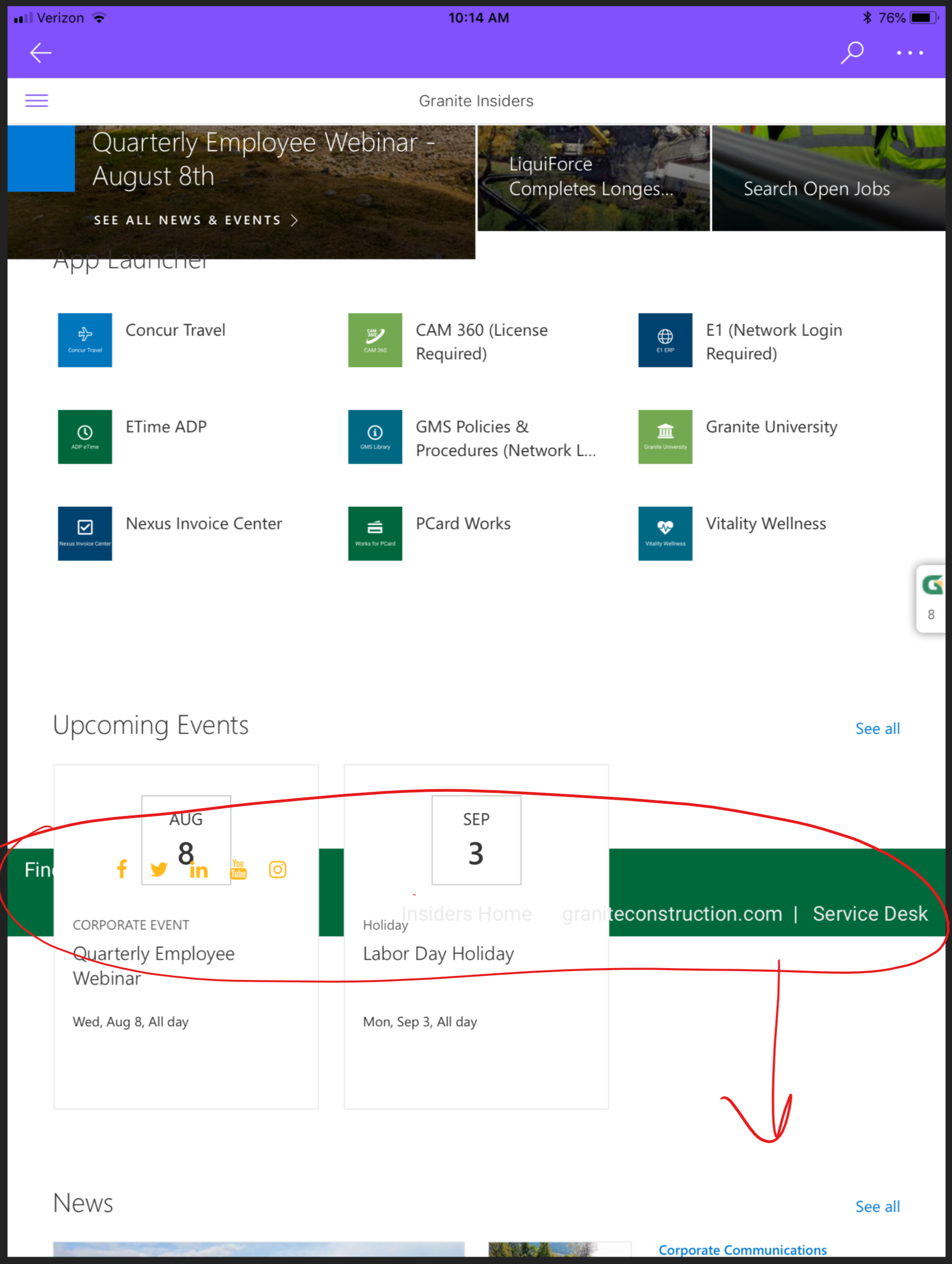
Sometimes on pages that require scrolling the footer/bottom placeholder is rendered and then stays at the initial position. See the attached screenshot.
Happens in the SharePoint app on IOS & Android and with smaller screensizes in desktop browsers.

Steps to Reproduce
Happens intermittendly, not always on the same pages. Haven't found anything specific that triggers this so keep trying and you'll probably run into this. Sorry....
 O365Tycho
All 19 comments
We have this issue as well, though for us it seems to be on every page.
 sparkitect
on 2 Aug 2018
sparkitect
on 2 Aug 2018
Yes, same here (SharePoint App as well as mobile browsers).
It always helps to refresh the page - then the footer does not get stuck. But often when navigating via links, the footer gets stuck "behind" a web part.
Any ideas so far?
 mschaefer85
on 25 Sep 2018
mschaefer85
on 25 Sep 2018
we've pulled in a CSS file which sets the position of the placeholder to fixed and that seems to help, for the most part.
The difficulty lies in getting the SharePoint Mobile App to 'uncache' our CSS file when we change it.
sparkitect
on 25 Sep 2018
Thanks for that update! I'm wondering whether this behaviour occurs only for us - it seems like this is something that is somehow broken on Microsoft's side ...
mschaefer85
on 27 Sep 2018
I am also experiencing this similar issue on iOS and Android mobile devices via the device's browser and on the device's respective SharePoint Mobile app. This issue seems to be occurring consistently after when landing on a modern page where the footer renders properly and then navigating to different modern page such as a news article on the site.
My workaround so far has been to refresh the page each time so that the page re-inits and resets the footer placeholder to the bottom. We also experimented with forcing the footer to a fixed position with bottom 0 using CSS. However this causes the footer to cut off content at the bottom such as the "like" count on modern article pages.
Any idea on a better solution or when I can expect a fix for this?
 dochen88
on 13 Jun 2019
dochen88
on 13 Jun 2019
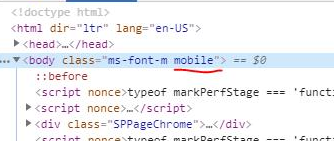
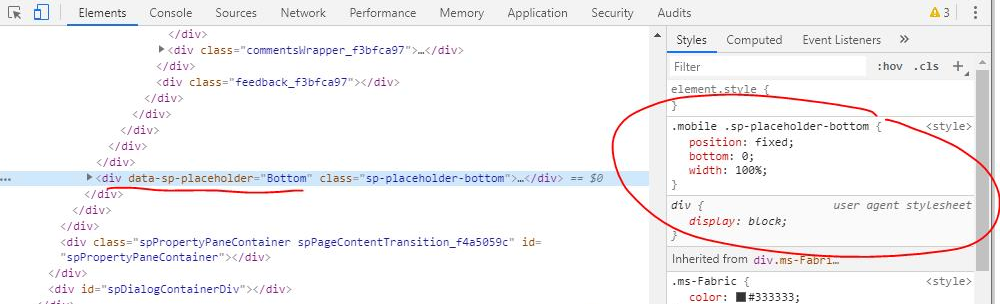
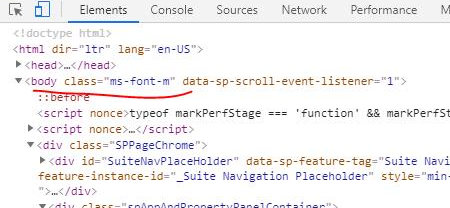
This appears to be because on first load, a "mobile" class is applied to the body tag. But when you navigate to a page that doesn't require a full page refresh, the class doesn't get carried across so the style gets lost.
1.png - initial load, .mobile class added
2.png - .mobile class affects positioning of the footer placeholder
3.png - after navigating to another page, .mobile class is lost
 corriespondent
on 9 Jul 2019
corriespondent
on 9 Jul 2019
Take a note, folks. This is what genius looks like 👆
sparkitect
on 9 Jul 2019
Is this still occurring? If so what page do you navigate when this issue occurs? @corriespondent @O365Tycho
 kemesfun
on 24 Jan 2020
kemesfun
on 24 Jan 2020
@O365Tycho Does this issue still occur?
kemesfun
on 28 Jan 2020
I don't know and honestly don't care. Last time I checked it was still
there but It's now 2020 and I gave up on it and the SharePoint app
On Tue, 28 Jan 2020, 00:48 Kennedy Mesfun, notifications@github.com wrote:
@O365Tycho https://github.com/O365Tycho Does this issue still occur?
—
You are receiving this because you were mentioned.
Reply to this email directly, view it on GitHub
https://github.com/SharePoint/sp-dev-docs/issues/2257?email_source=notifications&email_token=ACQO4DYYPSARKA4FFPYU64TQ75XGBA5CNFSM4FK2DZW2YY3PNVWWK3TUL52HS4DFVREXG43VMVBW63LNMVXHJKTDN5WW2ZLOORPWSZGOEKBQF6I#issuecomment-579011321,
or unsubscribe
https://github.com/notifications/unsubscribe-auth/ACQO4D2TUTC6TZED6I7MYA3Q75XGBANCNFSM4FK2DZWQ
.
O365Tycho
on 28 Jan 2020
I wasn't able to reproduce this issue, so I am closing it for now. If this issue occurs and affects more customers then another issue will be opened.
kemesfun
on 28 Jan 2020
@kemesfun It has been quite a while and I am not sure I have access to the same environment to check this issue. I looked on a different site, and while it seems like the mobile class is sticking around this time, I found that the bottom placeholder did not render when I went into a news page, and the "events" page had improper styling or structure on the main content area so that it wasn't scrolling properly, keeping the footer fixed and floating in the middle of the page as I scrolled down.
corriespondent
on 29 Jan 2020
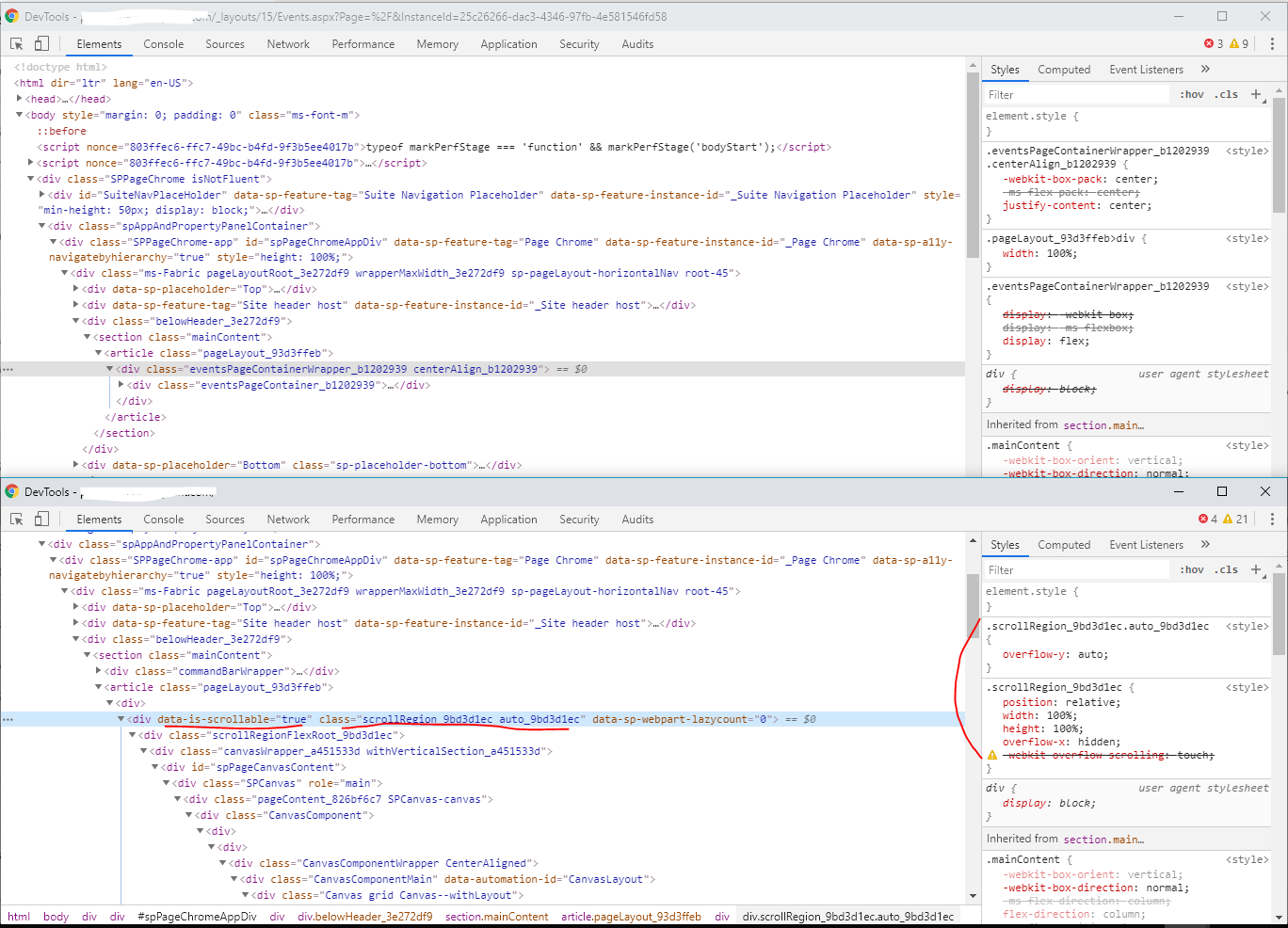
@kemesfun I think the event page is a totally separate issue, after looking into it more. It seems like the event page container doesn't allow for scrolling the way that most other pages do. The top is the event page, and there is no height or overflow-y styling, while the main page (bottom) allows for scrolling. If you have a footer rendering in the bottom placeholder, it becomes very evident that this is a problem.
corriespondent
on 29 Jan 2020
@corriespondent can you give me the repro steps that you took to get to that state?
Also if this is unique to the event page then another Github Issue can be opened, so I can close this again.
kemesfun
on 29 Jan 2020
@kemesfun This seems specific to the event page. I will open a new Github issue and retest the original mobile issue tomorrow.
corriespondent
on 29 Jan 2020
corriespondent
on 29 Jan 2020
@kemesfun I cannot duplicate the original error either. Looks like it might be fixed.
corriespondent
on 29 Jan 2020
Closing this issue since it can't be duplicated.
kemesfun
on 29 Jan 2020
Issues that have been closed & had no follow-up activity for at least 7 days are automatically locked. Please refer to our wiki for more details, including how to remediate this action if you feel this was done prematurely or in error: Issue List: Our approach to locked issues
 msft-github-bot
on 5 Feb 2020
msft-github-bot
on 5 Feb 2020
Related issues
 jonthenerd
·
3Comments
jonthenerd
·
3Comments
 ken-harris
·
3Comments
ken-harris
·
3Comments
 karishmaTCS
·
3Comments
karishmaTCS
·
3Comments
 thechriskent
·
3Comments
thechriskent
·
3Comments
 Ralms
·
3Comments
Ralms
·
3Comments