Sp-dev-docs: sp-core-library Log class missing _initialize
Category
- [X] Question
- [ ] Typo
- [ ] Bug
- [ ] Additional article idea
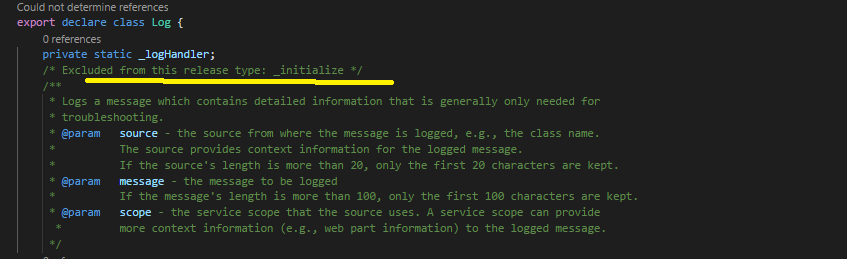
I was using the Logging option from sp-core-library. When I upgraded from 1.4.7 to the 1.5.0 version of @microsoft modules, noticed that the Log class has been changed. When earlier there was the option to call _initialize and set up the log handler, this seems to have been commented out in this version. Can someone let me know how can i do the same right now? or the rational behind removing the method? Below is the message that has been found on the class declaration.
Excluded from this release type: _initialize */
Thanks
 sid1260
All 11 comments
So anything with an _ in the name was internal and not made for public use. In the 1.5.0 release, we have removed those functions from the typings files. How were you using _initialize()?
 patmill
on 20 Jun 2018
patmill
on 20 Jun 2018
Thanks for the reply. Noted for the future.
Log._initialize(new SPOnlineLogHandler((window as any).LOG_LEVEL || LogLevel.Info));
Reference : https://blog.mastykarz.nl/logging-sharepoint-framework/
This did not work - https://github.com/SharePoint/sp-dev-docs/wiki/Working-with-the-Logging-API. Hence used the earlier mentioned approach.
The idea would be to extend the logging mechanism to support on-demand logging to a persistent storage, for now it is a simple implementation of just logging to the console. Bearing this in mind, is it recommended practice to use the pnp Logging framework "@pnp/logging" or can I still use the sp-core-library?
sid1260
on 20 Jun 2018
Solution: #2093
 vsoderholm
on 22 Jun 2018
vsoderholm
on 22 Jun 2018
running into the same issue with 1.5.1-plubeta.
The package,json typings property is still pointing to the dist/internal and the method there is commented out.
{
  "_from": "@microsoft/[email protected]",
  "_id": "@microsoft/[email protected]",
  "_inBundle": false,
  "_integrity": "sha1-KGH5zb0zqJhEoB1PpFblpVXcLZ0=",
  "_location": "/@microsoft/sp-core-library",
  "_phantomChildren": {},
  "_requested": {
    "type": "version",
    "registry": true,
    "raw": "@microsoft/[email protected]",
    "name": "@microsoft/sp-core-library",
    "escapedName": "@microsoft%2fsp-core-library",
    "scope": "@microsoft",
    "rawSpec": "1.5.1-plusbeta",
    "saveSpec": null,
    "fetchSpec": "1.5.1-plusbeta"
  },
  "_requiredBy": [
    "/",
    "/@microsoft/sp-application-base",
    "/@microsoft/sp-client-preview",
    "/@microsoft/sp-component-base",
    "/@microsoft/sp-diagnostics",
    "/@microsoft/sp-dynamic-data",
    "/@microsoft/sp-extension-base",
    "/@microsoft/sp-http",
    "/@microsoft/sp-loader",
    "/@microsoft/sp-page-context",
    "/@microsoft/sp-webpart-base",
    "/@microsoft/sp-webpart-workbench"
  ],
  "_resolved": "https://registry.npmjs.org/@microsoft/sp-core-library/-/sp-core-library-1.5.1-plusbeta.tgz",
  "_shasum": "2861f9cdbd33a89844a01d4fa456e5a555dc2d9d",
  "_spec": "@microsoft/[email protected]",
  "_where": "C:\\Users\\vince\\Desktop\\test",
  "bundleDependencies": false,
  "dependencies": {
    "@microsoft/sp-lodash-subset": "1.5.1-plusbeta",
    "@microsoft/sp-module-interfaces": "1.5.1-plusbeta",
    "@types/es6-promise": "0.0.33",
    "@types/webpack-env": "1.13.1"
  },
  "deprecated": false,
  "description": "SharePoint Framework core libraries",
  "devDependencies": {
    "@ms/sp-build-internal-web": "~0.16.16",
    "@types/chai": "3.4.34",
    "@types/mocha": "2.2.38",
    "chai": "~3.5.0",
    "gulp": "~3.9.1"
  },
  "homepage": "http://aka.ms/spfx",
  "license": "SEE LICENSE IN \"EULA\" FOLDER",
  "main": "lib/index.js",
  "name": "@microsoft/sp-core-library",
  "scripts": {
    "build": "gulp test --clean"
  },
  "tsdoc": {
    "tsdocFlavor": "AEDoc"
  },
  "typings": "dist/index-internal.d.ts",
  "version": "1.5.1-plusbeta"
}
 baywet
on 3 Jul 2018
baywet
on 3 Jul 2018
HI there! I am facing this same issue. Is the current solution to go manually search and replace the typings declaration file setting in all @microsoft/node_modules?
/cc @VesaJuvonen
 alexkolson
on 5 Dec 2018
alexkolson
on 5 Dec 2018
OK, picking this up here. Is the ask essentially "I would like to persist the information flowing through the Log class"? vs. "I would like to create and persist my own logging"?
patmill
on 5 Dec 2018
I would like to create and persist my own logging. :) thank you!
Pat Miller notifications@github.com schrieb am Mi. 5. Dez. 2018 um 14:24:
OK, picking this up here. Is the ask essentially "I would like to persist
the information flowing through the Log class"? vs. "I would like to create
and persist my own logging"?—
You are receiving this because you commented.
Reply to this email directly, view it on GitHub
https://github.com/SharePoint/sp-dev-docs/issues/2067#issuecomment-444654118,
or mute the thread
https://github.com/notifications/unsubscribe-auth/AARMJa0M-rvUMjb_sh6LLPFyf4BOQ7G9ks5u2Dl_gaJpZM4Utcbi
.
alexkolson
on 5 Dec 2018
@patrick-rodgers - does PNP contain this functionality? @pnp/pnpjs looks somewhat promising.
patmill
on 5 Dec 2018
Yes, you can have a look at the logging module in pnpjs, docs here. You can set any number of loggers. We don't have one ready to go that persists to anything as there are too many options to cover, but would be trivial to create. If this seems like it would help happy to have this issue transferred over to pnp/pnpjs repo and we can see how we can help.
The only difference is you would call our logger instead of the spfx one - unsure if that is an issue for your scenario.
 patrick-rodgers
on 6 Dec 2018
patrick-rodgers
on 6 Dec 2018
@patmill @patrick-rodgers wow thanks to both of you for the quick responses and for being so helpful!! What a fantastic open source experience!
Okay I will take a look at pnp/pnpjs to see how that works!
alexkolson
on 6 Dec 2018
I should add that the logging module is stand alone, so you can use just that - but of course I encourage you to use the entire pnpjs stack ;)
patrick-rodgers
on 6 Dec 2018
Related issues
 qrown
·
3Comments
qrown
·
3Comments
 jonthenerd
·
3Comments
jonthenerd
·
3Comments
 christianbueschi
·
3Comments
christianbueschi
·
3Comments
 acksoft
·
3Comments
acksoft
·
3Comments
 StfBauer
·
3Comments
StfBauer
·
3Comments
Most helpful comment
I should add that the logging module is stand alone, so you can use just that - but of course I encourage you to use the entire pnpjs stack ;)