Sp-dev-docs: Error while importing GraphHttpClient, HttpClientResponse, IGraphHttpClientOptions
import { GraphHttpClient, HttpClientResponse, IGraphHttpClientOptions } from '@microsoft/sp-http';
Giving error: "c:/_/hellograph-webpart/node_modules/@microsoft/sp-http/dist/index-internal"' has no exported member 'GraphHttpClient'.
Document Details
⚠ Do not edit this section. It is required for docs.microsoft.com ➟ GitHub issue linking.
- ID: 10854d33-70e9-04ce-fd21-bb26eb55d267
- Version Independent ID: 181693b7-2dcb-332c-39e8-9bf74d13a68f
- Content: Tutorial - Use GraphHttpClient to call Microsoft Graph
- Content Source: docs/spfx/call-microsoft-graph-using-graphhttpclient.md
- Product: sharepoint
- GitHub Login: @spdevdocs
- Microsoft Alias: spdevdocs
 lipalath-ms
All 18 comments
This is unfortunately known issue with 1.5 release which will be addressed in a matter of days with 1.5.1 release.
 VesaJuvonen
on 18 Jun 2018
VesaJuvonen
on 18 Jun 2018
@VesaJuvonen
Here is the code I tested:
import { AadHttpClient } from "@microsoft/sp-http";
import { MSGraphClient } from "@microsoft/sp-client-preview";

export default class HelloWorldWebPart extends BaseClientSideWebPart<IHelloWorldWebPartProps> {
 public render(): void {
   const client: MSGraphClient = this.context.serviceScope.consume(MSGraphClient.serviceKey);
   client
     .api('/v1.0/groups')
     .get((error, response: any, rawResponse?: any) => {
       console.log(response.json());
   });
}
Please let me know if the code is right.
lipalath-ms
on 18 Jun 2018
The code is right, but due to the mentioned known issue, your code will not work properly with 1.5. You will currently need to go back to 1.4.1 version until 1.5.1 is out.
VesaJuvonen
on 18 Jun 2018
Tried with 1.4.1. But, it gives the following error:

lipalath-ms
on 18 Jun 2018
this error seems to be a Type error on your footer.tsx on line 13, can you check if its not a just a type error in your code ?
 tioger
on 20 Jun 2018
tioger
on 20 Jun 2018
@tioger Line 13 has the following code:
const client: MSGraphClient = this.context.serviceScope.consume(MSGraphClient.serviceKey);
client
.api('/me')
.get((error, response: any, rawResponse?: any) => {
console.log("THIS IS THE RESPONSE");
});
I followed this link https://docs.microsoft.com/en-us/sharepoint/dev/spfx/use-msgraph. Please let me know if the code is wrong. Thanks!
lipalath-ms
on 20 Jun 2018
Hi @cythomli ,
The GraphClient and MSGraphClient are both beta APIs. To use these APIs in the 1.5 release, please use the --plusbeta flag. See more details
here
 ghost
on 22 Jun 2018
ghost
on 22 Jun 2018
@cythomli your code seems to be goob and its maybe because graph api doesn't work with 1.5 but i have an other idea :
you call this.context on your footer but on webpart the context is only accessible on the entry component find it in src/webpart/nameOfYourWebpart
If you want to use the context inside a child component you need pass this.context from entry component to child component using props.
Share your code if you can.
tioger
on 22 Jun 2018
@tioger Thanks for your suggestion. Based on what you suggested, I moved my code to src/webpart/nameOfMyWebpart and did the following steps:
run gulp bundle and gulp package-solution
deploy the generated package to the app catalog
run gulp serve --nobrowser to start the local web server
add the web part to the hosted (remote) workbench
(These steps are based on a solution from https://github.com/SharePoint/sp-dev-docs/issues/1774)
After doing these steps, I get the following error:

Here is my code:
import { AadHttpClient } from "@microsoft/sp-http";
import { MSGraphClient } from "@microsoft/sp-client-preview";
const client: MSGraphClient = this.context.serviceScope.consume(MSGraphClient.serviceKey);
client
.api('/me')
.get((error, response: any, rawResponse?: any) => {
console.log(response);
});
I tested the Authorization token from the Request Headers on https://jwt.io/ and it says invalid signature.
Please let me know if you have any suggestion(s). Really appreciate your help. Thanks!
lipalath-ms
on 26 Jun 2018
I thought the MSGraphClient and GraphHttpClient were different. I upgraded from 1.41. to 1.5.1 today and got this error. I don't want to move to the preview MSGraphClient. Is it not possible to fix this for GraphHttpClient?
 devinprejean
on 28 Jun 2018
devinprejean
on 28 Jun 2018
@lahuey @VesaJuvonen
Thanks for your reply. So, I upgraded spfx to 1.5.1 and installed the following package version:
"@microsoft/sp-client-preview": "1.5.1-plusbeta",
I now see the following error:
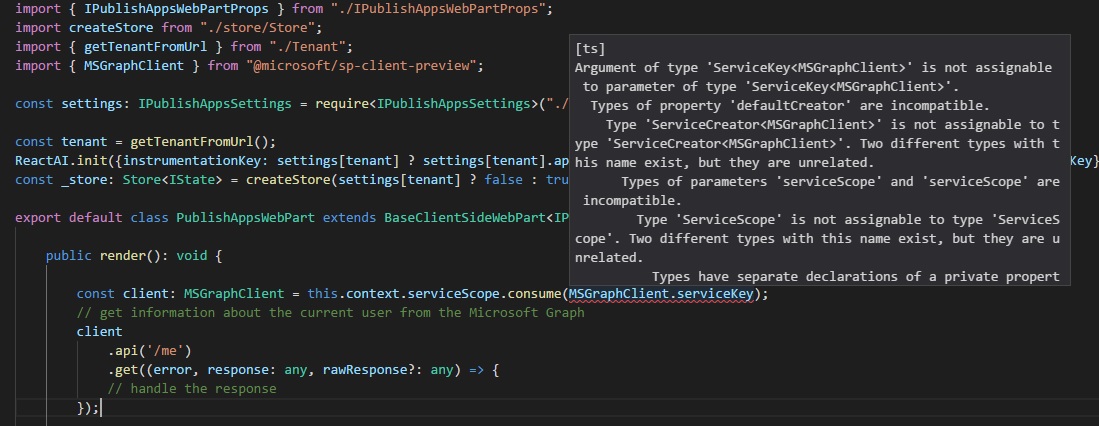
Please let me know your thoughts on this issue. Thanks!
@lahuey Please reopen this issue as it hasn't resolved yet. Thanks!
lipalath-ms
on 5 Jul 2018
@devinprejean GraphHttpClient is a beta API. As of SPFx 1.5, developers will need to use the --plusbeta flag to gain access to APIs that are marked as beta.
@cythomli Are you using "1.5.1-plusbeta" for all of your SPFx packages?
I've verified that this works with a clean project that was generated using the --plusbeta flag. I would delete the node_modules folder and run npm install after verifying that all SPFx packages have the same version.
ghost
on 6 Jul 2018
Yes. Mixing --plusbeta packages with normal packages is unsupported. Can you update these packages and let me know if you're unblocked? Thanks!
"@microsoft/sp-core-library": "1.5.1-plusbeta",
"@microsoft/sp-client-preview": "1.5.1-plusbeta",
"@microsoft/sp-lodash-subset": "1.5.1-plusbeta",
"@microsoft/sp-office-ui-fabric-core": "1.5.1-plusbeta",
"@microsoft/sp-webpart-base": "1.5.1-plusbeta",
ghost
on 6 Jul 2018
@lahuey I see here they don’t talk about using the plus beta flag. Could we get that document updated?
https://docs.microsoft.com/en-us/sharepoint/dev/spfx/use-msgraph
devinprejean
on 6 Jul 2018
@lahuey Thanks for your response. So, I updated the packages you mentioned to 1.5.1-plusbeta, deleted node_modules folder, ran npm install. When I run the app, I don't see any error now but I get a null response:
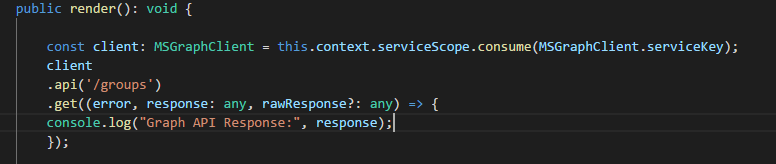

I tested the same in a simple hello-world project. On running, I see the following error:
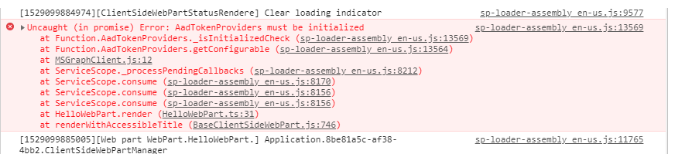
Please let me know if you have any solution for the same. Appreciate your help. Thanks!
lipalath-ms
on 6 Jul 2018
Could you check the value of the error object?
On Thu, Jul 5, 2018, 6:04 PM cythomli notifications@github.com wrote:
@lahuey https://github.com/lahuey Thanks for your response. So, I
updated the packages you mentioned to 1.5.1-plusbeta, deleted node_modules
folder, ran npm install. When I run the app, I don't see any error now but
I get a null response:[image: image]
https://user-images.githubusercontent.com/6519992/42354708-865df0fc-807d-11e8-94e3-47ed70201440.png[image: image]
https://user-images.githubusercontent.com/6519992/42354721-9c548114-807d-11e8-9cb0-606f983b43a9.pngPlease let me know why it is returning a null response. Appreciate your
help. Thanks!—
You are receiving this because you were mentioned.
Reply to this email directly, view it on GitHub
https://github.com/SharePoint/sp-dev-docs/issues/2051#issuecomment-402894626,
or mute the thread
https://github.com/notifications/unsubscribe-auth/AHBvHImTLb8GjoNYcyHs3KPtB7dST-wUks5uDrdkgaJpZM4UqHg2
.
ghost
on 6 Jul 2018
@lahuey Here is the value of error object:

lipalath-ms
on 7 Jul 2018
Issues that have been closed & had no follow-up activity for at least 7 days are automatically locked. Please refer to our wiki for more details, including how to remediate this action if you feel this was done prematurely or in error: Issue List: Our approach to locked issues
 msft-github-bot
on 27 Jan 2020
msft-github-bot
on 27 Jan 2020
Related issues
 patrick-rodgers
·
3Comments
patrick-rodgers
·
3Comments
 ken-harris
·
3Comments
ken-harris
·
3Comments
 byrongits
·
3Comments
byrongits
·
3Comments
 jonthenerd
·
3Comments
jonthenerd
·
3Comments
 mikeparkie
·
3Comments
mikeparkie
·
3Comments
Most helpful comment
This is unfortunately known issue with 1.5 release which will be addressed in a matter of days with 1.5.1 release.