Sp-dev-docs: All calls with MSGraphClient return 403
Category
- [ ] Question
- [ ] Typo
- [x] Bug
- [ ] Additional article idea
SPFx 1.4.1.
Using the MSGraphClient gives a 403 exception since a few days:
Error: 403: Access is denied. Check credentials and try again.
In the manifest we still have the same permissions as before.
We also didn't change any code at all!
See also: https://github.com/SharePoint/sp-dev-docs/issues/1934#issuecomment-394306890
 Nasicus
All 18 comments
The permissions listed in the manifest are used only to provision a permission request that needs to be approved by the tenant admin. It doesn't mean that these permissions are automatically granted. If the tenant admin revoked previously granted permissions, your code could indeed stop working without any changes to it.
To verify the permissions you have to access the Microsoft Graph either:
- see the contents of the JWT token used when calling the MS Graph API using a tool like jwt.io, or
- see the API management page in the SharePoint tenant admin site
 waldekmastykarz
on 5 Jun 2018
waldekmastykarz
on 5 Jun 2018
This issue started yesterday morning without any changes to code or permissions granted. We have the same thing on 4 different tenants, all with calls from MSGraphClient. I've tried re-authorizing the addin (full reinstall including all permissions re-approved) but no luck. It's a breaking issue, we can not continue development right now... If there is a change in code we'd love to know so we can update and continue our project.
 justdevelopment
on 5 Jun 2018
justdevelopment
on 5 Jun 2018
@waldekmastykarz same as @justdevelopment said.... we are also blocked.
Nasicus
on 5 Jun 2018
Have you verified your access token and if the granted permissions match the permissions required by the particular MS Graph API you're calling?
waldekmastykarz
on 5 Jun 2018
Seems like whatever is happening behind the scenes is not requesting the proper permission scopes or something similar.
When I check the token for authorization (using http://jwt.calebb.net/) it's not as we request. The only scope in there is "People.Read user_impersonation", we definitely have a lot more in our manifest, CA etc. This code was working 100% last week, no changes made by us.
justdevelopment
on 5 Jun 2018
We're also seeing this behaviour with a set of SPFx code which is unchanged. Checking the token from SPFx it is only returning the basic login scope. We've tried across several tenants and even removed and retrusted the API in the Tenant Admin UX. All with no changes to this behaviour. Seems to have only been happening since Monday morning (4/6/2018)
 weshackett
on 5 Jun 2018
weshackett
on 5 Jun 2018
I am seeing this exact same issue. No code change, no permissions revocation. All requests to the graph now return 403.
The only additional thing I have seen is, as others have noted, that the token issued only contains the scope "People.Read user_impersonation" which suggests that the scopes added via the manifest are no longer being respected and only the default scope is enabled.
 JHolah
on 5 Jun 2018
JHolah
on 5 Jun 2018
Thanks for reporting, we'll start an investigation right away. Have reported this forward as it seems to be an issue in the underlying platform. We'll get it sorted out asap, but it will take a while still as the capability is currently in preview, so there's no Support for it through official channels yet and the majority of the engineers are in the Pacific areas.
 VesaJuvonen
on 5 Jun 2018
VesaJuvonen
on 5 Jun 2018
Same thing for me, SPFx Extension that worked friday and this week it suddenly stopped working, returning 403 while trying to access Mail.ReadWrite scope.
tried reinstalling and reauthenticating the apirequest in tenantadmin but no luck.
 yonas101
on 5 Jun 2018
yonas101
on 5 Jun 2018
@VesaJuvonen
I understand (and always knew) that it's still in preview, but since day one when SPFx 1.4.1 came out the documentation had this title & headline:
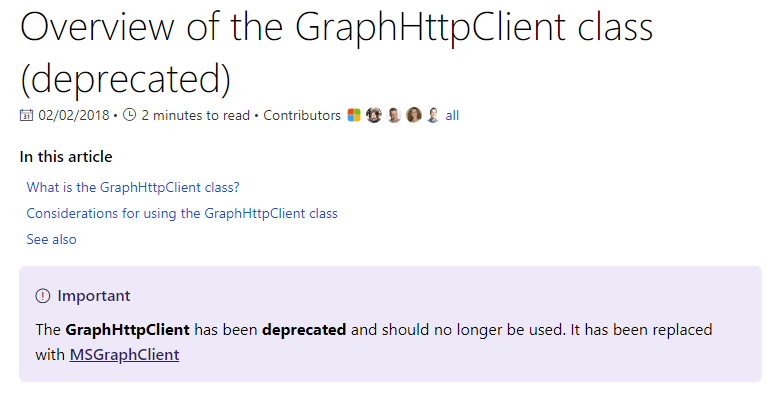
So from the beginning you could either decide to use the already marked as deprecated client or the new one (which was still in preview) - there is no real "in-between"/perfect solution here in my opinion....so the choice for every new project was pretty obvious for us ;)
I don't write this to blame you, just want to tell you "our side" so you can understand why most of us "expect" the new client to work :)
Nasicus
on 5 Jun 2018
Deprecation means that it's supported but we are not investing in that option anymore. It does not mean that it's not supported. We need to still fix certain things around MSGraphClient until we can ship that to be ready for production usage. We absolutely understand the inconvenience this will cause for our ISVs and customers so trying to solve the situation as fast as possible.
Now - in this case, we have not yet identified the root cause of what has happened. We definitely should not break you without any warning even though capability would be "only in preview".
VesaJuvonen
on 5 Jun 2018
Same issue with MSGraphClient here, without updating anything it stopped working. Thanks for investigating the issue @VesaJuvonen
 bastianjohn
on 5 Jun 2018
bastianjohn
on 5 Jun 2018
OK, sorted out the issue. It should be fixed now, and it might take 1 hour for your tokens to expire and then work. The problem had to do with someone removing the scopes associated with the app. We are taking measures to ensure that can't happen in the future.
 patmill
on 6 Jun 2018
patmill
on 6 Jun 2018
@patmill @VesaJuvonen
Confirmed. It's working again - thanks for your help & commitment guys!
Btw: The other one was introduced around the same time frame, maybe a little later and is still not working: https://github.com/SharePoint/sp-dev-docs/issues/1934
(I will close as soon as some of the other guys give feedback :) )
Nasicus
on 6 Jun 2018
@patmill @VesaJuvonen @Nasicus
It is also working for me! Thanks for your quick fix!
bastianjohn
on 6 Jun 2018
Confirm also working for me. Thank you for the quick fix.
JHolah
on 6 Jun 2018
Thanxs for the quick fix, awesome work =)
yonas101
on 6 Jun 2018
Issues that have been closed & had no follow-up activity for at least 7 days are automatically locked. Please refer to our wiki for more details, including how to remediate this action if you feel this was done prematurely or in error: Issue List: Our approach to locked issues
 msft-github-bot
on 27 Jan 2020
msft-github-bot
on 27 Jan 2020
Related issues
 ken-harris
·
3Comments
ken-harris
·
3Comments
 jonthenerd
·
3Comments
jonthenerd
·
3Comments
 thechriskent
·
3Comments
thechriskent
·
3Comments
 nanddeepn
·
3Comments
nanddeepn
·
3Comments
 acksoft
·
3Comments
acksoft
·
3Comments
Most helpful comment
Thanks for reporting, we'll start an investigation right away. Have reported this forward as it seems to be an issue in the underlying platform. We'll get it sorted out asap, but it will take a while still as the capability is currently in preview, so there's no Support for it through official channels yet and the majority of the engineers are in the Pacific areas.