Sp-dev-docs: Unable to add links to blank Hub Site navigation
Category
- [ ] Question
- [ ] Typo
- [x] Bug
- [ ] Additional article idea
Expected or Desired Behavior
When clicking 'Add Link' in a Hub Site Navigation bar that has no links you should be able enter a URL and Title for the link in the dialog that appears. You should then be able to save and see the link in the Nav bar.
Observed Behavior
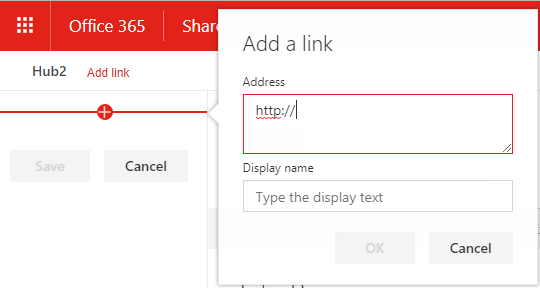
When adding a link from the dialog the navigation side bar is blank and therefore no link is added to the Hub Nav. To workaround you need to cancel the dialog and then click the + in the side bar to get a new dialog which allows links to be added correctly.
Steps to Reproduce
Go to any Hub Site that doesn't have any links in the Hub Nav and click 'Add Link'. Add a URL and title in the box that appears and click OK.
The Hub nav has an 'Add Link' option as there are no existing links. The default dialog shown does not add a link to the sidebar, and by extension Hub nav, after clicking OK.
This works fine as there is an existing link and 'Edit' does not trigger a dialog to add a link automatically.

 365Iain
All 16 comments
Thanks for reporting this! I've checked in a fix, which should roll out in the first week of June.
@VesaJuvonen FYI
 ecraig12345
on 24 May 2018
ecraig12345
on 24 May 2018
Awesome news. Thanks!
365Iain
on 26 May 2018
As of writing 2 x Hub sites created on 13/09/2018 exhibit the same issue - cannot add links to the navigation - the option exists, you get a pop up click save, then links dont update.
Cheers
 RichBurdes1
on 13 Sep 2018
RichBurdes1
on 13 Sep 2018
We are also having this issue. On two different tenants. Cannot add links to navigation. Once we add a url and click save it doesn't update.
 mmdmo2090
on 13 Sep 2018
mmdmo2090
on 13 Sep 2018
Same issue here
 docwisdom
on 13 Sep 2018
docwisdom
on 13 Sep 2018
Me too.
 baskb
on 13 Sep 2018
baskb
on 13 Sep 2018
I was having this issue too. Try adding a link from a document library page or a list page (not a normal page). It opens up the add link in a slightly different spot, but worked for me.
 pbowens
on 14 Sep 2018
pbowens
on 14 Sep 2018
Same issue here too!
 fchopo
on 14 Sep 2018
fchopo
on 14 Sep 2018
Same issue here too. Seems to only happen from the "Home" page. I tried it from the Documents page and it worked! Thanks @pbowens !!
 diver7
on 14 Sep 2018
diver7
on 14 Sep 2018
@diver7 I can confirm that @pbowens workaround does in fact work!
docwisdom
on 14 Sep 2018
Chatted with the team that owns this. There is a bug (as you have pointed out), and a fix has been checked in and should be rolling out across the service over the next week or so. The workaround mentioned here is the best way to deal with the issue at the moment.
 patmill
on 14 Sep 2018
patmill
on 14 Sep 2018
same issue here. The workaround mentioned by @diver7 worked.
 maruthigadde
on 17 Sep 2018
maruthigadde
on 17 Sep 2018
Yes, workaround worked for me too.
Op ma 17 sep. 2018 om 06:19 schreef maruthigadde notifications@github.com:
same issue here. The workaround mentioned by @diver7
https://github.com/diver7 worked.—
You are receiving this because you commented.
Reply to this email directly, view it on GitHub
https://github.com/SharePoint/sp-dev-docs/issues/1831#issuecomment-421887352,
or mute the thread
https://github.com/notifications/unsubscribe-auth/AKNeP8n3DrabI6GGYSiUaM-sfp4lYiShks5ubyK5gaJpZM4T5_CQ
.
baskb
on 17 Sep 2018
Thanks for reporting this! I've checked in a fix, which should roll out in the first week of June.
@VesaJuvonen FYI
I See that same issue again in my tenant (dec 2018). Unable to add blank link . @VesaJuvonen @ecraig12345
 mmohamedbasith
on 19 Dec 2018
mmohamedbasith
on 19 Dec 2018
Trading the workaround (thanks for those that found and posted it), or the intire hub global nav interface for the richness of term store navigation interface borders on byzantine torture! The concept of hub site global navigation is laudable, but the interface is deplorable!
 rdnllc
on 20 Jun 2019
rdnllc
on 20 Jun 2019
Experiencing this same issue in our tenant. Link to /search.aspx not responsive from homepage, but responsive from other site elements.
 KSteenis
on 8 Oct 2019
KSteenis
on 8 Oct 2019
Related issues
 mikeparkie
·
3Comments
mikeparkie
·
3Comments
 waldekmastykarz
·
3Comments
waldekmastykarz
·
3Comments
 ken-harris
·
3Comments
ken-harris
·
3Comments
 byrongits
·
3Comments
byrongits
·
3Comments
 StfBauer
·
3Comments
StfBauer
·
3Comments
Most helpful comment
As of writing 2 x Hub sites created on 13/09/2018 exhibit the same issue - cannot add links to the navigation - the option exists, you get a pop up click save, then links dont update.
Cheers