Sp-dev-docs: 'Cannot read property 'id' of undefined' error when trying to debug a web part using MSGraphClient in the hosted workbench
Category
- [ ] Question
- [ ] Typo
- [x] Bug
- [ ] Additional article idea
Expected or Desired Behavior
Be able to debug web part using MSGraphClient in the hosted workbench while serving from the local web server.
Observed Behavior
After adding the web part to the page, you get the following error in the console:
sp-webpart-workbench-assembly_en-us_9f8c6f0aa83e12a3358a5cca73b1ce92.js:283 Uncaught (in promise) TypeError: Cannot read property 'id' of undefined
    at e.consume (sp-webpart-workbench-assembly_en-us_9f8c6f0aa83e12a3358a5cca73b1ce92.js:283)
    at sp-client-preview.js:94
    at e._processPendingCallbacks (sp-webpart-workbench-assembly_en-us_9f8c6f0aa83e12a3358a5cca73b1ce92.js:283)
    at e.consume (sp-webpart-workbench-assembly_en-us_9f8c6f0aa83e12a3358a5cca73b1ce92.js:283)
    at e.consume (sp-webpart-workbench-assembly_en-us_9f8c6f0aa83e12a3358a5cca73b1ce92.js:283)
    at e.consume (sp-webpart-workbench-assembly_en-us_9f8c6f0aa83e12a3358a5cca73b1ce92.js:283)
    at PersonalCalendarWebPart.render (PersonalCalendarWebPart.ts:33)
    at t (sp-webpart-workbench-assembly_en-us_9f8c6f0aa83e12a3358a5cca73b1ce92.js:569)
    at PersonalCalendarWebPart.t._renderWithAccessibleTitle (sp-webpart-workbench-assembly_en-us_9f8c6f0aa83e12a3358a5cca73b1ce92.js:569)
    at sp-webpart-workbench-assembly_en-us_9f8c6f0aa83e12a3358a5cca73b1ce92.js:569
Tenant is running on the 2018-04-20.015 release of SPFx.
Steps to Reproduce
- scaffold new project using generator v1.4.1 with a React web part
- to the
rendermethod add:
const graphClient = this.context.serviceScope.consume(MSGraphClient.serviceKey);
graphClient.api('me').version('v1.0').get();
- run
gulp serve --nobrowser - in the hosted workbench, add the web part to the canvas
- in the console you get the aforementioned error
 waldekmastykarz
All 12 comments
I'am experiencing the same behavior, when running gulp serve --nobrowser the MSGraphClient does not get initialized.
When deploying the app, the MSGraphClient works as expected.
 RobinBreman
on 9 May 2018
RobinBreman
on 9 May 2018
Same here
 aslanovsergey
on 14 May 2018
aslanovsergey
on 14 May 2018
@waldekmastykarz Any news on this? My team experiencing the same behavior. Will it fix?
Can we create a MSGraphClient in another way as a workaround?
 Maksim-Ilyenia
on 15 May 2018
Maksim-Ilyenia
on 15 May 2018
Same here. Tenants I tried on:
- DEV tenant with Targeted Release
'Normal' tenant with Targeted Release
 mmsharepoint
on 16 May 2018
mmsharepoint
on 16 May 2018
@Maksim-Ilyenia have you tried the following?
- run
gulp bundleandgulp package-solutionbut don't use the--shipflag so that the generated package will point to your local files - deploy the generated package to the app catalog
- run
gulp serve --nobrowserto start the local web server - add the web part to the workbench
waldekmastykarz
on 17 May 2018
@mmsharepoint When you still encounter an error using the steps above add the webpart to a new modern-page (ignoring the remote workbench). This worked for me.
RobinBreman
on 18 May 2018
Thanks for your answer @RobinBreman
But I already knew the steps and they are working for me as well but the original issue and question was who else faces the error when working with the workbench.aspx without deploying the app
One of the main disadvantages of the mentioned workaround is:
Your colleagues cannot work with an already deployed Version of your Webpart as long as you need to debug it (OK, I also know there would be another Workaround for this as well but too much effort ...)
mmsharepoint
on 24 May 2018
Thanks @waldekmastykarz your solution works fine.
 JayakumarB
on 2 Jun 2018
JayakumarB
on 2 Jun 2018
A short update on this with version 1.5.0:
I updated an existing solution from 1.4.1 to 1.5.0 by follwoing the standard approach
https://docs.microsoft.com/en-us/sharepoint/dev/spfx/toolchain/update-latest-packages
and additionally had to use Chris O' Breins nuclear approach:
http://www.sharepointnutsandbolts.com/2018/05/Update-SPFx-version.html
Now the debugging seems to work with the workbench on server-side ("/_layouts/15/workbench.aspx) although I received some timeout issues at first on renewing the token ...("Token renewal operation failed due to timeout") after some F5 they were gone and debugging seems to work now.
mmsharepoint
on 6 Jun 2018
Based on the message from @mmsharepoint, we should be fine with this starting from 1.5. If that's not the case, let's re-open.
 VesaJuvonen
on 7 Jun 2018
VesaJuvonen
on 7 Jun 2018
@waldekmastykarz @VesaJuvonen I followed your solution and my code looks as follows:
import { AadHttpClient } from "@microsoft/sp-http";
import { MSGraphClient } from "@microsoft/sp-client-preview";
const client: MSGraphClient = this.context.serviceScope.consume(MSGraphClient.serviceKey);
client
.api('/me')
.get((error, response: any, rawResponse?: any) => {
console.log(response);
});
Adding web part to the hosted (remote) workbench fails with the following error:
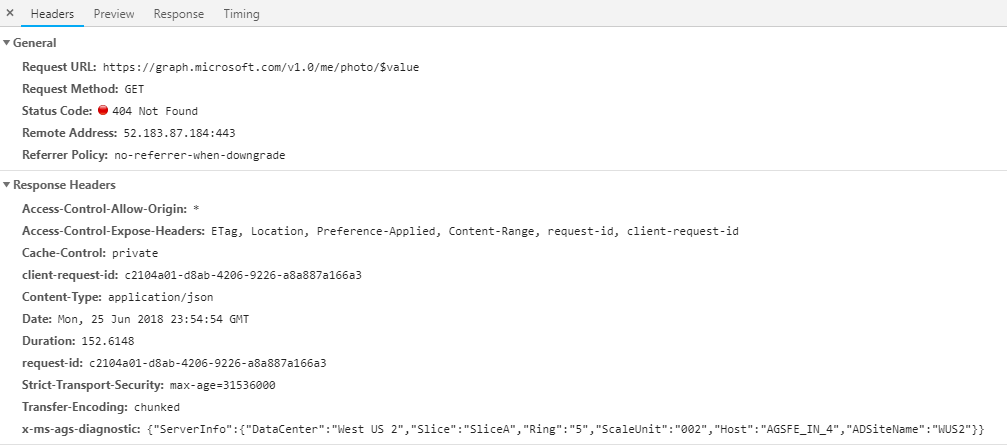
I tested the Authorization token from the Request Headers on https://jwt.io/ and it says invalid signature.
Please let me know if you have any suggestions to resolve this. Appreciate your help.
Thanks!
 lipalath-ms
on 18 Jun 2018
lipalath-ms
on 18 Jun 2018
Issues that have been closed & had no follow-up activity for at least 7 days are automatically locked. Please refer to our wiki for more details, including how to remediate this action if you feel this was done prematurely or in error: Issue List: Our approach to locked issues
 msft-github-bot
on 27 Jan 2020
msft-github-bot
on 27 Jan 2020
Related issues
waldekmastykarz
·
3Comments
 jonthenerd
·
3Comments
jonthenerd
·
3Comments
 byrongits
·
3Comments
byrongits
·
3Comments
 karishmaTCS
·
3Comments
karishmaTCS
·
3Comments
 patrick-rodgers
·
3Comments
patrick-rodgers
·
3Comments
Most helpful comment
@Maksim-Ilyenia have you tried the following?
gulp bundleandgulp package-solutionbut don't use the--shipflag so that the generated package will point to your local filesgulp serve --nobrowserto start the local web server