Sp-dev-docs: Can we change language preferences using Javascript , Pnp js in SharePoint Online.
Can we change language preferences using Javascript , Pnp js in SharePoint Online.
How much time does it take to reflect the changes
Basically i need to a dropdown where i can list the languages . User selects a language and then it will reflect on the page .
 harshdamaniahd
All 7 comments
Hi @harshdamania,
Could you please detail what kind of action are you going to achieve with the code on the page? Please just describe an equivalent of manual actions.
If you're are talking about browser language (settings) which affects on what localization should be shown, I'm afraid this is not possible via JavaScript due security limitations.
For variations, should not it be just as easy as changing the URL (window.location.href = url for other lang)?
 koltyakov
on 11 Apr 2018
koltyakov
on 11 Apr 2018
We use to have this option in previous versions of SharePoint where when a user clicks on his profile , user has the option to change the display language based on the language packs available.Once the user changes the language, for example the default language was English and now user changed it to Danish.
So sharepoint default lables like List setting , webpart header changes and it gets reflected.
This option is not available in SharePoint Online, also just for changing display language user has to go through certain steps, this irritates the user : https://support.office.com/en-us/article/change-your-personal-language-and-region-settings-caa1fccc-bcdb-42f3-9e5b-45957647ffd7
As the user doesnt want to update the language in userprofile , just change the display language for that time.
I hope this explains the issue.
harshdamaniahd
on 12 Apr 2018
Yeah, make sense. Good question. Not sure, that there is another way than changing profile languages.
Those profile settings mentioned above can be changed with PnPjs though.
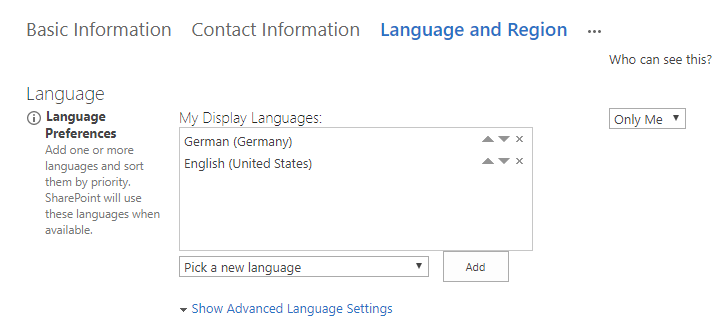
// Gets a user profile MUILanguages properties
pnp.sp.web.currentUser.select('LoginName').get()
.then(user => {
return pnp.sp.profiles
.getUserProfilePropertyFor(user.LoginName, 'SPS-MUILanguages');
})
.then(console.log);
// Updates a user profile MUILanguages properties
pnp.sp.web.currentUser.select('LoginName').get()
.then(user => {
return pnp.sp.profiles
.setSingleValueProfileProperty(user.LoginName, 'SPS-MUILanguages', 'de-DE,en-US');
})
.then(console.log);
Unfortunately, updating SPS-MUILanguages doesn't immediately effects in the UI. For me, it takes a couple of minutes. Maybe somebody else knows the better approach?
koltyakov
on 12 Apr 2018
It's possible, our product does it, but it can take several minutes for it to take effect. I see Andrew Koltyakov has already answered the code for doing it. It is waiting for a low-priority timer job to synchronize the user profile setting with all the site collections. Today it was quick, other times it was as long as 6 minutes.
I can't share how we do it instantly in code, but I can share a trick that power users can use to change their language instantly. If your profile language is blank, then SharePoint will use the browser language to determine the UI language.
Details here
 MartinLaplante
on 12 Apr 2018
MartinLaplante
on 12 Apr 2018
@MartinLaplante, thank you for some insides and sharing the great article! Hope my following comment won't affect on your product success.
So, yes, a timer job updates UIL in site collections for the settings to take place.
With corresponding permissions, we can update it instantly with the code. For site collection admin:
// Gets a user profile MUILanguages properties
pnp.sp.web.siteUserInfoList.items
  .getById(_spPageContextInfo.userId)
  .select('MUILanguages')
  .get().then(console.log);

// Updates a user profile MUILanguages properties
pnp.sp.web.siteUserInfoList.items
  .getById(_spPageContextInfo.userId)
  .update({
    'MUILanguages': 'de-DE,en-US'
  })
  .then(console.log);
// And the admin sees instantanious changes in the UI
Profile props probably should be updated to avoid syncing back with after timer job next run.
User information list can be updated with an account with corresponding permissions. With the desire and necessity, it can be an Azure Function method (with AAD auth validation) which updates users UIL's item instantly on demand.
Could be a more elegant way but secure Azure Function with elevated permissions was the first thing which came to me.
koltyakov
on 13 Apr 2018
Can we access the service?
harshdamaniahd
on 15 Apr 2018
This issue is being closed as part of an issue list cleanup project. Issues with no activity in the past 6 months that aren't tracked by engineering as bugs were closed as part of this inititive. If this is still an issue, please follow the steps outlined to re-open the issue.
 msft-github-bot
on 22 Jan 2020
msft-github-bot
on 22 Jan 2020
Related issues
 acksoft
·
3Comments
acksoft
·
3Comments
 patrick-rodgers
·
3Comments
patrick-rodgers
·
3Comments
 waldekmastykarz
·
3Comments
waldekmastykarz
·
3Comments
waldekmastykarz
·
3Comments
waldekmastykarz
·
3Comments
 jonthenerd
·
3Comments
jonthenerd
·
3Comments
Most helpful comment
@MartinLaplante, thank you for some insides and sharing the great article! Hope my following comment won't affect on your product success.
So, yes, a timer job updates UIL in site collections for the settings to take place.
With corresponding permissions, we can update it instantly with the code. For site collection admin:
Profile props probably should be updated to avoid syncing back with after timer job next run.
User information list can be updated with an account with corresponding permissions. With the desire and necessity, it can be an Azure Function method (with AAD auth validation) which updates users UIL's item instantly on demand.
Could be a more elegant way but secure Azure Function with elevated permissions was the first thing which came to me.