Sp-dev-docs: [HTTP]:400 - [CorrelationId] when attempting to Approval API permissions for SPFx package
Thank you for reporting an issue or suggesting an enhancement. We appreciate your feedback - to help the team to understand your needs, please complete the below template to ensure we have the necessary details to assist you.
Category
- [X ] Bug
This is the straight tutorial from https://docs.microsoft.com/en-us/sharepoint/dev/spfx/use-aad-tutorial,
so it's pretty bad.
My tenant is on "Targeted released for all users."
Here's the package-soution.json
{
"$schema": "https://dev.office.com/json-schemas/spfx-build/package-solution.schema.json",
"solution": {
"name": "spfx-api-scopes-tutorial-client-side-solution",
"id": "f8e40c26-d627-4e26-b0b7-8d6666166e77",
"version": "1.0.0.0",
"includeClientSideAssets": true,
"webApiPermissionRequests": [
{
"resource": "Microsoft Graph",
"scope": "User.ReadBasic.All"
}
]
},
"paths": {
"zippedPackage": "solution/spfx-api-scopes-tutorial.sppkg"
}
}
Expected or Desired Behavior
I should be able to approve the permission request when I log in as a Global Admin. If there is some legitimate reason why the above package should not be manageable, there should be some way more informative message than below.
Observed Behavior
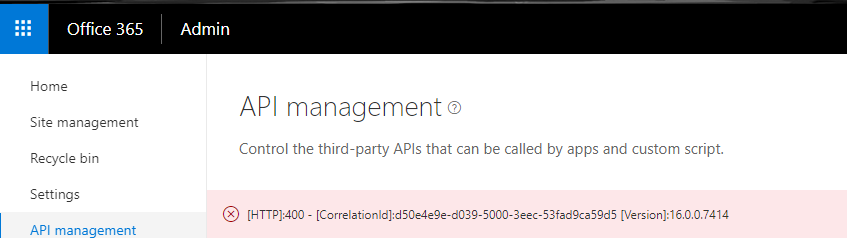
When I looked up the ULS logs the most relevant stack tracke I could find was this:
Exception occured in scope Microsoft.Online.SharePoint.TenantAdministration.Internal.SPOWebAppServicePrincipalPermissionRequest.Approve. Exception=System.ArgumentException: A service principal with the name Microsoft Graph could not be found. Parameter name: resourceName
at Microsoft.Online.SharePoint.TenantAdministration.Internal.SPOWebAppServicePrincipal.Consent(SPOWebAppServicePrincipalPermissionRequest permissionRequest)
at Microsoft.Online.SharePoint.TenantAdministration.Internal.SPOWebAppServicePrincipalPermissionRequestCollection.Approve(SPOWebAppServicePrincipalPermissionRequest permissionRequest)
at Microsoft.Online.SharePoint.TenantAdministration.Internal.SPOWebAppServicePrincipalPermissionRequestServerStub.InvokeMethod(Object target, String methodName, ClientValueCollection xmlargs, ProxyContext proxyContext, Boolean& isVoid)
at Microsoft.SharePoint.Client.ServerStub.InvokeMethodWithMonitoredScope(Object target, String methodName, ClientValueCollection args, ProxyContext proxyContext, Boolean& isVoid)
...but the actually "unexpected" line had now exception message and was much more verbose with no obvious problem in the stack. It ends with:
aefae935-f2f6-44ef-9004-766519a1b86c Stack trace:
at Microsoft.SharePoint.SPListItemCollection.EnsureListItemsData()
at Microsoft.SharePoint.SPListItemCollection.get_Count()
Steps to Reproduce
Build the package exactly as described in https://docs.microsoft.com/en-us/sharepoint/dev/spfx/use-aad-tutorial.
 adambu
All 21 comments
I suffer the same issue. CorrelationId in the error massage changes every time the page is refreshed
 aslanovsergey
on 26 Feb 2018
aslanovsergey
on 26 Feb 2018
I have found a solution. As a workaround approve request through powershell https://docs.microsoft.com/en-us/sharepoint/dev/spfx/use-aadhttpclient#manage-permissions-with-powershell
aslanovsergey
on 26 Feb 2018
And it seems that you need Office 365 Global admin rights to be able to approve reuests
aslanovsergey
on 26 Feb 2018
That doesn't work for me. Well, it doesn't work because when I run Get-SPOTenantServicePrincipalPermissionRequests I don't see any pending requests.
As mentioned in my stack trace, it looks like there was never any Service Principal for "Microsoft Graph" created in my tenant. Just a guess, but that's what is suggested stack I get just before the 400 is returned. @VesaJuvonen does this seem reasonable? Any suggestions to resolve, as I can't really progress troubleshooting until this is resolved.
adambu
on 27 Feb 2018
Correction. I ran SPOTenantServicePrincipalPermissionGrants instead of SPOTenantServicePrincipalPermissionRequests. But the result was the same after getting the request ID and trying to approve it with Approve-SPOTenantServicePrincipalPermissionRequest -RequestId
@aslanovsergey did you get the EXACT same error message "[HTTP]:400 - [CorrelationId]:
adambu
on 27 Feb 2018
Seems that no. Mine was [HTTP]:500 - [CorrelationId]:fafb4c9e-f086-5000-cf6c-825482f885d6 [Version]:16.0.0.7414
aslanovsergey
on 27 Feb 2018
This issue is really unfortunate and related to the resolution logic of the Azure application, which is currently based on the DisplayName of the application principal. When you try to approve the the permission request, code in SharePoint Online side cannot resolve the right Principal in the Azure AD if you are using "Microsoft Graph" in the package-solution.json like instructed in the tutorial.
Technically this is since the application principal DisplayName was "", until it was updated to the latest value.
The workaround is to use the following configuration in the package-solution.json for those tenants where the Principal Name for Microsoft Graph is using old value. Basically use the "Microsoft.Azure.AgregatorService" as the value for the resource entry.
    "webApiPermissionRequests": [
      {
        "resource": "Microsoft.Azure.AgregatorService",
        "scope": "User.ReadBasic.All"
      }
    ]
We are looking into fixing this for the GA release of the MSGraphClient and AadHttpClient. Right now the only solution is to use the alternative Resource entry in package-solution.json file.
You can use Azure PowerShell or Azure CLIs to check the principal name.
 VesaJuvonen
on 2 Mar 2018
VesaJuvonen
on 2 Mar 2018
Thanks Vesa. Your description provides some insight into what is going on behind the scenes.
adambu
on 2 Mar 2018
Thanks everybody for the feedbacks. we are working with the Graph team and a solution will be available by the time we move to feature to General Availability
 lucaband
on 20 Mar 2018
lucaband
on 20 Mar 2018
Good to know what happens behind the scenes. When is the GA expected?
 jayeshvg
on 20 Mar 2018
jayeshvg
on 20 Mar 2018
We have not yet locked the GA schedule as it's dependent on the findings during preview. GA will certainly happen during spring.
VesaJuvonen
on 20 Mar 2018
@VesaJuvonen Any news on the GA dates? Or is it spring 2019? ;-) We have stunning solutions waiting to be published to our customers' environments!
 advdberg
on 22 Jun 2018
advdberg
on 22 Jun 2018
I tried to use this Microsoft.Azure.AgregatorService in my package-solution json file and when i try to approve it tells me A service principal with the name Microsoft.Azure.AgregatorService could not be found
 devinprejean
on 26 Jun 2018
devinprejean
on 26 Jun 2018
I have same error with Microsoft.Azure.AgregatorService. If I discover answer I will post here.
 grahampasmurf
on 6 Aug 2018
grahampasmurf
on 6 Aug 2018
Same problem.
'16.0.0.8126 - A service principal with the name Microsoft.Graph could not be found.
Parameter name: resourceName'
'16.0.0.8126 - A service principal with the name Microsoft.Graph could not be found.
Parameter name: resourceName'
 AmolM27
on 8 Oct 2018
AmolM27
on 8 Oct 2018
The same behavior on my tenant. The workaround @VesaJuvonen mentioned has worked.
When I use the Azure Console to read the service principal and get an empty array but a valid json respond for Microsoft.Azure.AgregatorService
λ az ad sp sp list --spn "Microsoft Graph"
[]
Does anyone have experience if its possible to create the right "Microsoft Graph" principal with "Create a service principal" azure CLI?
Is there an info when the bug will be fixed? Otherwise we have to provide several packages for our customers.
 seriewe
on 12 Oct 2018
seriewe
on 12 Oct 2018
@seriewe I have tried but nothing works for me,
'16.0.0.8203 - A service principal with the name Microsoft.Azure.AgregatorService could not be found.
Parameter name: resourceName' if i use the workaround.
I tried PnP PowerShell as well
Connect-PnPOnline –Url
Grant-PnPTenantServicePrincipalPermission -Scope "Mail.Read" -Resource "Microsoft.Graph"
and that give me: 'Grant-PnPTenantServicePrincipalPermission : The remote server returned an error: (401) Unauthorized.'
I am SharePoint Administrator on the tenancy. Do I need to be Global Administrator as well. Does anyone know?
AmolM27
on 12 Oct 2018
@AmolM27 As you are granting permissions to Azure AD/Graph, I think this does require global admin access.
 CloudDesignBox
on 8 Apr 2019
CloudDesignBox
on 8 Apr 2019
Tonight I added a solution with webApiPermissionRequests with app name + user_impersonation, then I updated the solution by adding a new webpart, and i set isDomainIsolated to true, and put it to the appcatalog with an new version.
Today my tenant admin wanted to approve the request and strange error come in the UI and in the powershell ... same identifierUri... .
Does someone have a good trick to solve this deadlock?
 FlorianGrimm
on 10 May 2019
FlorianGrimm
on 10 May 2019
@VesaJuvonen has this been addressed? We're seeing this occur within a new SPFx web part built on v1.7.0 of SPFx that has the config below and making GET queries to https://graph.microsoft.com/v1.0/me/joinedTeams. It seems to work in some O365 tenants, but not all.
Do you have an example of the Azure PowerShell or Azure CLI approach to obtaining the value of the resource entry? :-)
"webApiPermissionRequests": [
  {
    "resource": "Microsoft Graph",
    "scope": "User.Read.All"
  },
  {
    "resource": "Microsoft Graph",
    "scope": "Group.Read.All"
  }
]
 skaggej
on 5 Jun 2019
skaggej
on 5 Jun 2019
@skaggej - as this issue is closed our engineering system is not picking up any updated requests. Can you please submit a new issue with the details on what you are seeing, so that we can route the issue resolution to right engineer. This issue should be fully resolved, but if it's not, we definitely need more details on it.
VesaJuvonen
on 7 Aug 2019
Related issues
 patrick-rodgers
·
3Comments
patrick-rodgers
·
3Comments
 acksoft
·
3Comments
acksoft
·
3Comments
 StfBauer
·
3Comments
StfBauer
·
3Comments
 zerovectorspace
·
3Comments
zerovectorspace
·
3Comments
 thechriskent
·
3Comments
thechriskent
·
3Comments
Most helpful comment
We have not yet locked the GA schedule as it's dependent on the findings during preview. GA will certainly happen during spring.