Sp-dev-docs: Incorrect resource property reference in the schema for webApiPermissionRequests
Category
- [ ] Question
- [ ] Typo
- [x] Bug
- [ ] Additional article idea
Expected or Desired Behavior
Following the tutorial to test out the new Graph and AAD clients (https://docs.microsoft.com/en-us/sharepoint/dev/spfx/use-aad-tutorial), it mentions adding the Microsoft Graph permission scope to package-solution.json file, but the schema validation shows an error on the resource property.
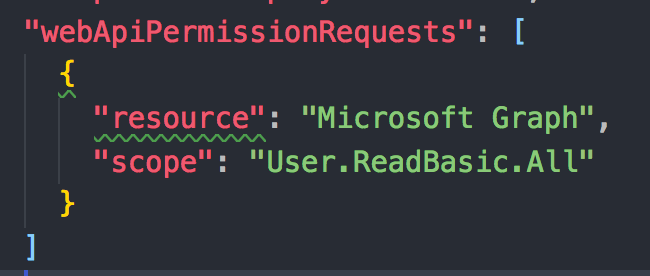
It seems that in the current schema, the property has to be resourceId, but changing it results in a build error:
Error - Unknown
 JSON validation failed:
/v1.4.1/config/package-solution.json

Error: #/solution/webApiPermissionRequests/0
       Missing required property: resource
Error: #/solution/webApiPermissionRequests/0
       Additional properties not allowed: resourceId
Probably the schema has to get updated with the correct property name.
 estruyf
All 12 comments
The schema at https://dev.office.com/json-schemas/spfx-build/package-solution.schema.json says resourceId, which is what VSCode uses for validation, but the @microsoft/sp-build-core-tasks version of the schema says resource.
 wictorwilen
on 16 Feb 2018
wictorwilen
on 16 Feb 2018
Some extra info; the generated AppManifest.xml in the .sppkg file uses ResourceId. (and no, if you change it to resource the upload will fail with an invalid manifest error)
wictorwilen
on 16 Feb 2018
Same issue, are there any workarounds? resource causes error when uploaded to app catalog and ResourceId errors on build....
 CloudDesignBox
on 16 Feb 2018
CloudDesignBox
on 16 Feb 2018
Looking into this. Can you confirm that you are running in a FirstRelease tenant (not user, but tenant)?
 patmill
on 16 Feb 2018
patmill
on 16 Feb 2018
OK. Sorted this one out. The bug got a bit confused, because it is looping in part of this bug (https://github.com/SharePoint/sp-dev-docs/issues/1365) as well. The workaround for this is "ignore the squiggles". We'll update the online json schema as soon as possible. Unfortunately that might take a bit longer than we would like.
patmill
on 16 Feb 2018
Yes, it works perfectly if you ignore the squiggly warnings in VS Code. But as you said, #1365 is what's prohibiting this now. And yes, it's a targeted release tenant
wictorwilen
on 16 Feb 2018
so, considering #1365 has been resolved, you guys think that this one can be closed as well?
 lucaband
on 19 Feb 2018
lucaband
on 19 Feb 2018
It now works fine for me, although the schema still is incorrect....and wiggly lines exist but app does work in app catalog without errors.
CloudDesignBox
on 19 Feb 2018
@lucaband - keep this until you've fixed the schema error in VS Code
wictorwilen
on 19 Feb 2018
Let's keep this indeed open until we get the schema updated. Work in progress.
 VesaJuvonen
on 20 Feb 2018
VesaJuvonen
on 20 Feb 2018
Schema appears fixed... can't repo.... closing as fixed.
 andrewconnell
on 1 Feb 2019
andrewconnell
on 1 Feb 2019
Issues that have been closed & had no follow-up activity for at least 7 days are automatically locked. Please refer to our wiki for more details, including how to remediate this action if you feel this was done prematurely or in error: Issue List: Our approach to locked issues
 msft-github-bot
on 28 Jan 2020
msft-github-bot
on 28 Jan 2020
Related issues
 waldekmastykarz
·
3Comments
waldekmastykarz
·
3Comments
 karishmaTCS
·
3Comments
karishmaTCS
·
3Comments
 Ralms
·
3Comments
Ralms
·
3Comments
 zerovectorspace
·
3Comments
zerovectorspace
·
3Comments
 jonthenerd
·
3Comments
jonthenerd
·
3Comments
Most helpful comment
The schema at
https://dev.office.com/json-schemas/spfx-build/package-solution.schema.jsonsaysresourceId, which is what VSCode uses for validation, but the@microsoft/sp-build-core-tasksversion of the schema saysresource.