Sp-dev-docs: Annoying package-solution warning for extensions
Category
- [ ] Question
- [ ] Typo
- [X] Bug
- [ ] Additional article idea
Expected or Desired Behavior
When packaging an SPFx solution using VSTS build pipelines I expect that the gulp package-solution -- ship command should work. and not abort after that task. The warning is nice, but should rather be textual information than a warning.
Observed Behavior
When having an application customizer in the solution the package-solution command gives the following warning:
Warning - XXXApplicationCustomizer: Admins can make this solution available to all sites in the organization, but extensions won’t automatically appear. SharePoint Framework extensions must be specifically associated to sites, lists, and fields programmatically to be visible to site users.
This is interpreted by VSTS as an error and the build is aborted.
Steps to Reproduce
Create a simple VSTS build definition based on the npm gulp template and add the build, bundle and package-solution npm tasks and see it fail on the package-solution task.
 wictorwilen
All 13 comments
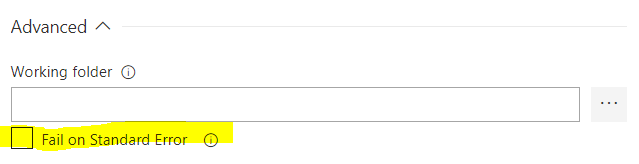
The idea of the warning was to let users know that they were in a potentially dangerous state, as their extensions will need to get explicitly enabled in the site collection level. However, this warning shouldn't be causing your VSTS builds to fail (i.e. it shouldn't be causing the build process to return a non-zero error code). Do you have the build task configured to fail if something is written to stderr?
 nickpape
on 13 Feb 2018
nickpape
on 13 Feb 2018
Thanks @nickpape-msft. I understand why it's there - but it's more good thinking than real value. First of all I do not think that any admins will run this gulp command and thus never ever see it, so it kinda defeats its purpose.
For me this warning could be removed, and instead be shown at "install time". But if you want to keep it - just create a text message, no warning, no error.
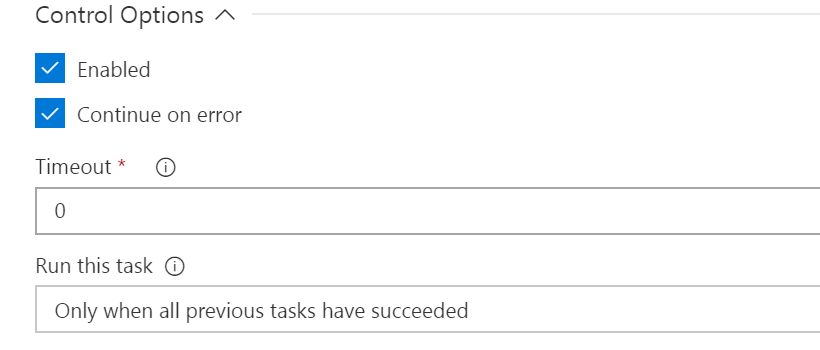
To get this to work meanwhile, I have to use "Continue on Error" in VSTS (on the Gulp task). I can't se that "fail on standard error" you have. It works, but doesn't look pretty since the builds are only shown as partially succeeded.
wictorwilen
on 13 Feb 2018
One mitigation for now would be to add a warning suppression to the build.. e.g.
gulpfile.js
build.addSuppression(/XXXApplicationCustomizer\: Admins can make this solution available to all sites in the organization/);
https://github.com/Microsoft/web-build-tools/blob/master/core-build/gulp-core-build/README.md#addsuppressionsuppression-string--regexp
nickpape
on 13 Feb 2018
Tried that, but did not get that to work. Are you sure the suppressions works for the package-solution command?
wictorwilen
on 14 Feb 2018
I've just tested it and it's working @wictorwilen. Here is my gulpfile.js
'use strict';

const gulp = require('gulp');
const build = require('@microsoft/sp-build-web');
build.addSuppression(`Warning - [sass] The local CSS class 'ms-Grid' is not camelCase and will not be type-safe.`);
build.addSuppression(/Warning\s-\s[\w]+ApplicationCustomizer\: Admins can make this solution available to all sites in the organization/);

build.initialize(gulp);
Update: this works as well (shorter):
build.addSuppression(/[\w]+ApplicationCustomizer\: Admins can make this solution available to all sites in the organization/);
 waldekmastykarz
on 14 Feb 2018
waldekmastykarz
on 14 Feb 2018
Gotta try it again. I did EXACTLY that the other day
wictorwilen
on 14 Feb 2018
SPFx 1.4.0?
waldekmastykarz
on 14 Feb 2018
It did work now, probably got that Regexp wrong then. And yes, it's 1.4.
Thanks @waldekmastykarz and @nickpape-msft
This should probably be added to the docs.
wictorwilen
on 14 Feb 2018
I've identified and checked-in a longer-term fix for this issue which will make it so that the warnings that are written during this package-solution task do not cause the build to return a non-zero error code. We should see this in the next release.
nickpape
on 16 Feb 2018
Thanks @nickpape-msft I was getting that warning all this week and was really confused by it. Also I have a quick question, if anyone is willing to help out. I built a simple Application Customizer to add a custom header. I've built and packaged it, and dropped the sppkg file up to the app catalog. I've published the app for all sites, but app is just not available to add from any site. I've got other custom apps that do work, but this one just won't show up even though it shows enabled, valid, deployed and no errors the app catalog.
What am I missing?
 BryantAvey
on 23 Feb 2018
BryantAvey
on 23 Feb 2018
@BryantAvey If you used tenant-wide deployment for the .sppkg with Application Customizer in it, then the feature enabling it on sites won't be activated. Instead, you'd have to enable it yourself using a custom action.
waldekmastykarz
on 23 Feb 2018
Seems like issue was fixed as commented here: https://github.com/SharePoint/sp-dev-docs/issues/1350#issuecomment-366122504
 andrewconnell
on 1 Feb 2019
andrewconnell
on 1 Feb 2019
Issues that have been closed & had no follow-up activity for at least 7 days are automatically locked. Please refer to our wiki for more details, including how to remediate this action if you feel this was done prematurely or in error: Issue List: Our approach to locked issues
 msft-github-bot
on 28 Jan 2020
msft-github-bot
on 28 Jan 2020
Related issues
 bengtmoss
·
3Comments
bengtmoss
·
3Comments
 zerovectorspace
·
3Comments
zerovectorspace
·
3Comments
 patrick-rodgers
·
3Comments
patrick-rodgers
·
3Comments
 nanddeepn
·
3Comments
nanddeepn
·
3Comments
 christianbueschi
·
3Comments
christianbueschi
·
3Comments
Most helpful comment
I've identified and checked-in a longer-term fix for this issue which will make it so that the warnings that are written during this
package-solutiontask do not cause the build to return a non-zero error code. We should see this in the next release.