Sp-dev-docs: Context not being reinitialized between pages
This issue seems related to #544. I talked with Vesa on twitter and he asked me to create a new issue.
Category
- [ ] Question
- [ ] Typo
- [X] Bug
- [ ] Additional article idea
Expected or Desired Behavior
We have an SpFx web part that renders an editing experience for additional list fields on the page. The web part is upgraded to the latest 1.4 drop. The editors can edit the page and then select a value from a dropdown. On save, the web part persists the field value for the current page. This works as intended on a single page.
Observed Behavior
When standing on a page with the web part present, and then creating a new page, and adding this web part again, the problem appears. Seemingly everything works as intended, but when selecting a value in the dropdown and saving the page, the previous page's value is updated, not the current one. When creating another page and repeating this again, the _first_ page is updated.
Investing this further, it looks like this.context is not being reinitialized. Specifically the page id (which we are using) is not updated, and always contains the first, initial page that has this web part. This property is this.context.pageContext.listItem.id. I haven't noticed (nor looked for to be fair) if any other properties are updated later.
Our code uses OnInit to create the pnp context each time, but while debugging it doesn't look like the context changes in this method.
Another observed behavior is that the web part's console logging is stacking on subsequent pages. I.e. if you've created 5 pages in one go, the web part's log messages are appearing in the console 5 times with the exact same messages. Not sure if this is related, or a symptom of something else.
Steps to Reproduce
- Create a web part that uses this.context.pageContext.listItem.Id
- Add web part to a page
- Create a new page while standing on the first page
- Add the same web part to the new page
- Observe that this.context.pageContext.listItem.Id has the Id of the initial page
 tarjeieo
All 24 comments
Hi @tarjeieo, looks like there is a bug in the compose scenario. The pageContext is not updated. That said, the code behaves correct in the page navigation scenario. We are look at fixing this. Thank you for the report.
 manishgarg1
on 18 Jan 2018
manishgarg1
on 18 Jan 2018
I have the same problem. I created a ListViewCommandSet extension, and I use the pageContext to identify the list in which I currently am, and when switching between lists using the quick launch, the pageContext.list.title is updated just fine on the first click of each list link, however when clicking back on a list that I previously clicked on, now the pageContext.list.title has the value of the previously clicked list.
For now, I went with a workaround that checks the URL instead of the page context to get the current list I am in, but it's kinda sketchy.
By the way I think this is not an SPFX issue but a SPO issue in general, because you can replicate the problem simply by going to Library Settings many times when switching library, at some point the Library Settings will bring you to the settings page of the previously clicked library, it really is something with the cache / MDS.
Update : Interestingly, the pageContext seems updated correctly when using it in the onExecute of my extension (which is when the extension button is clicked) instead of the onInit. This is interesting because it means that it's most likely a lifecycle issue, as it looks like the onInit exposes a pageContext that isn't updated yet but seems to be updated later in the lifecycle
 spplante
on 27 Mar 2018
spplante
on 27 Mar 2018
Facing the same issue here. Anyone know if this is going to be fixed soon? I'm suddenly scared that several things I've built are broken because they can't rely on the the page context being correct.
 tdwhite0
on 26 Apr 2018
tdwhite0
on 26 Apr 2018
Hi @tdwhite0, I use the same workaround as @spplante by getting the item from the URL of the current page, but it feels a little bit hacky. Would be nice with a fix for this indeed.
tarjeieo
on 27 Apr 2018
Actually as I said in my update, I figured out that the context is actually valid 100% of the time when used in the onExecute method rather than the onInit.
So I reverted back to using the context but did everything in the onExecute instead.
It’s still a bug that needs to be fixed however.
spplante
on 27 Apr 2018
@spplante Mine is happening inside webparts, which don't look like they have an onExecute method. Looks like I might need @tarjeieo 's hack.
tdwhite0
on 27 Apr 2018
I see, didn’t use it in a WebPart yet
spplante
on 27 Apr 2018
So, I'm struggling to reproduce this. I've created an application extension that writes out some information to the header and the console.
I see two specific areas that are problematic, and that need to get fixed
1 - Creating a new page doesn't trigger a navigate / context update
2 - The interaction with Search is dodgy at times
WIth respect to this line - "Update : Interestingly, the pageContext seems updated correctly when using it in the onExecute of my extension (which is when the extension button is clicked) instead of the onInit. This is interesting because it means that it's most likely a lifecycle issue, as it looks like the onInit exposes a pageContext that isn't updated yet but seems to be updated later in the lifecycle"
There might be a misconception of the lifecycle. OnInit will be called the first time the extension is loaded. It won't get called on every navigate. You'll need to hook into the OnNavigate() application event if you are storing information, or access the context object at the point in time you need the data.
Does that makes sense?
 patmill
on 27 Apr 2018
patmill
on 27 Apr 2018
@patmill that's in fact something I noticed, but I couldn't find a regular patern in which the onInit was called si I thought it was a bug. Indeed, the documentation has always been clear about the fact that the onInit was only called the first time the extension is loaded, but I was assuming that between libraries (different pages) the extension would be loaded for the first time everytime you change page...
Then I figured that as you said, it's not the case, once the extension has been loaded even if you switch page (switching libraries using the quick launch for example) the extension was somehow cached and not reloaded when going back to the original page.
However, when switching pages multiple times, it ends up being reloaded once a while, so lets say you switch page 20 times I was entering the onInit 3-4 times within the 20 page reloads, so the inconsistency made me believe that it wasn't by design.
As for the onNavigate() event, I had never heard of it before, yes it would make sens but do you have an example of how to use it in a List Command Extension? Because the following seems to be only available in application customizers :
this.context.application.navigatedEvent
Also note that it's been a while since I had the problem, the problem has been documented at plenty of places like this one https://github.com/SharePoint/sp-dev-docs/issues/1042 and it seems that a fix was implemented on april 24th, no idea if it works better as of today.
spplante
on 27 Apr 2018
I am seeing some similar behavior around this. Previously I used to get a partial page load when navigating between pages in the same modern team site. This was a little frustrating because as mentioned above things like list item id didn't update but I could use the Url in certain cases on click events.
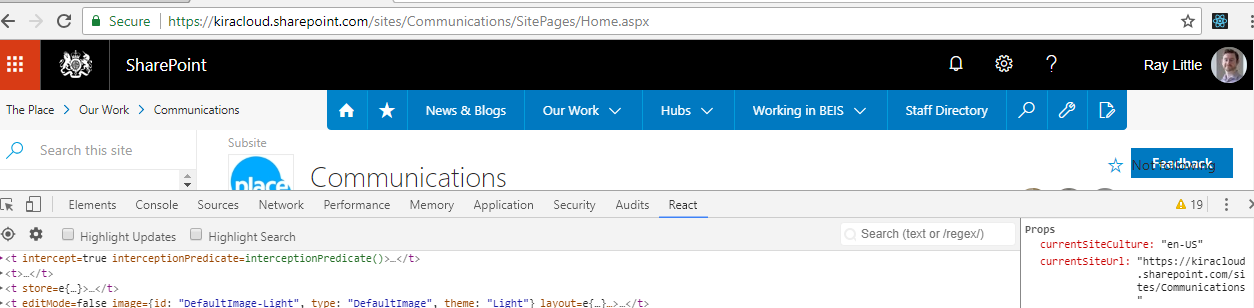
It now seems like the context isn't updating when moving between modern team sites now so when I access a modern team site I pass the current site URL to my react component but when I click a link to go to another modern team site my react component isn't reloaded it still has the original site URL, see below
First load
After link click
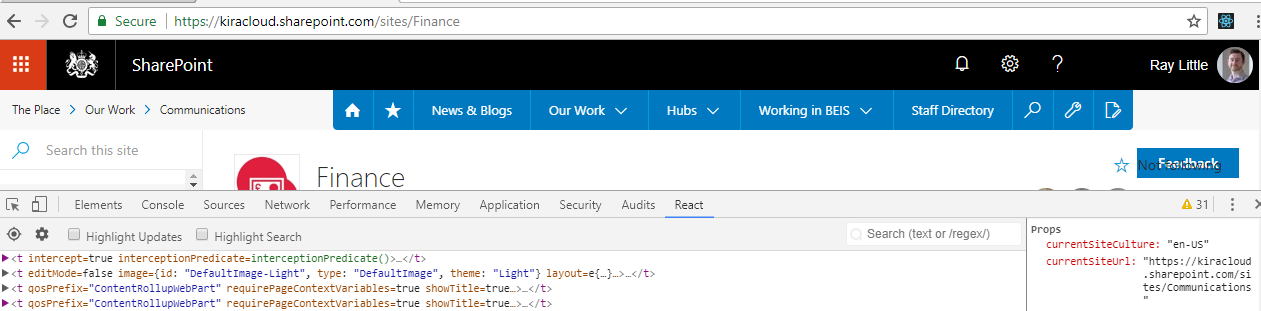
@VesaJuvonen could you confirm this behavior? I have setup the customizer as per the documentation with the changeEvent being registered in the onInit. Others are suggesting onExecute can you confirm the correct behavior expected and the correct event in which to register the customizer.
Thanks much appreciated
 raymondlittle100
on 31 May 2018
raymondlittle100
on 31 May 2018
@raymondlittle100 we're successfully using navigatedEvent but there is a huge amount of confusion around this.
We had a secondary issue where we didn't update our PnP JS context in our data-getter/service after navigation. This was fixed by switching to the second initialisation method in PnP JS.
 rmillener
on 3 Jun 2018
rmillener
on 3 Jun 2018
@rmillener thanks for the response.
Its good to know it isn't just me experiencing this and there is a way to resolve this its just the confusion around is this a bug or expected behavior going forward. I'm reluctant to make code changes I may have to revert if its a bug but if its the expected behavior it would be good to know the recommended approach to initialize customizers going forward
raymondlittle100
on 4 Jun 2018
Any updates on this one in a web part scenario? Struggling with the exact same issue...
 michelsmit
on 6 Feb 2019
michelsmit
on 6 Feb 2019
@michelsmit - can you clarify what you are seeing? This thread is a bit of a mess at the moment, with webparts, application customizers, command sets, etc.
For webparts, your entire webpart should be disposed and created when you navigate between pages. There shouldn't be a need to have the context "reinitialized" or updated, because the lifetime of a webpart context should be one page.
patmill
on 6 Feb 2019
@patmill - We've developed a SPFX webpart which loads page property by querying the list item using the list id and list item id (using pnpjs).
In a normal scenario (page exists and is saved once) this works, also when navigating between pages.
When this webpart is placed on a new page (NewPage.aspx) the webpart fails, no problem in this scenario, but problem is the underlying context still exposes the old list item id (so the id of the page on which the create page button is clicked), also after the new page has been saved.
As a workaround we're looking into using the url instead of the list item id but this becomes an issue when the newpage is saved, the webpart won't load again so data is not refreshed.
Do you have any guidance on this? See attached ZIP file which contains a small recording to show the issue. Notice I log the list id, list item id and server request path which are part of the pageContext within the webpart context. When a new page is created (or a copy is made), the pageContext of the page which initiated the action are available. Only when refreshing the saved page (F5), the updated context gets loaded.
michelsmit
on 7 Feb 2019
I've a similar problem with my ListViewCommandSet. The this.context.pageContext.list.id is not updated when navigating between document libraries.
I create multiple lists and show them on the Quick Launch. When I navigate between them and click on my button the list id is always the first one.
@override
public onExecute(event: IListViewCommandSetExecuteEventParameters): void {
....
this.context.pageContext.list.id // not updated
}
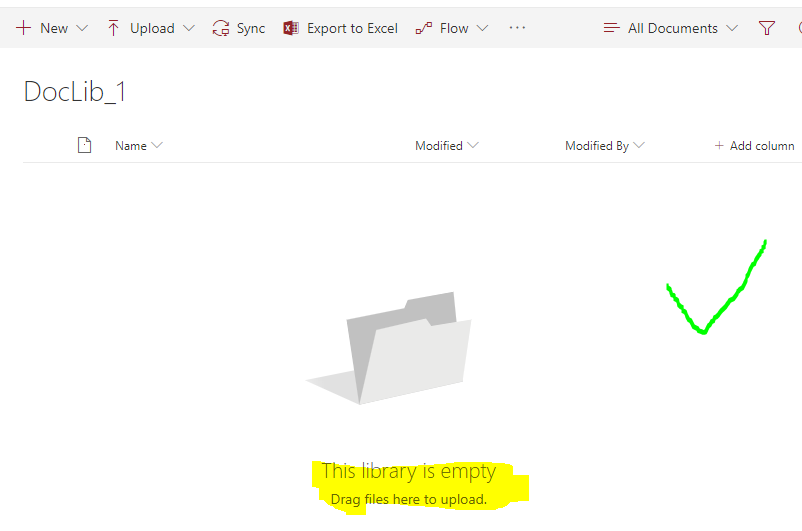
I realized that this happens on a single tenant. In another tenant it works. I don't know the difference between them but I can see that the document library looks different.
This is the one which does not work

This doclib works
 barisbikmaz
on 13 Jun 2019
barisbikmaz
on 13 Jun 2019
My problem may not be entirely related to this. I have a list view command set that shows a button in command bar. On click it queries for the selected item's properties. I am using sp.web.lists.getById(this.context.pageContext.list.id.toString()) to get the list. It works fine when I go the document library because the list.id reflects that of the Document library. But when I add the document library as a webpart to some modern page, the list.id reflects that of the 'SitePages' library. Please let me know if that is how pageContext is supposed to behave in my case. If so, how to get the correct list id?
 RamaKaryam
on 12 Aug 2019
RamaKaryam
on 12 Aug 2019
@RamaKaryam I had the same question here #4238. Seems to be expected behabiour, which I also don't understand. Currently I've to hide my command button when used in webparts. Really ugly.
barisbikmaz
on 13 Aug 2019
Still having this problem with SPFX 1.9.1. The context is not updated when switching between lists in a site.
barisbikmaz
on 16 Sep 2019
@RamaKaryam & @barisbikmaz, we're facing this issue too - a commandset in a webpart does not work because of there being no way to get the context, since pageContext is not applicable to the list webpart.
I've found issue #3396, which is now being tracked internally which would address this. There is a uservoice feature request in there which would address this, which probably needs upvoting.
 ghost
on 9 Oct 2019
ghost
on 9 Oct 2019
@tobiaswest83 I want to make sure that we are talking about two different issues.
- Command Set can't get the id of the list within WebParts #4238, #4687
- This issue here adresses the problem that when you have a commandset on a list and you navigate between different lists in the same web, the spcontext object within the commandset returns always the context of the first library.
barisbikmaz
on 10 Oct 2019
@barisbikmaz, yes, to clarify, we are talking about two issues, #4687 was closed as a dupe of this issue but several issues, including the issue with the command set have been discussed in this thread and it's a bit confusing.
3396 discusses the issue regarding the Command Set explicitly and should, I believe, be where the Command Set issue should be discussed going forward. Was drawing your attention to it as you seem to be facing this issue too on 13th Aug.
ghost
on 10 Oct 2019
Can reproducee this in my tests, even with a clean Yeoman SharePoint Generator project.
Just make a log with the list id in one of the events and navigate between two different lists via the SP navigation. The context is updated only the first time a list is visited.
This seems to be a big bugand makes SPFx command sets totally unusable.
import { override } from '@microsoft/decorators';
import {
  BaseListViewCommandSet,
  IListViewCommandSetListViewUpdatedParameters,
  IListViewCommandSetExecuteEventParameters
} from '@microsoft/sp-listview-extensibility';


export interface ICheckItCommandSetProperties {
}

export default class CheckItCommandSet extends BaseListViewCommandSet<ICheckItCommandSetProperties> {
  @override
  public onInit(): Promise<void> {
    console.log(`ID: ${this.context.pageContext.list.id}`);
    return Promise.resolve();
  }

  @override
  public onListViewUpdated(event: IListViewCommandSetListViewUpdatedParameters): void {
    this.onInit();
    console.log(`ID: ${this.context.pageContext.list.id}`);
  }

  @override
  public onExecute(event: IListViewCommandSetExecuteEventParameters): void {
    console.log(`ID: ${this.context.pageContext.list.id}`);
  }
}
@VesaJuvonen any updates on this?
 Philluxx
on 11 Oct 2019
Philluxx
on 11 Oct 2019
I had the same problem with Extensions. You could use the solution below to reload the page if the context is not updated, I hope this helps.
https://www.eliostruyf.com/handling-page-creation-events-spfx-application-customizer/
 carlosfac
on 5 May 2020
carlosfac
on 5 May 2020
Related issues
 nanddeepn
·
3Comments
nanddeepn
·
3Comments
 thechriskent
·
3Comments
thechriskent
·
3Comments
 jonthenerd
·
3Comments
jonthenerd
·
3Comments
 mikeparkie
·
3Comments
mikeparkie
·
3Comments
 waldekmastykarz
·
3Comments
waldekmastykarz
·
3Comments
Most helpful comment
Can reproducee this in my tests, even with a clean Yeoman SharePoint Generator project.
Just make a log with the list id in one of the events and navigate between two different lists via the SP navigation. The context is updated only the first time a list is visited.
This seems to be a big bugand makes SPFx command sets totally unusable.
@VesaJuvonen any updates on this?