Sp-dev-docs: Client Web Part not visible in "Add > Web Part" gallery on ribbon
Category
- [ ] Question
- [ ] Typo
- [x] Bug
- [ ] Additional article idea
Expected or Desired Behavior
I create Client Side Web Part on SP2016 with DEC2017 CU using SPFx Yeoman Generator v1.4, and want to add it to page as demonstrated on video here https://docs.microsoft.com/en-us/sharepoint/dev/spfx/sharepoint-2016-support
Observed Behavior
Web part is not visible in web part gallery - no "Other" nor "Under Development" categories exist
Steps to Reproduce
- I create new SPFx web part with pure JavaScript
- I use default scaffold, no custom code is added
- I configure web part to deploy assets to SiteAssets library on root site, in subfolder named spfx. json file format is enabled on farm
- I build and package web part
- I copy sppkg to app catalog, grant permissions to deploy the web part
- I add webpart app to desired root web in site collection (used both Team Site and Dev site templates)
- When I edit page and try to add web part to page from web part gallery (in page ribbon), web part is not visible in any of the web part categories.
 panjkov
All 33 comments
@panjkov - Could you send the package to us in order for us to investigate the issue?
 GrahamMcMynn
on 28 Dec 2017
GrahamMcMynn
on 28 Dec 2017
Yes sure. Can I attach it to the thread?
Get Outlook for iOShttps://aka.ms/o0ukef
From: GrahaMc notifications@github.com
Sent: Thursday, December 28, 2017 7:30:40 PM
To: SharePoint/sp-dev-docs
Cc: Dragan Panjkov; Mention
Subject: Re: [SharePoint/sp-dev-docs] Client Web Part not visible in "Add > Web Part" gallery on ribbon (#1188)
@panjkovhttps://github.com/panjkov - Could you send the package to us in order for us to investigate the issue?
—
You are receiving this because you were mentioned.
Reply to this email directly, view it on GitHubhttps://github.com/SharePoint/sp-dev-docs/issues/1188#issuecomment-354333163, or mute the threadhttps://github.com/notifications/unsubscribe-auth/AIAjSdWsCeYwIweqPcZ21DfJet_Xjd2vks5tE95QgaJpZM4ROUQP.
panjkov
on 28 Dec 2017
I also have this issue after upgrading to 1.4. If you need an additional package to check against please let me know.
 Zytegeist
on 28 Dec 2017
Zytegeist
on 28 Dec 2017
h-1 spfx.zip
In the zip file I uploaded sppkg and asset files. Let me know if you need anything else.
panjkov
on 29 Dec 2017
thx @panjkov for the package. @Zytegeist - One is enough for now, but will come back later, if needed. Thx for the offer.
 VesaJuvonen
on 29 Dec 2017
VesaJuvonen
on 29 Dec 2017
Now, I created another solution with identical settings, and everything works as expected. It seems that it is something wrong in the package that I uploaded - so investigation would be helpful. I suggest that we keep this issue open until you complete the investigation.
panjkov
on 29 Dec 2017
@panjkov - thx for following up on the additional findings. I can confirm that we can reproduce the issue in our SP2016 environment with the given package. Since also @Zytegeist is having this same issue, we'll absolutely have a closer look at the root cause even though it was apparently not there with another solution. My personal hunch is around something in the solution naming/web part naming, which in certain scenarios are causing exceptions.
I'll get back on the issue when we have figure out the root cause.
VesaJuvonen
on 3 Jan 2018
I experienced similar issue, I can't use my custom webpart in my site. However, I am using SharePoint Online but not SharePoint 2016.
Here is what I did:
I created a webpart named "Departmental News" using SharePoint Framework v1.4, and I can debug it in my SharePoint site
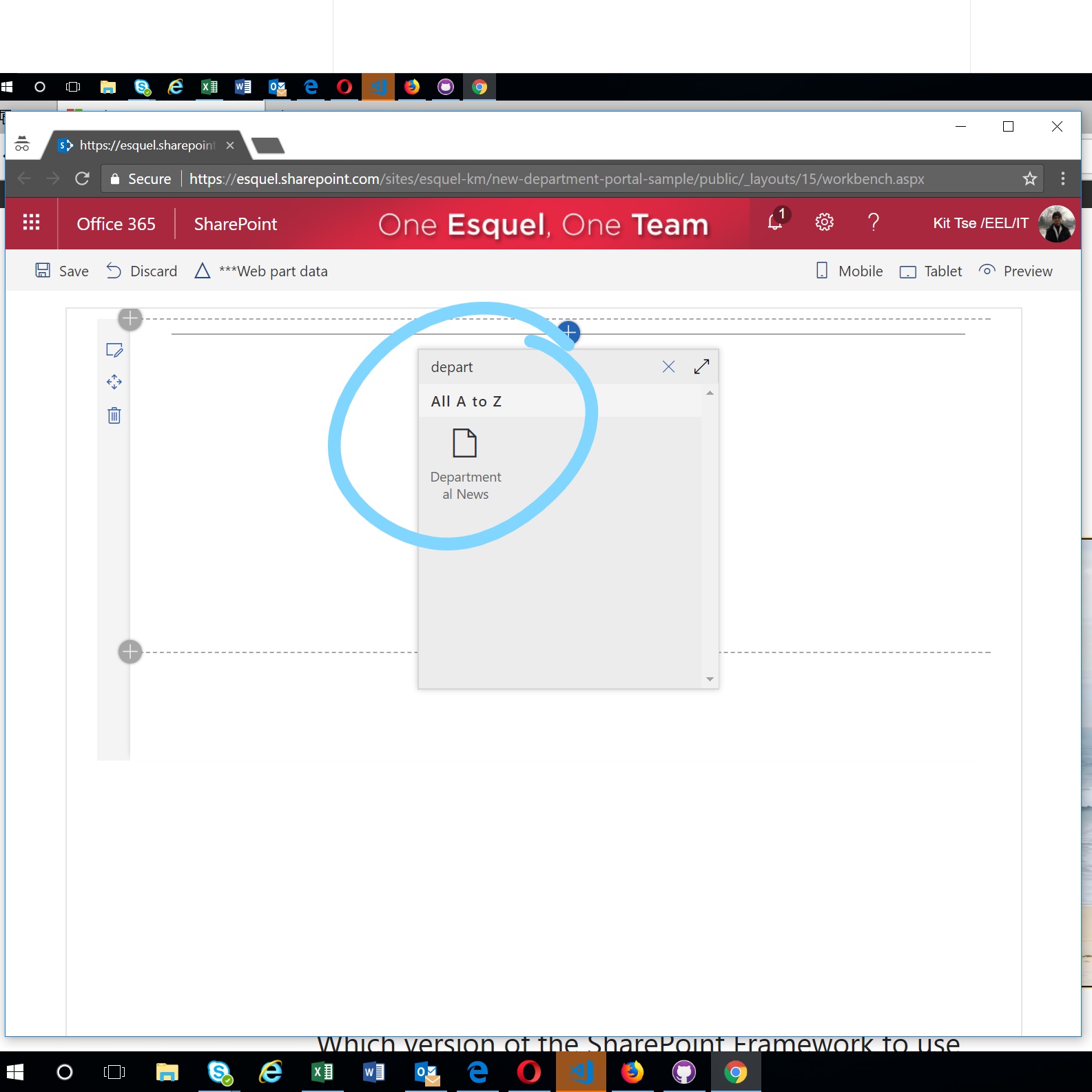
When it's ready for deployment, I uploaded it to App Catalog. And then I added it to the site that should use this webpart

However, when I tried to use it in a modern page, I can't find it in the available webpart list. I got no result when I search for "Departmental News" webpart.
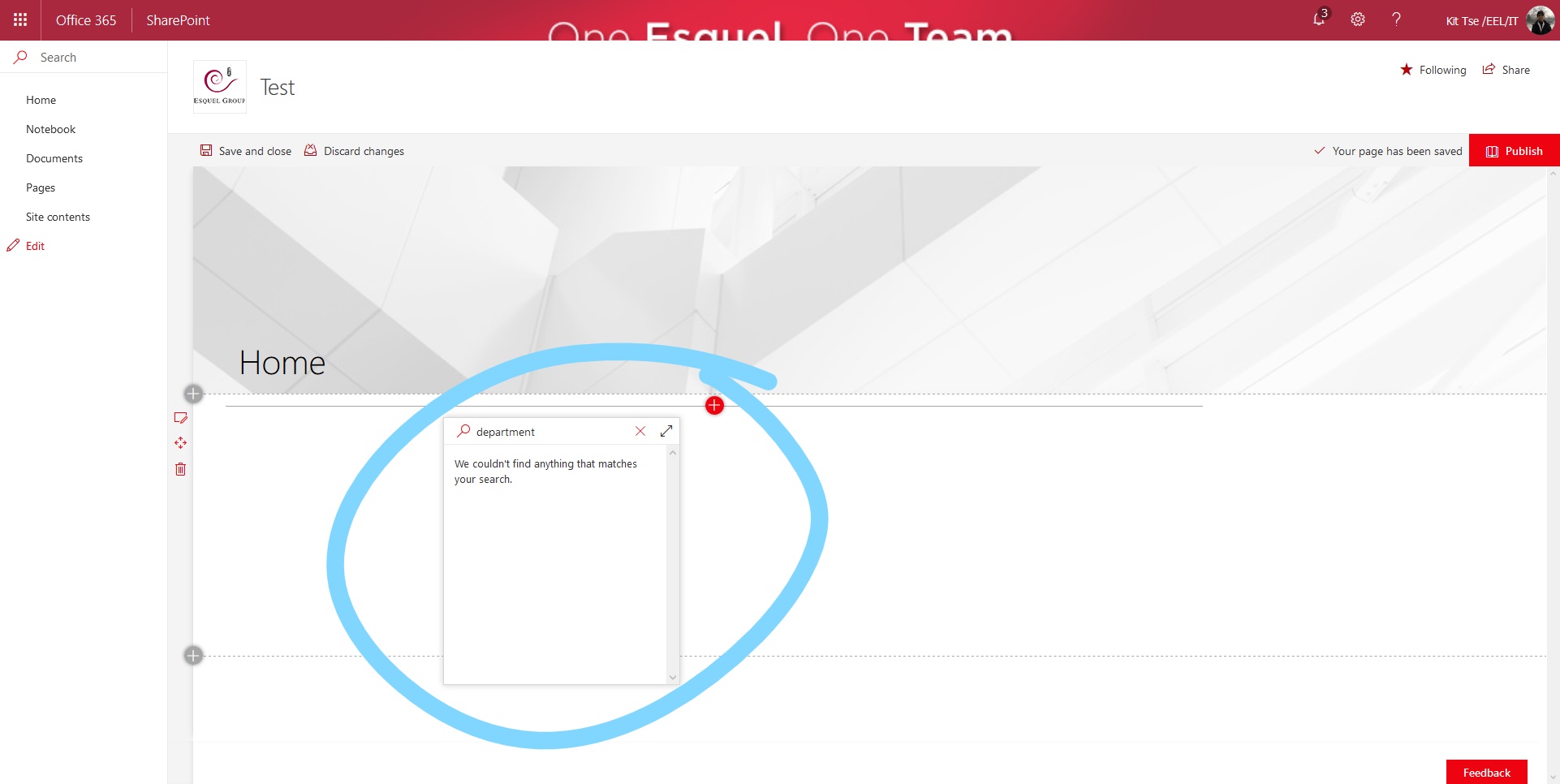
FYI, I followed https://docs.microsoft.com/en-us/sharepoint/dev/spfx/web-parts/get-started/hosting-webpart-from-office-365-cdn to depoly my webpart. Do let me know if you need any further information.
By the way, I will try recreating the solution with the same setting, as @panjkov mentioned above. I will let you know if I have any finding.
 tsekityam
on 8 Jan 2018
tsekityam
on 8 Jan 2018
I am also getting same issue as mentioned by @tsekityam
 vamsi981
on 8 Jan 2018
vamsi981
on 8 Jan 2018
I got the same problem after updating af webpart to v1.4 of the SPFx framework. One difference though: On my dev tenant where I am running 1st release it is not working. On my production tenant it is (still) working fine.
/_api/web/GetClientSideWebParts does NOT report the webpart either (this is the REST call that the gallery box is using).
 Leif-Frederiksen
on 10 Jan 2018
Leif-Frederiksen
on 10 Jan 2018
We have removed the webpart from AppCatalog and Re-added the Webpart to Catalog it started showing up in all places
vamsi981
on 11 Jan 2018
I created a new web part project used yo, then I copied the source code from old project to the new project and build the new one. Now I can see the new web part available in the catalog.
tsekityam
on 12 Jan 2018
Experiencing same after update on newly made webpart. After update I got an error message saying there was a problem with the manifest, after multiple attempts of removing, re-adding (to both catalog and site contents) and renaming nothing seems to work. Currently attempting to create new project and copy source code :/
 Katli95
on 12 Jan 2018
Katli95
on 12 Jan 2018
@Katli95 there is some delay in webpart after adding to appCatalog Due to CDN, webpart is taking time to load files from CDN and thats the reason we are getting the manifest errors and saying contact administrator.
vamsi981
on 12 Jan 2018
I also experience this issue, I have deployed my web part on 3 separate tenants (running targeted release), it is able to create a pre defined asset list on 2 of the tenants and displays in the webpart gallery, but not on the third tenant. Not sure why
 Grahamworth
on 24 Jan 2018
Grahamworth
on 24 Jan 2018
I think my problem is a duplication of #775
tsekityam
on 2 Feb 2018
Are there any conclusions that lead to a fix for this phenomenon of uploading the webpart in App Catalog and deployed in Site successfully, but no ability to "Add Web Part" to a page. Seems identical problem(s) described above. My host is SharePoint Online. Initially I had "Something went wrong" and some reading advised emptying SP Recycle Bin and after more reading repackaged with incremented version (package-solution.json Version: 1.5.0.0) gulp package-solution --ship. So close, and yet so far. At least the boss saw it "online" via a demo using workbench. Help please.
 waltsully
on 23 Feb 2018
waltsully
on 23 Feb 2018
I'm experiencing the same i manage to debug in workbench local and hosted, bundle, pack and deploy solution - but it does not appear in the web part listing. Help needed - no messages to specify error or correlation id.
 trillian74
on 27 Feb 2018
trillian74
on 27 Feb 2018
I also experience this issue. A redeployment as mentioned above has not worked for me.
 Hausi91
on 27 Feb 2018
Hausi91
on 27 Feb 2018
@waltsully @trillian74 @Hausi91 - Sorry that you are still experiencing this problem. We had a bug which was fixed, however, in order for the fix to take place you must follow these steps:
- Uninstall the app from a site collection
- The app will have to be deleted from the app catalog
- The new version of the app (built with the new generator (spfx 1.4)) will have to be uploaded to the app catalog
- Then the app will have to be added back to the site collection.
If you have followed these steps please do the following and send me both the correlation ID as well as the URL of the site collection and I can investigate the issue. The correlation ID I am interested in can be viewed by:
- Go to a modern page
- Press F12 to load the developer tools
- Enable a network trace
- Edit the page
- Refresh the page
In the network trace there should be a request to GetClientSideWebParts. Please view the response header sprequestguid and sent that to me (along with the site URL).
Thanks,
Graham
GrahamMcMynn
on 27 Feb 2018
I ran script to allow custom script on this particular site collection. I did have custom script allowed in the tenant but this was still denied for this site. The Webpart appeared after that.
Connect-SPOService -Url https://$orgName-admin.sharepoint.com -Credential WCMStoredCredentials;
$site = Get-SPOSite  $url
$site.DenyAddAndCustomizePages

Set-SPOsite $url -DenyAddAndCustomizePages 0
 ryanjonhealy
on 28 Feb 2018
ryanjonhealy
on 28 Feb 2018
Complied with all directions. Did not find GetClientSideWebParts in trace (HAR file), but did find a few sprequestguid
I’m not sure what I’m looking for here’s an excerpt below. Too bad no way to send a full trace.
I appreciate that you’re working on this issue; this project is POC and has high viz in executive suite. I think Flo is curious too 😉
Walter Sully
Progressive Home
2 ASI Way
St. Petersburg, FL 33702
[logo]https://www.americanstrategic.com/
(866) 511-0793 x326 [email protected]wsully@e-ins.net
"entries": [
{
"startedDateTime": "2018-02-28T14:09:47.166Z",
"time": 315.27699998393655,
"request": {
"method": "POST",
"url": "https://einsfl.sharepoint.com/IT-Projects/default.aspx?PageView=Shared&InitialTabId=Ribbon.WebPartPage&VisibilityContext=WSSWebPartPage",
"httpVersion": "http/2.0",
"headers": [
{
"name": ":path",
"value": "/IT-Projects/default.aspx?PageView=Shared&InitialTabId=Ribbon.WebPartPage&VisibilityContext=WSSWebPartPage"
},
"queryString": [
{
"name": "PageView",
"value": "Shared"
},
{
"name": "InitialTabId",
"value": "Ribbon.WebPartPage"
},
{
"name": "VisibilityContext",
"value": "WSSWebPartPage"
}
"name": "sprequestguid",
"value": "c3ee4e9e-50f9-5000-5313-8c41751c2b87"
"startedDateTime": "2018-02-28T14:09:47.990Z",
    "time": 125.96350097714458,
    "request": {
      "method": "POST",
      "url": "https://einsfl.sharepoint.com/IT-Projects/_layouts/15/commandui.ashx?ver=1347988415&id=Ribbon.WebPartPage&lcid=1033&qt=ribbonvisibletabdeep",
      "httpVersion": "http/2.0",
      "headers": [
        {
          "name": ":path",
          "value": "/IT-Projects/_layouts/15/commandui.ashx?ver=1347988415&id=Ribbon.WebPartPage&lcid=1033&qt=ribbonvisibletabdeep"
        },
{
"name": "referer",
"value": "https://einsfl.sharepoint.com/IT-Projects/default.aspx?PageView=Shared&InitialTabId=Ribbon.WebPartPage&VisibilityContext=WSSWebPartPage"
},
{
"name": ":authority",
"value": "einsfl.sharepoint.com"
},
     {
          "name": "sprequestguid",
          "value": "c4ee4e9e-a041-5000-5313-89e5c5f54e73"
        },
From: GrahaMc [mailto:[email protected]]
Sent: Tuesday, February 27, 2018 12:51 PM
To: SharePoint/sp-dev-docs sp-dev-docs@noreply.github.com
Cc: Walter Sully wsully@e-ins.net; Mention mention@noreply.github.com
Subject: Re: [SharePoint/sp-dev-docs] Client Web Part not visible in "Add > Web Part" gallery on ribbon (#1188)
@waltsullyhttps://github.com/waltsully @trillian74https://github.com/trillian74 @Hausi91https://github.com/hausi91 - Sorry that you are still experiencing this problem. We had a bug which was fixed, however, in order for the fix to take place you must follow these steps:
- Uninstall the app from a site collection
- The app will have to be deleted from the app catalog
- The new version of the app (built with the new generator (spfx 1.4)) will have to be uploaded to the app catalog
- Then the app will have to be added back to the site collection.
If you have followed these steps please do the following and send me both the correlation ID as well as the URL of the site collection and I can investigate the issue. The correlation ID I am interested in can be viewed by:
- Go to a modern page
- Press F12 to load the developer tools
- Enable a network trace
- Edit the page
- Refresh the page
In the network trace there should be a request to GetClientSideWebParts. Please view the response header sprequestguid and sent that to me (along with the site URL).
Thanks,
Graham
—
You are receiving this because you were mentioned.
Reply to this email directly, view it on GitHubhttps://github.com/SharePoint/sp-dev-docs/issues/1188#issuecomment-368966085, or mute the threadhttps://github.com/notifications/unsubscribe-auth/AfrSNXrStO-SwNtebxD2XUFvB8VN8wlrks5tZEB_gaJpZM4ROUQP.
This email has been scanned by MessageLabs on behalf of E-INS
waltsully
on 28 Feb 2018
Site URL: https://einsfl.sharepoint.com/IT-Projects/default.aspx
From: ryanjonhealy [mailto:[email protected]]
Sent: Wednesday, February 28, 2018 4:04 AM
To: SharePoint/sp-dev-docs sp-dev-docs@noreply.github.com
Cc: Walter Sully wsully@e-ins.net; Mention mention@noreply.github.com
Subject: Re: [SharePoint/sp-dev-docs] Client Web Part not visible in "Add > Web Part" gallery on ribbon (#1188)
I ran script to allow custom script on this particular site collection. I did have custom script allowed in the tenant but this was still denied for this site. The Webpart appeared after that.
Connect-SPOService -Url https://$orgName-admin.sharepoint.com -Credential WCMStoredCredentials;
$site = Get-SPOSite $url
$site.DenyAddAndCustomizePages
Set-SPOsite $url -DenyAddAndCustomizePages 0
—
You are receiving this because you were mentioned.
Reply to this email directly, view it on GitHubhttps://github.com/SharePoint/sp-dev-docs/issues/1188#issuecomment-369167471, or mute the threadhttps://github.com/notifications/unsubscribe-auth/AfrSNek5T4G0k-A_clSozAOfzVCMNkC0ks5tZRaEgaJpZM4ROUQP.
This email has been scanned by MessageLabs on behalf of E-INS
waltsully
on 28 Feb 2018
@waltsully - if the behavior you are seeing changed when you turned on DenyAddAndCustomizePages it sounds like you set the requiresCustomScript flag. In the project that you build your webpart in can you go to the src\webparts\
@ryanjonhealy - can you validate whether the above was true for your solution as well?
GrahamMcMynn
on 28 Feb 2018
C:\Workspace\workorder-webpart\lib\webparts\workOrder\WorkOrderWebPart.manifest.json
"requiresCustomScript": false,
SITE SETTINGS:
Prevent users from running custom script on personal sites
Allow users to run custom script on personal sites
Prevent users from running custom script on self-service created sites
Allow users to run custom script on self-service created sites
From: GrahaMc [mailto:[email protected]]
Sent: Wednesday, February 28, 2018 12:51 PM
To: SharePoint/sp-dev-docs sp-dev-docs@noreply.github.com
Cc: Walter Sully wsully@e-ins.net; Mention mention@noreply.github.com
Subject: Re: [SharePoint/sp-dev-docs] Client Web Part not visible in "Add > Web Part" gallery on ribbon (#1188)
@waltsullyhttps://github.com/waltsully - if the behavior you are seeing changed when you turned on DenyAddAndCustomizePages it sounds like you set the requiresCustomScript flag. In the project that you build your webpart in can you go to the src\webparts
@ryanjonhealyhttps://github.com/ryanjonhealy - can you validate whether the above was true for your solution as well?
—
You are receiving this because you were mentioned.
Reply to this email directly, view it on GitHubhttps://github.com/SharePoint/sp-dev-docs/issues/1188#issuecomment-369323523, or mute the threadhttps://github.com/notifications/unsubscribe-auth/AfrSNbGmVsv5j35mKQWpnPltHgIX0a67ks5tZZHPgaJpZM4ROUQP.
This email has been scanned by MessageLabs on behalf of E-INS
waltsully
on 28 Feb 2018
@waltsully - thank you for sending that information. I have looked at the logs and the issue in your case is the bug we had where on upgrade the feature id's changed. The fix for this problem is to follow these steps:
- Uninstall the app from a site collection
- The app will have to be deleted from the app catalog
- The new version of the app (built with the new generator (spfx 1.4)) will have to be uploaded to the app catalog
- Then the app will have to be added back to the site collection.
Thanks and sorry that you are hitting this issue.
GrahamMcMynn
on 28 Feb 2018
Isn’t that what I did before?
From: GrahaMc [mailto:[email protected]]
Sent: Wednesday, February 28, 2018 2:24 PM
To: SharePoint/sp-dev-docs sp-dev-docs@noreply.github.com
Cc: Walter Sully wsully@e-ins.net; Mention mention@noreply.github.com
Subject: Re: [SharePoint/sp-dev-docs] Client Web Part not visible in "Add > Web Part" gallery on ribbon (#1188)
@waltsullyhttps://github.com/waltsully - thank you for sending that information. I have looked at the logs and the issue in your case is the bug we had where on upgrade the feature id's changed. The fix for this problem is to follow these steps:
- Uninstall the app from a site collection
- The app will have to be deleted from the app catalog
- The new version of the app (built with the new generator (spfx 1.4)) will have to be uploaded to the app catalog
- Then the app will have to be added back to the site collection.
Thanks and sorry that you are hitting this issue.
—
You are receiving this because you were mentioned.
Reply to this email directly, view it on GitHubhttps://github.com/SharePoint/sp-dev-docs/issues/1188#issuecomment-369353158, or mute the threadhttps://github.com/notifications/unsubscribe-auth/AfrSNXbI8-2HtyjBfZGH4HO3qySp5Qtpks5tZafmgaJpZM4ROUQP.
This email has been scanned by MessageLabs on behalf of E-INS
waltsully
on 28 Feb 2018
[SOLVED]
Alrighty then. Once I remembered to change the version number (to avoid the "Whoops something wen wrong" message as well as needing to empty recycle bin, AND do the steps in the exact order spelled out by Graham, it worked! My app came up under "Other" but I know the category can be set on properties in App Catalog.
waltsully
on 28 Feb 2018
@waltsully - Thanks for the quick responses
This thread is too muddied with duplicates of #775 and issues without correlation IDs or anything for us to follow up on. If you are still seeing this issue after having gone through the steps of uninstalling the app from the site collection, deleting the app from the app catalog, rebuilding with SPFX 1.4, readding the app to the app catalog, and finally adding the app back to the site collection, then please open a new thread. In the new thread please include the requestId for the call to GetClientSideWebParts (if it's a modern page) and the site URL.
Thanks,
Graham
GrahamMcMynn
on 28 Feb 2018
btw, "npm outdated" followed by getting all the latest versions into my SPFx dev env was also a part of my getting it right. Edited \
finally...
(1) Uninstalled the app from the site collection
(2) Deleted app from the App Catalog
(3) Uploaded new version app to the App Catalog
(4) Add app to the site collection.
(5) Edit Page, click Add Web Part, scroll the Categories Chooser in the Edit Ribbon, select "Other"
(6) The select
(7) go hunting in lower extreme right corner of panel for the "Add" button and click
(8) click "Stop Editing" and SMILE!
waltsully
on 28 Feb 2018
I'm still getting the same issue. Not sure why this thread is closed.
Installed this app correctly


And I can't even find it on both modern page/classic page
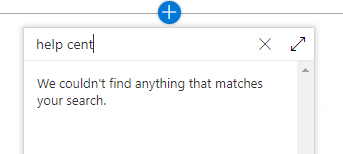
I tried to uninstall the app from site collection, deleted app from the catalog and uploaded the new version as per instruction and it doesn't work..
I'm not able to delete the app from the recycle bin:

However when I changed the skipFeatureDeployment to true I can see my webparts correctly.
SPFX version: 1.4.1
Any thoughts?
 jonathanhotono
on 26 Mar 2018
jonathanhotono
on 26 Mar 2018
@jonathanhotono I've been having problems with this, but when it comes to the error when deleting from the Recycle Bin, make sure you go to the Site Collection Recycle Bin (Site Settings -> Site Collection Administration -> Recycle Bin) then just hit "Empty Recycle" bin. It'll go into second stage which you can just check the box next to the solution and hit delete as normal.
 jimmywim
on 29 Mar 2018
jimmywim
on 29 Mar 2018
Issues that have been closed & had no follow-up activity for at least 7 days are automatically locked. Please refer to our wiki for more details, including how to remediate this action if you feel this was done prematurely or in error: Issue List: Our approach to locked issues
 msft-github-bot
on 28 Jan 2020
msft-github-bot
on 28 Jan 2020
Related issues
 nanddeepn
·
3Comments
nanddeepn
·
3Comments
 karishmaTCS
·
3Comments
karishmaTCS
·
3Comments
 jonthenerd
·
3Comments
jonthenerd
·
3Comments
 StfBauer
·
3Comments
StfBauer
·
3Comments
 acksoft
·
3Comments
acksoft
·
3Comments
Most helpful comment
We have removed the webpart from AppCatalog and Re-added the Webpart to Catalog it started showing up in all places