Sp-dev-docs: Command Set localization does not work
Category
- [ ] Question
- [ ] Typo
- [x] Bug
- [ ] Additional article idea
Expected or Desired Behavior
When pointing the id property on the Command item object in the Command Set manifest to a localized string, the Command Set should use the localized string as button text. It should use the correct resource if a resource is available for that locale.
Observed Behavior
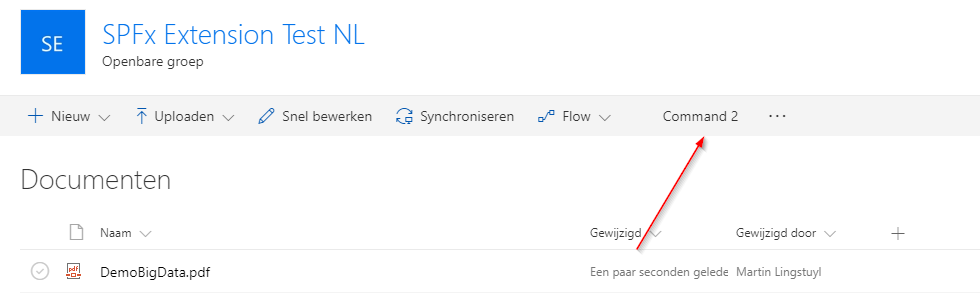
The Command Set does not use the localized string of the correct resource, it uses the default localization resource instead. (en-US)
Steps to Reproduce
- Create a Command Set extension with the name CommandSetTest
- in the manifest json file, swap the default property with the following id property:
"id": "$CommandSetTestCommandSetStrings:CommandSetTestCommandSetStrings.Command1;"
as in the screenshot:

- Add a resource file to the loc directory, for example: a nl-nl.js file with dutch values.
- Run gulp serve --nobrowser
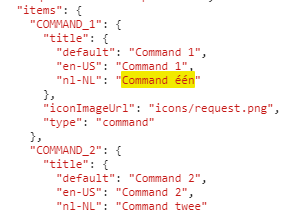
Check the temp/manifests.json file. It should contain the localization keys and values:
Debug the extension on a SharePoint site in the targeted language. It will show the default en-US text:
Origin of the issue:
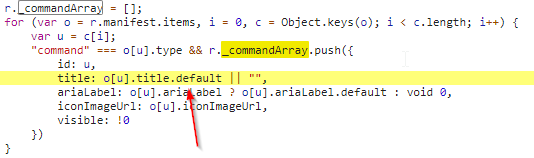
In the file named listview-host-assembly-[locale]_[hash].js the Commands list is loaded from the spfx extension manifest. Unfortunately, while the manifest file contains the right keys and values, the default property is used to instantiate the Commands array:
 martinlingstuyl
All 10 comments
The fix is included in the next patch release. Thanks for reporting it.
 qz2017
on 23 Oct 2017
qz2017
on 23 Oct 2017
At Ignite 2017, I thought I saw an example of grouped commands, but I haven't been able to find any information on it and would have to spend hours going combing through the videos of the sessions I attended. It would appear from the code snippet provided by @martinlingstuyl that this would not be supported. Sure would be nice if it was. Anyone else know?
 paulewert
on 1 Dec 2017
paulewert
on 1 Dec 2017
What do you kwam my grouped commands? Like submenu’s?
martinlingstuyl
on 1 Dec 2017
You could file it under a new issue though, that’s probably better. If you do mean submenu’s: that’s certainly not something I came across, though that doesn’t mean it isn’t possible. Nice feature it would be though!
I’ll close this issue down now.
martinlingstuyl
on 1 Dec 2017
@martinlingstuyl Does this work for you now?
I'm experiencing the exact same issue that you have described here. Can anyone confirm that this patch has been installed in the meantime?
 cwdata
on 24 Jan 2018
cwdata
on 24 Jan 2018
Cannot confirm that it works, no. But I didn't have time to check thoroughly.
martinlingstuyl
on 5 Feb 2018
In case anyone else stumbles upon this thread - I found another solution for this issue.
It is less efficient but very easy to use. You could set the title in the onListViewUpdated eventhandler:
@override
public onListViewUpdated(event: IListViewCommandSetListViewUpdatedParameters): void {
    const command1: Command = this.tryGetCommand('COMMAND_1');
    command1.title = strings.Command1Title;
}
Like any other access to the strings class it will at runtime set the title with the matching language from the string resource.
cwdata
on 6 Feb 2018
I am still having this issue with german translations (SPFX 1.8). The manifest will ignore the translations and just show the default value.
@cwdata answer will work, but that is just a work around.
 diabhoil
on 16 May 2019
diabhoil
on 16 May 2019
I am still having this issue with german translations (SPFX 1.8). The manifest will ignore the translations and just show the default value.
@cwdata answer will work, but that is just a work around.
The same thing on SP FX 1.10, according to manual for web part should be used gulp serve --locale=de-DE, but despite I have both localized values in manifest and /loc/.js files, without overwriting like was described by @cwdata, they're ignored from both places, with overwriting used values from /loc/.js files, so values in manifest have no sense.
 fonbrauzen
on 28 Jan 2020
fonbrauzen
on 28 Jan 2020
Issues that have been closed & had no follow-up activity for at least 7 days are automatically locked. Please refer to our wiki for more details, including how to remediate this action if you feel this was done prematurely or in error: Issue List: Our approach to locked issues
 msft-github-bot
on 4 Feb 2020
msft-github-bot
on 4 Feb 2020
Related issues
 nanddeepn
·
3Comments
nanddeepn
·
3Comments
 waldekmastykarz
·
3Comments
waldekmastykarz
·
3Comments
 ken-harris
·
3Comments
ken-harris
·
3Comments
 zerovectorspace
·
3Comments
zerovectorspace
·
3Comments
 thechriskent
·
3Comments
thechriskent
·
3Comments
Most helpful comment
The fix is included in the next patch release. Thanks for reporting it.