Sp-dev-docs: PropertyPaneDropdown 'selectedKey' option does not set the value of the control
Category
- [ ] Question
- [ ] Typo
- [x] Bug
- [ ] Additional article idea
Expected or Desired Behavior
When a PropertyPaneDropdown is defined in the property pane configuration with a specific "selectedKey" option, the control in the property pane should actually have the selectedKey as the value of the control; instead, while it is showing the associated text for the selectedKey in the display, the control does not show the selected item as the actual value of the control. We need to be able to set a default value for property pane drop down controls that can be used in code even if the property has never been changed by the user.
Observed Behavior
After adding a dropdown with a default selectedKey to the property pane like this:
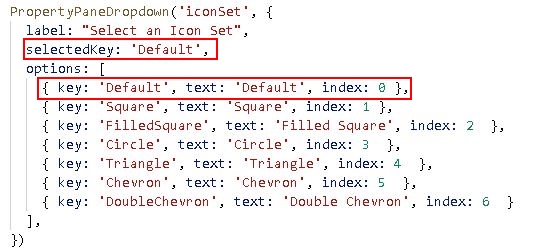
I added an extra element to the UI to display the value of the dropdown like this:
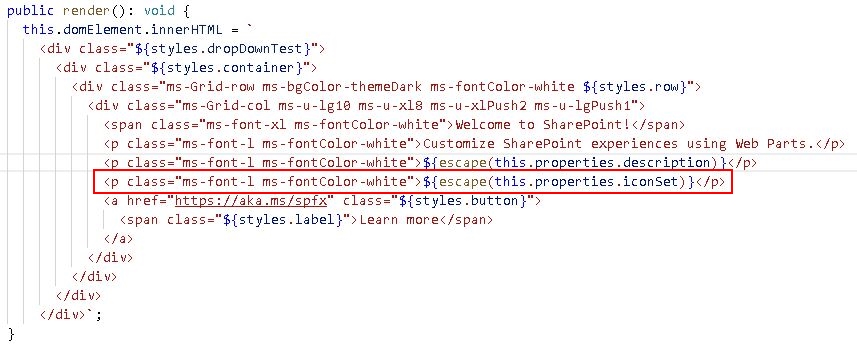
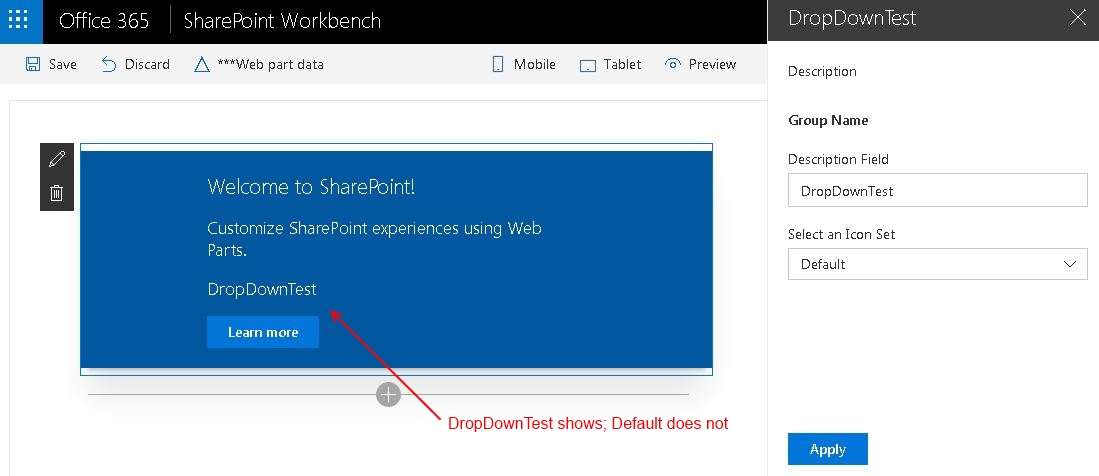
When I run the web part in the Workbench and open the property pane, I can see that the value of the Description property is displayed in the web part UI and the value of the Icon Set property is not, even though it looks like it is selected in the property pane UI, like so:
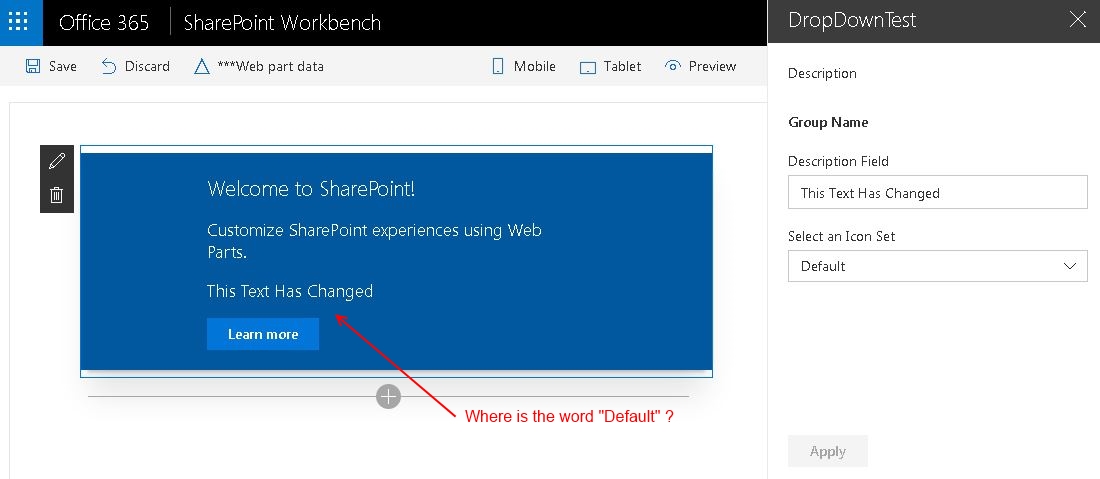
When I change the text for the Description property and click the "Apply" button, the text for the Description changes in the UI but the value of the drop down still does not, even though in the property pane UI it appears to be selected:
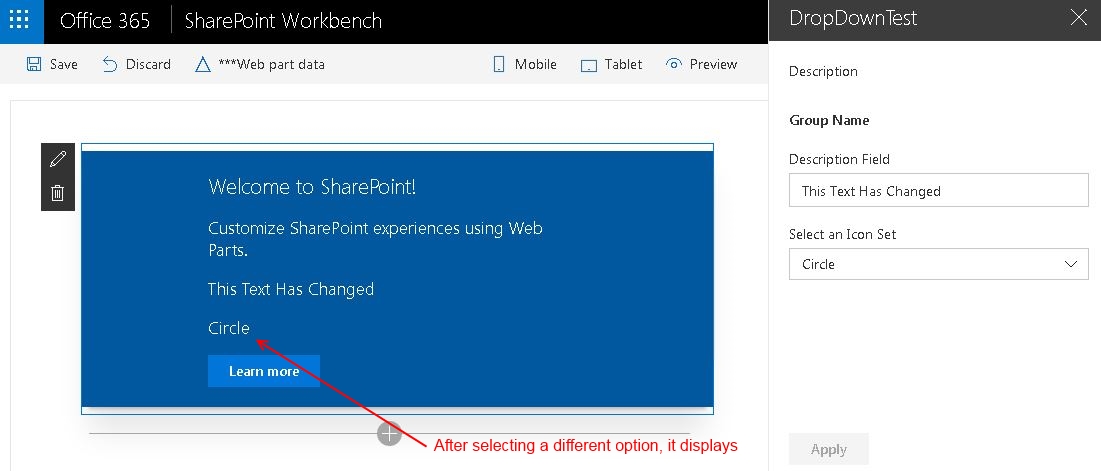
When I change the selected item in the property pane dropdown and click the "Apply" button again, I can now see that the value of the dropdown control in the property pane is available to the code in the web part UI.
Steps to Reproduce
- Create a new web part with the yeoman generator
- Add a dropdown to the web part properties configuration, with one of the options as the 'selectedKey'
- Add an element to the web part UI to display the value of the dropdown property
- Test the web part in the Workbench to see where the value of the dropdown property is and is not available to the code in the web part UI.
 acksoft
All 12 comments
Hi, @acksoft - In the code, you are trying to access the iconset value from the properties bag. However, you did not update the properties bag with that value nor you have made any changes to that control on the property pane for that value to be reflected in the property bag.
Today, for consistency sake we do not want to update the property bag with the default values supplied by the user. Property pane mutates the property bag only when there is some end user action on the property pane.
Instead, I would suggest you update the property bag to reflect the default value for that target property.
I am closing the issue now, but feel free to re-open if you are not satisfied with the answer and let me know if you have any more questions in this regard.
Thanks,
Srikanth
 srideshpande
on 15 Aug 2017
srideshpande
on 15 Aug 2017
Srikanth,
Please do not take offense, but this answer is completely unacceptable and does a poor job of understanding the perspective of the developers who are using this product.
You say to me "you are trying to access the iconset value from the properties bag...for consistency sake we do not want to update the property bag with the default values supplied by the user." But NO that is not what I am doing. I may, behind the scenes and without my knowledge be doing that (you would know better than I), but what I am actually doing is defining a set of options for a pulldown control and setting the "selected" option on the control that represents that property in my user interface.
Let me be clear: I do not care about your property bag, whatever that may be, or what you may have to do to keep it "consistent." That is an internal engineering detail that has no relevance to developers who will be writing web parts with the SharePoint Framework.
From our perspective, this is exactly the same problem as #758 ("PropertyPaneToggle 'checked' option is being ignored") which is now marked as "fixed":
- We define a property in our code
- We set it's options in our code
- We have the expectation that those options are respected and are returned to us when we try to make use of them
You say "Property pane mutates the property bag only when there is some end user action on the property pane." As I said, you may be using this magical property bag, but I have no reason to care about it. And as far as I am concerned, defining which option in the control is the "selected" one is an action: defining which option in the list is "selected" is not required, so I must be doing something to make it the selected option. That is the action.
Please re-open this item and get this fixed. If I cannot define properties for the web part and have them returned to me when I need them in my web part, they are of no use to me.
Thanks,
Joseph
acksoft
on 15 Aug 2017
Hello Joseph,
I understand your confusion here. I apologize for not making few things clear in my earlier response.
- By property bag, I meant the
propertiessection in thepreconfiguredEntriesof your web part's manifest file. You are totally right in saying that external people wouldn't understand the terminology we use internally and I will be clear here after. - When I said
we do not want to update the property bag with the default values supplied by the user. Property pane mutates the property bag only when there is some end user action on the property pane.what I meant is the moment we change/update the property bag( your web part's properties) it might have uncalled for effects on the web part. On top of that, web parts, in general, wouldn't want their properties to be mutated by the framework. - When I said
I would suggest you update the property bag to reflect the default value for that target propertyI was asking you to update your web part's properties with the default value for the associated property.
There are two ways you can achieve this:
- In your web part you can say -
this.properties.<nameOfTheProperty> = <value>or - if you know the default value before hand you can also directly edit in the web part's manifest.
- In your web part you can say -
I know this results in you updating two times, one for the properties and the other in the actual group field, but this will resolve your problem.
Just so you know, if you update the properties, you need NOT update the group field but not the vice versa.
Please let me know if it is still not clear and you have any questions around this, I am more than willing to help and resolve your issue.
I am re-opening the issue now, and we will close it only when you are unblocked.
Thanks for your patience,
Srikanth
srideshpande
on 16 Aug 2017
By property bag, I meant the
propertiessection in thepreconfiguredEntriesof your web part's manifest file.
Okay, now we are getting somewhere -- thank you for clarifying the terminology. I truly appreciate you getting back to me in a timely fashion and taking my concerns seriously.
the moment we change/update the property bag (your web part's properties) it might have uncalled for effects on the web part. On top of that, web parts, in general, wouldn't want their properties to be mutated by the framework.
If by 'we' you mean you mean the framework itself, then your basic premise is flawed and this should be a non-issue. It is not the framework that is changing (or as you say 'mutating') the property, it is the definition of the group configuration that is changing the value of the property and that is a change made by the programmer, not the framework. If it helps conceptually, think of the framework as merely carrying out the change as ordered by the programmer, not as a change made by the framework.
There are two ways you can achieve this...{snip}...I know this results in you updating two times, one for the properties and the other in the actual group field, but this will resolve your problem.
I am very happy to know that this is a usable work-around solution (it will allow me to keep moving forward with my project), however this does not actually solve the LONG TERM problem: _I will not be the only person who runs into this issue and many man-hours of frustration and lost productivity will be the result._ Even if you document this very thoroughly and publicly in the SPFx Guidance, it is still going to be perceived as a kludge by developers. If setting the selectedKey option of the PropertyPaneDropdown() function does not have any effect on the way the control is created at runtime, what purpose does it serve? Why is it even there if it actually does nothing?
I very strongly suggest that you either:
- remove the option and provide very visible and obvious guidance regarding defining the default value of the property in the manifest OR
- do the work it takes to make it work the way it looks like it is supposed to
Thank you again for your time, help and attention. While I can now move forward, it is only because of this bit of 'tribal knowledge' that you have passed on to me, and ultimately should be more permanently fixed.
acksoft
on 18 Aug 2017
@acksoft - Thanks for the feedback. We have had a discussion on this and we have decided to include this feature as well. This will be fixed as a bug according to the priority. Once it is fixed I will update this thread.
Thanks!
srideshpande
on 22 Aug 2017
Is this bug has fixed?
 ongun23
on 11 Apr 2018
ongun23
on 11 Apr 2018
@ongun23 I still have the issue, so no. Lost more than 1h around this until I arrived at this page
 pcostarg
on 8 Apr 2020
pcostarg
on 8 Apr 2020
does anyone have a workaround? there must be...
 jm06
on 17 Jun 2020
jm06
on 17 Jun 2020
@jm06 this is working as it should according to the comments above. You should add the default value in json manifest of your webpart. This is the only source of truth for default values.
Code:
```C#
PropertyPaneDropdown('presentationType', {
label: strings.presentationTypeLabel,
options: [{
key: 'standard',
text: strings.presentationTypeStandard
},
{
key: 'variable',
text: strings.presentationTypeVariable,
}
]
}),
JSON:
```json
"properties": {
      "presentationType": "standard",
      "presentationCount": "3"
    }
Thank you for that.
My issue is to do with the onChange and mainly capturing/exploiting the selectedItem key/text from a react propertypane DropdownOption ('office-ui-fabric-react/lib/components/Dropdown' )? Any reference, piece of code you can suggest ?
jm06
on 18 Jun 2020
Thank you for that.
My issue is to do with the onChange and mainly capturing/exploiting the selectedItem key/text from a react propertypane DropdownOption ('office-ui-fabric-react/lib/components/Dropdown' )? Any reference, piece of code you can suggest ?
PropertyPaneDropdown is not from office-ui-fabric-react project. I don't think there is an onChange for PropertyPaneDropdown.
You could build your own property pane control that will use 'office-ui-fabric-react/lib/components/Dropdown' and access that https://docs.microsoft.com/en-us/sharepoint/dev/spfx/web-parts/guidance/build-custom-property-pane-controls
If your goal is to simply build a cascading dropdowns on properties you can follow this documentation: https://docs.microsoft.com/en-us/sharepoint/dev/spfx/web-parts/guidance/use-cascading-dropdowns-in-web-part-properties
Either way, it has nothing to do with this opened issue.
pcostarg
on 18 Jun 2020
I will take another look at those examples. I started with those but I am missing a point somewhere and that is where I am looking for guidance.
Would there be a more relevant issue I could find the solution I am looking for?
Your intervention most welcome and appreciated.
jm06
on 18 Jun 2020
Related issues
 StfBauer
·
3Comments
StfBauer
·
3Comments
 jonthenerd
·
3Comments
jonthenerd
·
3Comments
 bengtmoss
·
3Comments
bengtmoss
·
3Comments
 karishmaTCS
·
3Comments
karishmaTCS
·
3Comments
 zerovectorspace
·
3Comments
zerovectorspace
·
3Comments
Most helpful comment
Is this bug has fixed?