Sp-dev-docs: SPFx web part on classic web sites causes uncaught type error
Category
- [x] Bug
Expected or Desired Behavior
The web part should load properly on classic publishing pages (in classic web sites) as it does on modern pages (the development environment).
Observed Behavior
When I try to implement a SPFx web part including React, Redux and some other modules (namely moment, immutable, jQuery and superagent), written in TypeScript, I'm getting an 'Uncaught TypeError: Unexpected anonymous AMD define.':

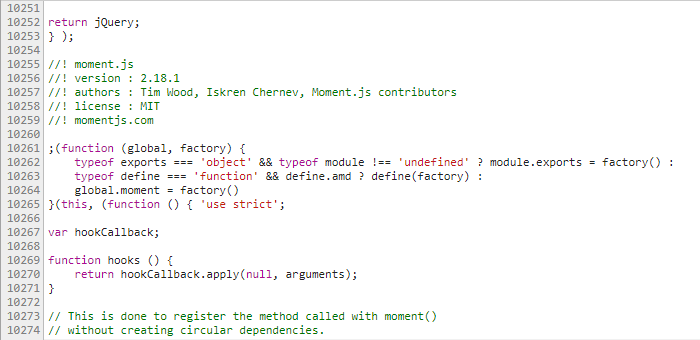
The error occurs at the point define(factory) in 'branding.o365.js' where moment.js should be included (line 10263):
Steps to Reproduce
The app has been developed and successfully tested on a modern page and wiki page in a modern team site. Even when it was deployed on the production tenant, it worked on these page types.
But when the web part is placed on a classic wiki page or publishing page (in a classic team site), we experience the described behavior.
If you need some more detailed information, feel free to ask for it!
Tags: #spfx
 MarcoSimon
All 30 comments
Thanks for reporting this issue. Could you include the sppkg file that you are using which causes this error? It would help us investigate the issue.
 GrahamMcMynn
on 11 Jul 2017
GrahamMcMynn
on 11 Jul 2017
Thanks for your answer. Please find the zipped sppkg file attached. I hope it can help to figure out what the issue is.
webpart-beezy-activities.zip
MarcoSimon
on 12 Jul 2017
Hello Marco,
I was not able to find branding.o365.js in the package, so I'm wondering how you're loading it on the page. Is it coming from a master page? If so, is it using requirejs to load modules?
 moyali
on 20 Jul 2017
moyali
on 20 Jul 2017
Thanks for your reference to the branding.o365.js, I just didn't recognize it before! Now I could have a look at the branding wich is loaded via 'Custom User Action'.
I figured out the following:
- When using our Beezy webpart on an un-branded site collection (no branding.o365.js is loaded), or using the branded site collection without the Beezy webpart, everything works without any error.
- We don't use require.js, but some included modules are defined as anonymous AMD modules (moment.js, magnific-popup, jQuery and some jQuery UI widgets). When I don't include them, it works.
- When I enable browser caching, the webpart works (mostly) as expected, even with AMD modules. But when disabling the cache, the loading procedure crashes in _sp-classic-page-assembly…js_, although the loading order of the scripts obviously remains the same (I can post some screenshots if needed). See the different error message in the screenshot attached:

MarcoSimon
on 27 Jul 2017
How do you load the anonymous AMD modules?
From the callstack, it looks like it may be using the global define() that SPFx sets for loading modules as a script. The problem is not on loading the JS files, but eval'ing them.
Understanding what's your use case when loading those scripts will help understand how adding SPFx in the page impacts with that.
 mpasarin
on 28 Jul 2017
mpasarin
on 28 Jul 2017
The AMD modules (moment.js, jQuery, jQueryUI) are concatenated by a gulp action in the branding.o365.js which is injected into the
-tag of the DOM by an UserCustomAction-ScriptLink, so the modules should be in global context. These are used for the branding tasks in the classic page. We don't use require.js explicitly here, but we noticed that require.js is used in the SharePoint page context itself. So it may be that this require.js instance influences our scripts.In the modern webpart, the modules (moment.js, React, Redux, ...) are required by 'import'-statement and bundled by webpack as usual.
MarcoSimon
on 31 Jul 2017
We are in the process in rolling out a change in the loader using RequireJS that (as a side effect) will probably fix that problem directly.
If you want, contact me at [email protected] and we can sync up and check that it will fix your problem (or otherwise debug it together). As it's something specific with your classic experience, I think it'll be more efficient to do it this way.
mpasarin
on 31 Jul 2017
Please repoen this issue if you don't see a fix within 3 weeks
 ghost
on 7 Aug 2017
ghost
on 7 Aug 2017
Hi,
We are also experiencing this issue. We have a self calling JavaScript method that loads some analytics (a but like Google Analytics does) that we run via a Site scoped UserCustomAction. This has worked for years on classic pages, but, by design, doesn't work on modern pages.
Now, when we put a SPFx Client Side Web Part on a classic wiki page, we get the exact error message shared by the OP.
By the nature of @mpasarin's reply, can I assume that we should see this start to work with the rollout of the change eluded to on the 31 Jul? Do we know when we are likely to see that in our tenants so that we can update our customers?
Regards,
 MarkStokes-outlook
on 3 Oct 2017
MarkStokes-outlook
on 3 Oct 2017
We too are still seeing the same issue. We have a very simple SPFx web part which, when added to a classic SharePoint page, produces the error "Unexpected anonymous AMD define".
It would be good to know whether the change eluded to previously is likely to have been rolled out completely or if there is further debugging and fixing that we must do.
 JHolah
on 5 Oct 2017
JHolah
on 5 Oct 2017
We need this bug resolving very quickly as it is impacting a number of customer deployments.
@mpasarin, do you have a timeline that we can give to our customers of when this will be resolved?
MarkStokes-outlook
on 11 Oct 2017
The change rollout had to be stopped due to unforeseen side effects. After fixing those, we are currently rolling out those changes. The expectation should be that in 2-3 weeks the issue should be resolved.
mpasarin
on 11 Oct 2017
We worked around this issue by not loading our script dependencies in the page via javascript. We packaged everything up into one file and loaded this directly via custom action.
The problem arises when script dependencies are loaded "later" asynchronously when SharePoints require.js is active. This seems to happen only when there is an modern webpart on the page.
But this approach won't work for all cases.
Regards
Tobias
 toblum
on 16 Oct 2017
toblum
on 16 Oct 2017
Hello everyone,
Any news about this issue ?
EDIT : I worked around the issue. I set the "define" property to undefined before the script injection, after the script loaded I redefine the "define" property.
Regards
Ibrahim
 Supaibo
on 7 Dec 2017
Supaibo
on 7 Dec 2017
I haven’t implemented the workaround suggested by Supaibo yet but we are still experiencing this issue.
Was anyone else able to solve this without the workaround?
Are other people still experiencing this as well?
@mpasarin: Can you confirm that the changes to solve this issue are rolled out?
Regards,
Rob
 RobLempens
on 2 Mar 2018
RobLempens
on 2 Mar 2018
Hi has there been any updates for this? I'm using the pnp javascript loader to load javascript files for branding, analytics etc and get this error with a classic 2016 SP On-premises page with a SPFx webpart.
 sonicbaz
on 30 May 2018
sonicbaz
on 30 May 2018
@sonicbaz Having same issues with the AMD conflict.
 ravinleague
on 9 Jul 2018
ravinleague
on 9 Jul 2018
@mpasarin any hope of getting a fix pushes to SharePoint 2016 on-prem?
 samculver
on 15 Feb 2019
samculver
on 15 Feb 2019
Can anyone confirm this is still an issue with SharePoint Online as this has been open for quite some time... likely fixed in SPO...
@samculver Unfortunately there's no story for updating SPFx in on-prem environments.
 andrewconnell
on 20 Feb 2019
andrewconnell
on 20 Feb 2019
SPFx webparts load properly in our default template SPO classic pages.
We have a client though who has a customized template in SPO. They are now encountering this issue in their custom template but not in SPOs classic default template.
Is it possible for the DEV to shed some light on how this was fixed? We'd like to pass this information onto our client.
 butchmarshall
on 21 Feb 2019
butchmarshall
on 21 Feb 2019
@butchmarshall customized as in with SharePoint Designer & unghosted? That's not recommended anymore esp considering you're blocking that page/template from getting any updates to the page/template, including references to updated JS & CSS files.
andrewconnell
on 21 Feb 2019
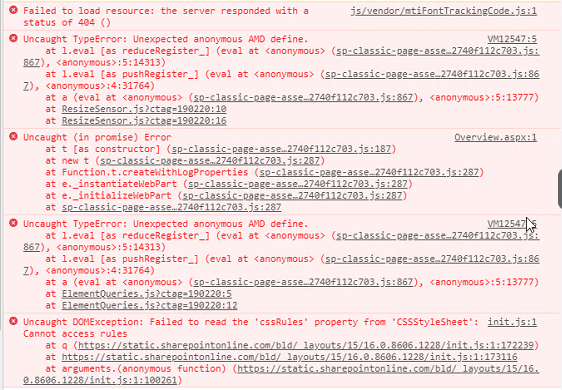
To be honest I don't know how they implemented the custom template - but using the template does cause this crash to occur.
I assume this must be the cause (no more template updates?).
When our SPFx webpart starts loading, it just spins forever.
butchmarshall
on 21 Feb 2019
There's just no way to tell what the problem is from that screenshot, unfortunately. A very painful way to figure out what's different is to do a side by side comparison of a working page and non-working page. Sorry... I know this isn't the answer you'll want to hear.
andrewconnell
on 21 Feb 2019
@andrewconnell we had a formal support ticket opened last year for this issue, on behalf of a client. After some time, the outcome (summarized in my words) was that the issue was validated, but not to be put on top of their backlog to be fixed.
Just to clarify, the issue is:
When an SPFx web part is added to a classic page that already makes use of some JS module loader, this one is being overwritten by the SPFx loader, and so the 'classic' components (using module loader) stop working
 biste5
on 21 Feb 2019
biste5
on 21 Feb 2019
@biste5 That's interesting... I wasn't aware that was a known issue. It makes sense. Sounds like it falls into the category that when you're working within another environment (ie: we're building plugins for SharePoint with SPFx), you have to sometimes deal with decisions they make upstream from you.
Unfortunately, it's not fixed, but if it was something that was affecting a lot of customers I'm sure it would be prioritized. Thankfully we're getting closer to the classic exp being more legacy...
andrewconnell
on 21 Feb 2019
Can anyone confirm this is still an issue with SharePoint Online as this has been open for quite some time... likely fixed in SPO...
@andrewconnell we are testing our 1.1 WebParts in online however we are also prepping containers so we can upgrade our solutions to 1.4.1 as I'm suspicious there are breaking changes between 1.1 and 1.4.1 based on the framework fork to SP2019 and no 2016 framework update on the horizon unless someone can confirm otherwise.
sonicbaz
on 27 Feb 2019
There were def changes... can't recall if there was breaking stuff as it's been over a year since I looked at that.
You're correct... there are no plans to update SPFx on-premises in SP2016 / SP2019 at this time.
andrewconnell
on 27 Feb 2019
This issue has been automatically marked as stale because it has marked as requiring author feedback but has not had any activity for 7 days. It will be closed if no further activity occurs within next 7 days of this comment. Thank you for your contributions to SharePoint Developer activities.
 msft-github-bot
on 6 Mar 2019
msft-github-bot
on 6 Mar 2019
I don't think this issue should be closed. From recent activity in this conversation can be taken out that the issue is still there!
biste5
on 6 Mar 2019
This issue is being closed as part of an issue list cleanup project. Issues with no activity in the past 6 months that aren't tracked by engineering as bugs were closed as part of this inititive. If this is still an issue, please follow the steps outlined to re-open the issue.
msft-github-bot
on 22 Jan 2020
Related issues
 ken-harris
·
3Comments
ken-harris
·
3Comments
 SteIvanov
·
3Comments
SteIvanov
·
3Comments
 nanddeepn
·
3Comments
nanddeepn
·
3Comments
 waldekmastykarz
·
3Comments
waldekmastykarz
·
3Comments
 StfBauer
·
3Comments
StfBauer
·
3Comments
Most helpful comment
Hello everyone,
Any news about this issue ?
EDIT : I worked around the issue. I set the "define" property to undefined before the script injection, after the script loaded I redefine the "define" property.
Regards
Ibrahim