Sortable: sorting not working correctly when direction is rtl
Problem:
jsbin ul : https://jsbin.com/biyebicize/edit?html,output
when direction is rtl d&d not working correctly, i'm using latest sortable version using cdn
 moeinrahimi
All 7 comments
Hi, any update on this one ? I have the same issue with flex-direction: row-reverse. See https://github.com/SortableJS/Vue.Draggable/issues/604
 ligne13
on 11 Apr 2019
ligne13
on 11 Apr 2019
@ligne13 No but support may be added in the future. I would just set the flex-direction to normal for now and reverse the elements in the DOM.
 owen-m1
on 13 Apr 2019
owen-m1
on 13 Apr 2019
@moeinrahimi, @owen-m1, please re-open this task. This still doesn't work, even when with direction: ltr and flex-direction: row-reverse.
 laukstein
on 18 Jul 2019
laukstein
on 18 Jul 2019
Actually, this problem can be observed even with justify-content: flex-end;. The draggable container won't be receiving childs properly (probably because of this isLastEl checks, as far as I've inspected).
A proper fix for this would be to check that the container has free space on the left and drop the ghost there. If I'm not being mistaken, dragula is doing this correctly.
A temporary fix I've came up with is an empty div with data-id="__filler__" in the container with right aligned items, with this CSS (I'm having a horizontal drag & display: flex for the drag container):
order: -1;
flex: 1;
height: 100%;
This will force the empty space to be filled with this dummy div and thus getting the interaction to work properly. Just make sure to filter out __filler__ value in your onChange() handlers.
 andreiglingeanu
on 18 Jul 2019
andreiglingeanu
on 18 Jul 2019
Is there any progress on this/intent to resolve this?
 Kezzei
on 30 Jun 2020
Kezzei
on 30 Jun 2020
@owen-m1 per your suggestion I reversed the DOM element order in order to mimic the look of an RTL list. However, because the DOM order is reversed, the list items will be read (screen readers) or tabbed (keyboard users) backwards (last item first), which is a dealbreaker for a sorted list. Here is a sample that shows that limitation: https://codepen.io/skitterman/pen/GRobWwJ
For my use-case, It looks and sorts correctly, but is an accessibility dealbreaker. @owen-m1 do you have an sense on the time/complexity it'd take for a contributor to make SortableJS support RTL? Are there any specific files/lines of code you can point to that might need changing?
Without a change to the core library code, I don't see a way of having accessible, RTL-working sorted lists with sortablejs. As mentioned, changing flex parent flex-direction or flex child order breaks the sorting.
 skitterm
on 30 Jul 2020
skitterm
on 30 Jul 2020
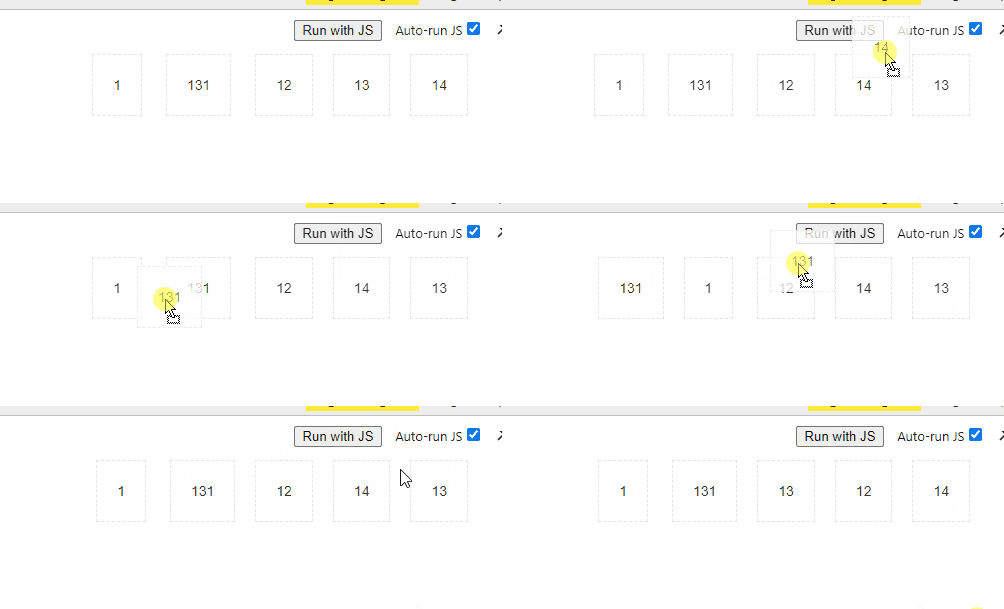
there is something I just noticed here. if you drag the element and place it on the upper side of the container and it gets sorted.
 RoduanKareemAldeen
on 12 Aug 2020
RoduanKareemAldeen
on 12 Aug 2020
Related issues
 garygreen
·
3Comments
garygreen
·
3Comments
 benfoster
·
3Comments
benfoster
·
3Comments
 chrishaigy
·
3Comments
chrishaigy
·
3Comments
 tom-sherman
·
3Comments
tom-sherman
·
3Comments
 pageYe123
·
3Comments
pageYe123
·
3Comments
Most helpful comment
@moeinrahimi, @owen-m1, please re-open this task. This still doesn't work, even when with
direction: ltrandflex-direction: row-reverse.