Sortable: Can't drag on target area itself when not empty
Problem:
When there is already an item on the target area, it's no longer possible to drop an item on the target area itself, but only on an other item.
On demo, please try to drag an item from the second list onto the gray area of the first list: it's not possible. Only dragging onto the item already in the first list is possible, and will trigger a swap.
http://take.ms/LFdiO
The fact that the container is a flex-box plays a role.
But even with a block container, dragging is only possible relatively to the other item, either vertically or horizontally depending on the configuration: http://take.ms/3rfae
JSBin/JSFiddle demonstrating the problem:
https://jsbin.com/neloxup/edit?html,css,js,output
 rndmerle
All 14 comments
+1. Also seeing this behavior and it's not what users expect.
 mrodrig
on 7 Feb 2019
mrodrig
on 7 Feb 2019
This appears to work fine in sortablejs 1.7.0, but is broken as of 1.8.0. This begs the question - why are "major" changes being released in a "minor" version update? Given that many modules are using "^
mrodrig
on 7 Feb 2019
@mrodrig This was not a breaking change, but a bug in the automatic direction detection. The whole reason I made an automatic direction detection was specifically to prevent a breaking change.
@rndmerle
Anyways, the solution to this issue in specific is not an easy one. We cannot simply append an item that is dragged over the container element to the end of the list, because then it would be appended any time the user drags in between elements or he is dragging to a specific spot into the list from another list.
I am working on a solution that emulates "grid detection" within normally position HTML elements (not absolute or in any kind of grid element). You will be able to drag an item to the end of a specific "row" or "column" (depending on direction) and the item will be inserted into that specific row/column as if it was inserted into a slot in an imaginary grid made up by the container element. This will work even if there are elements below this item on a different row. However it will be some time before this solution is released.
 owen-m1
on 8 Feb 2019
owen-m1
on 8 Feb 2019
@owen-m1 From 1.7.0 to 1.8.0, there is a breaking change or bug, whichever you would like to call it, with the _detectDirection function though as you mentioned in your comment on #707. It's not backwards compatible functionality, which is what minor version updates are meant for. Perhaps tests would be a good way to detect these issues before they're released?
https://semver.org/#summary
Also, the 1.8.0 release tag here on Github indicates that there were "Major fixes" which is concerning since it was a "minor" version update. That's how you end up causing issues with other modules and projects from my experience. That's exactly what caused the issue that I'm seeing in vuedraggable which has now propagated into an issue that took a couple of working days to track back to this repo/module.
Can't wait to see a fix for this issue. 👍
mrodrig
on 8 Feb 2019
@mrodrig I can see how this causes confusion, I changed the name of the release.
I do not understand what you mean by backwards compatible in this scenario. Backwards compatible does not mean there are no bugs... because any bug that arises is "breaking". So are you saying I should release a major version with each new update because there could be a bug that "breaks" a part of the plugin? The intent was that it is backwards compatible, as there is no "breaking change" in the API, as well as any significant change in the behavior of the plugin (it was not functioning properly before this change, this is just a small bug you are experiencing).
The problem is a bug with getComputedStyle giving display property as block when it is in fact inline-block.
I have spent many hours testing ever change I have made, but with the amount of times Sortable is run, there is bound to be a few small bugs the appear once in a while. I apologize for the inconvenience.
owen-m1
on 8 Feb 2019
@owen-m1 Ah. I was under the impression that 1.8.0 was intended to be a major change based on the release title and that's why it was a bit frustrating as an end user to see. I can understand having a bug in a minor release and not realizing it's there - it happens.
I know the feeling. I've spent several hours testing every change for the modules that I maintain too. What I was suggesting was the creation of automated tests or some set of core examples of the functionality that can be verified before releases are published in order to catch things like this in the future. Merely a suggestion.
mrodrig
on 8 Feb 2019
@mrodrig Yes, I meant "major" as in "big"... I should have realized the confusion.
Your issue should be solved in commit 071f190410af462b148a1720b2869f7d5aa2dd60 if it is the problem I think it is.
owen-m1
on 8 Feb 2019
Following up on your comment in https://github.com/SortableJS/Vue.Draggable/pull/540, I just tested it by pulling in the latest commits from master. It seems like that helped a bit. Based on one of your previous JS Bin links, it seems to behave about the same as setting {direction: 'horizontal'} on 1.8.1. It's still not quite work the way that 1.7.0 handles it with regards to picking up items that are moved and dropped in an empty area of the section.
Edit: When I moved 'C' up, if I hit the horizontal line with 'A' and 'B', then it would get picked up and pulled into that "container"
mrodrig
on 10 Feb 2019
@mrodrig Thank you for testing, that behaviour is expected. I was up last night working out a new way to do this checking. Again, it seems 1.7.0's solution had some issues. I will figure this out and once I commit a fix then I will release a patch version. Thanks for your patience.
owen-m1
on 10 Feb 2019
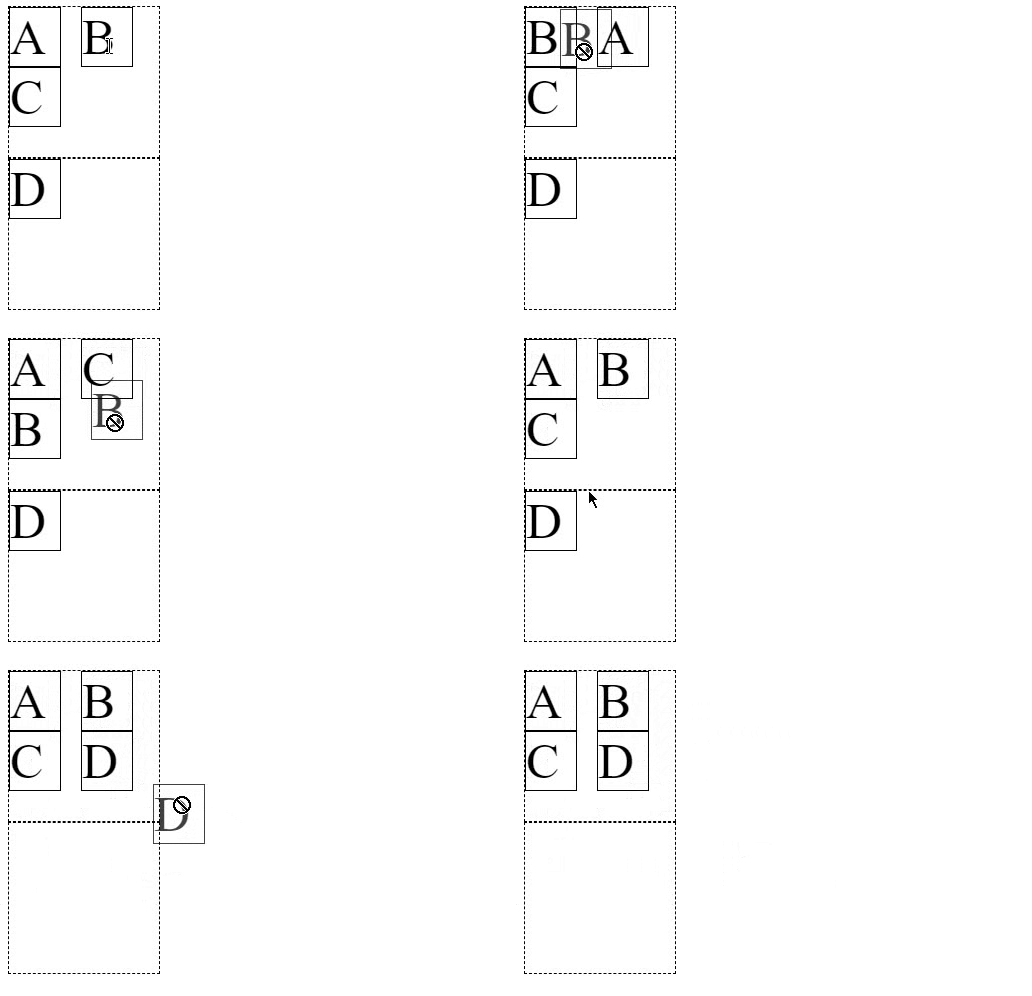
@rndmerle @mrodrig Solved in 1.8.2.
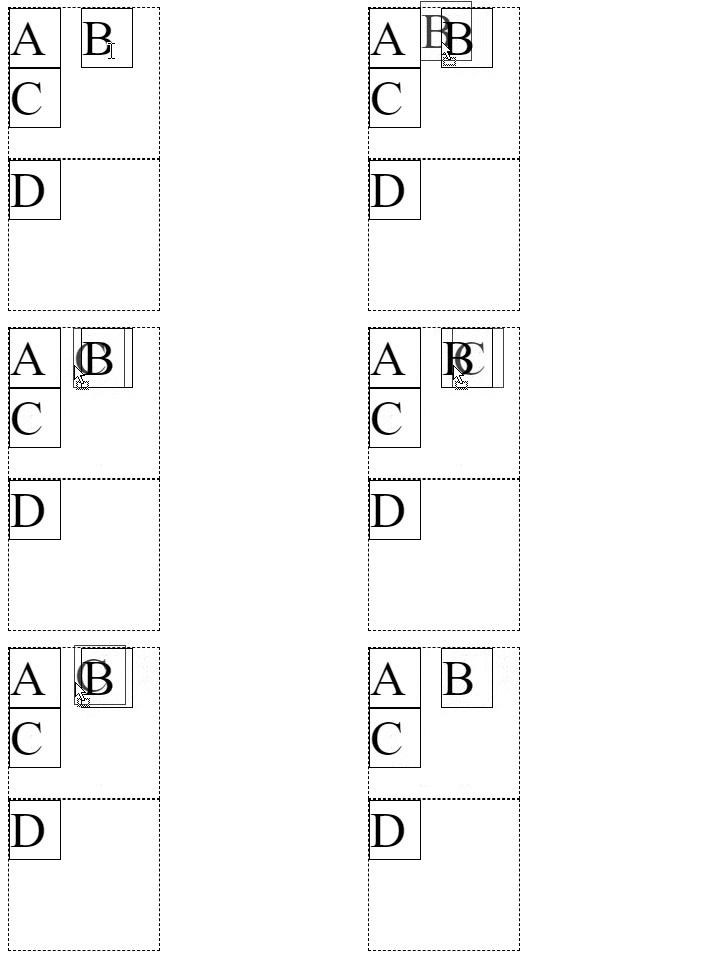
Here is the difference in behavior between 1.7.0 and 1.8.2.
1.7.0:
1.8.2:
owen-m1
on 10 Feb 2019
I can confirm it's working wonderfully on our project and the initial issue is gone.
Thanks for your hard work!
And thanks for the stuff solved by 1.8.0 too.
rndmerle
on 11 Feb 2019
@owen-m1 Hi, I noticed that when I try to center the items in the container, I cannot drag new items above or at the left of the items.
https://jsbin.com/qucacawedu/edit?html,css,js,output
I may be doing something wrong, could you take a look at it plz ?
Thanks in advance.
 Polluux
on 17 Jul 2019
Polluux
on 17 Jul 2019
@Polluux It will not work. In time I will make a plugin to support grid-style dragging, but for now Sortable will treat it like a list.
owen-m1
on 17 Jul 2019
Okay thanks
Polluux
on 18 Jul 2019
Related issues
 artaommahe
·
4Comments
artaommahe
·
4Comments
 jkrasnay
·
3Comments
jkrasnay
·
3Comments
 benfoster
·
3Comments
benfoster
·
3Comments
 seltix5
·
3Comments
seltix5
·
3Comments
 irfanlone
·
3Comments
irfanlone
·
3Comments
Most helpful comment
I can confirm it's working wonderfully on our project and the initial issue is gone.
Thanks for your hard work!
And thanks for the stuff solved by 1.8.0 too.