Sortable: Ghost not properly working on chrome 63
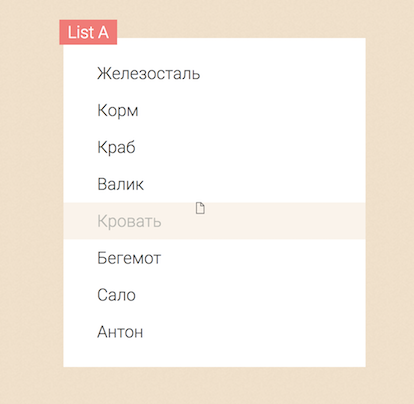
In Chrome 63: the ghost element is not being displayed correctly in some situations. Normally when you drag an element, you should see a transparant 'copy' of that element, instead a file icon sometimes appears in some cases. You can test this on the demo page http://rubaxa.github.io/Sortable/.
Not sure if the change in Chrome making this happen is a Chrome bug or not.
 bart-1990
All 11 comments
@bart-1990 I experienced the same issue with chrome 63 (related to their latest implementation of HTML5 Drag&Drop). Updating to the latest sortablejs fixes this bug.
{ "sortablejs": "^1.7.0" }
 adammanderson
on 11 Jan 2018
adammanderson
on 11 Jan 2018
I still have the bug in 1.7.0
Please note : this happen only when the page is being scrolled down.
 mrdoinel
on 15 Jan 2018
mrdoinel
on 15 Jan 2018
I'm still encountering this bug in the latest version (1.7.0).
bart-1990
on 15 Jan 2018
I've encountered this bug too - doesn't seem to occur in Safari.
 bscutt
on 16 Jan 2018
bscutt
on 16 Jan 2018
onEnd not work on Chrome 61/62/63
 ngxlua
on 17 Jan 2018
ngxlua
on 17 Jan 2018
Seems to be ok again in Chrome 64 (beta), so it probably is a Chrome bug.
bart-1990
on 18 Jan 2018
Just to confirm : this has been fixed in Chrome 64
mrdoinel
on 26 Jan 2018
I tried on the site with last version of Chrome and drag and drop seems still kinda buggy
 sotaan
on 30 Jan 2018
sotaan
on 30 Jan 2018
I tried on demo site (http://rubaxa.github.io/Sortable/) with Version 64.0.3282.119 (Official Build) (64-bit) ubuntu ,but drag and drop seems still not work.
 zhangolve
on 1 Feb 2018
zhangolve
on 1 Feb 2018
window 7 64bit
chrome 64
sortable.js 1.7.0
Sortable doesn't work
 lvgao2012
on 7 Apr 2018
lvgao2012
on 7 Apr 2018
I must say sorry about last time I commented on this issue . Sortable doesn't work just because my chrome had a extension that was used to drag and select some text to translate to Chinese. the extension has a bug that can't drag and drop something .
So maybe everyone test sortable.js should in a incognito window .
zhangolve
on 8 Apr 2018
Related issues
 tom-sherman
·
3Comments
tom-sherman
·
3Comments
 kinjal-codes
·
3Comments
kinjal-codes
·
3Comments
 garygreen
·
3Comments
garygreen
·
3Comments
 benfoster
·
3Comments
benfoster
·
3Comments
 jkrasnay
·
3Comments
jkrasnay
·
3Comments
Most helpful comment
onEnd not work on Chrome 61/62/63