Sortable: Doesn't work with tables.
The script work well with lists.
But less well when there is a margin between items
And doesn't work with with tables
http://codepen.io/paganaye/pen/WpEGmG
 paganaye
All 7 comments
Seem <div> can stand alone but <tr> should be wrapped by <table>. You can refer flex box to display dive as table.
 phuong
on 31 Mar 2017
phuong
on 31 Mar 2017
@paganaye it does work, it's just not the most elegant thing. table borders remain in place, but the rows themselves can be dragged around.
I forked your code: http://codepen.io/jlapinski/pen/gmZQBg
I really haven't looked into this much, but I believe if you want your <tr> to be draggable, you must init with Sortable.create with the <tr>'s immediate parent, <tbody>
 aintJoshinya
on 31 Mar 2017
aintJoshinya
on 31 Mar 2017
I am happy with ainJoshinya response and am closing this request.
paganaye
on 9 Jun 2017
While using Sortable on the tbody works fine in Safari (10.0.1, macOS Sierra), I'm having issues where nested (inside the td) <img> and <input> elements disappear from the dragged item. In fact, the background disappears (it's fully transparent), unlike Chrome, which behaves as expected.
This can be observed in the example @aintJoshinya gave as well: http://codepen.io/jlapinski/pen/gmZQBg (input disappears, no green background)
cc @RubaXa could this be a race-condition, where the dragClass is not applied in time for the 'snapshot' (image) to be constructed by Safari?
 fabien
on 7 Jul 2017
fabien
on 7 Jul 2017
I'm experiencing the same issue as described by @fabien. The dragClass is not applied in Safari (background stays fully transparent)
 mitomm
on 12 Dec 2017
mitomm
on 12 Dec 2017
I'm experiencing the same [roblem as @mitomm i.e. transparent background on dragged row.
 thelucid
on 16 Feb 2019
thelucid
on 16 Feb 2019
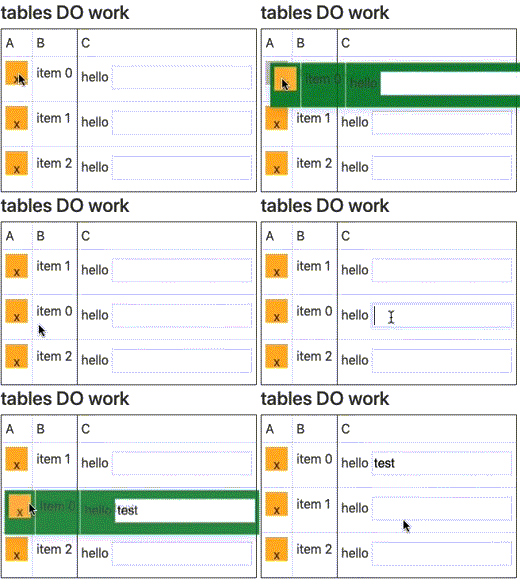
@thelucid It seems to be working for me in MacOS Mojave w/ Safari 12.
Are you using the latest version of Sortable (1.8.3)?
 owen-m1
on 9 Mar 2019
owen-m1
on 9 Mar 2019
Related issues
 dwburdick
·
3Comments
dwburdick
·
3Comments
 binitghetiya
·
4Comments
binitghetiya
·
4Comments
 irfanlone
·
3Comments
irfanlone
·
3Comments
 benfoster
·
3Comments
benfoster
·
3Comments
 seltix5
·
3Comments
seltix5
·
3Comments
Most helpful comment
@paganaye it does work, it's just not the most elegant thing. table borders remain in place, but the rows themselves can be dragged around.
I forked your code: http://codepen.io/jlapinski/pen/gmZQBg
I really haven't looked into this much, but I believe if you want your
<tr>to be draggable, you must init withSortable.createwith the<tr>'s immediate parent,<tbody>