Sonataadminbundle: user block is not displayed on the top right
I followed the configuration described here https://sonata-project.org/bundles/admin/3-x/doc/reference/templates.html but still not displaying the user_block.
config.yml:
sonata_admin:
    templates:
        user_block: ApplicationSonataUserBundle:Default:user_block.html.twig
versions I'm using:
"require": {
        "php": ">=5.5.9",
        "doctrine/doctrine-bundle": "^1.6",
        "doctrine/orm": "^2.5",
        "incenteev/composer-parameter-handler": "^2.0",
        "sensio/distribution-bundle": "^5.0.19",
        "sensio/framework-extra-bundle": "^5.0.0",
        "sonata-project/admin-bundle": "^3.43",
        "sonata-project/doctrine-orm-admin-bundle": "^3.7",
        "sonata-project/user-bundle": "4.0.0",
        "symfony/monolog-bundle": "^3.1.0",
        "symfony/polyfill-apcu": "^1.0",
        "symfony/swiftmailer-bundle": "^2.6.4",
        "symfony/symfony": "3.4.*",
        "twig/twig": "^1.0||^2.0"
    },
this is where I have placed my user_block.html.twig file:
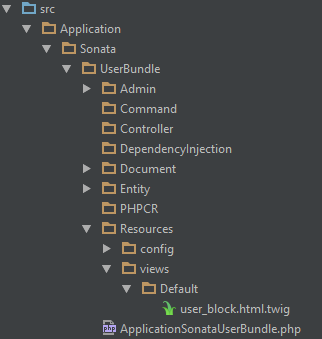
I get no error however the user icon on the top right is not displayed !

 SlimenTN
All 3 comments
The user_block is displayed here and some lines up, there is this condition:
{% if app.user and is_granted(sonata_admin.adminPool.getOption('role_admin')) %}
could it be possible that you are not logged in or don't have that role?
 franmomu
on 10 Apr 2019
franmomu
on 10 Apr 2019
@franmomu I'm connected with role ROLE_SUPER_ADMIN does this make a difference ?
SlimenTN
on 10 Apr 2019
@franmomu ok thanks to your hint I found that I need to add this to the configuration:
sonata_admin:
    security:
        role_admin: ROLE_USER #since all users has this role they will be able to see the user block
we just need to tell sonata which role presents to role_admin
now this condition will return true:
{% if app.user and is_granted(sonata_admin.adminPool.getOption('role_admin')) %}
SlimenTN
on 10 Apr 2019
Related issues
 Baltazar5000
·
3Comments
Baltazar5000
·
3Comments
 jenyak
·
3Comments
jenyak
·
3Comments
 tiagojsag
·
4Comments
tiagojsag
·
4Comments
 leonboot
·
4Comments
leonboot
·
4Comments
 thomas2411
·
4Comments
thomas2411
·
4Comments
Most helpful comment
@franmomu ok thanks to your hint I found that I need to add this to the configuration:
we just need to tell sonata which role presents to
role_adminnow this condition will return true:
{% if app.user and is_granted(sonata_admin.adminPool.getOption('role_admin')) %}